Got a tip for us?

iPhone Products

In January 2007, Steve Jobs, the then CEO of Apple, announced a revolutionary product that would change the way people interacted with their phones forever. The product was the iPhone, and it was released on June 29, 2007. Since then, the iPhone has gone through numerous iterations and has become a ubiquitous part of modern life. In this article, we will trace the history of the iPhone from its launch in 2007 to the present day.

The First iPhone (2007)

The first iPhone was a game-changer in many ways. It had a large, high-resolution touch screen, a built-in camera, and a unique and intuitive user interface. It was also the first phone to feature the Safari web browser, which allowed users to browse the internet just like they would on a computer.

The iPhone ran on iOS, which was a new operating system designed specifically for the iPhone. It also had a range of other features, including a music player, email client, and messaging app. At the time, the iPhone was only available on AT&T’s network in the United States.

iPhone 3G (2008)

The iPhone 3G was released in July 2008 and featured 3G connectivity, which made browsing the internet and downloading apps much faster. It also introduced the App Store, which allowed developers to create and distribute their own apps to iPhone users.

The iPhone 3G also came with built-in GPS, which enabled turn-by-turn navigation and location-based services. It was also available in more countries and on more carriers, making it more accessible to people around the world.

iPhone 3GS (2009)

The iPhone 3GS was released in June 2009 and was a significant upgrade over the iPhone 3G. It featured a faster processor, more storage, and improved camera, and it introduced video recording to the iPhone for the first time.

It also introduced a new feature called Voice Control, which allowed users to control their iPhone using voice commands. This was a precursor to Siri, which would be introduced in later versions of the iPhone.

iPhone 4 (2010)

The iPhone 4 was released in June 2010 and was a major redesign of the iPhone. It featured a new, more angular design with a glass front and back and a stainless steel frame. It also had a high-resolution Retina display, which made images and text look sharper and clearer.

The iPhone 4 also introduced FaceTime, which allowed users to make video calls to other iPhone users. It also featured a new front-facing camera, which made taking selfies and making video calls much easier.

iPhone 4S (2011)

The iPhone 4S was released in October 2011 and was an incremental upgrade over the iPhone 4. It featured a faster processor, better camera, and improved Siri integration. Siri was a virtual assistant that could perform a range of tasks, including making phone calls, sending text messages, and setting reminders.

The iPhone 4S also introduced iCloud, which allowed users to store their photos, music, and other files in the cloud and access them from any device.

iPhone 5 (2012)

The iPhone 5 was released in September 2012 and was another significant redesign of the iPhone. It featured a larger, 4-inch display, a thinner and lighter design, and 4G LTE connectivity. It also introduced a new Lightning connector, which replaced the 30-pin connector that had been used in previous iPhones.

The iPhone 5 also introduced a new, faster processor and improved camera, as well as a new version of iOS that included a range of new features and improvements.

iPhone 5C and 5S (2013)

In September 2013, Apple released two new iPhones: the iPhone 5C and the iPhone 5S. The iPhone 5C featured a colorful plastic body and was designed to be a more affordable option for consumers. The iPhone 5S, on the other hand, featured a more premium design and introduced a new feature called Touch ID, which allowed users to unlock their phone and make purchases using their fingerprint.

The iPhone 5S also featured an improved camera and a faster processor, as well as a new version of iOS that introduced a range of new features and improvements.

iPhone 6 and 6 Plus (2014)

The iPhone 6 and 6 Plus were released in September 2014 and marked another major redesign of the iPhone. The iPhone 6 featured a larger, 4.7-inch display, while the iPhone 6 Plus featured an even larger 5.5-inch display. Both phones featured a new, rounded design with a metal body, and they were the first iPhones to support NFC, which enabled Apple Pay, a mobile payment system.

The iPhone 6 and 6 Plus also introduced a new, faster processor and improved camera, as well as a new version of iOS that included a range of new features and improvements.

iPhone 6S and 6S Plus (2015)

The iPhone 6S and 6S Plus were released in September 2015 and were similar in design to the iPhone 6 and 6 Plus. However, they introduced a range of new features, including 3D Touch, which allowed the screen to detect different levels of pressure and enabled new interactions with apps and the user interface.

The iPhone 6S and 6S Plus also featured an improved camera, a faster processor, and a new version of iOS that introduced a range of new features and improvements.

iPhone SE (2016)

The iPhone SE was released in March 2016 and was designed to be a more affordable option for consumers. It featured a design that was similar to the iPhone 5S, but it had updated hardware, including a faster processor and an improved camera.

The iPhone SE also introduced a new version of iOS that included a range of new features and improvements.

iPhone 7 and 7 Plus (2016)

The iPhone 7 and 7 Plus were released in September 2016 and marked another significant redesign of the iPhone. The iPhone 7 featured a new, water-resistant design with a metal body, and it was the first iPhone to remove the headphone jack, relying on wireless and Lightning-connected headphones instead.

The iPhone 7 Plus introduced a dual-camera system, which allowed for optical zoom and a range of new camera features. Both phones featured a faster processor and a new version of iOS that included a range of new features and improvements.

iPhone 8 and 8 Plus (2017)

The iPhone 8 and 8 Plus were released in September 2017 and featured a similar design to the iPhone 7 and 7 Plus. However, they introduced a range of new features, including wireless charging, an improved camera, and a new processor.

The iPhone 8 Plus also featured a new Portrait Lighting mode, which allowed for more advanced lighting effects in portrait photos. Both phones came with a new version of iOS that included a range of new features and improvements.

iPhone X (2017)

The iPhone X was released in November 2017 and marked a significant departure from previous iPhone designs. It featured a new, all-screen design with a notch at the top for the front-facing camera and Face ID, a new facial recognition system that replaced Touch ID.

The iPhone X also introduced a range of new features, including Animoji, which allowed users to create animated emojis using facial expressions, and a new, more advanced camera system with optical image stabilization and improved low-light performance. It also came with a new version of iOS that included a range of new features and improvements, including a redesigned control center and improved notifications.

iPhone XS, XS Max, and XR (2018)

An iPhone Xs in front of an iPhone Xs Max.  

In September 2018, Apple released three new iPhones: the iPhone XS, XS Max, and XR. The iPhone XS and XS Max featured an updated design that was similar to the iPhone X, while the iPhone XR featured a design that was similar to the iPhone 8 and 8 Plus, but with an all-screen display.

iPhone XR in white finish.  

All three phones featured a new, more powerful processor, improved cameras, and a new version of iOS that introduced a range of new features and improvements, including Memoji, which allowed users to create personalized emojis that looked like them.

iPhone 11, 11 Pro, and 11 Pro Max (2019)

A stack of iPhone 11 in six finishes.  

In September 2019, Apple released three new iPhones: the iPhone 11, 11 Pro, and 11 Pro Max. The iPhone 11 featured a design that was similar to the iPhone XR, while the 11 Pro and 11 Pro Max featured a new, triple-camera system and a design that was similar to the iPhone XS and XS Max.

All three phones featured a new, more powerful processor and a new version of iOS that introduced a range of new features and improvements, including Dark Mode, which allowed users to switch to a darker color scheme for the user interface.

iPhone SE (2020)
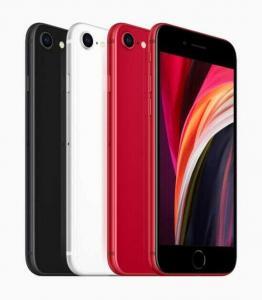
The Second Generation iPhone SE in black, white and (PRODUCT)RED.  

In April 2020, Apple released a new version of the iPhone SE. The new iPhone SE featured a design that was similar to the iPhone 8, but with updated hardware, including a faster processor and improved camera.

The iPhone SE also came with a new version of iOS that introduced a range of new features and improvements, including improved Siri functionality and the ability to customize the appearance of the home screen.

iPhone 12, 12 Pro, 12 Pro Max, and 12 Mini (2020)

iPhone 12 in blue, red, white, green, and black aluminium finishes.

In October 2020, Apple released four new iPhones: the iPhone 12, 12 mini, 12 Pro, and 12 Pro Max. All four phones featured a new, more angular design with an all-screen display and support for 5G connectivity.

The iPhone 12 and 12 Mini featured a dual-camera system, while the 12 Pro and 12 Pro Max featured a triple-camera system with improved low-light performance and a LiDAR scanner for improved augmented reality experiences.

All four phones featured a new, more powerful processor and a new version of iOS that introduced a range of new features and improvements, including widgets on the home screen and improved privacy controls.

iPhone 13, 13 Pro, 13 Pro Max, and 13 Mini (2021)
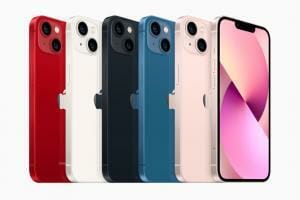
iPhone 13 lineup in (PRODUCT)RED, starlight, midnight, blue, and pink.

In September 2021, Apple announced the iPhone 13, iPhone 13 mini, iPhone 13 Pro, and iPhone 13 Pro Max. They featured a design that looked virtually identical to the iPhone 12 models (save for some new colors), though the notch was significantly smaller.

Powered by the A15 Bionic chipset, all the iPhone 13 models brought a significant boost to battery life – a feature that had previously been one of the iPhone’s greatest shortcomings. They also introduced a new Cinematic Mode in video, recording footage with a depth effect that automatically changed the focus depending on the scene. The iPhone 13 Pro models were the first iPhones to ship with a 120Hz display, but this feature wasn’t available on the cheaper iPhone 13 and iPhone 13 mini.

iPhone SE 3 (2022)
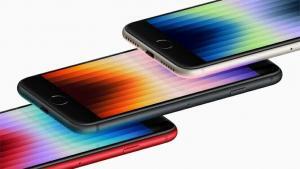
Angled shot showing the display of the third generation iPhone SE in (PRODUCT)RED, midnight, and starlight.  

On March 8, 2022, Apple introduced the iPhone SE 3. Launched just two years after the iPhone SE 2, the iPhone SE 3 didn’t bring any major upgrades to the design, continuing to offer a small 4.7-inch display, thick bezels and a Home button with a Touch ID fingerprint sensor. The smartphone packed new features such as 5G, an A15 Bionic chip, and improved battery life. Apart from that, there wasn’t much difference from the older model.

iPhone 14, 14 Plus, 14 Pro, and 14 Pro Max (2022)
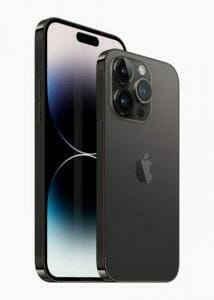
iPhone 14 Pro and iPhone 14 Pro Max are shown in space black.

Announced at Apple’s ‘Far Out’ event on Sept. 7, 2022, the iPhone 14 series comprise the iPhone 14, iPhone 14 Plus, iPhone 14 Pro, and iPhone 14 Pro Max. The iPhone 14 Plus is a new model in the lineup, replacing the iPhone mini that Apple axed after just two years owing to poor performance. While the iPhone 14 and iPhone 14 Plus carry forward most features of the iPhone 13 series, including the A15 Bionic chip, the iPhone 14 Pro models brought all the upgrades.

The biggest change is the new Dynamic Island – an oval-shaped cutout that replaces the wide notch. Additionally, the Pro models feature a new 48MP primary camera, the biggest resolution upgrade on an iPhone in years. They are powered by the A16 Bionic chip, which brings only minor upgrades over the A15. Another new feature is the Always-On Display – the first on an iPhone.

All the iPhones in the iPhone 14 series feature the new Crash Detection and Emergency SOS via Satellite features, offering users access to emergency services when they may be immobile after a car crash or have no cell service or Wi-Fi access. The new iPhones also get rid of the physical SIM tray in the U.S., leaving users with only eSIM as a connectivity option. The new iPhone 14 Pro models are Apple’s most powerful iPhones yet, but the iPhone 15 series is expected to bring even more upgrades, most notably, the inclusion of a USB-C port instead of Lightning.

Conclusion

The iPhone has come a long way since its initial release in 2007. With each new iteration, Apple has introduced new features and improved performance, design, and functionality. The iPhone has become more than just a phone; it is now a central part of many people’s lives, providing a range of features and functions that were once unimaginable. As we look to the future, it will be exciting to see what new innovations Apple has in store for the iPhone.
Apple products have long been a popular choice for consumers due to their high quality, sleek design, and user-friendly features. However, it is not uncommon for people to notice that Apple products are often cheaper on Amazon compared to buying them directly from Apple or other retailers. This raises the question: why are Apple products cheaper on Amazon? Here are some possible explanations:

1. Third-party Sellers

One reason why Apple products are cheaper on Amazon is due to the presence of third-party sellers. These third-party sellers may have purchased the Apple products in bulk, which can lead to lower prices due to discounts offered by Apple for bulk purchases. Additionally, some third-party sellers may be selling refurbished or used Apple products, which can be sold at a lower price compared to new products.

2. Amazon’s Prizing Algorithms

Another reason why Apple products may be cheaper on Amazon is due to Amazon’s pricing algorithm. Amazon uses an algorithm to set prices for products on its platform, and this algorithm takes into account factors such as supply and demand, competitor prices, and historical data. This can result in lower prices for Apple products if they are in high demand or if there are a lot of competitors selling similar products. Amazon’s pricing algorithm is constantly updated to ensure that prices are competitive and attractive to customers, which can lead to lower prices for Apple products on Amazon.

3. Reduced Overhead Costs

Amazon also has lower overhead costs compared to traditional brick-and-mortar retailers, which can allow the company to offer lower prices for products. Amazon doesn’t have the same expenses as traditional retailers, such as rent, utilities, and employee salaries. This can allow Amazon to offer lower prices for products, including Apple products.

4. Limited Selection

Another factor that can lead to lower prices for Apple products on Amazon is the limited selection of products. While Amazon does offer a wide variety of Apple products, the selection may not be as comprehensive as buying directly from Apple or other retailers. This limited selection can sometimes result in lower prices for the products that are available on Amazon.

5. Bundled Deals

Amazon sometimes offers bundled deals on Apple products, which can result in lower prices overall. For example, customers may be able to purchase an Apple product along with accessories or other products at a lower price than if they were to buy them separately. These bundled deals can make Apple products more affordable for customers who may be on a budget.

6. Amazon’s partnership with Apple

Amazon has a partnership with Apple, which allows the company to sell new Apple products directly on its platform. This means that Amazon is an authorized reseller of Apple products, which can result in lower prices compared to buying from other retailers. The partnership also means that Amazon can offer exclusive deals and promotions on Apple products, which can make them more affordable for customers.

7. Sales tax

Sales tax can vary depending on the state you live in, and some states may have lower sales tax rates compared to others. If you live in a state with a lower sales tax rate, you may be able to purchase Apple products on Amazon at a lower price compared to buying directly from Apple or other retailers. This can be especially beneficial for customers who are purchasing expensive Apple products, as the savings can be significant.

8. Seasonal discounts

Amazon often offers seasonal discounts and promotions on Apple products, especially during major shopping events like Black Friday and Cyber Monday. These discounts can result in significant savings for customers who are looking to purchase Apple products, and they can be a great way to get a good deal on a new iPhone, iPad, or MacBook.

9. International shipping

Amazon has a global reach, which means that customers from around the world can purchase Apple products on its platform. This can be especially beneficial for customers who live in countries where Apple products may not be available, or where they may be more expensive due to taxes or import fees. By purchasing Apple products on Amazon and using international shipping, customers may be able to save money and still get their hands on the latest Apple products.

10. Competition Among Sellers

One more compelling reason why Apple products may be cheaper on Amazon is due to the competition between different sellers on the platform. Amazon has a vast number of sellers, including both third-party sellers and Amazon’s own retail operations, all competing to sell Apple products. This competition can lead to lower prices, as sellers may need to lower their prices to attract customers and remain competitive. The competition among sellers can be especially fierce for popular Apple products like iPhones and iPads, where there is a high demand from customers. This can result in lower prices for Apple products on Amazon compared to buying directly from Apple or other retailers. Customers can take advantage of this competition by shopping around and comparing prices from different sellers on Amazon to find the best deal possible.

Conclusion

There are several reasons why Apple products may be cheaper on Amazon, including the presence of third-party sellers, Amazon’s pricing algorithm, reduced overhead costs, limited selection, bundled deals, Amazon’s partnership with Apple, sales tax, seasonal discounts, international shipping, and competition among sellers. These factors can result in lower prices for Apple products on Amazon compared to buying directly from Apple or other retailers. However, customers should always compare prices and do their research before making a purchase to ensure that they are getting the best deal possible.

Every year, millions of people around the world eagerly anticipate the release of Apple’s latest iPhone models. And without fail, these new iPhones are released in September. But why does Apple release iPhones in September? Is there a specific reason for this timing, or is it simply a coincidence?

First, it’s important to understand that Apple typically holds a major event in September each year to announce their latest products. This event, known as the Apple Special Event, has become something of a tradition in the tech industry. It’s the stage on which Apple unveils its newest iPhone models, as well as any other major products or updates they have in the works.

There are several reasons why Apple chooses to release new iPhones in September. Here are some of them:

1. Capitalizing on the holiday season

One of the primary reasons for the September release is to capitalize on the holiday shopping season. The period between Thanksgiving and Christmas is a critical time for retailers, and Apple is no exception. By releasing the new iPhone in September, Apple can generate buzz and excitement for its latest product just in time for the holiday shopping rush. Consumers often view the iPhone as a desirable gift, making it an ideal product for the holiday season.

2. The production cycle

Another reason why Apple releases iPhones in September is the production cycle. Apple has a rigorous production process that involves extensive testing and quality control measures. Releasing the iPhone in September allows the company to complete production and testing in time for the holiday season. Additionally, by releasing the iPhone in September, Apple can gauge consumer demand and adjust production accordingly.

3. Staying ahead of competition

Apple faces intense competition in the smartphone market, and the September release cycle allows the company to stay ahead of its competitors. By releasing the new iPhone before its competitors, Apple can capture market share and maintain its position as a leader in the smartphone market. It’s worth noting that Apple’s competitors typically release new products in the fall as well, so the September release allows Apple to stay on par with its rivals.

4. Sales cycle

Another reason why Apple releases iPhones in September is the sales cycle. The tech industry often sees a spike in sales during the back-to-school period, which typically runs from August to September. By releasing the new iPhone in September, Apple can take advantage of this sales cycle and appeal to students who may be in the market for a new device for the new school year.

5. Building hype and generating buzz

Finally, the September release allows Apple to generate hype and excitement for its new products. Apple has a loyal following of fans who eagerly await each new iPhone release. By releasing the iPhone in September, Apple can build up anticipation for the new product through marketing and media coverage. Apple typically holds a launch event for the new iPhone, which generates a significant amount of media attention and creates a sense of excitement around the product.

Conclusion

There are several reasons why Apple releases iPhones in September. By releasing the new iPhone just before the holiday season, Apple can take advantage of the critical shopping period and generate buzz and excitement for its latest product. The September release also allows Apple to complete production and testing in time for the holiday season, gauge consumer demand, stay ahead of competitors, and appeal to students during the back-to-school period. Overall, the September release cycle has proven to be a successful strategy for Apple, contributing to the company’s continued success in the highly competitive smartphone market.

Before buying Apple AirPods, you should know their main disadvantages.

Apple AirPods are some of the most popular wireless earbuds on the market – and since December 2020, when the AirPods Max arrived, the most popular over-ears too. Whether you’re listening to music, making voice calls or chairing a Zoom meeting, you can rely on the AirPods to do a good job. Due to many benefits of Apple AirPods, it’s nigh-on impossible to ride a bus or hit the gym without seeing a pair of Apple’s colourful oversized ear cups being pulled out of a bag, or Tim Cook’s familiar white buds poking out of someone’s ears.

In addition to the classic AirPods (2019), Apple has introduced a duo of pricier, noise-cancelling buds called the AirPods Pro, replaced them with the 2022-released AirPods Pro 2, and added the over-ear AirPods Max to the line-up. There’s also the AirPods 3 – a sort of middle ground between the Pro variant and the regular AirPods. So what are disadvantages of Apple AirPods?

1. They Are expensive

Being a premium product, the Cupertino giant’s AirPods don’t come cheap – in any of their guises. Granted, AirPods are more convenient, but they make you pay a lot more to enjoy that convenience. This is because making a pair of wireless headphones is more costly than making wired ones.

The added components that make Apple AirPods wireless inflate their bill of materials, i.e., the price of all intermediate goods required to create the final product. The higher this cost, the more you pay as a consumer.

The AirPods Pro are Apple’s noise-canceling version of the AirPods. They’re smaller and sleeker than the AirPods and come with an even heftier $249 price tag.

There’s the first AirPods disadvantage. $249 is a lot of money for a set of earbuds. For that sort of money, they don’t need to be good, they need to be pretty much perfect.

Simple touches — like Transparency Mode (which allows the outside noise in, which makes it feel like you’re not wearing earbuds) coming on automatically when you have one bud in, and noise-canceling kicking in when you add the second — are welcomed. And these features work and work flawlessly.

But, still, $249 is a lot of cash, especially when you factor in how long they will last. After two years original AirPods owners were starting to report that battery life was down to minutes, but you might be lucky and get three or more years or decent usage. But be in no doubt, these are disposable items, and the memory of dropping $250 on the earbuds might still be reasonably vivid by the time they start giving you problems.

Let’s assume a worst-case that they last a couple of years, then the AirPods Pro cost you $125 a year, or about $2.50 a week. I’ll let you choose whether that’s a good value or not.

2. They Require frequent Charging

In this day and age, where pretty much every gadget comes with a battery, having yet another thing to recharge from time to time is a major pain.

Having AirPods means one more electronic device that you’ll need to keep charged. And if you forget, your new headsets will be rendered useless.

On the other hand, wired headphones don’t need to be recharged as they come with an audio plug; the convenience of “plug and play” is nothing to take for granted.

Also, since you don’t have to recharge them constantly, they help you save some electricity and reduce your power bills just a little bit. While that may not be a big consideration for you, it’s an added benefit nonetheless.

3. They Have Latency Issues

Apple AirPods have come a long way, and the latency they used to have is slowly mitigating over the years. You may not notice the delay when casually listening to music, but if you are a gamer, you are well aware of how prominent those milliseconds can be.

Wireless latency is always a concern with any headphones or earbuds that use Bluetooth, but a new report points out that AirPods Pro 2 are way better than the generation they replace. But they still aren’t quite good enough.

Musician and developer Stephen Coyle has tested the latency of the first-gen AirPods, AirPods 2, AirPods Pro, and AirPods Pro 2 to see how well all of them handle latency. It turns out Apple’s latest earbuds are pretty great, but they’re still some way off being usable by people who need an instant response to things happening on-screen.

Sounds good, but not good enough

Coyle ran some tests by tapping the iPad Pro’s screen with an Apple Pencil and measuring the time it took for earbuds to play a sound. The results showed that the iPad Pro’s onboard speaker took 83ms to play the sound, giving us a baseline from which to work.

From there, the AirPods 1 took 296ms, and the AirPods Pro 167ms. The AirPods 2 were quicker at 153ms, with AirPods Pro winning the day with 126ms. That’s a notable improvement over the original AirPods Pro but a little off the baseline. “Perhaps a more interesting point to note is that the second-generation AirPods Pro perform only 43ms worse than the built-in speakers,” Coyle says.

However, as impressive as that might be, it isn’t good enough. Coyle says that “there’s still too much latency for audio feedback to feel snappy and responsive,” meaning some use cases still need wired headphones. Those are likely to be professional audio mixers and podcasters, but for everyone else, there’s a good chance that AirPods Pro 2 will be good enough for most things, if not all.

4. They Are Difficult and Expensive to Repair

This one is fairly straightforward. However, as AirPods have more components in their body, they are harder and more complicated to fix.

Apple will replace the batteries for $150, but that’s a lot of cash, and a significant chunk of the cost of an outright replacement, so I wonder how many will go down the route of getting Apple to fix them.

Forget about trying to repair them yourself, because you’ll fail and end up with a bunch of bits. I understand that it’s hard to make something that’s this small and integrated, and still keep it repairable, but the short lifespan, combined with the zero repairability, makes the AirPods Pro — and AirPods, along with every other product in this category — a crime against Mother Nature.

That’s not to say that wired headphones are a bargain to fix, of course. Depending on how high-end your headphones are, the repair prices vary. But by a general rule of thumb, repairing AirPods requires more work.

5. They Are not Ideal for Professionals

Pretty much all professional-grade headphones are wired, and that’s because wired cans are simply more reliable and are designed to be specialized as opposed to wireless ones that are made for the masses. This is also why studio headphones are so expensive.

For professionals like artists and audio engineers, headphones are a work investment for mixing and mastering tracks, not a tool for recreational listening. This means they must work as expected every single time and be tuned in a very specific way.

Apple AirPods are tuned to have fun and upbeat sound, i.e., a “V-shaped” sound signature. The sound signature is designed to manipulate the sound in a way that is pleasing to hear at the cost of losing accuracy and detail.

Professional wired headphones tend to have a flat or balanced sound signature to ensure maximum accuracy and precision of sound reproduction. Musicians can’t afford not to know how their track sounds; they need it to be as true-to-life as possible.

6. They Are not Environment Friendly

One disadvantage of AirPods is that they don’t last for a long time because their battery capacity usually decrease over time.

Like other Apple products, AirPods are not designed to be user serviceable. Sensitive circuitry is protected by a nearly impenetrable outer shell and held together with gobs of glue, but owners looking to keep the device functional will inevitably require a replacement for its diminutive Lithium-ion battery.

“For roughly 18 months, AirPods play music, or podcasts, or make phone calls. Then the lithium-ion batteries will stop holding much of a charge, and the AirPods will slowly become unusable. They can’t be repaired because they’re glued together. They can’t be thrown out, or else the lithium-ion battery may start a fire in the garbage compactor. They can’t be easily recycled, because there’s no safe way to separate the lithium-ion battery from the plastic shell. Instead, the AirPods sit in your drawer forever,” according to Vice magazine.

Finally, on the disposal end, one big disadvantage of AirPods is that they are highly toxic. The plastics, metals and batteries that go into making AirPods are rarely disposed of correctly. Most likely they will go into one’s regular trash.

Their compact design is attractive to buyers, but is intended for disposal and yet it’s difficult to do that without contributing to e-waste.

AirPods will stop holding a charge within a few months of purchase, and while Apple will be able to replace them with another set, that too will be heading for the pile.

When people throw AirPods away without a thought, they are contributing to a growing environmental problem of plastic waste.

7. They Face Connectivity Issues

Another notable disadvantage of AirPods is that they don’t always pair with your device seamlessly, forcing you to spend more time than necessary trying to get both to connect. Not to mention how there are a number of Bluetooth codecs, and not all of them will be compatible with your device. For example, Apple’s devices use ALAC (Apple Lossless Audio Codec) to provide high-res audio, but that standard doesn’t work with other devices. On the flip side, many devices will use Qualcomm’s aptX (and its variants) or Sony’s LDAC for high-res audio, but Apple’s iPhone and iPad support neither.

Some users of the second-generation AirPods Pro are reporting ongoing issues with their brand-new earbuds randomly disconnecting from their devices as they listen to music or watch videos.

Symptoms can also include an iPhone or iPad showing the ‌AirPods Pro‌ as connected, but no audio actually being played. Reports suggest the bugs are sporadic and apparently not caused by anything specific, with no clear fix.

Such problems are not entirely unique to the second-generation ‌AirPods Pro‌, as customers of the original ‌AirPods Pro‌ that launched in 2019 have reported similar issues in the past. The new ‌AirPods Pro‌, having launched three years after the original, have caused some users to be frustrated that bugs related to connectivity are seemingly not yet addressed.

This is not a problem with wired headphones, as you just need to insert the headphone plug into the jack. The only minor connectivity issue with wired headphones is that if your plug or jack is dirty, you may sometimes hear static noises, but that’s something a quick wipe from a dry cloth can easily fix.

Conclusion

So, yes, the AirPods are great. They are like not wearing earbuds. But they are also an abomination. AirPods disadvantages such as limited lifespan and zero repairability are hard to swallow. The price is startling. The fact that they rely on so much support baked into iOS that other manufacturers cannot access is also worrying because it gives Apple such a leg up over all the competition. I’m begging you—yes, you, dear reader. You have to stop buying the newest AirPods just because they work well with your iPhone. Just don’t. Buy any of Apple’s other models, which have the modern features (and comfy fit) you deserve.

I have been using an iPhone for over 10 years now, and even though I am a massive fan of the device, I was a heavy Android user during my early years.
I was not a big fan of the iPhone or iOS back then and used to even strongly suggest my friends and family members choose Android over iOS.
There were a few reasons why I used to be an Android fanboy.
Back in the day, Android phones were much more affordable than iPhones and had more customization options and features.
But now, the price gap between Android and iOS flagships is pretty narrow, and most features you find on Android are also available on iPhones.
Besides, Apple has made many improvements to its software and hardware over the years and is now one of the best in the industry in terms of performance, battery life, software support, etc.
Despite a few reasons like the choice of devices, affordability, and fast charging, if you are in the market for a smartphone that’s easier to use, it makes much more sense to go with an iPhone than an Android phone.
In this post, I will explain why iPhone is user friendly than Android phone.

Why is the iPhone the easiest phone to use?

This is going to hurt a little, Android fanboys. One of iOS’ biggest selling points is just how intuitive it is. From kids all the way up to senior citizens, many people love iOS simply because it is pretty straightforward to use.

Despite all the promises by Android phone makers to streamline their skins, the iPhone remains the easiest phone to use by far. Some may lament the lack of change in the look and feel of iOS over the years, but I consider it a plus that it works pretty much the same as it did way back in 2007. Pick it up, turn it on, touch the app to open.

All the apps in iOS are displayed right on the home screen, so you’ve got quick access to everything on your phone without delving into hidden menus. And all of Apple’s standard apps, like Weather and Mail, are top-notch, and most people don’t feel the need to download other versions. You can’t say the same thing for Android, where phones from different manufacturers often ship with a completely different set of stock apps with varying degrees of quality.

Apple knows people love iOS because it’s simple, and there have been times when it has been criticized for not giving users enough options to personalize their experience. But even though some might say it’s too simplified, what iOS lacks in customization, it more than makes up for in usability.

Android features an open platform that accommodates full-on customization. You’ll have total control over your smartphone’s settings, and you can use the broad scope of apps on Google Play to execute them.

However, this level of customization also creates a steep learning curve. You’ll need some technical proficiency and customization experience to utilize Android’s platform, which not all smartphone users have.

On the contrary, iOS devices have a straightforward, user-friendly interface. They come with various pre-installed, out-of-the-box features, so you can start using them right from the get-go. You wouldn’t need much time to learn an iOS interface.

Conclusion

This one is definitely down to personal preference, but as someone who has jumped back and forth between iOS and Android, i can confidently say that iPhone is easier to use than Android.

Apple phones are known for their ease of use. Their usability comes from simple operating logic: all the apps are launched from the home screen. All the settings, for example, can be found under one menu. And even if you upgrade your iPhone to the newest model, the operating system still works the same way and taking it into use is easy.

An android phone can be modified and customised in various ways, but the basic features of its operating system are much more complicated and confusing than the iOS system. If you value an easy to use and good smartphone for basic use, an iPhone is the obvious choice.

We have the shiny new iPhone 14 Pro Max in our hands, a phone that costs a cool $1099. So, it’s always a good idea to put a case on it for the added peace of mind on such an expensive purchase. In this article, we’ll be taking a quick look at Mkeke clear case for iPhone 14 Pro and iPhone 14 Pro Max to see how good of a case it actually is.
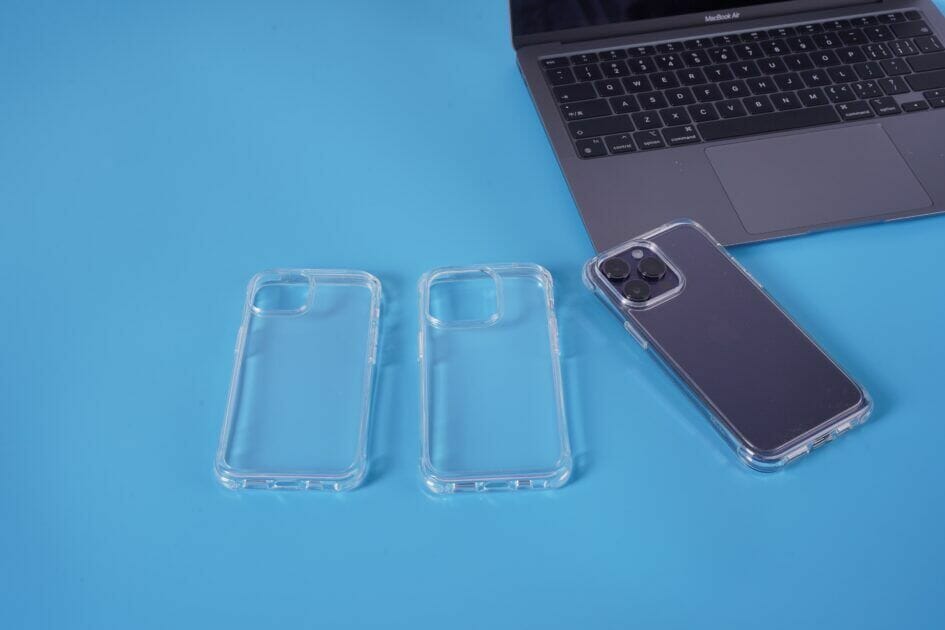
The Mkeke clear case for iPhone 14 Pro and iPhone 14 Pro Max allows you to see your phone while keeping it protected. However, if you’re not too fussed about the color of your phone, there is a variation of different colors and styles to suit your needs.

Around the camera, there are 3.53mm raised lips To protect the 48MP main, ultrawide, and telephoto lenses from surface scratches that can easily happen when you place your phone down. The bumpers around the corners help to absorb shock, whether you drop your phone or it comes into contact with other objects in your bag or pockets.

The material is extremely grippy, ensuring your phone doesn’t slide out of your hands when using it. And, with all this protection, the Mkeke Clear Case for iPhone 14 Pro and iPhone 14 Pro Max is compatible with wireless charging, so you’ll only need to remove the case to clean it once in a while.

Mkeke iPhone 14 Pro clear case

Key Features

  • Clear transparency.
  • anti-yellowing properties.
  • Raised bezels for sufficient protection.
  • Super-slim profile.
  • Scratch-resistant coating.
  • Affordable price.

SPECIFICATIONS

  • Brand: Mkeke
  • Material: Polycarbonate, Plastic, Acrylic
  • Wireless Charging Support: Yes
  • Thickness: 1.9mm.
  • Weight: 1.09 ounces
  • Included Screen Protector: No

PROS

  • Clear transparency
  • Precise cutouts around the ports and buttons
  • Shockproof airbags on the corners
  • Top-notch quality
  • Easy to install
  • Comfortable non-slip grip.
  • Affordable

CONS

  • No magnet installed in the case.

BUY THIS PRODUCT

Amazon’s Choice: Mkeke iPhone 14 Pro cases | Amazon’s Choice: Mkeke iPhone 14 Pro Max cases

Design, Look & Feel

Mkeke iPhone 14 Pro clear case

This case’s raised bezels keep the camera and display from coming in contact with any surfaces you place your iPhone on. Also, the material used is made to withstand the test of time. Mkeke has been in the case game for a while now, so the brand definitely knows what its doing.

Say you want to showcase your iPhone 14 Pro or iPhone 14 Pro Max in its full glory without covering it up with a matte, opaque case. Mkeke has you covered with this crystal clear case. If you’re someone who doesn’t like cases because they hide your iPhone, this case will fit you like a glove.

Now for how it feels. The case being soft material also means it’s grippy. You won’t have to worry about your iPhone sliding out of your hand or off a smooth surface when it’s in this case. Made from specially polycarbonate and flexible materials, the exterior feels great in the hand and doesn’t turn yellow over time.

It’s also comfortable to hold. Since it doesn’t add much to the phone’s dimensions, it feels almost like you’re just holding the iPhone without a case.

Fit

Mkeke iPhone 14 Pro clear case

This iPhone 14 Pro series case is made to fit like a glove around the phone without adding bulk. The dimensions are perfect, and all ports and sensor remain accessible and functional.

It’s easy to put on and take off, too. I’ve had annoying experiences with iPhone cases in the past where once installed, they fit fine, but actually getting them onto the phone is a nightmare. And I can say the same for taking them off. Mkeke managed to provide both a good fit and a good installation/removal experience. Putting this Clear Cover case on is plenty easy, and once it’s on, it fits snugly without any annoying air gaps.

Durability

Mkeke iPhone 14 Pro clear case

One of the more important reasons for using a case is protection. Everyone drops their phone at some point, and a case is meant to at least somewhat reduce the chance of something breaking. Will Mkeke iPhone 14 Pro Series case do that? Well, I don’t particularly want to go outside and drop my $1099 phone onto cement to find out, so I’m going to have to be a little more theoretical here.

Mkeke case for iPhone 14 Pro series is a very grippy case, which should limit the times you drop your phone.

The sides of the case do come up over the screen about 3.9mm on the edges for protection. If you drop your phone and it hits the floor, you’ll probably be fine. The raised bezels around the case should provide enough cushioning to give the phone a fighting chance to simply bounce instead of crack. There’s also a raised lips around the camera module, which should shield the camera glass from direct hits on a flat surface. Protection is key when owning such an expensive smartphone, so you better take that into account.

The case itself is scratch-resistant and specially coated to prevent yellowing over time with higher-quality materials.

Affordable Cases for iPhone 14 Pro and iPhone14 Pro Max

Mkeke iPhone 14 Pro clear case

If you want to maintain your iPhone’s original look, you simply can’t go wrong with Mkeke iPhone 14 Pro Series case. You can count on this case to fit perfectly, protect well, and offer comfortable grip. The case is scratch-resistant and easy to install. And all of this at a very affordable price point, what’s not to like?

The Apple iPhone 14 Pro and 14 Pro Max are the newest iPhones on the block. These are the most notable differences to help you make the right buying decision.

Earlier this year, Apple unveiled the iPhone 14 Pro and ‌iPhone 14 Pro‌ Max as the successors to the popular iPhone 13 Pro and ‌iPhone 13 Pro‌ Max, featuring an always-on display with the Dynamic Island, the A16 Bionic chip, significantly improved cameras, longer battery life, and more. As Apple’s premium flagship offerings, the ‌iPhone 14 Pro‌ and ‌iPhone 14 Pro‌ Max are the most fully-featured iPhones available.

The ‌iPhone 14 Pro‌ starts at $999 and the ‌iPhone 14 Pro‌ Max starts at $1,099. Although the two phones share the vast majority of features, there are a small number of differences between the devices besides just screen size. Our guide highlights the differences between the ‌iPhone 14 Pro‌ and ‌iPhone 14 Pro‌ Max, and helps to answer the question of how to decide which of these two iPhone models is best for you.

Comparing the iPhone 14 Pro and the iPhone 14 Pro Max

The ‌‌iPhone 14 Pro‌ and ‌‌iPhone 14 Pro‌ Max share virtually all of the same key features. Both phones have the same OLED Super Retina XDR always-on display with ProMotion and the ‌Dynamic Island‌, the A16 Bionic chip, 5G connectivity, a “Pro” camera setup, and are available in the same colors. More interesting is where the two devices differ:

Differences

iPhone 14 Pro

  • 6.1-inch OLED Super Retina XDR display with 2532-by-1170-pixel resolution
  • 23-hour battery life (during video playback)
  • 5.81-inch (147.5mm) height
  • 2.81-inch (71.5mm) width
  • 7.27-ounce (206 grams) weight
  • $999, $1,099, $1,299, or $1,499 for 128GB, 256GB, 512GB, or 1TB storage

iPhone 14 Pro Max

  • 6.7-inch OLED Super Retina XDR display with 2778-by-1284-pixel resolution
  • 29-hour battery life (during video playback)
  • 6.33-inch (160.7mm) height
  • 3.05-inch (77.6mm) width
  • 8.47-ounce (240 grams) weight
  • $1,099, $1,199, $1,399, or $1,599 for 128GB, 256GB, 512GB, or 1TB storage

Unlike some previous ‌iPhone‌ models offered in two sizes like the iPhone 12 Pro and iPhone 12 Pro Max, there are no additional camera improvements to be gained with the larger model this year, meaning that there is even less difference between the two flagship devices than usual.

Final Thoughts

The most important decision point between the ‌iPhone 14 Pro‌ and ‌iPhone 14 Pro‌ Max comes down to screen size, but comfort, pocketability, weight, and battery life are also important considerations. The added $100 in price for the ‌iPhone 14 Pro‌ Max seems fair for the added display area and battery life, but it is important to weigh up these additional factors in your personal use case.

The ‌iPhone 14 Pro‌ Max represents the most you can get out of an ‌iPhone‌ with the best possible battery life, but that does not necessarily translate into a worthwhile purchase for all users. A larger, heavier 6.7-inch ‌iPhone‌ is not for everyone. Some may find the ‌iPhone 14 Pro‌ Max’s size excessive or uncomfortably large to hold, while others will love the larger display for consuming media. Screen size is ultimately a matter of personal preference, and since the ‌‌iPhone 14 Pro‌ and ‌‌iPhone 14 Pro‌ Max share almost all features except for battery capacity, it comes down to individual taste.

Why you should get dirty in Apple’s walled garden.

It wasn’t my plan to betray Google’s mobile platform for iOS. I’ve always enjoyed Android — it’s customizable and “open,” encouraging competition between handset makers and app developers that leads to better products for consumers. If you told me a year ago that I’d be writing a story about buying my first iPhone, I would have called you insane. After all, I’ve been on Team Samsung Galaxy for almost 10 years.

But here I am, the proud owner of a brand new iPhone 14 Pro Max. It’s a little hard to believe given my long relationship with Galaxy phones. But this is real, and let me tell you, I’m glad I made the switch.

But why did I ditch Android for Apple? I was all but ready to get the Samsung Galaxy S22 Ultra only a few short weeks ago. As I’ll detail below, though, the time was right for me to make the jump from Android to iPhone. And while I’m still getting acquainted with my new device, I already know it’s one of the best investments I’ve made. I may even be in love.

Apple does not approve this message

First things first: This assessment was not written using a review unit provided by Apple. I bought this iPhone 14 Pro Max using an upgrade available on my family’s Verizon account and I’ve been using it as my primary handset for about 14 days.

Please also note: this isn’t an iPhone vs Android opinion piece. I deal with enough console war nonsense on Twitter to jump into another Big Brand debate. The purpose of this op-ed is to share my story and to let Android users know what it’s like moving from that platform to Apple. It may be the best decision you could make — it has been for me.

Here’s why I switched from Android to iPhone and why I’m never going back.

iOS provides a smoother experience over Android

As a tech nerd, I’ve had the chance to review Android and Apple products such as the Samsung Galaxy Tab S8 Ultra and iPad Air 5, respectively. I’ve also used the MacBook Pro 14-inch at various times. The latter was my first real experience with macOS and it was somewhat of an eye-opening encounter.

Reviewing Android and Apple devices has revealed how clunky the Android interface actually is. I’ve heard this complaint many times in the past but, since I’ve mostly only used Android devices (Samsung’s phones and tablets), I didn’t see a problem with Android. Now I understand what people have been telling me all this time.

For example, my Android phone and tablets would occasionally lock up or randomly restart. Apps could also become unresponsive and sometimes require me to uninstall and reinstall them. I’m a Windows user and face these same issues on PC. Android’s hiccups seemed perfectly normal. Operating systems are naturally messy, no?

Maybe I was being willfully ignorant, but looking back, I haven’t faced these issues on Apple devices. While being a computing writer has let me become more familiar with Apple, I’m not completely unaware of the company’s devices. I used the first generation iPod touch for many years and also own the 7th Gen iPad released in 2019. Both provided smooth and seamless experiences.

These Apple products just worked, which is something I couldn’t always say about my Galaxy phones and tablets. In retrospect, I knew the iPad 7 was superior to the Galaxy Tab A. As an Android user, I just didn’t want to admit it.

The iPhone experience

Acclimating to iOS 16 wasn’t hard. In fact, it has been a natural transition since I’m already so familiar with the operating system’s basic functions. Aside from downloading and logging in to all the apps I had on my old Android phone, it didn’t take long for me to use the iPhone 14 Pro Max as if I’ve owned an Apple phone for years. Then there are the new (or new to me) features that have enhanced the iPhone experience.

FaceID is easily my favorite iPhone 14 Pro Max feature. Instead of manually entering a password to unlock my phone or to log in to apps, I can just look at my phone. I’m surprised how well this feature works. In fact, it’s kind of scary. FaceID has worked when I’m checking my phone at night with the lights off, while wearing a mask, and even when I’m glancing off to the side. The technology is borderline magic.

MagSafe is another “how the hell did I live my life without this?” feature. I bought Anker’s MagSafe charger and I love how it magnetically locks to the back of the iPhone 14 Pro Max. Best of all, I don’t have to remove my Spigen Tough Armor case for MagSafe to function. I’m glad this is a viable charging option because, for reasons unknown, iPhones still use Lighting cables… but I won’t rant about that here. I also like using the Spigen MagSafe wallet. While it only holds three cards, it’s a great accessory that spares me from having to carry both a wallet and a phone.

Presently, I only have two complaints with the iPhone. Apps aren’t listed alphabetically like they are on Android. Moving apps around on the phone screen is surprisingly cumbersome. Doing so feels like playing one of those sliding puzzle games from when you were a kid, only more annoying.

I also wish there was a blinking light that told me if I had notifications. But considering how I’m no longer distracted by a constant notification light, perhaps I shouldn’t complain.

Customization? I don’t need it

One of the main reasons people prefer Android over iPhone is customization. Where Apple keeps its ecosystem under a tight leash, Android allows for a deep level of customization. In all honestly, I’ve only ever used Android’s basic features. I have no inclination to manually install programs not found on the Google Play Store or to dive into the operating system and tweak things. Apple’s operating systems being restrictive isn’t an issue for me.

With that said, it’s not like I wasn’t able to tailor the iPhone experience to my liking. I use Google’s various platforms for work and my personal life. The first thing I did with my new phone was to install every Google app I needed, such as Google, Chrome, Drive, Maps, Photos and so on. I removed Safari, Apple News, and the built-in calendar from the home screen and replaced them with Google’s equivalents.

Goodbye, Android

I’ve owned an iPhone for just shy of two weeks but I can safely say I won’t be going back to Android phones any time soon. Though Android is a perfectly viable platform that continues to improve, it still isn’t up to par with Apple’s operating systems. And as I said, I don’t care about customization. I just want a device that works and doesn’t give me headaches.

Before I go, I want to apologize to all of the iPhone users I’ve texted over the years. I shouldn’t have subjected you to those garish-looking green text bubbles. Sorry for making you put up with that.

If you’ve ever been duped into buying a fake iPhone charger, you know how frustrating it can be. Luckily, there are a few ways to tell if a charger is the real deal or not. In this blog post, we’ll show you how to identify a fake iPhone charger.

Introduction

If you’ve ever seen a charger that looks strikingly similar to the official Apple chargers but is much cheaper, you may be thinking: is this thing legit or not? Well, before you plug it into your iPhone, there are a few things you can do to verify its authenticity. In this guide we will show you how to identify a counterfeit or fake iPhone charger. We will show you the things you should look for that will help you in identifying if your iPhone charger is fake or real.

How to spot a fake iPhone charger

Check the Box

Apple is meticulous about its packaging, so if you still have the box your charger came in, check here first. The box may look legitimate at first glance, but there are a few areas to check.

  • Look for MFI (Made for iPhone/iPad/iPad) logo on the box packaging. All authentic Apple accessory cables have ‘Designed by Apple in California’ printed on them.
  • Check the box for typos. Fake products are usually covered with English spelling and grammar errors.

Check the Price Tag

Depending on the strength of the power adapter, you’re likely going to need to pay anywhere from $29 to $79 for a genuine product. From time to time, you may find legitimate discounted products for less than that, but always be on high alert when you see large price discrepancies.

If a deal seems too good to be true, it probably is. However, this isn’t a guarantee, as some sellers may also raise the prices of their counterfeit chargers to make it seem like they’re the real deal. That’s why it’s crucial to use price as an alert trigger and then progress to a more detailed product analysis.

Inspect the Lightning to USB cable and connector

It is also possible to check whether the Lightniing-connected end is genuine.

  • On Apple’s genuine Lightning cables the Lightning connector is made up of a single piece. On a fake cable you might find that the Lightning connect is made up of more than one pieces.
  • Apple-certified Lightning to USB cables have a grey/metallic faceplate insert, White or Black faceplate inserts mean fake.
  • An original Apple charger has a consistent length of 7.7mm x 12mm. Varying width, length, or thickness is sign of counterfeit Lightning cable.
  • The contact points on genuine cables are rounded with smooth contacts and are always gold-plated. Rough or inconsistent finish is an indication of a fake apple charger.
  • An Apple Lightning to USB cable has “Designed by Apple in California” and either “Assembled in China,” “Assembled in Vietnam,” or “Indústria Brasileira” on the cable about seven inches from the USB connector. You’ll see a 12-digit serial number at the end of this text.

Inspect the USB connector end

  • The interlocks on USB shell of a genuine Apple charger are trapezoidal. Moreover, the interlocks are equally spaced from edge. On the other hand, the USB shell interlocks of fake Apple chargers have right angles. In addition, the interlocks are inconsistently spaced.
  • The USB contacts of genuine Apple chargers are gold-plated. If the USB contacts are silver-plated, for example, you may be dealing with a counterfeit.
  • The surface of the USB shell is smooth and consistent. In contrast, USB surface of a fake iPhone charging cable is rough or grainy.
  • The surface of the insulator for the USB connection is uniform and flat. Meanwhile, insulator for a fake iPhone charger has notches or indents.

Check the Text on the Charging Adapter

Apple genuine chargers have ‘Designed by Apple and Assembled in China’ printed on them. If the charging adapter doesn’t have that information, then it’s fake.

Inspect the charger for spelling mistakes. If you see any typos in spellings on the charging adaptor, then it’s fake.

Verify the Apple Logo on the Adapter

Genuine Apple power adapters will have the Apple logo engraved on the product. It’s not a sticker or a printing—it’s a tangible engraving. Fakes will mimic this branding, too, but sometimes they’ll get details wrong with the logo sizing and minutiae.

Common fake iPhone chargers on the market

When shopping for an iPhone charger, be sure to look for the correct type. Many fake iPhone chargers are sold with branding that is similar, but not identical to authentic chargers. Additionally, many counterfeit iPhone chargers do not have proper insulation or arcing protection and may overheat or even catch fire.

How to avoid buying a fake iPhone charger

When shopping for an iPhone charger, it is important to be aware of the signs that a charger may be fake. Here are a few tips to help you avoid purchasing a fake iPhone charger:

  • First and foremost, always purchase your iPhone charger from an authorized Apple retailer. If you are unsure of where to find an authorized Apple retailer, search for a store locator online.
  • Always check the authenticity of the charger by checking the Apple logo. If the logo is not genuine, the charger is likely fake.
  • Always check the voltage rating of the charger. A fake iPhone charger may have a lower voltage rating than an authentic charger, which could damage your iPhone.
  • Always check the plug type of the charger. A fake iPhone charger may have a different plug type than an authentic charger, which could prevent your iPhone from charging.
  • Always check the quality of the materials used. A fake iPhone charger may be made of cheap plastic or metal, which may not hold up to regular use.
  • Always look for markings that do not match those on a genuine iPhone charger. A fake iPhone charger may have markings that are incorrect or copied from the genuine iPhone charger.
  • Test the charger before you buy it. Plug in your iPhone and see if it works. If it doesn’t, it’s likely a fake iPhone charger.

What to do if you’ve already bought a fake iPhone charger

If you’ve determined your charger isn’t a legitimate Apple product, what do you do now? This mostly depends on where you bought the counterfeit charger from.

Was your purchase from an Amazon seller? In many cases, you can return your product for a full refund as long as it is undamaged, and you’re not outside the return window. Other retailers like eBay offer some buyer protection, but it varies on many factors.

If you can’t get a refund, you’re probably out of luck. That said, if you’re reading this before buying a suspicious charger, hopefully you know enough to make sure you’re getting what you pay for.

Conclusion

If you’re uncertain whether an iPhone charger is genuine, there are a few things to look for. Firstly, the adapter should have a Apple Logo or symbol on it – if it doesn’t, it’s likely fake. Secondly, the connector pins should be gold-plated rather than copper – if they’re not, the charger may be counterfeit. Finally, make sure that the size and shape of the outlet matches that of an authentic iPhone charger – if not, it’s most likely a knockoff.

If you’re unsure about whether or not your iPhone charger is fake, leave a comment below and we’ll help you out. Remember, it’s important to be careful when purchasing chargers online – only buy from trusted sources to avoid being scammed.

Do you have an iPhone? Do you wish your case was more durable, stylish, and eco-friendly? We feel your pain. Being eco-friendly and sustainable is a lifestyle we all should aim for (personality-wise): cutting down our carbon footprint, saving money, and being kind to mother nature.

Thankfully there are many great options to help you switch from plastic to sustainable materials that are less harmful to the environment.

What Makes an iPhone Case Sustainable Or Eco-Friendly?

The term “sustainable” refers to products made with materials that can be reused or recycled, so they don’t end up in landfills. These materials are often from renewable resources like wood, bamboo, or cotton.

Eco-friendly phone cases are made with materials that have less of an impact on the environment than other materials used in their construction. For example, they may be biodegradable or recyclable. They may also contain no PVC plastics (which are difficult to recycle) or only use recycled polymers in their construction.

iPhone Cases For People With Personality [Top 8]

It’s important to choose eco-friendly accessories and products for our daily lives as they’re better for our health and our planet because they don’t contain toxic chemicals like BPA or phthalates. They’re also usually more durable and last longer than their non-green counterparts.

Based on your personality type, here are some of the most crucial aspects you should look for when in the market to buy a sustainable iPhone case.

1. Environmentalists

The best way to ensure your case is sustainable is to choose one made of bioplastics, which are made from plants such as sugar cane or corn starch. These materials are renewable, biodegradable, and compostable. It also doesn’t hurt that they’re more affordable than other options!

To make sure your new case doesn’t contain harmful chemicals, look for one with a low VOC (volatile organic compound) rating — typically below 50 ppm (parts per million). It means that the product does not emit harmful chemicals into the air or water supply during the production or disposal phases of its lifecycle.

2. Nature Lovers

If you love nature and want to protect it, too, you should look for an eco-friendly case manufactured using recycled plastic bottles or bamboo leaves! These materials are biodegradable and do not release harmful chemicals into the ground, air, or water supply.

Nature lovers should buy iPhone cases in a color that matches their favorite flower or animal. It will be a constant reminder of why they love nature so much.

3. Minimalist

If you like to keep things simple, you will want a case that does not add too much bulk to your phone. Many people love thin cases because they look more stylish and sleek than bulky ones.

4. Clumsy People

Do you tend to drop your phone a lot? Then you’ll need to choose a case that can withstand the shock of impact.

You need something that’s going to be able to protect your phone from getting damaged or cracked when it’s dropped and durable enough so it doesn’t break easily. Look for an iPhone case with a lot of protection around the edges of the screen because those are usually the parts that get damaged first when dropped.

5. Art Lover

If you are an Art Lover, you should look for a case that matches your interests, whether painting, drawing, or photography.

If you like abstract art or watercolors, go for a case with some bright colors. You can also get instances with landscape paintings or portraits of famous artists like Van Gogh or Monet.

Doodlers who love drawing want something more colorful than black and white. They might want something with bold colors and fun patterns or designs on them so they can show off their sense of humor with their phone case design!

6. Germaphobes

Germaphobes should look for cases made from natural materials like wool felt or bamboo, which are sustainable, antibacterial, and anti-fungal. The antibacterial feature helps prevent germs from spreading while you’re on the go, while the anti-fungal properties avoid mold and mildew from forming on your phone.

Look for a case made with food-grade silicone that can be washed off with soap and water. The case should also have an anti-dust plug at the bottom to keep dirt out while charging and air vents on the back that allow heat to escape so your phone won’t overheat while charging, thus preventing germs from culture.

7. Adventurer

If you’re an adventurer at heart, you probably have a lot of photos from your travels on your phone. You might have a picture of yourself surfing in Hawaii or hiking through the mountains in Nepal. If so, you should get an iPhone case with similar designs.

Look for waterproof cases that can survive water up to 3 feet deep for 30 minutes or more. The iPhone case should also be designed with shock-absorbing materials that help protect your phone from falls of up to 6 feet. If you’re worried about dust getting in your case, choose one that comes with an anti-microbial seal. It will prevent germs from growing inside your case and later causing odor problems or allergies.

8. Globetrotter

Globetrotters should be looking for a case that will last, one that is environmentally friendly and offers a great look.

If you spend money on an item, you want it to last as long as possible. You do not want to replace your phone case every few months because they break or tear easily, mainly because of rough usage when traveling. You want something that can withstand damage and still look good after years of use.

Final thoughts

The moral of the story is that there’s a case out there for everyone if you’re willing to do a little searching. And while they may not be as cheap as non-sustainable options, they still tend to be less expensive than high-end models.