Got a tip for us?

iPhone Products

AirPods are wireless Bluetooth earbuds designed by Apple Inc. In this article, i’ll explain the advantages of Apple AirPods in 2022.

AirPods were first announced on September 7, 2016, alongside the iPhone 7. Within two years, they became Apple’s most popular accessory.[3][4] The most recent model, AirPods (3rd Generation), are a replacement to the 1st and 2nd Generation models although the 2nd Generation is still sold on Apple’s website. These models are Apple’s entry-level wireless headphones, sold alongside the AirPods Pro and AirPods Max. Check out some of the benefits of Apple AirPods.

Advantages of Apple AirPods

Here are 11 benefits that you get by owning Apple AirPods:

1. AirPods don’t have wires to tangle

One of the major advantages of Apple AirPods is that they are true wireless. This means they have neither cords or wires between them nor to an audio source (iPhone, iPad, MacBook, etc.). Since they have no wires, the mic, controls and battery are built into the housing of the earbuds.

With Apple AirPods, you are able to do away with the multiple wired gadgets in your life. You can do your things handsfree, meaning that you will be able to pick your calls without the need to place your iPhone on your ears. The hands-free earbuds will do the work for you. It is also true that you will never have to unwind any knots formed by the wires of your headphones or earbuds. It also becomes easy to work out as you listen to music from your iPhone through the Apple AirPods. In short, it is convenient to use the Apple AirPods.

2. You can connect your AirPods to all of your Apple devices at once

Another great advantage of Apple AirPods is that It’s incredibly easy to connect them to all your Apple devices at the same time, whether you want to listen to music on your phone or watch a movie on your tablet.

After unboxing the AirPods, unlock your iPhone, then open the AirPods’ charging case next to the phone (or your iPad). Don’t do anything else. After a second or two, there will be a pop-up on your iPhone asking if you want to connect the AirPods to it. Tap Connect. A few seconds later, the pop-up will display the current battery level of your AirPods and the charging case.

Yes, it’s just that easy.

3. AirPods are so easy to use

Another advantage of Apple AirPods is that they are incredibly easy to use. Just insert the buds into your ears and they work instantly and seamlessly with your iPhone. When you are done using them, pop them into a white case that replenishes their power. They are sleek, innovative and convenient.

4. Use AirPods before sleep

Another fringe benefit of having Apple AirPods is that some people use their earbuds to fall asleep at night—think earplugs, but with soothing sounds. Apple AirPods can function a bit like a white noise machine, but one that only you can hear. This is particularly useful if you live in an urban area or your partner snores, and this would not be possible with wired or standard wireless headphones.

5. AirPods have good sound quality

The fact that the Apple AirPods are wireless does not mean that they will not give you the best quality sound. AirPods produce the best quality sound.

The AirPods’ bass won’t make your world shake, but it’ll hit with surprising impact on songs like Woodkid’s “Iron.” There’s enough of everything — bass and treble extension, soundstage, clarity, and detail — in Apple’s tuning to render a convincing reproduction of most genres of music.

I say the AirPods aren’t technically amazing, but that’s only when comparing against existing standards for sound quality. In the category of truly wireless earbuds, the AirPods are the best you can get.

6. AirPods are highly convenient

Another advantage of Apple AirPods is that you have the freedom to walk as you talk. In fact, with the Apple AirPods, you can work and even do chores at home without the need for you to hold the phone. You can listen to music and even receive calls and resume the playback as you wish. You could actually drive as you use the AirPods. You will, however, need to make sure that you are careful enough not to cause an accident.

For starters, having two earbuds without an interconnecting cable is a lot simpler of an equation than what we’ve seen in the past. Just think about the myriad inconveniences that you can avoid by getting rid of that cable. This is especially true for the gym where having a cord is simply the worst.

7. AirPods can work even with non Apple devices

Another advantage of AirPods is that you can pair them with non Apple devices such as phones, tablets, computers, TV sets, MP3 Players and so on. This means that you can listen to your programs on TV or computer by pairing the AirPods with these devices. This way, you can enjoy your programs without the need of bothering other people in the room.

8. AirPods have extended battery life

This is an often overlooked point, but if you compare Apple AirPods to regular wireless earbuds, the battery life is technically better with the AirPods if you count the charge case—which you should. Taking the new third Generation AirPods as an example, the battery life on a single charge is about six hours, however, practically speaking it’s more like 30 hours since you will absolutely be using them with the charge case. This means more often than not, your Apple AirPods will be charged and ready to go since, in effect, they have three to four times the battery capacity of your regular wireless earbuds.

9. AirPods are highly portable

The portability of Apple AirPods is another benefit that AirPods enjoy. Apple AirPods are easier to carry around because you don’t have to worry about messy wires. You can literally place them anywhere you want since they don’t take up much space. Put them in your pocket, backpack, or hold them in your hand.

Flexibility and freedom of movement are some of the Apple AirPods advantages. AirPods’ portability is what amplifies this factor. You can go wherever you want with them and enjoying your music, podcasts, etc. For sports users, Apple AirPods are a must-have.
There are still many more uses of Apple AirPods portability. You can use them at work, when traveling, at the gym, in your bedroom, in the car, in the shower – anywhere! The options are unlimited, as long as you know what you want out of them.

10. AirPods are affordable and stylish

Apple AirPods look stylish and sophisticated. They are sporty in looks and design. They are made in such a way that they will remain firm when you are working out. You will love their looks even if you are a casual user of earbuds. They are also affordable despite their stylish looks and nature.

11. AirPods are durable

Durability is a factor that should be looked into while buying a headset whether they are wired or not. And compared to the wired earphones, the Apple AirPods definitely are more durable. The simple reason being that the wire can easily wear out. The connection point between the wire and the connector is always a problematic area for wired earphones. Twisting and turning eventually will meet its toll. Unlike conventional wired headphones, AirPods have no cables to break their fall if they slip out of your ear or accidentally dropped from your grasp. AirPods have a durable plastic coating that protects the important inner components from damage. This plastic housing is thick enough to effectively shield the electrical components in the earbuds. Normal wear and tear should not affect them as they just lie on your ears all the time. As long as you take care of your AirPods when they are away from your body, they should be fine for a long time.

These are advantages of AirPods

So, these, according to us, are the 11 of the most important benefits of owning an Apple AirPods. they’re lightweight, easy to use, durable. They don’t have wires to tangle and get caught on something when your move. They sync easily with your iPhone and other Apple products. They have good sound for such a tiny hardware. The carrying case are wirelessly charged. The AirPods will last around 6 hours on a single charge and wit the case you can recharger and use for up to 30 hours. Plus, although they work best when used with an Apple product, they can be paired with any Bluetooth device, from smart TVs to smartphones. They are very convenient.

Now that you know the benefits of Apple AirPods, consider checking out our article on benefits of AirTags: Apple’s Item Trackers
AirTag is a small, puck-shaped tracker that can help you locate misplaced or stolen items with the Find My app. In this article, i’ll explain the advantages of Apple AirTags in 2022.

AirTags use ultra-wideband technology and Apple’s existing network of devices to help you track down lost or stolen items. Here are some of the advantages of Apple AirTags you should know.

Everyone has at one point or another lost something. Nothing quite matches that frantic feeling of scouring through your couch, nightstand, or car for something that was there just a moment ago. What if you could find your lost stuff easily and precisely with your smartphone? An entire industry has sprung into action for this very scenario and several device makers, including Tile and Samsung, have created smart tags for help locating things. Apple saw a market ripe for entry and dove in headfirst with its AirTags. Check out all the benefits of AirTags below!

Benefits of Apple AirTags

Here are 11 benefits that you get by owning Apple AirTags:

1. AirTags Work Amazingly in the Apple Ecosystem

As you’d expect from any Apple product, your AirTag will work flawlessly with all of your other Apple devices, especially your iPhone. Especially when you compared them with other popular trackers like Tile, the AirTag is way easier to use.

One great advantage of AirTags is that they are incredibly easy to use. In fact, they might be too easy to use. Wake your iPhone, bring the tag near the iPhone, tap a couple of permissions buttons, and bingo they are instantly paired. It takes mere seconds to get AirTags up and running on your iPhone. Attach the tag to whatever you want to track, and you’re all set.

Location tracking is ridiculously precise. AirTags rely on multiple technologies to work. There’s Bluetooth, ultra-wideband, and Apple’s Find My network, which is created by the more-than-one-billion iOS devices out in the world.

Using the Find My app, you can initiate a search for a lost item and it will emit an audible chirp. The chirp is loud enough (60dB) to hear in a quiet house, but you might miss it if the TV is on. Simply follow the sound to your item. We were able to find an AirTag hidden in various places around a house in just moments. It works with Siri on your phone, Watch, iPad, or HomePod. Just say, “Hey, Siri, find my keys,” and Siri will automatically ping the associated AirTag, which will then begin emitting a sound.

2. AirTag makes it easy to keep track of your stuff.

AirTags are just such a product. Apple designed these little trackers to do one kind of thing: help you find your lost stuff. And they do that well! Very well, in fact. Attach one to your keys, slip another in your backpack. And just like that, they’re on your radar in the Find My app, where you can also track down your Apple devices and keep up with friends and family.

Aside from the obvious things – keys, a purse, a backpack, etc. – AirTags can be used to track some less common items. You could stick one under your bicycle seat; you could put one in a musical instrument case; you could even tape one to a remote that you misplace often (though that’s a bit clunky).

Now, there will be several instances where you might not feel the need for any sort of object to attach your AirTags to your important items. If you want to track some luggage, a purse, or even something like a jacket, you can toss the AirTag in there and forget about it until it’s time to change the battery.

3. Tracking AirTags is very efficient

One of the major benefits of AirTags will probably be to find your keys. Most people misplace their keys from time to time, and this can be quite stressful, if you think you’ve lost them. You’ll be able to use the Find My app (or ask Siri) to see if you left your keys in the office, in the car, or at a friend’s house.

4. Privacy

What’s really impressive about AirTags and how they interact with the Find My network is that all of this was built with privacy in mind, which is a little strange for a tracker. But Apple thought about things like anti-stalking protections, as well as protecting the devices that help you track down your lost items.

First, all the communication between your iPhone and your AirTag is end-to-end encrypted. This includes all the devices that ping a lost AirTag that you’re trying to find. What this means is that no one, not even Apple, has any information on the devices that relayed your AirTag’s location back to you. These devices are all anonymous, including from you, and AirTags utilizes rotating secure Bluetooth identifiers to increase the privacy of the Find My network.

5. AirTags Are Also Super Secure

Another great advantage of Apple AirTags is that there are safety precautions built right into the device. We all know that there are bad actors out there, and it would be just a matter of time before someone tried to use an AirTag to track an unsuspecting person. Thankfully, Apple has built in security restrictions that are designed to prevent an AirTag for being used for unwanted and secretive tracking purposes.

Let’s say someone is trying to use an AirTag to track your location and see where you’re going in real life. When your iPhone “senses” an AirTag’s been following you for a long time without the owner being nearby, you’ll receive a notification telling you that there’s an AirTag near you. When this happens, you’ll be able to play a sound to find the AirTag, after which you can discard it as you see fit, or at the very least, remove its battery. That way, you can avoid any unwanted or unnecessary tracking from an AirTag.

6. Apple AirTag have good Battery

AirTags use a replaceable CR2032 battery that is designed to last about a year before it needs to be replaced. The batteries are user replaceable, and to swap out a battery, you can press and twist on the back panel of the AirTag to pop it off.

If your AirTag is low on battery life, you’ll get a notification that the battery needs to be replaced.

7. AirTags are highly durable

Apple’s products are known for being reliable in the long term, and the AirTag is not an exception.

Another great advantage of AirTags is that they are more durable than you might expect. Of course, they have to be, especially if you’re carrying them on your keys all day. Still, AirTags are certified IP67 water- and dust-resistant. You can drop them in water for some time, and nothing will happen to them. This makes the AirTag a perfect companion for when you’re commuting to work or camping in the wild. AirTags can stand up to a lot, and they are well designed for most of the extreme conditions they’ll encounter. Don’t worry too much about how you treat them, and, by all means, don’t buy AirTag screen protectors.

8. Anyone Can Find, Identify and Return Your Stuff

If you can’t find your stuff near you, you can easily see where your AirTag and your items are by following the indications on your iPhone 11 or iPhone 12. However, that doesn’t work if you’re too far away from your things. For that reason, Apple added a feature that lets other people use their smartphones to identify your AirTag to find who it belongs to.
Notice that I didn’t just say iPhones. People with Android phones can scan the AirTags too.
After you pair your AirTag, you’ll need to give it a name, as well as enter a phone number. If someone happens to find your AirTag, that name and number will show up when they scan the AirTag.

9. Returning lost AirTags is easy

If you come across a lost AirTag, or if someone comes across your lost AirTag, it can be scanned with any smartphone that’s equipped with NFC to bring up contact information.

This works on iPhones and Android devices, so if you find an item, give it a scan to locate the owner. If in Lost Mode, the AirTag will also relay its location back to the owner through the ‌Find My‌ network.

10. Keep track of 16 items simultaneously

Each Apple ID can be associated with up to 16 AirTags, so you can keep track of 16 items at one time.

11. AirTags Will Fit (Almost) Anywhere

The first thing you’ll notice about the AirTag is how small it is. It’s about the size of a coin, albeit a bit thicker. That said, your AirTag can virtually fit anywhere. You can put an AirTag in your bag, backpack, with your keys, and even in your wallet—if it’s big enough. There are even third-party accessories to put your AirTag in your glasses. They’re perfect for both big and small things you carry with you every day.

These are the benefits of Apple AirTags

These, according to us, are the 11 best advantages of Apple AirTag. When used for its intended purpose, the Apple AirTag is an amazingly effective product for finding lost items. Around your house, it can be an essential time-saver in help finding lost keys, bags, or other vital items. It locates your missing stuff quickly, audibly, and precisely. Moreover, the strength of Apple’s Find My network means lost AirTags (and the attached stuff!) can be located from many miles away just as easily as around your home. These products are a no-brainer purchase for iPhone owners who want to keep tabs on their valuables or essentials.

Since you often can’t put a price tag on losing something, the Apple AirTag is a priceless purchase — if you’ve got an iPhone.
Bottom line, if you’re an iPhone or iPad owner and want the best way to track down lost gear, the Apple AirTag is the best option for you.

Now that you know the benefits of Apple AirTags, consider checking out our article on benefits of Apple Card

Apple Card is a cash back credit card created by Apple and issued by Goldman Sachs. This card is meant to be used with your iPhone or iPad and Apple Pay wallet to earn rewards on purchases, but also offers a physical card (albeit with a lower rewards rate). In this article, i’ll explain the advantages of Apple Card in 2022.

There are numerous advantages of Apple Card, so we’ve created this guide to provide details on benefits you get after signing up for the card. Apple Card has been available since 2019, and Apple is continuing to add new features. You’ll find all the advantages of Apple Card below.

Advantages of an Apple Card

Here are the top 12 benefits of an Apple Card:

1. Apple Card Work Amazingly in the Apple Ecosystem

As you’d expect from any Apple product, the Apple Card work’s flawlessly with all of your other Apple devices, especially your iPhone.

The Apple Card offers deep integration with the Wallet app on the ‌iPhone‌, but it can also be used on the ‌iPad‌, Apple Watch, and the Mac for making purchases and viewing some credit card information.

There are many advantages of the Apple Card but overall, the best thing about it is how easy it is to use.

Everything from applying for the Apple Card, to paying your bill, to checking your Daily Cash and spending habits; it’s all done directly within the Wallet app. It’s incredibly simple to use and loads instantly on your iPhone.

Want to make your Apple Card your default card for App Store purchases? Easy, there’s a button for that. Chat with specialists, request replacement cards, lock your card, schedule payments, and more – it’s all done in the Wallet app.

It’s a notably pleasant experience that’s much quicker than using apps from Chase, Citi, or U.S. Bank, all of which were pretty good to begin with.

2. Apple Card supports real-time alerts and notifications

Another advantage of Apple Card is that it comes with built-in alerts to let you know when your payment due date is coming up.

You’ll also get a notification any time you make a purchase with your card. That’s a plus if you’re worried about fraud or hacking.

If a charge pops up that you don’t recognize, you can let Apple Card know with a tap. You won’t be held liable for fraudulent charges.

3. Card numbers are safe

One great advantage of Apple Card is that it boasts strong security features that aim to provide more peace-of-mind when using the card to pay for purchases.

When you get your card, a linked unique device number is created and stored on your iPhone in the Secure Element. Every purchase you make requires that unique device number to complete.

Purchases can be authorized with Face ID or Touch ID. So if someone steals your phone or you lose it, no one else can use it to buy anything.

The physical Apple Card doesn’t have any identifying information on it, other than your name. No card number and no CVV code mean nothing for anyone to copy if your card is lost or stolen.

If your card is lost, you can freeze it through the Wallet app. That can block anyone from using it to make a purchase. You can also use the Wallet app to order a replacement card.

4. No fees

With any credit card, you expect there to be some fees. This is another way the Apple Card is different.

There are no:

  • Annual fees
  • Cash advance fees
  • International foreign transaction fees
  • Over-the-limit fees
  • Returned payment fees
  • Late fees

If you ever plan to leave the U.S., you’ll want a credit card that doesn’t charge you an extra fee to use it abroad. That means you’ll want a card that doesn’t charge international fees, specifically; which is actually a very common practice.

Cards that don’t charge international fees will likely charge an annual fee (usually between $50 and $100 per year). Apple won’t charge either of those fees, which is a major bonus for those who like to visit new countries.

According to Apple, there are no hidden fees of any kind associated with the card.

That’s a huge advantage if you’re cost-conscious when it comes to spending on credit.

5. Physical credit card available

With Apple Card you can make digital ‌Apple Pay‌ payments, but Apple is also providing a physical card. Since this is a credit card designed by Apple, it is, of course, unique among credit cards.

Unlike most credit cards that are made from plastic, the Apple Card is made entirely from a titanium base material, with a multi-layer, white coating which is laser etched with your name. It’s the only card on the market made of this sleek metal.

One great advantage of Apple Card is that the front of the card does not have a card number or an expiration date listed, and on the back, there’s no CVV and no signature. If someone finds or steals your card, there’s no real way for them to use it, at least for online purchases.

There’s still a traditional magstripe on the back, along with a built-in chip. While the card number and CVV are not on the card itself, you can find them in the Wallet app if you need them.
The physical Apple Card does not support contactless payments itself — you need to use your ‌iPhone‌ for ‌Apple Pay‌ payments. There is no cost for the card and there is no fee associated with replacing it if you lose it.

6. Apple Card offers various spending management features

Another great advantage of Apple Card is that you can easily categorize your transactions to see where you’re spending the most.

Spending can be broken down weekly or monthly, which can make budgeting a breeze.

If there’s a purchase you don’t recognize, you can pinpoint where it took place on a map. You can get questions about your account answered via text.

Apple Card streamlines your monthly payment by making your due date the last day of every month. You can set up weekly or biweekly payments to manage your balance.

7. Apple Card offers virtual Card Numbers for Online Non-Apple Pay Purchases

As we’ve already pointed out, there are no credit card numbers or other information on the physical titanium Apple Card. This data is instead available in the app, leaving some questions about online purchases where you often need a number and a CVV.

One huge benefit of Apple Card is that it can generate virtual card numbers for these kinds of purchases. The Wallet app provides a virtual card number and a virtual confirmation code, with the number being semi-permanent and able to be regenerated whenever you want. This info can be used for non-Apple Pay online purchases, over-the-phone purchases, and other similar situations.

8. Interest-Free Payments for Mac, iPad, and More

Another advantage of Apple Card is that Apple offers interest-free monthly installment payment plans for Macs, iPads, AirPods, HomePods, and more. Users can pay for products over time with the Apple Card, and will also earn 3 percent Daily Cash for purchases.

The installment plans can be used when checking out on the online ‌Apple Store‌. Products like Macs and iPads offer 12-month interest-free installment plans, while others, like the Apple TV, AirPods, and HomePod have 6-month interest-free installment plans.

There are no payment plans for Apple Watch or iPod touch, but there are payment options for accessories like ‌iPhone‌ and ‌iPad‌ cases.

9. Apple Card features Advanced Fraud Protection

Advanced Fraud Protection is a new feature in iOS 15 that’s designed to keep Apple Card information more secure by changing the three-digit security code associated with the card on a regular basis.

When enabled, Advanced Fraud Protection will cause the three digit security code used for making purchases online to change every so often, which protects you if your card details are compromised by an online merchant. Apple says that the feature will not impact recurring purchases and subscriptions.

Advanced Fraud Protection can be enabled in the Wallet app.

10. Apple Card features fantastic Privacy measures

As with any credit or debit card added to Wallet, Apple creates a unique card number on ‌iPhone‌ for Apple Card that’s stored in the Secure Element. All payments are confirmed with Face ID or ‌Touch ID‌ along with a one-time unique dynamic security code.

This system means Apple does not know which stores a customer shopped at, what was purchased, or how much was paid.

11. Mastercard Network

As a Mastercard, the Apple card comes with benefits including access to Mastercard Priceless experiences, ID theft protection and a 24-hour hotline to report a lost or stolen card and get a replacement.

12. Apple Card supports Family Sharing

Another advantage of Apple Card is the Family feature, which allows for spouses to share a single Apple Card account, with each person serving as a co-owner in order to build credit.

Apple Card Family also lets parents share an Apple Card with their children for making purchases, with optional spending limits and parental controls to help children learn smart financial habits. All spending by the family is tracked with a single monthly bill.

Up to five people can be added to an Apple Card account for sharing purposes, with sharing handled through the Wallet app. All users must be part of the same Family Sharing Group, and be 13 years of age or older.

Co-owners must be 18 years or older, and will have a combined spending limit and the ability to see each other’s spending. Existing Apple Card customers will be able to merge their Apple Card accounts if they have two cards, resulting in a higher shared credit limit with the lower APR of the two accounts.

These are the advantages of an Apple Card

So, these, according to us, are the 11 of the most important advantages of Apple Card. Apple Card is user friendly and aesthetically pleasing. It charges absolutely no fees, which is a rarity in the credit card world. Transactions are color-coded and easy to follow, and cash back gets deposited daily. The card itself has a sleek, minimalist design without a credit card number in sight. The Apple Card could be a solid rewards credit card for you if you already use Apple Pay to make purchases. It’s secure and you can always see at a glance what you’ve spent and where.

Now that you know the benefits of Apple Card, consider checking out our article on benefits of Apple Pay

Apple Pay is a digital wallet that aims to replace your physical money. In this article, we’ll discuss the top 10 advantages of Apple Pay in 2022.

With Apple Pay, you don’t need to carry around your payment cards or cash. Everything is handily contained in one app, ready for you to tap and make payments when on the go. Millions of people around the world already use it—With that in mind, here are the advantages of Apple Pay in 2022.

Top 10 benefits of using Apple Pay

Apple Pay offers many benefits for Apple users. Here are some of them:

1. Apple Pay is easy to setup

Setting up Apple Pay is easy and intuitive. Most iPhone and Apple Watch users will find it pre-loaded on their device. Just click the “Wallet” icon, hit the plus sign in the right-hand corner and start adding your favorite credit cards by positioning your card in your camera’s view frame. You can also add a card manually by entering the name, account number, expiration date and CVV code on the back of the card.

You can store numerous types of cards in your Apple Wallet. This includes bank cards, rewards cards, and tickets. This makes it easy and convenient to pay on the go.

2. Apple Pay Is Faster and Easier Than Using Credit Cards

Besides being easy to set up, Apple Pay payments are quick to process. The transaction takes just seconds, which is noticeably faster than transactions on physical cards (especially EMV transactions).

A great advantage of Apple Pay is that the one-step payment process prevents people from needing to dig through a purse or wallet to find credit or debit cards. Because it is built on existing NFC technology, Apple Pay works anywhere NFC-based contactless payments are accepted. Simply unlock your phone screen, scan your phone on a card reader at a store, and you’re done.

If you own a business, Apple Pay helps make checkouts quicker. This contactless payment system processes payments faster than regular credit cards. It enables your audience to check out efficiently in seconds.

This will cut down on your line wait time. It also benefits you, as a merchant, because you can help more customers. When the line moves faster, more consumers are inclined to wait and make a purchase.

This means you’ll earn more conversions for your business. If you use Apple Pay, you’ll make your customers happy with faster checkout and your business happy with more customers.

3. Apple Pay Is More Secure Than Using Credit Cards

Apple Pay utilizes Near Field Communications (NFC) to carry out transactions. NFC technology has been deemed one of the safest ways to make payments as it’s immune to credit card skimming technology (where cyber thieves can collect your account number when you swipe your credit card) and uses sophisticated encryption to protect your account data.

One great advantage of Apple Pay is that a cashier does not see a credit card number, a name, an address, or any other personally identifying information, making it more secure than traditional payment methods. There is no need to take out a credit card or confirm the authenticity of a credit card with a driver’s license or ID card, because all of that information is stored on the iPhone and protected by several built-in security systems, including Touch ID. Plus, Apple’s “Find my iPhone” service enables you to wipe your phone of all its data if it’s ever lost or stolen.

Finally, if you are a merchant, Apple Pay benefits both your consumers and your business. If you offer Apple Pay, your audience will feel more comfortable making a purchase from your business. This will help you earn more conversions for your business.

See also: 12 tips That Will Strengthen Your iPhone Security

4. Apple Pay doesn’t require internet connection to work

Apple Pay does not require any form of internet service in order to make a transaction, as your payment details will be saved on your phone’s SE Chip upon setting up your account.

Once you submit your card details to your Apple Pay account, your details will immediately be stored on your phone or watch’s SE chip. An SE chip stands for Secure Element chip, this is an industry-standard, certified chip designed to store your payment information securely. Once your information is stored you will be able to make a transaction without the need for an internet connection.

The information on your phone or watch’s SE chip it will be able to communicate with the store’s card readers through Near Field Communication technology (NFC). you will then need to simply authenticate your payment method using Face ID, Touch ID, or your passcode.

So, you will not need to worry whether or not your phone has service in order to pay. Simply place the backside of your phone on the card reader’s terminal and you will be prompted to confirm your purchase with either your phone’s Pin, face ID, or touch ID. And that’s it, you just bought a doughnut!

5. Apple Pay Is More Private Than Using Credit Cards

One of the major advantages of Apple Pay is privacy. Apple Pay is designed to protect your personal information. Apple doesn’t store or have access to the original credit, debit, or prepaid card numbers that you use with Apple Pay. And when you use Apple Pay with credit, debit, or prepaid cards, Apple doesn’t retain any transaction information that can be tied back to you—your transactions stay between you, the merchant or developer, and your bank or card issuer.

6. Apple Pay is available in over 60 countries

Apple Pay is accepted in more than 60 countries around the globe. It can be used throughout  the European Economic Area, and also in the U.S., Canada, the U.K., Australia, Brazil, the United Arab Emirates, Saudi Arabia, Russia, Kazakhstan, New Zealand, Singapore, and other countries and territories.

7. You can use Apple Pay with Apple Watch

Another great advantage of Apple Pay is that it works with Apple Watch, the company’s wrist-worn wearable device. The Apple Watch allows owners of older iPhones, including the iPhone 5, 5c, and 5s, to use Apple Pay in retail stores. Though the Watch needs to be paired with a phone, Apple Pay can be used when the phone is not present.

8. No Additional or Hidden Charges

One of the major advantages of Apple Pay is that does not cost you anything extra to use the service. If you use Apple Pay at the register in stores or restaurants, Apple does not charge any fees. Since merchants consider this a “card present” sale, however, the merchant may charge additional fees, just like they would for physical credit card users. Merchants who offer “cash discounts” may not extend that discount to Apple Pay customers, so be sure to read the signage around the register carefully before you decide how you want to pay.

If you pay with Apple Pay using a debit card, there are no additional fees.

If you transfer money to another Apple Pay user from a debit card linked to Apple Pay, there is no fee. But you will pay a 3% fee if you transfer money to an individual using a credit card linked to Apple Pay.

Finally, if you are a merchant, there is no additional cost to your business to add Apple Pay. This makes it a great option because you can accept more forms of payment at no additional cost. You’ll earn more conversions from people who want to use Apple Pay.

9. You can use Apple pay in stores, in apps, and online.

You can use Apple Pay for in-app purchases on your iPhone and to pay for Apple services from the App Store, the iTunes store, Apple Music, Books, Apple News+, Apple TV+ and iCloud.

In stores, you can use Apple Pay anywhere you see the NFC logo or the Apple Pay logo at a point-of-sale location. This includes millions of stores, restaurants, and entertainment venues worldwide, from ACE Hardware and Albertsons grocery stores to Walt Disney World and Whole Foods. Apple Pay is currently accepted at more than 85% of retailers in the U.S.

You can also use Apple Pay on popular apps and online services, including Lyft, Fandango, Airbnb, GrubHub and Groupon.

Finally, use Apple Pay with the following metropolitan area transit provider apps:

  • Caltrain
  • MBTA
  • Metrolink
  • MTA Metro-North and Long Island
  • Railroads (LIRR)
  • NJ Transit
  • RTC
  • RTD
  • Ventra (CTA, Pace, and Metra)

10. Most banks are Apple Pay compatible

Apple Pay can link to thousands of banks and credit unions across the world, with more being added all the time. All major U.S. credit card providers support the payment system.

That means you can link credit cards from the following providers to your Apple Pay account to pay easily and securely through the platform:

  • American Express
  • Bank of America
  • Barclaycard
  • Capital One
  • Chase
  • Citi
  • Discover
  • Synchrony Bank
  • U.S. Bank
  • Wells Fargo

Smaller banks and credit unions that issue credit cards also support the service, including USAA, PNC Bank, HSBC, Fifth Third Bank, Navy Federal Credit Union, Huntington Bank, Regions Bank, Beneficial Bank, Citizens Bank, KeyBank, SunTrust, PenFed Credit Union and Alliant Credit Union.

These are the benefits of Apple Pay

There are numerous advantages of Apple Pay. With the ability to link to practically any credit card you’re likely to carry, there’s a reason Apple Pay is the most widely used mobile wallet app available today. iPhone and Apple Watch, in particular, users may want to consider making Apple Pay their main payment method going forward since it can help maintain social distancing from cashiers and its contactless operation means it might be more sanitary than other payment options.

See also: Top 10 Advantages of an iPhone Over Android

How to know if HomePod is fake original

Apple debuted the HomePod in 2018 and it wasn’t long before scammers flooded the market with cheap knockoffs. With a hefty price tag of $349, it’s no wonder fake HomePod became a hot counterfeit item so quickly.
Now, it’s harder than ever to know the difference. Without a bit of know-how and background info, it’s easy to get duped into a scam. We’re here to help make sure that doesn’t happen.

Below, we’ll walk you through everything you need to know about fake HomePod so that you can avoid scams and find good deals on authentic Apple’s smart speaker.

How to know if HomePod is fake original

HomePod delivers impressive sound, works seamlessly with iPhone, features the intelligence of Siri, and is the foundation for any smart home. Unfortunately, counterfeit HomePods and knock-offs have been profiting from this initiative as well. And, distinguishing the copycats from real ones has become noticeably harder.

Fake HomePod Manufacturers have become so clever — even nailing the software aspect of the HomePod. In fact, even actual HomePod owners have been scratching their heads when identifying the real ones from the fakes.

The burden of checking for authenticity falls on the buyer. And if that someone is you, then you’re lucky because we’ll show you five ways to spot fake HomePod.

How to know if HomePod is fake original

Without further ado, here’s your ultimate guide on how to tell if HomePod is fake.

How to Identify Fake HomePod or HomePod mini

1. How to Tell if HomePod is Fake via the Serial Number

The serial number is the fingerprint of a product. It is a combination of numbers and letters assigned only to a specific unit produced.

This allows Apple to track specific units during inventory. Aside from that, Apple also uses serial numbers to identify defective batches. For users, the serial number is proof that the product actually came from Apple and not any other manufacturer.

The serial number can also be used to identify stolen or lost HomePod. Every HomePod has a one-of-a-kind serial number so you can verify whether a unit is yours or not. For example, if you suspect that another person is using your lost HomePod, check the serial number.

If you’ve casually picked up your HomePod and looked for the serial number, you might not have noticed it, but Apple does print the numbers on each and every smart speaker.

Flip the HomePod upside down and take a closer look at the writing at the bottom. You’ll find that the serial number is stated along with the Designed by Apple in California writing that surrounds the Apple logo.

If you can’t read the serial number on the HomePod, you can also find it on the original packaging. The serial number is located next to a barcode on the sticker. Check each side of the packaging to find this sticker. Make sure you read the serial number and not the UPC, which is next to a different barcode.

Apple has a dedicated website to check the authenticity of its products. To check whether the HomePod mini is original or not, visit Apple’s official https://checkcoverage.apple.com page. Enter the serial number and check the validity of the purchase date along with other details.

Checking the serial numbers to identify fakes used to be a foolproof method. Unfortunately, that’s not the case nowadays. Manufacturers of fake HomePod have been taking serial numbers from real HomePods to use in batches of fakes
We also noticed that counterfeit HomePods have different serial numbers on the box and the smart speakers themselves.

2. Price Difference of Real vs. Fake HomePod

The price difference between fake and real HomePod is the most significant source of temptation for counterfeit buyers. After all, why spend almost a hundred bucks on authentic HomePod if you can buy a pair that looks like it for a third of the price?

Currently, the HomePod mini cost $99. We saw quite a few discounts on the ‌HomePod mini‌ over the 2021 holiday season, but right now there isn’t currently a notable deal on the speaker. In contrast, counterfeit HomePod mini only costs around $10-$40, depending on their quality.

Some high-quality counterfeit HomePods are sold at a higher price — closer to the original’s price range. Some sellers raise the prices of their counterfeit HomePods to make it seem like they’re the real deal.
The best way to ensure that you’re buying originals is to buy from Apple Stores of Apple Authorized Resellers. You can check Apple’s locate page to find the nearest legit sellers near you. If you’re buying through online platforms such as Amazon, make sure that you’re buying from their official Apple Store.

3. How to Spot Fake HomePod via the Packaging

Minimalist, intelligent, and clean — these are the perfect words to describe the boxes that come with Apple products. Anyone who knows a thing or two about tech brands also knows how much Apple pays attention to the details, even when it comes to the packaging.

Because of this, counterfeit manufacturers seem to have a harder time producing high-quality packaging than the smart speaker itself.

Different counterfeit HomePods come from different manufacturers. This means that some manufacturers could have gotten parts of packaging right that other manufacturers haven’t.

The packaging for an original HomePod minis is exquisite. Each of the real HomePod minis come in a matching box. They’re absolutely gorgeous and the colors are eye popping. Each box has a unique “mini” word mark with a different sound-related effect applied to it. The top of each box shows off the colors that appear on the top of the new HomePod minis as well.

Check for misspellings and wrong information. A company like Apple would not have typographical errors on the box itself and even on the manuals. These materials go through multiple rounds of proofreaders and copywriters before printing. If you spot any errors on your HomePod’s packaging, then you’re probably holding a counterfeit one.

You’ll also notice that the labels for original boxes are separated whereas fake ones simply have one whole strip of paper attached.

You can also authenticate your HomePod by checking what’s inside the box. Oftentimes, counterfeit HomePods would only have the manual. However, authentic HomePod would have two more items outside of the manual — the 20W power adapter and the warranty card.

Who knew that even the suction you feel when you open the box of an Apple product was intentionally put there?

Apple boxes are composed of two parts — an inner box that houses the box contents and an outer box that has the image of the product. To open the box, you need to raise the outer box and wait for the inner box to naturally release itself. This is something that most counterfeit products cannot fabricate.

To check this, get yourself another box from an authentic Apple product. Familiarize yourself with the drag and suction from that box and compare it to your HomePod’s box. If the sensation isn’t the same, then you probably have counterfeit HomePod.

4. Physical Checks To Help Identify Real vs. Fake HomePod

Now, onto the HomePod itself.

Apple really showed their detail-oriented side with the HomePod so counterfeit manufacturers tend to miss the little things.

Unlike the packaging, though, the physical differences between real and fake HomePod are a lot more subtle. To an untrained eye, high-quality counterfeits can easily pass as originals so below are the key areas you can use to authenticate.

Different manufacturers make counterfeit HomePods differently. Some manufacturers can get some areas of the HomePod right so it’s important to check out the smart speaker from all angles and spot the mishaps.

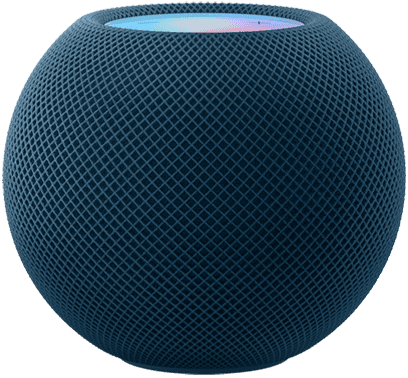
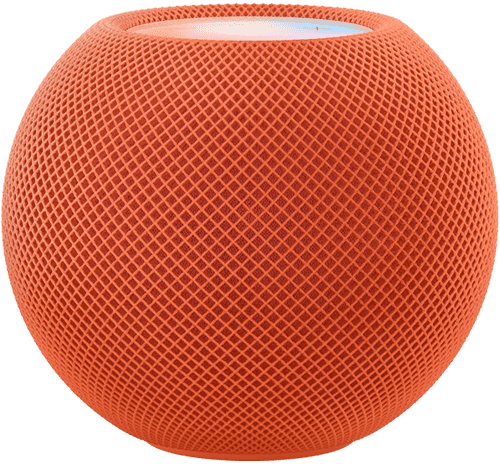
To identify HomePod clone, look carefully at the device. The ‌HomePod mini‌ has a compact spherical design, while the original ‌HomePod‌ has a bulkier capsule-like design.

Both devices are covered in Apple’s audio-conductive mesh material. The ‌HomePod‌ and ‌HomePod mini‌ also share the ‌Siri‌ waveform that appears on the top display to indicate when ‌Siri‌ is engaged, and integrated touch controls for volume.

The HomePod mini features a long, non-detachable fabric cable. The cable sports a USB-C connector,, which makes it fairly versatile on that end. HomePod mini clone will sometimes have a detachable cable instead.

Although technically not meant to be removed, the power cable on the original HomePod could be detached and reattached with a bit of force. In addition, the original HomePod model requires a direct connection to a power outlet via a plug, rather than a power adapter.

HomePod mini comes in 5 colors: orange, yellow, blue, white and space gray. If the HomePod mini doesn’t have either of these colors, that’s a bad sign.

On the bottom of the HomePod is a hard plastic base. This is where the Apple logo is located. If you don’t see Apple Logo on the bottom of the HomePod, it’s likely counterfeit.

Also in typical Apple fashion, HomePod has no buttons (no real physical buttons, at least). There’s just a glass touchscreen (more like touchpad) on the top. If you spot physical buttons on HomePod, you are dealing with counterfeit.

5. Check if it can connect to your iPhone

How to know if HomePod is fake original

Image Credit: Apple

You can’t connect your iPhone to the HomePod Mini through Bluetooth. However, the whole setup process is pretty simple with an iPhone. The HomePod and your iPhone see each other, and the iPhone tells the HomePod everything it needs to know about your home network, and your iCloud ID. It’s quite similar to pairing AirPods.

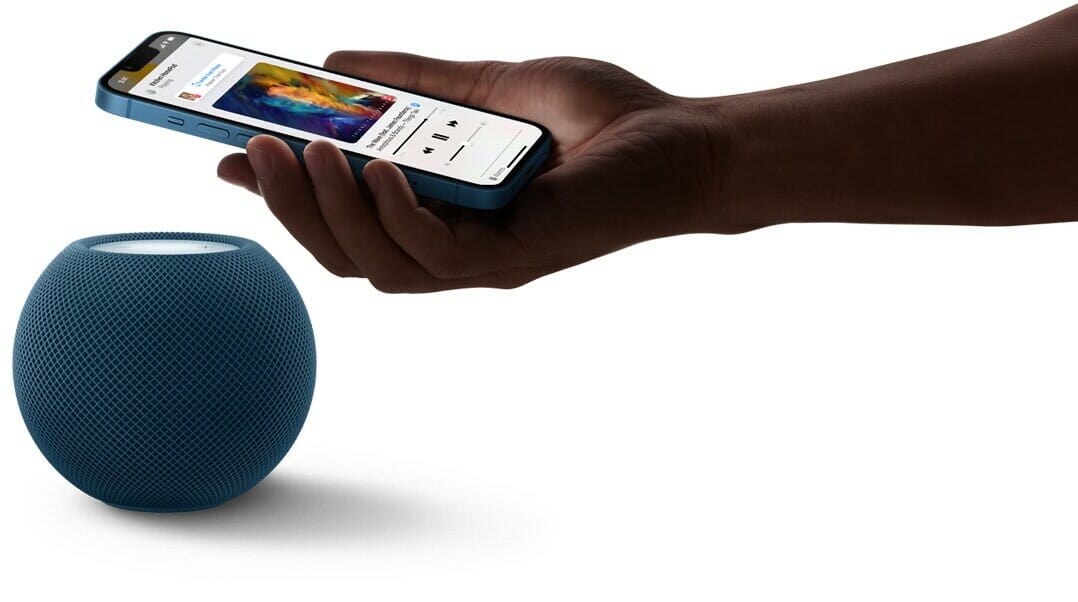
To set up your HomePod, plug it into an outlet and wait until you hear a chime and a white light appears on top. Then hold your unlocked iPhone next to it and tap Set Up. Follow the on-screen instructions, center the HomePod into your iPhone’s viewfinder, then wait for it to finish setting up.

If the HomePod is suddenly not working, make sure you’ve gone through the troubleshooting process first before calling the smart speaker a counterfeit.

What to Do If You Purchase Fake HomePod?

Mistakes happen. If you accidentally purchased fake HomePod, not all is lost. Depending on when you bought the smart speaker and where you bought it from, there’s still a lot you can do to recoup your money and right the wrong. The processes differ depending on the platform you purchased the product:

  • Wish: Contact Wish’s customer service to take advantage of their 30-day return policy. Check their list of exceptions to make sure your purchase qualifies. Wish is notorious for selling fake products, so always be cautious buying on the platform.
  • Craigslist: Craigslist won’t be able to protect you from scammers and counterfeits. You’ll need to do your due diligence to avoid getting scammed. However, if you believe you’ve been scammed, Craigslist still appreciates you reporting the fraud so that they can protect future buyers.
  • Facebook Marketplace: Facebook Marketplace doesn’t provide protections for sellers and buyers.
  • Walmart Marketplace: Request a refund via the Walmart Marketplace Promise to recover your funds.
  • Amazon: Contact Amazon customer support to file an A-to-Z Guarantee to start your refund process.
  • eBay: Contact eBay to ask for their money-back guarantee.

Contact the FBI’s digital division to submit a fraud report. They’ll provide additional advice, and this information will hopefully help them catch the bad guys.

Where Are Fake HomePods Sold?

Scammers sell fake HomePods all across the internet and local listings. So unless you’re buying from Apple, Best Buy, or another credible tech store, you’ll have to deal with fake products to some extent.

Here are the most common places scammers are selling fake Apple HomePods:

  • Craigslist
  • Amazon
  • Wish
  • eBay
  • Facebook Marketplace
  • Walmart
  • Alibaba

Scammers operate on other e-commerce platforms, too, but these are often the most prevalent. And that’s because these sites sometimes have mind-blowingly low legitimate discounts on high-quality tech items.

Where to Buy original Apple HomePod

You can find authentic HomePod at various in-store and online retailers. Here’s a shortlist of the most reliable places you can buy real HomePod:

  • Apple
  • Best Buy
  • Walmart
  • Target
  • Verizon
  • Microsoft

You can find real HomePod on popular e-commerce sites like eBay and Amazon, but you’ll always run the slightest risk of getting scammed. That’s not the case with the authentic websites listed above.

Conclusion

Authenticating HomePod is as tricky as ever. With the things we discussed above, though, you should be properly armed to take on the challenge. Now, you won’t be easily fooled by those who want to take advantage of you. The only thing left for you to do is to go get that HomePod now!

What inspections worked for you? Do you have any other tricks under your sleeves? Tell us about it through the comments below!

See also: 30 Best HomePod mini Tips and Tricks to Try First

HomePod sounds incredible, and with access to more than 90 million songs in the global Apple Music catalog and deep integration with your Apple devices, it’s the must-have smart speaker for iPhone users. HomePod fits in even more places and delivers amazing sound, the power of Siri, and simple and secure smart home controls, all while protecting your privacy. In this article, we’ll highlight 7 benefits of owning an Apple HomePod, kicking off with the room-rocking audio.

7 Benefits of Apple HomePod

Here are some of the advantages of having an Apple HomePod in 2025:

1. Genuinely Impressive Audio

This is arguably the most important thing about HomePod. Sure, whether it’s smart or not matters, but remember that Apple is promoting this as a hi-fi speaker, aiming to blow other smart speakers out of the water by offering greatly superior audio chops. Apple found that people who had smart speakers already, even cheap mini-model ones, were mostly being used for music, so that was Apple’s priority. If it doesn’t sound good, the implication is, the HomePod would be a disaster.

Not just compared to other smart speakers, though it certainly is better than any other I have heard, but also compared to regular, non-smart speaker systems that are similarly priced or more expensive.

The sad truth is that the vast bulk of smart speakers fail roundly to deliver on the audio front.

At first glance, it might seem unthinkable for a product to miss the mark in terms of core functionality, but that’s the thing.

For many smart-speaker customers, these dinky devices are simply portals for controlling other devices with voice commands.

Here is where being honest about your needs and usage habits can help you get the best device first time round. Think about how you will use the device, not what features it has and how you could theoretically use it.

Despite what smart speakers permit in terms of controlling other connected devices hands-free, for most people who buy Echo, Home or HomePod speakers, the main reason for purchase is listening to music.

HomePod is designed first and foremost as a speaker, so if you place real value on the quality of the audio you’re listening to, you won’t regret the stiff investment. Apple packed a lot of audio power into a small speaker. It’s loud enough to fill a room with sound. Bass, mids and treble are all distinct and easy to detect. Compared to the latest Echo Dot and Nest Mini, the HomePod Mini is clearer and less distorted.

Apple’s S5 processing chip powers some behind-the-scenes software to help make the audio clearer, pick up audio commands even when the music is loud, plus sort out direct and ambient sounds with echo cancellation.

Room-sensing tech baked in means Apple HomePod will optimize the soundscape to the living space. Using the multi-directional speakers, microphones, accelerometer and S5 chip, a lot of processing happens for real-time adjustments with the audio. The HomePod analyzes the room by listening to reflections of the sound off of surfaces, so it knows when it’s on a shelf, against a wall or in the middle of the room.

Energy is beamed into the centre of the room and reflects off the walls so that no matter where you are, the music sounds full and clear. You can stand behind the HomePod, in the corner of a cluttered room or directly in front of the speaker and you’ll have a consistent sound, much to my surprise. The impressive technology means there isn’t just one sweet spot for listening like other speakers have.

Room-sensing tech baked in HomePod works well with just one speaker, but when you have two HomePods set up through a simple stereo pairing process, the audio quality is even more full with an extra dimension and the hardware creates even better low and high frequencies. If money is no option, using stereo HomePods is the way to go.

In short, the technology makes for a very impressive music listening experience. Detail can be heard at all volume levels, making for crisp acoustics and deep bass. It is impressive that the high quality and detail in the sound can come from such small speakers.

You’ll be able to use AirPlay to stream audio from your phone to HomePod without needing to pair like you would with a Bluetooth set-up. AirPlay delivers superior audio compression, too. Connectivity with AirPlay is robust, but you will need to hook up to a WiFi network.

Analyze how you intend to use your smart speaker. If music is your first love, Apple makes sure you’ll hear all your music at its very best.

2. HomePod is the best way to listen to Apple Music

Apple Music doesn’t yet have the same global dominance as the music streaming service Spotify. As of 2021, Apple Music has estimated about 98 million users worldwide. Spotify, which has scored first place, has approximately 116 million users as of 2021.

Still, 98 million users is nothing to scoff at, and many of them are most likely looking for a way to get the most out of their music.

The iteration of Siri built into HomePod can be sorely lacking in places. Fortunately, Siri comes fully to the fore with Apple Music.

Siri will gradually become accustomed to your tastes and can soon start presenting you with playlists based on artists and genres you listen to on a regular basis. You can say things like, “Hey, Siri, I don’t like this song,” and the device will adjust the music accordingly and remember for the future.

It also learns what you like over time, so if you say, “Hey, Siri, play some party music,” it will present you a playlist full of the types of artists and genres it knows you like.

Ask, “Hey Siri, play my station” and you’ll get a customized playlist based on the contents of your Apple Music library.

AirPlay yourself a podcast and listen to something stimulating as you get ready for your day.

While these capabilities may not be must-have features, they’re certainly enhancements to any listening experience. Plus, everything syncs between the Apple Music you’re enjoying on the HomePod and the version on your phone, so your preferences will carry over when you leave the house.

If you’re already a committed Apple Music fan and iOS user, you’ll find Apple HomePod the perfect way to get the very most from the service.

3. Tight Integration with Apple Ecosystem

When you buy an Apple HomePod, you’re not only getting a HomePod, you’re getting a small cog in the grand symphony that a machine is. In this case, you’re buying a part of Apple’s Ecosystem. This is basically a fancy way of saying that almost every if not every piece of tech Apple makes works well with the rest of their devices.

The way HomePod slides in with the Apple ecosystem is made clear right out the box.

The setup process for the HomePod is simple. You simply hold your iPhone next to speaker and an automatic pop-up takes you through the process — a couple of minutes at most. Your iPhone’s Apple ID will be the profile associated with the HomePod and its calendar, reminders, messages and music library.

Phone calls and text messages are both supported, which is not the case with Alexa.

One potential flashpoint to be aware of is that you can only sync Apple HomePod to a single iPhone. This is less than ideal in the average household. The problem is that anyone could read your text messages or potentially send a message to anyone in your contacts. Think closely about the environment where you’ll be placing your speaker and ask yourself whether you’re comfortable with this or not. You can disable access to messages if required.

In a sense, the situation is the same with Apple HomePod as with all smart tech. If you’re heavily invested in the Apple ecosystem—Macs, iPhones, iPads, and HomeKit security devices—HomePod is your best bet. That makes for simple setup, more interoperability, and smoother functioning. If you’re not already a convert, buckle up for an expensive but rewarding journey!

4. Privacy Comes Uppermost

It seems like everybody and their mother is harvesting personal data from technology users these days. A lot of people are hesitant to buy a smart speaker because of this fear, and tech companies like Apple are keenly aware of this.

Apple assures users that the HomePod only listens after hearing the wake phrase, and you can disable Siri by saying, “Hey Siri, stop listening.” You can later re-enable Siri in the Home app. You can also disable the HomePod’s location services. Your verbal requests are associated with a random identifier rather than your Apple ID when they are sent to Apple to be processed, which prevents Apple from storing this information about you. When you ask Siri to read your messages or notes aloud, the HomePod doesn’t send that information to Apple, but rather the communication occurs directly between the HomePod and your iPhone.

Sending or receiving personal messages can only be tied to a single iCloud account. When your phone is not connected to the WiFi network, messages won’t shoot through to Apple HomePod. This is a nice touch if you’re concerned about your kids or housemates getting into your inbox.

Apple doesn’t adopt the same cavalier approach to monetizing your data as you can expect from Amazon and Google. Their business model is more fluid and you can remain quietly confident your data is as safe as it could be.

If you dislike the idea of inviting always-on devices from Amazon, Facebook, and Google into your home in the wake of so many privacy breaches, HomePod is a sea change. You can install a smart device without worrying about the manufacturer probing into your personal information.

5. Enjoy Basic Smart Home Control

It’s no secret that most people invest in a smart speaker at least in part due to the ability to control other compatible connected devices.

If you’re interested in Apple HomePod, this is quite likely not your primary motivation. We’ll assume, though, that you’ll want to enjoy at least basic control of other devices in your ecosystem.

While you might not be able to have items re-ordered from Amazon on your behalf or engage in a round of trivia questions, when the frippery is stripped away, Apple HomePod allows you to control other devices hands-free or in-app.

Smart Home control is improving with Siri as more companies add HomeKit support into their products. Third-party app integration has also been getting considerably better thanks to SiriKit. You won’t get the reach of control or interoperability that you’ll enjoy with Alexa or Google Assistant, but you’ll be able to get the job done.

And you can get that job done while listening to your favorite tunes in fine style rather than enduring a tinny whine.

6. You can use Your HomePod as a TV Speaker

Speaking of entertainment, another advantage of HomePod speakers is as the output for Apple TV, making for an immersive audio experience no matter what you’re watching.

The experience used to be fiddly, but it has improved with newer tvOS releases. A pair of HomePod speakers will certainly sound better than the speakers built into your TV so it’s worth taking the time to set this up if you have HomePods in the same room as your Apple TV. It’ll be a huge improvement over your TV’s stock speakers, turning movie night into a true surround-sound cinematic experience.

The bonus advantage of using Apple HomePod instead of regular external speakers is that you’ll also get all the perks of a Siri-powered smart home. You’ll be able to control your TV with voice commands like, “Hey, Siri, play Dexter season 4, episode 1,” and you won’t even need to bother with the remote control.

You’ll need to make sure your TV supports ARC or eARC technology to use your HomePod as a TV speaker, but most modern smart 4K TVs do, so you likely won’t need to upgrade to an entirely new TV at least.

7. It sounds more human.

Much has been made of the superior sound quality of Apple’s speaker, but the improvements go beyond technical specs for audiophiles. Siri’s communication on the HomePod is more human-like than that of Amazon’s Alexa or Google Home.

Specifically, after asking a question, [Siri] does not repeat the whole thing back to you as is the case with Google Assistant and Alexa, which makes for a subtly smoother process.

The HomePod is also a better listener than the Echo or Google Home. Thanks to a noise-cancellation feature, you could use your regular speaking voice with HomePod even in a situation where you’d have to raise your voice to talk to others in the same room. This is the HomePod’s most stellar feature.

Amazon’s weakness in that sense has been with listening: users like myself often have to shout several times to be heard by Alexa. Google’s is personality, and the fact that users still have to say “Ok, Google” to activate its speaker. (I still can’t make peace with the idea of regularly addressing a multibillion dollar corporation in my living room.)

Advantages of having an Apple HomePod: now you know!

So, these, according to us, are the seven of the most important benefits of owning an Apple HomePod. If you’re an Apple Music convert and you’re looking for a primary listening device that delivers, HomePod is a smart bet. For music lovers already invested into Apple’s ecosystem, this is undoubtedly the neatest match. AirPlay 2 means you can send the audio from your Apple TV or Mac to the HomePod, for example. You can also use your iPhone to control all the HomePods and other AirPlay devices in your home, plus individually switch which one is playing what. It’s very seamless and useful.

Being able to read and send messages, add reminders and notes, use the HomePod as a speaker phone and other native iOS features is very useful and not in other speakers. Plus if you use Apple Music as your primary music source like I do, then suddenly the HomePod feels like the smart speaker that opens up the floodgates. Other smart speakers don’t play nearly as well with the service.

See also: 10 Amazing Advantages of Apple TV in 2022

Have you bought a new iOS device but you’re worried you won’t be able to transfer Whatsapp data to your new device? Well, we have some great news for you.

It is indeed possible to transfer WhatsApp from Android to iPhone. Whether you’re transferring that data to an old or a new iPhone, the process is actually quite simple.

You might already know that WhatsApp transfer is very common since people are constantly switching from Android to iPhone and from iPhone to Android.

While WhatsApp remains by far the most popular and feature-rich messaging app across platforms, it lacks an essential feature – data transfer across platforms. Thankfully, you can take advantage of the third-party tool, like Wondershare MobileTrans to move your WhatsApp from Android to iPhone within few simple clicks.

What is MobileTrans – WhatsApp Transfer? Why should you download it?

MobileTrans – WhatsApp Transfer is a professional tool that is designed to transfer WhatsApp between devices. The software lets you transfer WhatsApp messages from Android to iPhone with minimal effort. Whether it’s transferring WhatsApp from iOS to Android or backing up the chat history to PC or restoring the app from backup, it performs the assigned tasks efficiently.

What separates MobileTrans-WhatsApp Transfer from the pack, is much simpler interface than other data transfer tools out there, which makes it easier for anyone to navigate and use.

MobileTrans-WhatsApp Transfer doesn’t stop there, though. It also lets you backup WhatsApp files to computer and you can restore them to your iPhone/iPad or Android devices with a single click.

The backup feature works like magic. You just need to connect your iPhone to your computer, launch MobileTrans and perform a single Click.

iPhone users can back up their messages and then selectively restore – or copy to their computer – file attachments, specific messages and chat histories.

Talking of chat histories, the software allows you to transfer your chat history directly from one phone to another. For instance, you can transfer your chat history from Android to Android, iPhone to iPhone, iPhone to Android, or Android to iPhone.

Besides WhatsApp, MobileTrans also works with a host of messaging apps like WeChat, Viber, Line, Kik, and more. So, you shouldn’t worry about losing your memorable chats when moving from one iPhone to the other or switching from one platform to the other.

With that in mind, let’s look at how to transfer WhatsApp from Android to iPhone.

How to transfer your WhatsApp from Android to iPhone using Wondershare MobileTrans

To migrate WhatsApp from android to iphone
you’ll need the following;

  • MobileTrans – WhatsApp Transfer
  • A PC or Mac
  • Your iPhone and connecting cable
  • Your Android Phone and connecting cable

Now, here are step-by-step instructions for how to transfer whatsapp data from Android to iPhone using MobileTrans – WhatsApp Transfer:

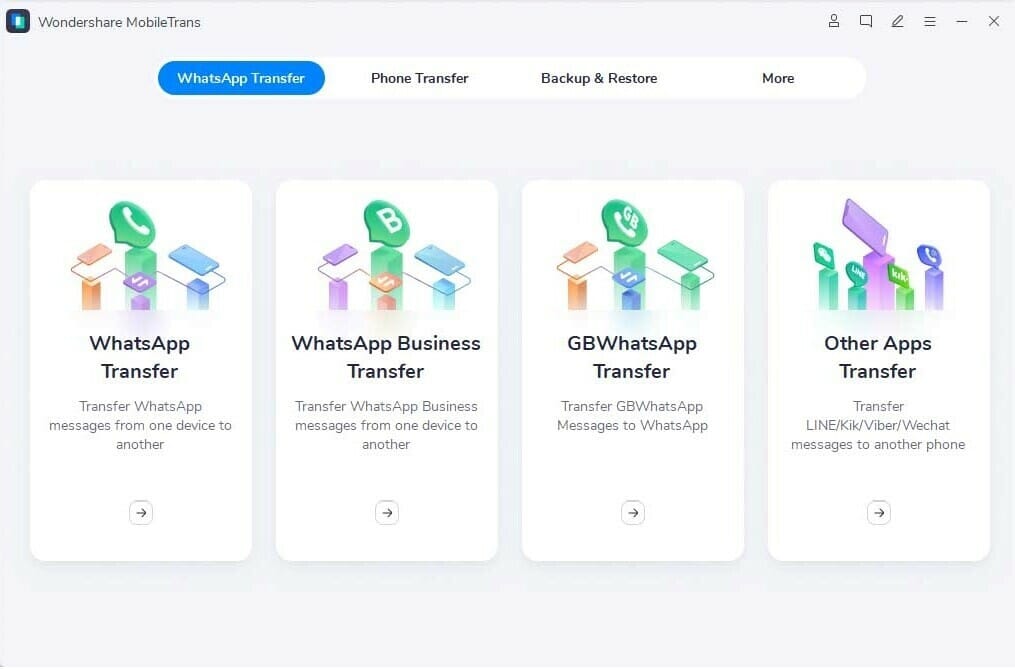
Step 1: Download, install and launch MobileTrans on your Mac or Windows computer.

MobileTrans -home

Now, click on the “WhatsApp Transfer” module.
From the left panel.

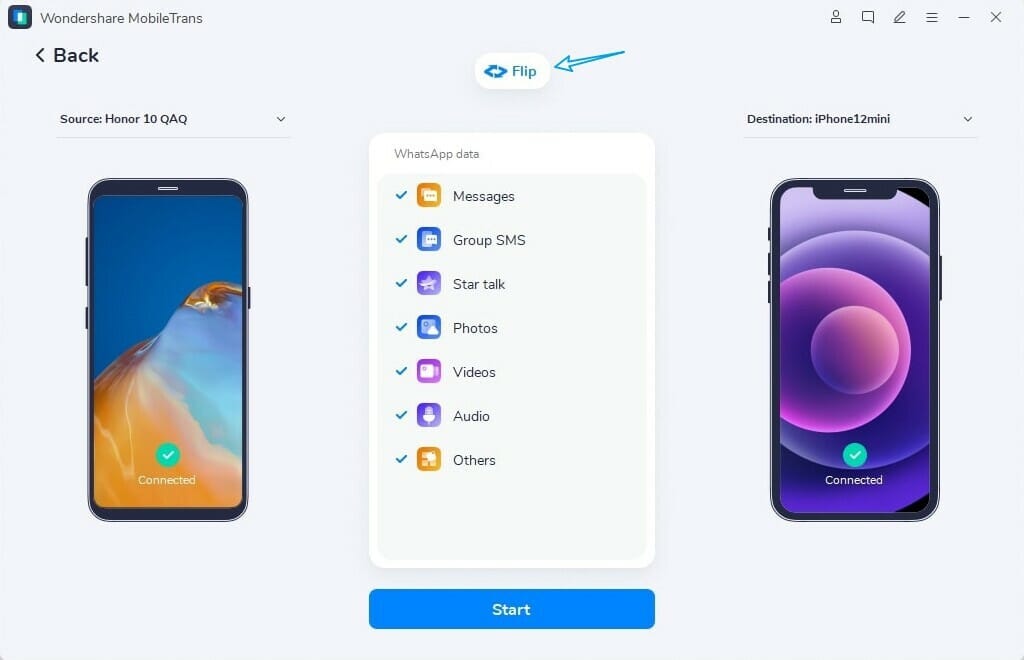
Step 2: Next, build the connection between both of your devices and computer with a USB cable. When the two devices get detected, you will see them on the screen.

whatsapp transfer android to ios

Step 3: After making sure that the iPhone is the destination device, select the type of files you wish to transfer, then click on “Start” to initiate the transfer process. Now you need to agree to the warning messages to confirm your decision as the existing WhatsApp data on the target device will be deleted.

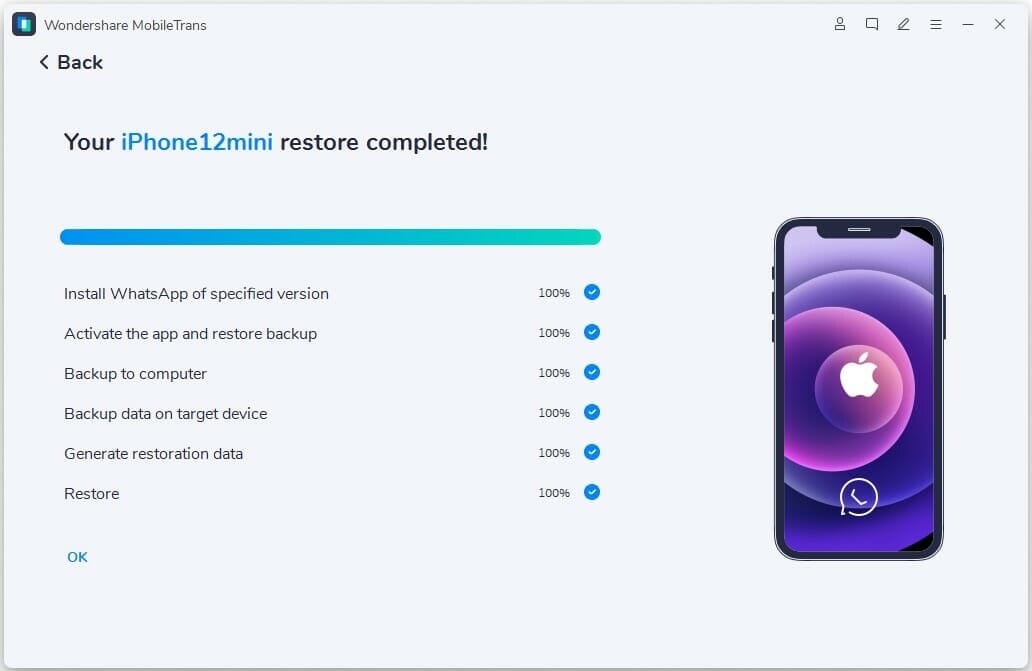
Step 4: After that, MobileTrans will begin the WhatsApp transfer process.

transfe -whatsapp to ios

Step 5: Finally, grab your iPhone, open WhatsApp, and restore the backup.

Now, my WhatsApp was transferred successfully within no time and pricing was also cheap and affordable.

MobileTrans – WhatsApp Transfer Features

  • Great and comprehensive UI design
  • Multiple price plans for different needs
  • Compatible with most devices from different manufacturers
  • Great transferring speeds
  • 100% secure
  • Complete backup of your device
  • Accessible

Wondershare MobileTrans is trusted by millions of users around the world and has also received tons of praise from reputable media outlets such as PC World, Forbes, CNET,and many more.

It’s security has never been called into question. Wondershare takes security very seriously by ensuring that your privacy is thoroughly protected, through both data encryption and advanced fraud protection. This is arguably the main outstanding factor that separates MobileTrans from its competitors.

Wondershare is one of the most reputable names when it comes to data-recovery or data transfer between smartphones. They have a range of products and most of their products are easy to use; above all, they do the job very well.

Our two sense

It’s not often that I find an honor of reviewing an app which is not only feature-rich and revolutionary in its feature set, but takes users experience
to an entirely new level.

MobileTrans – WhatsApp Transfer is a blazingly fast software which does its job very efficiently. Whether you want to backup your WhatsApp history, or transfer Whatsapp messages from iPhone to Android, nothing can beat MobileTrans.

MobileTrans – WhatsApp Transfer is a brilliant software . Actually, it might just be the best in its class in that respect.

When purchasing a new smartphone, people usually have to choose between two of the most popular operating systems. Here are 7 reasons why iPhone is the best smartphone.

Why iPhone is the best smartphone

Here are the reasons why iphone is the best phone in the world:

1. Information security

Information security companies unanimously agree that iPhones are more secure than Android devices. According to a report by Forbes, 97 percent of smartphone malware targets Android phones.

Android phones get malware and viruses particularly from app stores. Apple’s App Store has fewer apps to offer than the Android phones’ app store, but the number of available apps is not the most important element of app stores. Apple is very careful with selecting which app developers gain access to the so-called Apple ecosystem – a network of devices, apps and developers. Getting apps that contain malware into the App Store is practically impossible.

In comparison, Google’s app store, Google Play, is an ad-supported and free environment where anyone can put their apps on display. Android allows the user to install apps from outside the Google Play store as well – making it impossible to monitor apps possibly containing malware and viruses.

In addition to the app store, un-updated operating systems also cause security threats. Because several phone manufacturers use the operating system provided by Google, not all of them get the updates at the same time and are thus exposed to massive security threats. iOS devices are made only by Apple, so the corresponding problem doesn’t exist.

2. The Apple ecosystem

The range of Apple products has grown notably in recent years. Apple started out making computers and has since added music players, tablet computers and smart watches to their product selection. Today, Apple provides a wide range of products and services for various purposes.

The devices work seamlessly and effortlessly together. You don’t need to download or install separate applications to link them together, it’s enough when you sign in to the devices with the same Apple ID. Photos, emails, notes and calendars can be shared to all the devices. You also don’t have to pay twice for apps, movies or books – they can be found on all your devices.

The closed ecosystem also guarantees the user safety. The operating environment is secure when devices, users, manufacturers and app developers are all in the same ecosystem.

The situation is different for Android phones. Several different manufacturers produce phones and tablets based on the same operating system, so a safe ecosystem and using the devices together seamlessly cannot be guaranteed.

3. Ease of use

iPhones are known for their ease of use. Their usability comes from simple operating logic: all the apps are launched from the home screen. All the settings, for example, can be found under one menu. And even if you upgrade your iPhone to the newest model, the operating system still works the same way and taking it into use is easy.

An android phone can be modified and customised in various ways, but the basic features of its operating system are much more complicated and confusing than the iOS system. If you value an easy to use and good smartphone for basic use, an iPhone is the obvious choice.

4. Get the best apps first

The developers of the best and highest quality apps still favour Apple and this explains why iPhone is the best phone in the world. Most apps use Apple’s App Store as their launch platform and release their apps there much earlier than they do in the Android phones’ Google Play store. This has been the case with some of the most popular apps of recent years, such as Super Mario Run and Snapchat.

Some apps may not be released at all for Android phones. It’s much harder for app developers to create games and apps for Android phones, as there is a wide range of them and many unique features of the phones should be taken into account in the development. The App Store’s revenue model also serves the developers of high-quality apps better, which will guarantee safe and good apps for iPhone users in the future as well.

5. Apple Pay

Apple Pay is Apple’s payment service, which enables making credit and debit card payments using your phone. Paying works the same way as contactless payment with a plastic card, i.e., by placing the phone by the card reader. The card is protected with Face ID, Touch ID or the phone’s passcode, which let you keep your payment information safe.

Apple Pay can also be used to make purchases in apps: reserving a hotel room, shopping for clothes or ordering a pizza couldn’t be easier. Google Pay is not yet available in many countries, so users in need of a simple and easy mobile payment method should opt for the Apple iPhone.

6. Family Sharing

The Apple iPhone is a good choice for children, especially if the entire family is using Apple devices and phones. Phone use is safe because parents can easily keep track of what their children are doing with their phones.

Apple’s Family Sharing makes family life easier. Up to six family members can make, for example, shared music, film or app purchases and share photo albums, calendars and reminders. There is no risk of children downloading inappropriate or paid apps, as Family Sharing enables parental approval for their children’s apps.

And when children start to go to school by themselves, for example, parents can keep track of the journey with the Find My feature.

7. iPhones hold their value

Since new smartphone models with attractive features are published often, people constantly want to upgrade their phones to newer models. When people stop using their phones and buy a new one, they often want to sell their still functional old phone at the best possible price.

Apple phones keep their resale value far better than Android phones. iPhones are made of high-quality materials, which goes a long way in helping them maintain their resale value. Apple phones also remain as flagship models and up-to-date longer, as there is only one manufacturer and new and better phones aren’t launched as often as Android phones.

Why do you buy what you buy? Why do you buy iPhones? Why do people buy iPhones? Do you ever stop to think about it? Do you ever stop to contemplate your reasons for buying something?

Why do i buy iPhones?

For the longest of time, I struggled to find the answer, even though i use iPhone for pretty much everything. It’s my wallet, my calendar, my notepad, my connection to work, and yes, the tool I use to get in touch with the world.

Let’s take this iPhone 16 Pro Max I’m using right now. Why did I buy it? Well, First of all, I truly needed it. Perfect, why else did I buy it? Is it because of what it does for me? Yes! Is this iPhone a device used to get things done? Yes! Is it for entertainment purposes? Yes! Is it a tool used to create entertainment? Yes! Is it to produce content? Yes! Is it to store and edit pictures? Yes! It is to stream music? Yes! Is it to handle my email? Sure! Yes. It handles all of these tasks. But those are the rational reasons why I buy iPhones. Let’s look at the far powerful, typically implicit, emotional reasons why i buy iPhones.

Far way back, before Apple totally and completely dominated the tech arena with the iPhone, iPad, new Macs, etc., Apple positioned itself as a brand for creators. It is practical to state that Steve Jobs created a cult, a Culture for Creators, by Creators, for people who take art, innovation and creativity seriously converging with nice, excellent design.

This philosophy was very specific. This philosophy was not for every person. This philosophy flew the black pirate flag over corporate headquarters in an act of disobedience
(yes, indeed). At the beginning, Jobs positioned Apple to care about art, innovation and creativity. Apple was — and still is — for people who care: People who care about innovation, people who care about the price, people who care about the quality, and most importantly, people who care about the customer.

Please keep in mind: Apple never was, nor is it currently, for every person. It is still for specific.

Because of this skillful positioning and completely careful attention paid to design through end user understanding, Apple enjoys “luxurious pricing” with very little discounting. Moreover, the company receives massive loyalty to the brand.

You know how some people gets thrilled when they land on Disney World in Orlando? As if they are finally seeing their childhood dream come true in front of them? Some people gets thrilled when they finally land on Cupertino, CA, to experience for themselves where it all started. And to see where the Real Magic gets created to this day. I belong to that group of people. (I’ll take the pilgrimage to Cupertino, not Orlando.)

Why do people buy iPhones?

We buy iPhones because of our profound emotional connection to the brand. Like loyalty to a beloved college football team, it is a resolute, inconspicuous connection, never to be broken. We buy the iPhone because it’s a phone that Apple built for enthusiasts. Using an iPhone is real enjoyment, real gratification, real pleasure. It is smart enough to know to get out of the user’s way and allow her to get to the significant job of productivity. This is a value that Android creators never got. They still don’t get it. And they never will.

That’s perfectly okay: it isn’t for them. iPhones are for people like us who do things like this. Apple knows exactly how to get the user experience aspect of their devices just right. The Cupertino company knows precisely what users want in a smartphone with regards to user interface and security.
Apple Bosses work very hard to ensure they don’t do anything to bungle this profound , emotional connection they and the brand has with tons and tons of people around the world. They are aware that they are in an extremely jealous business position with their luxury product pricing on consumer and professional goods.

The difference between Apple Bosses and bosses of other companies is Apple executives actually value what they do. They value music. They value art. They value bleeding-edge Tech. They value design. They value execution. They value the magic of small teams. They value building community around Apple Stores. They value emotions. They value people. They value legacy.

We buy iPhones because of emotional bond. We buy iPhones because of community. We buy iPhones because it makes us feel special associating with the brand. We buy iPhones because it is for Creators, by Creators. We buy iPhones because we want to make things better by making better things. And we want to look good while doing so.

If you enjoyed this article please share it with others.