Got a tip for us?

Editor’s Pick

The terms Apple Store and Apple App Store are often used interchangeably, but they serve distinct functions in the Apple ecosystem. If you’ve ever wondered what differentiates these two, then you’re in the right place. Let’s demystify the Apple lingo and dive into the nuances between the Apple Store and the Apple App Store.

What is the Apple Store?

The Apple Store is essentially the place where you can purchase Apple hardware and accessories. It’s akin to a marketplace where you can buy products such as iPhones, MacBooks, iPads, and all the fancy accessories that go with them.

The Apple Store also organizes free workshops and events to learn new skills, discover new apps, and meet other creative people who share your interests.

Furthermore, you can trade in your old Apple devices regardless of their condition–for credit towards a new one or recycle them for free.

There are two types of Apple Stores: brick-and-mortar and online.

Brick-and-Mortar Apple Store

The physical Apple Stores are a haven for Apple enthusiasts. You can walk into these sleek, minimalist stores to experience Apple products firsthand. Whether it’s getting the feel of the latest iPhone or getting a tutorial on how to use a Mac, the physical store has got it all.

Moreover, these stores often have a Genius Bar – a section where you can get technical support, advice, and repair services for your Apple products.

The majority of U.S. stores operate within indoor shopping malls, while some stores are standalone locations along busy streets or shopping areas. Apple also has a number of flagship stores worldwide, considered by many to be architectural wonders, including its iconic Fifth Avenue glass cube in New York City, Tower Theater location in Los Angeles, and Regent Street store in London, England.

Online Apple Store

If you’re someone who prefers shopping from the comfort of your home, the online Apple Store is for you. It’s accessible through the web at apple.com or through the Apple Store app. Here, you can purchase products, customize configurations (like choosing the memory size for your MacBook), and even get customer support.

What is the Apple App Store?

The Apple App Store, on the other hand, is a digital distribution platform. This is where you download and manage applications for your Apple devices, such as iPhones, iPads, and Macs.

For over a decade, the App Store has proved to be a safe and trusted place to discover and download apps. From productivity tools, social media apps, games, to virtually any type of app, the Apple App Store is a treasure trove of software that can augment your Apple device’s capabilities. And it’s not just third-party apps; Apple also offers cool services to improve your experience.

For example, Apple Arcade gives users unlimited access to exclusive games that are completely ad-free and free from microtransactions. Other Apple services you can get via App Store with an Apple One subscription include Apple TV , Apple Music, Apple News , and Apple Fitness .

Features of the Apple App Store

  • Discoverability: With categories, featured apps, and recommendations, finding new apps is a breeze.
  • Purchases and In-App Purchases: You can buy paid apps or make in-app purchases for additional features or content.
  • Updates: The App Store is where you get the latest updates for your apps, ensuring security and new features.
  • Family Sharing: Share purchases with up to six family members while keeping each person’s account separate and private.

The Common Thread

Though different, the Apple Store and the Apple App Store share a common goal: providing you with quality products and services to enrich your Apple experience.

In a Nutshell

  • Apple Store is a physical and online marketplace to purchase products exclusively made and featured by Apple.
  • Apple App Store is a digital marketplace for downloading and managing apps on your Apple devices.

Conclusion

So, there you have it! The Apple Store is your go-to destination for Apple hardware, while the Apple App Store breathes life into these devices with a myriad of apps. Both play a critical role in making the most out of your Apple products.

The next time you hear someone using these terms interchangeably, you can now kindly enlighten them on the differences between the Apple Store and the Apple App Store. Happy Apple adventuring! 🍏

In January 2007, Steve Jobs, the then CEO of Apple, announced a revolutionary product that would change the way people interacted with their phones forever. The product was the iPhone, and it was released on June 29, 2007. Since then, the iPhone has gone through numerous iterations and has become a ubiquitous part of modern life. In this article, we will trace the history of the iPhone from its launch in 2007 to the present day.

The First iPhone (2007)

The first iPhone was a game-changer in many ways. It had a large, high-resolution touch screen, a built-in camera, and a unique and intuitive user interface. It was also the first phone to feature the Safari web browser, which allowed users to browse the internet just like they would on a computer.

The iPhone ran on iOS, which was a new operating system designed specifically for the iPhone. It also had a range of other features, including a music player, email client, and messaging app. At the time, the iPhone was only available on AT&T’s network in the United States.

iPhone 3G (2008)

The iPhone 3G was released in July 2008 and featured 3G connectivity, which made browsing the internet and downloading apps much faster. It also introduced the App Store, which allowed developers to create and distribute their own apps to iPhone users.

The iPhone 3G also came with built-in GPS, which enabled turn-by-turn navigation and location-based services. It was also available in more countries and on more carriers, making it more accessible to people around the world.

iPhone 3GS (2009)

The iPhone 3GS was released in June 2009 and was a significant upgrade over the iPhone 3G. It featured a faster processor, more storage, and improved camera, and it introduced video recording to the iPhone for the first time.

It also introduced a new feature called Voice Control, which allowed users to control their iPhone using voice commands. This was a precursor to Siri, which would be introduced in later versions of the iPhone.

iPhone 4 (2010)

The iPhone 4 was released in June 2010 and was a major redesign of the iPhone. It featured a new, more angular design with a glass front and back and a stainless steel frame. It also had a high-resolution Retina display, which made images and text look sharper and clearer.

The iPhone 4 also introduced FaceTime, which allowed users to make video calls to other iPhone users. It also featured a new front-facing camera, which made taking selfies and making video calls much easier.

iPhone 4S (2011)

The iPhone 4S was released in October 2011 and was an incremental upgrade over the iPhone 4. It featured a faster processor, better camera, and improved Siri integration. Siri was a virtual assistant that could perform a range of tasks, including making phone calls, sending text messages, and setting reminders.

The iPhone 4S also introduced iCloud, which allowed users to store their photos, music, and other files in the cloud and access them from any device.

iPhone 5 (2012)

The iPhone 5 was released in September 2012 and was another significant redesign of the iPhone. It featured a larger, 4-inch display, a thinner and lighter design, and 4G LTE connectivity. It also introduced a new Lightning connector, which replaced the 30-pin connector that had been used in previous iPhones.

The iPhone 5 also introduced a new, faster processor and improved camera, as well as a new version of iOS that included a range of new features and improvements.

iPhone 5C and 5S (2013)

In September 2013, Apple released two new iPhones: the iPhone 5C and the iPhone 5S. The iPhone 5C featured a colorful plastic body and was designed to be a more affordable option for consumers. The iPhone 5S, on the other hand, featured a more premium design and introduced a new feature called Touch ID, which allowed users to unlock their phone and make purchases using their fingerprint.

The iPhone 5S also featured an improved camera and a faster processor, as well as a new version of iOS that introduced a range of new features and improvements.

iPhone 6 and 6 Plus (2014)

The iPhone 6 and 6 Plus were released in September 2014 and marked another major redesign of the iPhone. The iPhone 6 featured a larger, 4.7-inch display, while the iPhone 6 Plus featured an even larger 5.5-inch display. Both phones featured a new, rounded design with a metal body, and they were the first iPhones to support NFC, which enabled Apple Pay, a mobile payment system.

The iPhone 6 and 6 Plus also introduced a new, faster processor and improved camera, as well as a new version of iOS that included a range of new features and improvements.

iPhone 6S and 6S Plus (2015)

The iPhone 6S and 6S Plus were released in September 2015 and were similar in design to the iPhone 6 and 6 Plus. However, they introduced a range of new features, including 3D Touch, which allowed the screen to detect different levels of pressure and enabled new interactions with apps and the user interface.

The iPhone 6S and 6S Plus also featured an improved camera, a faster processor, and a new version of iOS that introduced a range of new features and improvements.

iPhone SE (2016)

The iPhone SE was released in March 2016 and was designed to be a more affordable option for consumers. It featured a design that was similar to the iPhone 5S, but it had updated hardware, including a faster processor and an improved camera.

The iPhone SE also introduced a new version of iOS that included a range of new features and improvements.

iPhone 7 and 7 Plus (2016)

The iPhone 7 and 7 Plus were released in September 2016 and marked another significant redesign of the iPhone. The iPhone 7 featured a new, water-resistant design with a metal body, and it was the first iPhone to remove the headphone jack, relying on wireless and Lightning-connected headphones instead.

The iPhone 7 Plus introduced a dual-camera system, which allowed for optical zoom and a range of new camera features. Both phones featured a faster processor and a new version of iOS that included a range of new features and improvements.

iPhone 8 and 8 Plus (2017)

The iPhone 8 and 8 Plus were released in September 2017 and featured a similar design to the iPhone 7 and 7 Plus. However, they introduced a range of new features, including wireless charging, an improved camera, and a new processor.

The iPhone 8 Plus also featured a new Portrait Lighting mode, which allowed for more advanced lighting effects in portrait photos. Both phones came with a new version of iOS that included a range of new features and improvements.

iPhone X (2017)

The iPhone X was released in November 2017 and marked a significant departure from previous iPhone designs. It featured a new, all-screen design with a notch at the top for the front-facing camera and Face ID, a new facial recognition system that replaced Touch ID.

The iPhone X also introduced a range of new features, including Animoji, which allowed users to create animated emojis using facial expressions, and a new, more advanced camera system with optical image stabilization and improved low-light performance. It also came with a new version of iOS that included a range of new features and improvements, including a redesigned control center and improved notifications.

iPhone XS, XS Max, and XR (2018)

An iPhone Xs in front of an iPhone Xs Max.  

In September 2018, Apple released three new iPhones: the iPhone XS, XS Max, and XR. The iPhone XS and XS Max featured an updated design that was similar to the iPhone X, while the iPhone XR featured a design that was similar to the iPhone 8 and 8 Plus, but with an all-screen display.

iPhone XR in white finish.  

All three phones featured a new, more powerful processor, improved cameras, and a new version of iOS that introduced a range of new features and improvements, including Memoji, which allowed users to create personalized emojis that looked like them.

iPhone 11, 11 Pro, and 11 Pro Max (2019)

A stack of iPhone 11 in six finishes.  

In September 2019, Apple released three new iPhones: the iPhone 11, 11 Pro, and 11 Pro Max. The iPhone 11 featured a design that was similar to the iPhone XR, while the 11 Pro and 11 Pro Max featured a new, triple-camera system and a design that was similar to the iPhone XS and XS Max.

All three phones featured a new, more powerful processor and a new version of iOS that introduced a range of new features and improvements, including Dark Mode, which allowed users to switch to a darker color scheme for the user interface.

iPhone SE (2020)
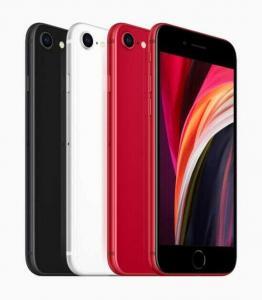
The Second Generation iPhone SE in black, white and (PRODUCT)RED.  

In April 2020, Apple released a new version of the iPhone SE. The new iPhone SE featured a design that was similar to the iPhone 8, but with updated hardware, including a faster processor and improved camera.

The iPhone SE also came with a new version of iOS that introduced a range of new features and improvements, including improved Siri functionality and the ability to customize the appearance of the home screen.

iPhone 12, 12 Pro, 12 Pro Max, and 12 Mini (2020)

iPhone 12 in blue, red, white, green, and black aluminium finishes.

In October 2020, Apple released four new iPhones: the iPhone 12, 12 mini, 12 Pro, and 12 Pro Max. All four phones featured a new, more angular design with an all-screen display and support for 5G connectivity.

The iPhone 12 and 12 Mini featured a dual-camera system, while the 12 Pro and 12 Pro Max featured a triple-camera system with improved low-light performance and a LiDAR scanner for improved augmented reality experiences.

All four phones featured a new, more powerful processor and a new version of iOS that introduced a range of new features and improvements, including widgets on the home screen and improved privacy controls.

iPhone 13, 13 Pro, 13 Pro Max, and 13 Mini (2021)
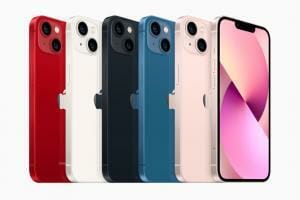
iPhone 13 lineup in (PRODUCT)RED, starlight, midnight, blue, and pink.

In September 2021, Apple announced the iPhone 13, iPhone 13 mini, iPhone 13 Pro, and iPhone 13 Pro Max. They featured a design that looked virtually identical to the iPhone 12 models (save for some new colors), though the notch was significantly smaller.

Powered by the A15 Bionic chipset, all the iPhone 13 models brought a significant boost to battery life – a feature that had previously been one of the iPhone’s greatest shortcomings. They also introduced a new Cinematic Mode in video, recording footage with a depth effect that automatically changed the focus depending on the scene. The iPhone 13 Pro models were the first iPhones to ship with a 120Hz display, but this feature wasn’t available on the cheaper iPhone 13 and iPhone 13 mini.

iPhone SE 3 (2022)
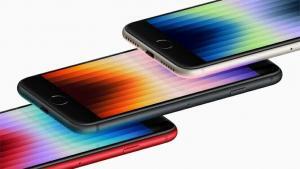
Angled shot showing the display of the third generation iPhone SE in (PRODUCT)RED, midnight, and starlight.  

On March 8, 2022, Apple introduced the iPhone SE 3. Launched just two years after the iPhone SE 2, the iPhone SE 3 didn’t bring any major upgrades to the design, continuing to offer a small 4.7-inch display, thick bezels and a Home button with a Touch ID fingerprint sensor. The smartphone packed new features such as 5G, an A15 Bionic chip, and improved battery life. Apart from that, there wasn’t much difference from the older model.

iPhone 14, 14 Plus, 14 Pro, and 14 Pro Max (2022)
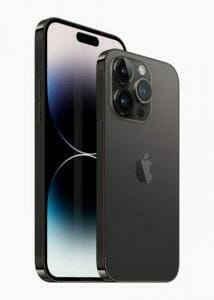
iPhone 14 Pro and iPhone 14 Pro Max are shown in space black.

Announced at Apple’s ‘Far Out’ event on Sept. 7, 2022, the iPhone 14 series comprise the iPhone 14, iPhone 14 Plus, iPhone 14 Pro, and iPhone 14 Pro Max. The iPhone 14 Plus is a new model in the lineup, replacing the iPhone mini that Apple axed after just two years owing to poor performance. While the iPhone 14 and iPhone 14 Plus carry forward most features of the iPhone 13 series, including the A15 Bionic chip, the iPhone 14 Pro models brought all the upgrades.

The biggest change is the new Dynamic Island – an oval-shaped cutout that replaces the wide notch. Additionally, the Pro models feature a new 48MP primary camera, the biggest resolution upgrade on an iPhone in years. They are powered by the A16 Bionic chip, which brings only minor upgrades over the A15. Another new feature is the Always-On Display – the first on an iPhone.

All the iPhones in the iPhone 14 series feature the new Crash Detection and Emergency SOS via Satellite features, offering users access to emergency services when they may be immobile after a car crash or have no cell service or Wi-Fi access. The new iPhones also get rid of the physical SIM tray in the U.S., leaving users with only eSIM as a connectivity option. The new iPhone 14 Pro models are Apple’s most powerful iPhones yet, but the iPhone 15 series is expected to bring even more upgrades, most notably, the inclusion of a USB-C port instead of Lightning.

Conclusion

The iPhone has come a long way since its initial release in 2007. With each new iteration, Apple has introduced new features and improved performance, design, and functionality. The iPhone has become more than just a phone; it is now a central part of many people’s lives, providing a range of features and functions that were once unimaginable. As we look to the future, it will be exciting to see what new innovations Apple has in store for the iPhone.


Apple is a company that is well-known for producing high-quality products, and their accessories are no exception. One accessory that consumers often find surprisingly expensive is the Apple cable. While there are many third-party cable options available at a lower price point, Apple cables remain popular and highly sought after. In this article, we will explore ten reasons why Apple cables are so expensive.

1. High-Quality Materials

Apple cables are made using high-quality materials, such as braided nylon, which is durable and resistant to wear and tear. These materials ensure that the cables last longer and do not need to be replaced as often.

2. Rigorous Testing

Apple cables undergo rigorous testing to ensure they meet Apple’s high standards for quality and durability. They are tested for strength, durability, and resistance to wear and tear to ensure it can withstand daily use. This testing process ensures that only the best quality cables make it to the market.

3. MFi Certification

Apple cables are MFi (Made for iPhone/iPad/iPod) certified, which means they meet the requirements set by Apple to ensure they work seamlessly with Apple devices. This certification guarantees that the cables are of high quality and provide the best performance. The MFi certification ensures that Apple cables are compatible with the latest versions of iOS and Apple devices.

4. Compatibility

Apple cables are designed to work seamlessly with Apple devices, providing the best performance and compatibility. Apple designs its cables to be compatible with the latest devices and iOS versions, ensuring that they continue to work even after system updates.

5. Brand Reputation

Apple is a premium brand, and their products come with a premium price tag. The company’s reputation for quality and innovation means that consumers are willing to pay more for their products, including their cables. Apple’s brand reputation ensures that their cables are perceived as premium products, which justifies their high price tag.

6. Warranty

Apple cables come with a one-year warranty, providing consumers with peace of mind that their investment is protected. If the cable fails within the warranty period, Apple will replace it at no cost. This warranty is an added value that justifies the high price of Apple cables.

7. Design

Apple cables are designed to be stylish and complement the overall aesthetic of Apple products. The design ensures that the cables are easy to use and plug in. The design also ensures that the cables are compact and easy to store, making them more convenient for users.

8. Accessibility

Apple cables are designed with accessibility in mind, making them easy to use and providing easy access to all ports and buttons. They are compatible with various charging accessories, such as wall adapters, car chargers, and power banks. This accessibility ensures that Apple cables are convenient to use, making them a preferred choice for many consumers.

9. Durability

Apple cables are designed to be durable and resistant to wear and tear. They have reinforced connectors and are built to withstand twisting and bending, which can cause cheaper cables to break. This durability ensures that Apple cables last longer than cheaper alternatives, making them a better investment in the long run.

10. Innovation

Apple is known for its innovation, and this is reflected in its cables. For example, the company has developed the Lightning connector, which is smaller and more durable than the previous connector. This innovation ensures that Apple cables are at the forefront of cable technology, providing users with the best performance and user experience.

Conclusion

Apple cables are expensive for a variety of reasons, including high-quality materials, rigorous testing, MFi certification, compatibility, brand reputation, warranty, design, accessibility, durability, and innovation. While there are cheaper third-party cable options available, those looking for the best quality, performance, and design will find that the premium price of Apple cables is worth it.

YouTube is a fantastic platform for sharing and discovering video content, from music videos and documentaries to tutorials and comedy sketches. However, sometimes you may want to download a video from YouTube to your iPhone’s Camera Roll for offline viewing, sharing with friends, or saving for later. In this article, we’ll explain how to download YouTube videos to your iPhone Camera Roll using a few simple methods.

Method 1: Download YouTube Videos to Your iPhone Camera Roll Using a Third-Party App

One of the easiest ways to download YouTube videos to your iPhone is to use a third-party app. There are several apps available on the App Store that allow you to download videos from YouTube, such as Documents by Readdle, Video Download Browser, and MyMedia.

Here’s how to use Documents by Readdle to download YouTube videos to your iPhone:

  1. Download and install Documents by Readdle from the App Store.
  2. Open the YouTube app on your iPhone and find the video you want to download.
  3. Tap on the share icon below the video and select ”Copy link”.
  4. Open Documents by Readdle and tap on the browser icon in the bottom-right corner.
  5. Go to www(dot)savefrom(dot)net in the browser and paste the YouTube video link in the search box. Tap on the green arrow to continue.
  6. Select the video quality and tap on the blue download button. The video will start downloading.
  7. Once the download is complete, tap on the ”Downloads” tab in Documents by Readdle and select the video. Tap on the share icon and select ”Save Video” to save the video to your Camera Roll.

Method 2: Download YouTube Videos to Your iPhone Camera Roll Using Safari

Another method to download YouTube videos to your iPhone Camera Roll is to use the Safari browser. This method requires a bit more effort than using a third-party app, but it’s still fairly simple. Here’s how to do it:

  1. Open the YouTube app on your iPhone and find the video you want to download.
  2. Tap on the share icon below the video and select ”Copy link”.
  3. Open the Safari browser on your iPhone and go to www(dot)savefrom(dot)net.
  4. Paste the YouTube video link in the search box and tap on the green arrow to continue.
  5. Select the video quality and tap on the blue download button. The video will start downloading.
  6. Once the download is complete, tap and hold on the video thumbnail and select ”Save Video” to save the video to your Camera Roll.

Method 3: Download YouTube Videos to Your iPhone Camera Roll Using Shortcuts

Shortcuts is an app that allows you to automate tasks on your iPhone, including downloading YouTube videos to your Camera Roll. This method requires you to install a shortcut that can be found on the Shortcuts app gallery. Here’s how to use it:

  1. Download and install the Shortcuts app from the App Store.
  2. Open the YouTube app on your iPhone and find the video you want to download.
  3. Tap on the share icon below the video and select ”Copy link”.
  4. Open the Shortcuts app and tap on the ”Gallery” tab at the bottom of the screen.
  5. Search for the ”YouTube Video Downloader” shortcut and tap on it.
  6. Tap on the ”Get Shortcut” button to install the shortcut.
  7. Open the YouTube app again and find the video you want to download.
  8. Tap on the share icon below the video and select ”Run Shortcut”.
  9. Select the ”YouTube Video Downloader” shortcut and tap on the blue play button.
  10. The shortcut will automatically download the video and save it to your iPhone’s Camera Roll.

Conclusion

Downloading YouTube videos to your iPhone Camera Roll can be a useful feature, allowing you to watch videos offline and share them with friends. With the methods described above, you can easily download YouTube videos to your iPhone using a third-party app, Safari, or Shortcuts app.

The iPhone is one of the most popular and recognizable smartphones in the world. First released in 2007 by Apple Inc., the iPhone quickly became a sensation and has since evolved into a household name. But have you ever wondered why iPhones are called iPhones? In this article, we will explore the origins of the iPhone name and what it represents.

The Origin of the Name iPhone

When Steve Jobs, the co-founder and former CEO of Apple Inc., introduced the first iPhone at a keynote address on January 9, 2007, he described it as "a revolutionary product that changes everything". But before he revealed the device, he had to address a crucial question: what would the product be called?

The origin of the name "iPhone" can be traced back to 2005, two years before the first iPhone was released. Apple had started developing a phone project called "Project Purple", which was led by Jon Rubinstein, a former executive at Apple who had previously worked on the iPod.

At that time, Apple was already using the name "iPod" for its popular digital music player, and the company was looking for a name that would complement it. The "i" in iPod stood for "internet", and Apple wanted a name that would reflect the iPhone’s ability to connect to the internet.

According to a former Apple employee, the name "iPhone" was proposed by Ken Segall, an advertising executive who had worked with Apple on the "Think Different" campaign. Segall had previously worked with Jobs and suggested the name "iPhone" during a brainstorming session.

The "i" in iPhone

The "i" in iPhone has become synonymous with Apple’s products, and it is used in the names of other popular Apple products such as the iPad, iPod, iMac, and iTunes. But what does the "i" actually stand for?

When the first iMac was released in 1998, Jobs described it as "the first computer to be born in the new millennium". The "i" in iMac stood for "internet", and it was meant to highlight the computer’s ability to connect to the internet.

Over the years, the "i" has come to represent several things, including:

  • Internet: Apple’s products are known for their ability to connect to the internet, and the "i" in iPhone represents this feature.
  • Innovation: Apple has a reputation for being innovative, and the "i" in iPhone represents the company’s commitment to pushing the boundaries of technology.
  • Individuality: Apple’s products are often seen as stylish and unique, and the "i" in iPhone represents the individuality of the user.

The Phone Aspect

Another reason why the iPhone is called the iPhone is because of its primary function as a phone. The iPhone was designed to be a mobile phone first and foremost, with additional features such as internet access and music playback added on. The name "iPhone" accurately reflects the device’s primary purpose and distinguishes it from other Apple products.

The "Phone" suffix is also a nod to Apple’s history of creating groundbreaking phones. Apple released its first phone, the Motorola ROKR, in 2005, which was followed by the iPhone in 2007. By including "Phone" in the name, Apple emphasized the device’s unique features and made it clear that it was not just another iPod or internet communicator.

Conclusion

The iPhone is called the iPhone because of the "i" prefix, which is synonymous with Apple and its innovative approach, and the "Phone" suffix, which accurately reflects the device’s primary purpose as a mobile phone. While the name may seem simple, it has become a symbol of Apple’s commitment to innovation and design excellence, and it has helped to establish the iPhone as one of the most iconic devices in the world.

While some people may find iPhones annoying, others may find them incredibly useful and user-friendly. However, there are several reasons why some people may find iPhones annoying, and we will explore them in-depth below.

1. Apple’s Walled Garden

The Apple ecosystem, commonly known as the "walled garden," can also be a significant source of frustration for some users. Apple’s strict rules and regulations on what can be installed on its devices can make it difficult to download and use third-party apps or software. Apple products are designed to work best with other Apple products, which means they can be difficult to integrate with other non-Apple devices or services. For instance, if you are an Android user, you may find it challenging to sync your contacts or calendar with your iPhone. Additionally, Apple’s proprietary Lightning cable and its closed operating system can limit users’ choices, making it difficult to use non-Apple products or software. Moreover, Apple’s strict control over their App Store can be frustrating for some users, as it limits the apps available for download.

2. High Price

Another factor that can make iPhones annoying is their high price point. Apple products are generally more expensive than their Android counterparts, and this can put a strain on some users’ budgets. Even though iPhones come with several features and functionalities that justify their price, not everyone can afford them. iPhones often require users to purchase additional accessories, such as a charger, which can add to the overall cost. Moreover, Apple’s constant updates and new models make it difficult to keep up with the latest technology, leading to frustration and annoyance.

3. Forced Updates

Apple frequently releases software updates for its devices, which can be a source of annoyance for some users. Although these updates often bring new features and functionalities, they can also cause older iPhones to slow down or malfunction. Moreover, these updates can take up significant amounts of storage space, leading to further frustration.

4. Overbearing Notifications

iPhones come with a constant barrage of notifications that can be both distracting and annoying. Although some of these notifications can be useful, such as email alerts or calendar reminders, others can be superfluous and unnecessary. Notifications from social media apps, for instance, can be especially disruptive, leading to a constant stream of updates and messages that can be difficult to ignore.

5. Limited Customization

Another factor that can contribute to iPhones being annoying is the lack of customization options. Apple products are known for their sleek and modern design, but this design can also be limiting for some users who prefer to personalize their devices. For instance, Android users have the ability to customize their home screens with widgets, which provide quick access to frequently used apps or information. In contrast, iPhone users are limited to a grid of icons on their home screen.

6. Limited Battery Life

Some users may find iPhones annoying because of their battery life. While newer models may have better battery life, older iPhones tend to drain quickly, leading to frustration and annoyance. Additionally, Apple’s proprietary batteries can make it difficult and expensive to replace them, leading to further irritation.

7. Limited File Sharing

The inability to share files easily with non-Apple users is another reason why some users find iPhones annoying. Apple’s proprietary file system, iCloud, can be difficult to navigate and may require an Apple ID to access. This can be a significant barrier for users who want to share files with non-Apple users.

8. Lack of Headphone Jack

The removal of the headphone jack in newer models is also a source of annoyance for some users. While Apple has provided alternative options such as AirPods, this can be an additional expense for users who prefer to use wired headphones.

9. Proprietary Components

Apple is well-known for its proprietary components, such as the Lightning cable used to charge and sync iPhones. These proprietary components can limit users’ choices, making it challenging to use non-Apple products or software.

Conclusion

While iPhones are incredibly popular and widely used, some users may find them annoying for various reasons, such as their cost, limited customization, Apple’s closed ecosystem, constant notifications, battery life, limited file sharing, and the lack of a headphone jack. However, it is important to remember that different users have different needs and preferences, and what one person may find annoying, another may find useful or even necessary.

iPhones are one of the most popular and sought-after smartphones in the market today. However, one common complaint that many iPhone users have is the weight of the device. iPhones are known to be relatively heavy compared to other smartphones in the same category. But why are iPhones heavy?

There are several factors that contribute to the weight of an iPhone, including the materials used, the size and screen of the device, the battery, and the components that are packed into it. Let’s take a closer look at each of these factors.

Materials Used

One of the reasons why iPhones are heavier than other smartphones is the materials used to make them. Apple uses high-quality materials like stainless steel and aluminum for the body of the iPhone. These materials are known to be sturdy and durable, but they also add to the overall weight of the device.

In comparison, some other smartphone manufacturers use plastic or polycarbonate materials that are lighter in weight. However, these materials are not as durable as the ones used in iPhones and can be easily scratched or cracked.

Size and Screen

The size and screen of an iPhone also play a role in its weight. Larger phones require more internal components to support the additional features, which also adds weight. In addition, iPhones have a relatively large screen size compared to some other smartphones in the market, which means that more components are required to power and operate the device. Apple tries to balance the size and screen of their phones with their weight, but larger phones will always be heavier.

Battery

Another factor that contributes to the weight of an iPhone is the battery. Apple prioritizes battery life, which means that they use a larger battery to ensure that the device can last for a long time without needing a recharge. The battery is one of the heaviest components in a smartphone, and the larger the battery, the heavier the phone will be. Apple has made significant strides in battery technology over the years, but a larger battery still requires more weight.

Components Packed into the Device

iPhones are packed with advanced components that make them perform better than most smartphones. These components include the A-series chip, which powers the device, and a high-quality camera that takes amazing photos and videos.

These advanced components require more space and contribute to the overall weight of the device. Additionally, iPhones also come with features like water resistance, which requires additional components like seals and gaskets, further adding to the weight of the device.

Durability

Finally, Apple designs their phones to be durable and long-lasting. This requires additional reinforcement and protective measures, which can add weight to the device. Apple uses materials like reinforced glass and stainless steel to make their phones more durable, which can add to the weight of the phone.

In conclusion, iPhones are heavier than other smartphones because of the high-quality materials used, the size and screen of the device, the battery, and the advanced components packed into it. While the weight of the device may be a concern for some users, it is important to note that the weight is a result of Apple’s focus on durability, performance, and features that make iPhones one of the most sought-after smartphones in the market.

From outrageous pricing to a closed ecosystem that locks its users in, there are many disadvantages of an Apple Watch.

Apple Watch is a wearable smartwatch that allows users to accomplish a variety of tasks, including making phone calls, sending text messages and reading email. Apple released the Apple Watch on April 24, 2015. Here are eight disadvantages of an Apple Watch in 2024.

1. You’ll Need an iPhone to Start Using the Apple Watch

One big disadvantage of an Apple Watch is that you can’t set it up without using an iPhone. The Watch must be paired with an iPhone to link an Apple ID. You can’t even activate the watch using another Apple product, like a Mac, Apple TV, or iPad. The Apple Watch app only works with the iPhone.

Apple’s choice to make its smartwatch a companion device to the iPhone has been controversial. An iPhone is expensive, and not everyone wants to shell out the cash to use the watch. Also, companies like Google have been more lenient. Android watches are compatible with other operating systems, including iOS.

You can’t use an Android device to set up an Apple Watch. The Watch is designed to be a companion device to an iPhone for much of its functionality. This is particularly true of the Wi-Fi model, though Apple also sells an Apple Watch with cellular connectivity that operates more like a standalone device.

Once you’ve set up your Apple Watch with cellular you can do many of the things you’d normally rely on an iPhone for, like receive text messages, take phone calls, and access functions that depend on the internet. Unfortunately, this isn’t advisable due to the power drain placed on your Watch when using cellular data.

You’re unlikely to receive all-day battery life if using your cellular Apple Watch away from your iPhone for prolonged periods. Wi-Fi models depend on your iPhone so you miss out on a lot of functionality when your paired iPhone is out of range. The exception here is when you’re in the presence of a Wi-Fi network that you’ve connected to before (when your iPhone was present).

2. Apple Watches do not work with Android phones

An Apple Watch and an Android phone might offer some users the best of both worlds, but it’s never that simple when it comes to Apple and Google.

If there’s one notable disadvantage of an Apple Watch, it’s the lack of compatibility with operating systems beyond iOS.

With a device as popular as this, it’s not surprising that Android phone users might want to consider pairing their smartphone with an Apple Watch. However, that’s not a very good idea as the two are just not designed to work with each other. To be clear, an Apple Watch can technically be used with an Android phone with a number of workarounds. However, there will be many issues to overcome, resulting in an experience that’s just not worth it for most consumers. Not to mention, an iPhone will still be needed to begin with.

The Apple Watch will only work with iPhones, which isn’t ever likely to change. To activate an Apple Watch, you’ll need an iPhone with the Watch app installed. There’s no substitute for this on Android, even if your device supports Bluetooth connectivity.

The main issue with using these two devices together is that they cannot be paired with each other. Considering that’s the main purpose of a smartwatch, the lack of pairing support and the inability to share data negates the point of owning a smartwatch and smartphone. More to the point, an Apple Watch needs to be connected to an iPhone during the initial setup process. Unless an iPhone is accessible to the Android phone user, they won’t even be able to get started with an Apple Watch.

In short, anyone can wear an Apple Watch, including Android phone users. However, the reality is that anyone looking to have a proper smartwatch experience should stay within their own OS lanes. Android users should use Wear OS or third-party platform watches, iPhone users should use Apple Watches.

3. Notifications on Apple Watch can be overwhelming

The Apple Watch is able to shoulder the tsunami of notifications you receive on a daily basis, letting you glance at updates without getting sucked into your iPhone. But most people don’t need or want such constant access to updates.

A more complex reason is that some alerts are only useful for learning information rather than doing something with that information without the iPhone. Furthermore, if you still view your iPhone regularly throughout the day, dealing with notifications on two screens instead of one can add to the mental load, rather than reducing screentime as intended.

Never-ending notifications can be harmful to both productivity and mental health. The Apple Watch make it possible never to miss another notification. But this isn’t necessarily a good thing.

4. Apple Watches are overprice

Yes, you want it. But do you want it to the tune of $799?

Generally speaking, you want to buy the newest watch you can afford so that it continues to receive software updates from Apple. The latest update, watchOS 10, launched on the Apple Watch Series 4 and newer models, though no one can say with certainty whether the Series 4 will get the next big software update. But the problem is the price.

In 2022, Apple launched its latest batch of smartwatches including the $399 Series 8 and the new $249 SE.

Oh. Did I mention there is a $799 model of the Apple Watch? The Apple Watch Ultra is made out of titanium, costs $799 and is built for extreme athletes. But a Peloton class with Olivia Amato is about as extreme as my workouts get, so these exciting new features were lost on me. If you’re like me and exercise is something you do to stay healthy, you don’t need to spend $799 on the Ultra.

For the same price, you can purchase a mid-range iPhone. The phone will have a bigger screen, higher specs, better functionality, and a built-in camera.

Apple Watches have their benefits, but in terms of value for money, there is no comparison.

First of all, you need an (overpriced) iPhone (a current model) in order to actually use your watch. Have an Android phone, or (like me) have no phone at all? Too bad, so sad. No Apple Watch for you.

Hypothetically, assume you have an iPhone. Then you buy an Apple Watch. Then your iPhone gets dropped down some stairs (hey, it happens). Now you need a new phone. Well, you better go plop down the (nearly) thousand dollars on a new iPhone… otherwise your exorbitantly priced watch just became a useless brick attached to your arm.

So what? It’s psychotically expensive. And, yeah, it forces you to use only specific pieces of technology for the indefinite future – effectively locking you out of any other technological advancements that happen outside of the Apple Watch/iPhone world. That doesn’t inherently make this a bad watch… does it?

Yes. Yes, it absolutely does. Add to this the fact that the Apple Watch hit the market a year later than the Android-powered smartwatches (which have more flexibility and more power than Apple’s gadget), and the Apple Watch instantly becomes a status symbol that declares to the world, “I have too much money, I want to be locked into a hardware ecosystem, and I like my technology to be out of date before I buy it.”

In such a situation, you are left wondering whether the watch is a fashion statement or a gadget. But the problem is that the device seems likely to fail on both counts. Viewed as a gadget, the device is just too expensive given its limited functionality. Yet it’s going to be an uphill battle to sell a square, bulky touchscreen device as a fashion statement. In trying to be both a gadget and a luxury item, it’s at high risk of falling in the no-man’s land between the two.

See also: Why Are Apple Watches so Expensive? (Top 10 Reasons)

5. Apple Watch Need Regular Charging

Another disadvantage of an Apple Watch is that it needs charging every one or two days. This is understandable given the functionality but it’s something you should think about if you’re planning on replacing a traditional watch.

Having an Apple Watch means one more electronic device that you’ll need to keep charged. And if you forget, your new watch won’t even be able to tell time.

The current lineup of Apple Watch models will easily get you through a full day before needing a charge. In my testing, both of the new Apple Watch models get at least 32 hours of runtime, but this is on the low end compared to other wearable devices on the market.

For runners using watches, battery life is indispensable to the experience. It can be a huge barrier, effectively rendering a run non-existent if the battery runs out. If there’s even a remote risk, the value is diminished.

Apple hasn’t strayed from its 18-hour battery life claim in what feels like a lifetime. If you ask, Apple Watch loyalists won’t hesitate to tell you their charging regimen to get around the fact that it needs daily charging. But the Garmin and Polar fans love getting a minimum of 14 days on a single charge and somewhere between 30-40 hours of GPS activity. In comparison, you get roughly 5-6 hours of GPS activity on the Apple Watch. That’s more than enough for the average person, but it still requires endurance athletes to do a little math or specifically remember to charge up their watch before a run. With a Garmin or Polar, you don’t have to think about it at all. You can just go.

The Apple Watch Ultra has twice the battery life of the regular Apple Watch. And while this is great, it still pales in comparison to Garmin. Let’s take a look:

Battery Life:

  • Apple Watch Ultra: Up to 3 days
  • Garmin Epix: Up to 10 days
  • Garmin Epix Solar: Up to 17 days
  • Garmin Fenix 7: Up to 18 days
  • Garmin Fenix 7 Solar: Up to 30 days
  • Garmin Enduro 2: Up to 45 days

Or if we take a look at how the battery life holds up during regular GPS Mode:

  • Apple Watch Ultra: 12 hours
  • Garmin Epix: 42 hours
  • Garmin Fenix: 57 hours
  • Garmin Enduro 2: 150 hours

On top of that, longer battery is more convenient than scheduled fast charging if you prioritize sleep tracking. All in all, battery life is still a big reason why some people opt for Fitbit, Garmin, and Polar devices. Now if Apple were to figure out multi-day battery life? That’d be an entirely different story.

6. Fitness Tracking Is Sometimes Unreliable

Fitness tracking is a relatively new concept. This means that the data that you receive from them isn’t always entirely accurate.

Data tracking issues apply to both Apple Watches and fitness trackers. They can give you a lot of information that you wouldn’t otherwise have. But the accuracy of that data is not something that anybody’s health should rely on.

7. Apple Watches Are Not Convenient for Phone Calls

Apple is improving the Apple Watch all the time, but the watch is not yet convenient for making phone calls. It’s easy to argue that it never will be.

Holding your wrist to your ear is never going to be comfortable, and until everybody changes their mind about this, you’re always going to look pretty strange doing so.

Apple Watches do work well with hands-free headsets like airpods, but the benefit of a watch over a phone in this scenario is debatable.

8. A Fitness Tracker Might Be More Practical

Apple Watches are designed to be used as fitness trackers. They achieve this goal, but there’s a reason that many people opt for a dedicated device instead.

Fitness trackers are significantly cheaper, often much smaller, and usually have much longer battery lives. For example, some fitness trackers last for up to 30 days without a charge.

If you’re looking for a device that can track your activity 24 hours a day, an Apple Watch might, therefore, not be the best choice.

Conclusion

Apple Watch has improved a lot in recent years, and it has also become a lot more popular. But, with so many disadvantages of an Apple Watch, it hasn’t yet become must-have accessories. If you’re an Apple fanatic and want to try something new—or you’ve simply been looking at new watches to try—the Apple Watch will likely appeal to you. But before you commit to a purchase, you need to critically think about these disadvantages of an Apple Watch.

The Apple Watch is great for health and fitness use, but that’s not all. Here are some other uses of an Apple Watch that you might not know about.

We’ve spent the last year digging into all of the weird and wonderful things that the best fitness trackers, like the Apple Watch, can offer, and we’ve discovered some important uses of an Apple Watch we think everyone should be aware of.

Without further ado, here are the best uses of an Apple Watch that you should know about.

1. Detailed sleep quality reports

Most people know this, but thought it worthy of a highlight at the top in any case. An Apple Watch offers the best way to track sleep outside of a professional study, as it can track things and offer trend reports that a phone app just can’t.

Apple’s sleep tracking is one of the best, offering 14-day trends, weekday and weekend sleep schedules, goals, sleep focus mode and a whole lot more. We love the ‘wind down’ feature that reminds us to wrap up our day and prepare our body and mind for bedtime.

2. Auto workout playlists (for Apple Music)

If you don’t want to bother carrying your iPhone with you during workout but still want to listen to your Apple Music playlist, you can do so with your Apple Watch—even if you’re offline!

it’s perhaps understandable that an Apple Music subscription opens up a whole new set of integrations. The best one might be the ability to tie a particular playlist with a workout, eliminating the need to jump around apps just when you want to set off.

3. Hand washing timer

Be honest, has your ‘happy birthday’ singing been lacking while washing your hands lately? While we were all diligent about hand hygiene just a couple of years ago, like any habit it can be difficult to stick to it long-term. Thankfully the Apple Watch has a timer specially designed for hand-washing, so you can be sure that you’re doing a thorough job – no singing required.

4. Cardio fitness alerts

Unless you’ve splashed out on a personal trainer, it’s likely that you only have a rough idea of your cardio fitness levels based on how you feel during and after a period of activity. The Apple Watch makes this a lot more precise, using data like your age, sex, weight, height, medications, and your VO² max range. You will even get an alert when this data indicates your fitness is lower than average.

5. Fall detection

Smartwatches aren’t just for athletes – they also have many functions for everyday safety and well-being. Apple Watch’s Fall Detection feature, for example, is a way to ensure an accident doesn’t go unnoticed. If the device detects that you have fallen down, it will display an option to call emergency services or press the ‘I’m OK’ button if things aren’t that serious. After a minute, help will be called automatically. You can also choose key contacts to be notified.

6. Access Siri from anywhere

Siri might not be as much of a household name as Google Assistant or Alexa, but it’s a great smart assistant if you’re an Apple user. Being able to access Siri from your Apple Watch is a bit of a gamechanger, as it means you have the helpful robot with you at all times (don’t worry, you can stop her from listening if you want), even without a HomePod Mini in the vicinity. Ask her questions, translate conversations on the go, or set timers and alerts with your voice.

7. Decompress with ‘Do Not Disturb’ mode

The ‘Do Not Disturb’ mode might be our favorite thing about the Apple Watch and iPhone, allowing us to literally switch off unnecessary distractions either when we want to get down to some focused work or wind down for the evening. Just a few taps on your wrist and precious silence is achievable. This mode silences everything except alarms, and you can also set certain contacts to be able to get through in an emergency. Otherwise, your time and attention are yours.

8. Get some ‘me time’ with apps like Headspace

Apple Health has its own meditation and mindfulness features, but we’re big fans of Headspace for its approachable tone and abundance of content. We’ve found that having Headspace (and other apps like Calm or Simple Habit) on your Apple Watch means you’re much more likely to fire up a guided meditation or calming video than if you had to unlock your phone in the morning.

9. Accessorise with different straps

Let’s face it, smartwatches are fantastic in a lot of ways, but they aren’t always the most stylish. Thankfully, there are a ton of third-party brands that have brought out their own straps that you can retrofit onto the Apple Watch face.sure the band matches your model.

10. Control Your iPhone’s Camera With Your Apple Watch

One of the coolest features on your Apple Watch is that you can use it as a camera remote to control your iPhone’s camera.

Those times when you are alone, and want to position your iPhone for a photo and then take the photo from a distance, you can use your Apple Watch to view the iPhone camera image and take the photo. You can also use your Apple Watch to set a shutter timer—this gives you time to lower your wrist and raise your eyes when you’re in the shot.

Use Your Apple Watch to Its Fullest

If you own an Apple Watch, you probably know all about its fitness-related uses, but there’s a lot more to smartwatches than that. With these 10 lesser-known uses of an Apple Watch, you can be sure to make the most out of it.

It’s no doubt iPhones are so slippery. Here’s why
How would you describe iPhones in one word? Exciting? Extravagant? Expensive, perhaps? In any case, I doubt that ”slippery” is a word on your mind right now.

I own several iPhones, and like millions of owners I marvel at the premium design of the casing. It is sleek, simplistic, and feels sensual in the hand. Unfortunately, that comes with a penalty when you use the devices.

In the last week alone I’ve almost dropped my iPhone 15 Pro Max due to the slippery back. The new design and slim profile make this huge iPhone one exquisite-looking piece of technology that’s a real pleasure to use and carry around, but there is nothing “grippy” to hold securely in the hand. Just turning one slightly in the hand can see it slip right out, leaving you to lunge to catch it before it hits the harsh floor.

I know I’m not the only one to experience it, I’ve seen other people perform the “iPhone dance” while trying to catch the device slipping out of the hand. I’ve seen numerous iPhones that weren’t saved before hitting the dirt and were subsequently sporting those disturbing cracks in the glass.

I recently spoke with an acquaintance about the slippery iPhone and he confessed his wife has had her iPhone screen replaced four times. She’s not clumsy, he said, it just slips out of her hand when she’s using it.

Some of you will be quick to point out that you just have to put a case on the phone to avoid the problem. You’d be correct, too, but let’s face it, if you have to put a case on an iPhone to use it securely, that’s what I’d call a design flaw. Good design is not just about making it look good, it’s also about usability.

We’ve seen this slippery problem since the first iPhone. It was sleek and beautiful but you needed a case to keep it in the hand. Then Apple followed that up with an iPhone that was not only sleek and gorgeous, but that was totally enclosed in glass. When that one slipped out of the hand it would not only crack the display but the back, too.

I’m convinced this inability to hold the iPhone securely in the hand is the real reason the bumper case was developed. It was released under the guise of dealing with Antennagate, but I believe it was really to deal with the design choice that makes the phone difficult to hold. After all, the term “bumper” denotes a thing designed to minimize the impact of a collision. Like what happens when the iPhone drops to the floor.

Take an iPhone 15 as an example, the device looks magnificent and feels great, but try using it without any case or cover and you know what I mean. It is almost impossible to hold in the hand without dropping it. Move it around while holding it and it doesn’t feel secure at all. It’s like holding a wet bar of soap covered in lubricant. While beautiful with the new matte frosted back, it’s downright impossible to get a good grip! You have to squeeze it so hard to try to grip it.

Unless I’m reviewing a case, I like to use my iPhone naked. But that’s not possible with the iPhone 15 Pro Max, because it’s too damn slippery.

Its matte glass panels, coupled with its size and weight, mean it’s nearly impossible to go a week without dropping the iPhone 15 Pro Max. And if you don’t drop it, it will surely slide off something or slip out of your pocket.

I can already hear the responses to this: “don’t buy an iPhone if you don’t like this.” Unfortunately, the sleek design of iPhones has been picked up by many of its competitors, so that’s not an answer.

Reasons Why iPhones Are so slippery

Glossy Frame

The first reason why iPhones are so slippery is because of the steel frame on the side of the phone. The steel frame looks more like a piece of jewelry rather than a phone. But the good news ends there. The steel frame is so glossy and slippery that it’s nearly impossible to pick up the iPhone 11 Pro, iPhone 12 Pro, iPhone 13 pro, or iPhone 14 Pro from your desk without risking dropping it midway. A case would help, of course, but it will diminish these premium looks. Better safe than sorry, i guess.

Frosted glass back,

Another reason why iPhones are so slippery is because of the frosted glass back, flat again, which looks nothing short of gorgeous. Whether it’s white or blue, gold, Deep Purple, or product red, it’s an instant eye-grabber. Plus, it feels presently soft on touch, and you’ll just loved running your fingertips across this surface.

Unfortunately, while the rear glass isn’t a smudge-fest like the frame, it is just as slippery. For instance, the matte glass on the iPhone 12 Pro series, iPhone 13 Pro series, iPhone 14 Pro series and iPhone 15 pro series provides an awful grip, and the only thing that kept me from constantly dropping them were the square, though not razor-sharp, edges of the frame.

On one hand, matte glass surfaces have the advantage of being immune to fingerprint smudges. Besides, they’re a rare design trait in the smartphone world, so that would instantly make the newer iPhone stand out among a crowd of shiny, flashy competitors.

But on the other hand, matte glass surfaces tend to be slippery. Like, really slippery.

I’ve handled various iPhone models with matte glass backs including iPhone 11 Pro, iPhone 12 Pro, iPhone 13 Pro,, iPhone 14 Pro and iPhone 15 Pro, and they’ve all felt slippery no matter what. The reason? It could be that when you have a matte glass surface – which is rough and uneven at a microscopic level – tiny gaps of air exist between it and your skin. Perhaps shiny glass surfaces have more contact area with your skin, therefore providing better grip.

The iPhone 8 is equally a slippery line of phones. When the iPhone 8 and iPhone 8 Plus came out in 2017, people complained about them being very slippery. This was due to the iPhone 8 series featuring glass on the front and back — the first time Apple had done this since the iPhone 4S. Previous iPhones, like the iPhone 7 and iPhone 6S had an aluminum back that wasn’t as slippery.

Having said that, the iPhone 6 and iPhone seven are so slippery because their bodies are made from anodized aluminum. Anodized aluminum is very slippery. The slipperiest iPhone was the iPhone 6 series. Apple gradually improved grip by making the aluminum on the iPhones 6s and 7 less prone to moisture. In addition, the curved sides on iPhone 7 and iPhone 6 series mean that you don’t have a good way to lock the phone in your hand like you could with a phone that has a more pronounced edge. This point is less a compromise for technical reasons, and more of a criticism of the fundamental way this phone was built from the start.

How To Make iPhone Less Slippery?

iPhones offer a sleek design with matte glass and stunning stainless steel frame all around, but while it sure looks aesthetically pleasing to the eye, it’s useless when it comes to providing grip. The slippery texture on a an iPhone makes it prone to falls and makes it hard to use with one hand. Maybe you hate to cover up the exquisite iPhone design but don’t you hate to see your lovely device damaged if it were to fall?

Many people are willing to cover the premium glass design of their iPhone with something like a plastic case, so long as that case comes with a promise of apt protection from daily wear and tear.

And although getting a case might feel like a compromise to some, aside from protecting your iPhone from scratches, it might even save it from the occasional accidental drop. In addition, impact protection aside, many cases are grippy and less likely to slide off the table as smooth glass will.

With the iPhone offering a sleek (and slippery) design, it’s arguably more important than ever to put it in a case for extra protection and less slippage, especially if you don’t have AppleCare or insurance for your device.






