Got a tip for us?

airpods pro 2

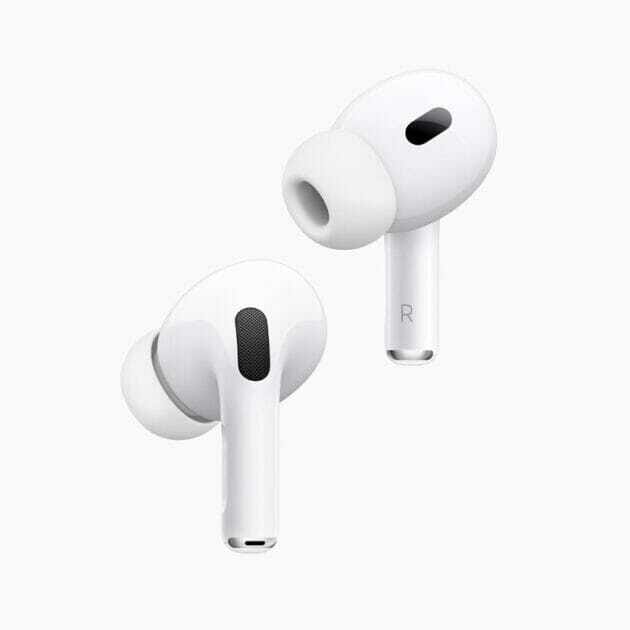
The AirPods Pro 2 are here, three years after the original launched, sporting an updated feature set and all-new charging case. In this article, I’ll explain all the best hidden Airpods Pro 2 features.
AirPods Pro 2

The new AirPods Pro 2nd Gen, while still among the top true wireless earbuds on the market, deliver some big upgrades in terms of both functionality and audio performance, with Apple clearly setting its sights on offering some of the best audio experiences on the market. So, if you were holding off on purchasing a new pair of wireless earbuds, check out all the major new features that the AirPods Pro 2 bring to the table.

The Best AirPods Pro Features

1. Improved Sound Quality and ANC

Thanks to its latest H2 chip, a new low-distortion audio driver, and a custom amplifier, the second-gen AirPods Pro delivers notably better sound quality and Active Noise Cancellation (ANC).

Apple claims the new earbuds cancel up to twice the amount of noise compared to the outgoing model. The bass is also richer, with a wider sound stage that helps improve the overall clarity.

2. Better In-Ear Fit

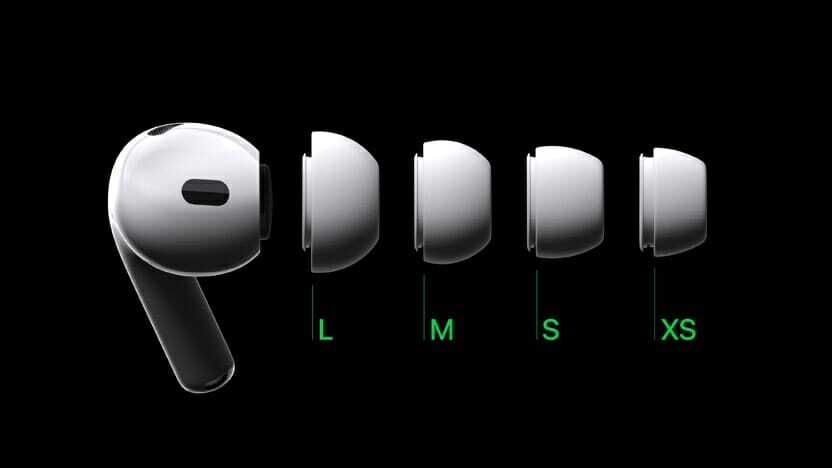
What’s the point of great sound quality if the earbuds keep falling from your ears? It looks like the company has heard some of your complaints, as the new AirPods Pro comes with an additional set of XS-sized ear tips to help provide a better in-ear fit for people with small ear canals.

This will allow the earbuds to passively block more noise, indirectly boosting the ANC performance and sound quality. The better fit will also help if you use the AirPods Pro to help hear conversations better.

3. Adaptive Transparency

The second-generation AirPods Pro takes the existing Transparency mode to the next level with Adaptive Transparency. Voice processing happens so much more naturally now, with it possible to hold a conversation without even realizing you’re wearing Apple’s new earbuds – although you might seem tremendously rude.

Apple is also claiming that, thanks to the H2 chip, it can offer ‘Adaptive Transparency’ automatically. So if you’re using Transparency when walking down the road and a vehicle with a siren goes past, the AirPods Pro will automatically tune down the sound without getting rid of it completely (in case you need to hear it as a warning).

4. New Charging Case With Find My Integration

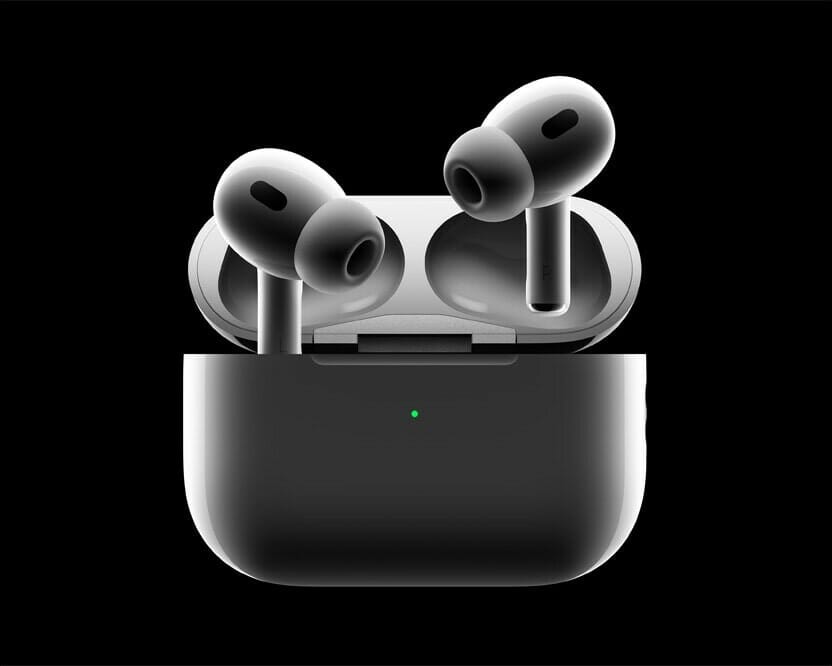
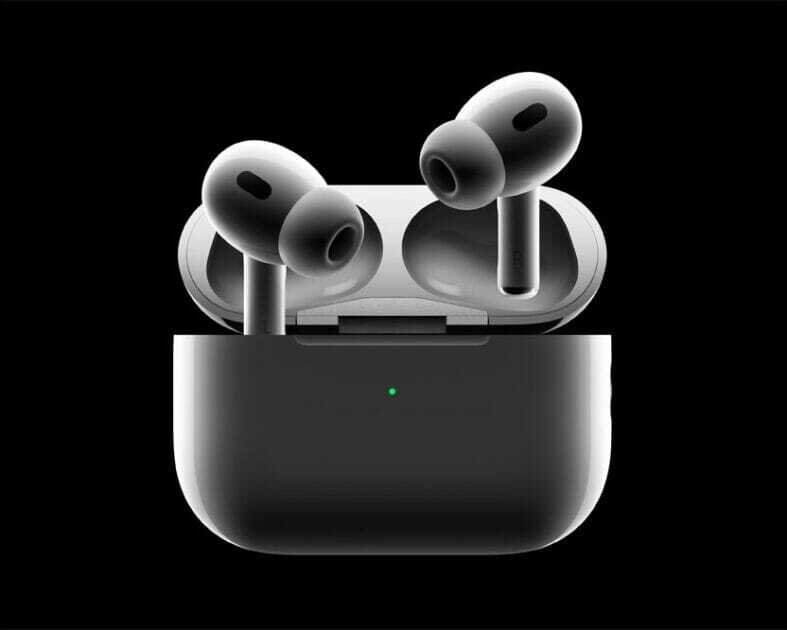
The new charging case of the second-generation AirPods Pro is dust and water-resistant, just like the earbuds. There’s a lanyard loop, too, for extra convenience. If you order the AirPods Pro 2 online through the Apple Store, you can even engrave your favorite Memoji on the charging case.

Another highlight of the new charging case is Find My integration and a built-in speaker. If you have an iPhone with a U1 chip, you can use the Precision Finding feature in the Find My app to get the exact location of the AirPods Pro. And the built-in speaker on the charging case will play a loud tone so that you can locate it quickly.

5. Longer Battery Life

The final improvement to the AirPods Pro comes with the battery life: thanks mostly to the more efficient H2 chip (compared to the original H1 in the older AirPods) the Pro 2 earbuds can last six hours off a single charge when using ANC, and seven hours without.

The case can charge the AirPods Pro 2 five times, so you’ve got 30 hours’ use in ANC mode – which is a big jump over the 24 hours’ use previously.

And you’re able to charge the case in a new way too: using an Apple Watch charger. This is something that makes so much sense, especially given Apple is so intent on getting people to think of the AirPods as a key part of owning a Watch, as you can easily listen to and control music from the screen on your wrist.

6. Touch Control

Unlike the original AirPods Pro, you don’t need to press the stem to adjust the music playback or volume. The stems pack a new feature: finally, you can control the volume of your music from your AirPods Pro. While gripping the stalks, slide a finger up or down the ridge, which can register your touch through the new capacitive surface. This allows you to adjust the volume with a light swipe up or down. And to accept phone calls or control music playback, you need to press the stem lightly.

Apple has also upgraded the skin detection sensor, so the earbuds will more accurately detect when to resume or stop music playback.

These are the best AirPods Pro 2 features

You might think that the new AirPods Pro 2 seem very similar to the original AirPods Pro – but there’s a lot going on here that means these true wireless headphones are going to be a big draw for so many people.

Whether it’s the new and massively improved noise cancellation, the extra speakers in the case so it’s much harder to lose them, or the improved transparency mode to chat to your pals, there are many AirPods Pro 2 features to be excited about.
Here are the best fixes to get your AirPods Pro 2 and AirPods Pro 2 case charging again

The second-generation AirPods Pro and new charging case.

Apple debuted in September a new version of its wireless earbuds called the AirPods Pro 2. They have a longer battery life, a new charging case with Find My support, updated microphones, new volume controls and a new H2 chip. Some people have reported that their AirPods Pro 2 are not charging. This issue is very common, thankfully, it’s relatively easy to troubleshoot AirPods Pro 2 problems. We’ve compiled a list of the best solutions to solve your device charging issues whether you’re having issues with the left or right AirPod not charging, both AirPods Pro 2 not charging, or the case failing to charge.

Why Are My AirPods Pro 2 Not Charging in Case?

There could be several reasons your AirPods Pro 2 are not charging. You could have dirty contacts that are making it impossible for the AirPods to connect with the charging case, there could be something blocking your case’s charging port, meaning it’s actually the problem, or there could be software issues at play. You may even find that something simple like a dead AirPods case is the issue. Here’s how to troubleshoot if one or both of your AirPods Pro 2 are not charging in their case.

Fixes for AirPods Pro 2 not charging issue

Solution #1: Check AirPods Are Connecting to the Case

Are both of your AirPods Pro 2 connecting to the case when you insert them for charging? When you place your AirPods into the charging case, you should feel a magnetic snap as the AirPods are connected properly. If your AirPods are not connecting properly, or if the top of your AirPods case won’t close, remove the AirPods to see if there’s dirt or grime blocking them from sitting correctly in the case. If so, cleaning your AirPods and the inside of your charging case will likely resolve your AirPods Pro 2 charging issues.

Solution #2: Check Your AirPods Charging Status & Case Battery Life

If your AirPods seem to be connecting normally, follow the steps below to check the charging status and battery of your AirPods and AirPods case on your iPhone.

Slip your AirPods into the charging case, and make sure to shut the lid.
Leaving your AirPods inside, check the charge status by opening the lid and hovering your case close to your iPhone.

The charging status will appear on your iPhone screen.
Make sure your AirPods case has more than 10% charge. If the battery life is less than 10%, the case will not have enough power to charge your AirPods and needs to be plugged in.

Check to make sure a lightning bolt appears next to the battery beneath the AirPods, signaling that both are charging. If not, you may need to clean your AirPods and case.

Solution #3: Clean Your AirPods

If your AirPods are dirty, the connection points that allow for the AirPods to charge might not be completing a circuit. Try cleaning your AirPods and then reinsert them into the case to see if they’ll begin to charge. This is the most common solution to solving charging issues with AirPods Pro 2 and AirPods Pro 2 case.

Solution #4: Update Your AirPods Firmware

This is a pretty uncommon solution, and only applies if it has been a while since you’ve connected your AirPods to a device such as your iPhone or iPad. AirPods firmware is updated automatically, rather than being installed by users. However, if it has been a few months since you’ve used your AirPods, you may have missed an update. To prompt an update (if needed), follow the steps below:

Slip your AirPods into the charging case, and make sure to shut the lid. Then, connect the ‌AirPods‌ charging case to a power source.
Move the iPhone or iPad that the ‌AirPods‌ have been paired with near to the charging case, and make sure your iPhone or iPad has an internet connection.
After a short while (around 15 minutes), any available software updates should be automatically installed. Check to see if your AirPods Pro 2 are now charging normally. If not, you can also try resetting the ‌AirPods‌.

Solution #5: Reset Your AirPods Pro 2

If the steps above have not solved your AirPods Pro 2 charging problems, you may need to reset your AirPods. It’s important to note that when you factory reset your AirPods, you will lose any of your saved settings. Because of this, I recommend trying the above solutions (if you haven’t already) to avoid having to reprogram your preferred settings.

Why Is My AirPods Pro 2 Case Not Charging?

If your AirPods Pro 2 case is not charging, the issue could be with the case itself, or with your charging cable or outlet.

Fixes for AirPods Pro 2 case not charging

Follow the steps below to troubleshoot if your AirPods Pro 2 charging case is not charging.

Solution #1: Check the Charging Status of Your AirPods Case

Slip your AirPods into the charging case, and make sure to shut the lid.

Leaving your AirPods inside, check the charge status by opening the lid and hovering your case close to your iOS device.

The charging status of your AirPods Pro 2 and AirPods Pro 2 case will appear on the screen.
If your AirPods case is charging, you should see a lightning bolt symbol beneath the image of the AirPods case.

If your AirPods Pro 2 case is not charging, follow the steps below to fix the issue.

Solution #2: Stop using non-Apple charging cables

You may experience charging problems when you use off-brand cords, like the colorful varieties you find at convenience stores or online to charge your AirPods case.

While these cords can be cheaper, and even look sturdier, they tend to break down more often than standard Apple-brand charging cables.

Apple charging cables are always white, and are made out of a smooth plastic — not fabric. One cable comes with every Apple device you buy, including your AirPods Pro 2.

You can buy these official cables directly from Apple’s website.

Solution #3: Check Your Charging Cable

Whether you use an Apple charging cable or a third-party charging cable, you should make sure that it’s working properly. Use it to charge another device, like a friend’s AirPods or your iPhone. If it works, then we know the charging cable is still functional.

Plug it into your AirPods’ charging case and make sure that the connection on both ends is tight.

If nothing happens, unplug the Lightning end of the cable (the part that plugs into the charging case), flip it over, and plug it back in.

Also check that the wall outlet is securely plugged into its wall outlet or powerstrip.

Solution #4: Check Your Outlet

If these other fixes don’t work, check to make sure you don’t have a faulty or short-circuited outlet.

Check that your power outlet is in working order. Test the outlet with a device that usually charges normally — if it’s still charging, you know the outlet is working.

You should also try plugging your device and cable into another outlet — ideally, in another room or on another powerstrip. If it works, then the problem was with your old outlet.

Solution #5: Check Your Wireless Charging pad,

Place your AirPods in the charging case and place the case on the wireless charging mat with the status light facing up.
The status light should blink on and off while charging. You may need to shift your case’s location on the charging pad for it to work.
If your case still won’t change, try using the Lightning to USB cable that came with your case.

Solution #6: Clean Your AirPods Case

If your AirPods case has dirt or grime in the charging port, it may be preventing your case from charging.

Solution #7: Reset Your AirPods

If the solutions above have not solved your AirPods Pro 2 Case charging problems, you may need to reset your AirPods to resolve a firmware bug that is keeping your AirPods from charging. Please note that when you factory reset your AirPods, you will lose any of your saved settings. Because of this, I recommend trying the above solutions before performing a factory reset.

AirPods Pro 2 Not Charging still? Other Solutions.

If the above solutions have not gotten your AirPods Pro 2 or your AirPods case to charge, you may need to replace either the AirPods or the charging case. Since your AirPods Pro 2 are still under warranty, Apple will replace the part that is not working.

Apple AirPods Pro 2 were released in September 2022, and it wasn’t long before scammers flooded the market with cheap knockoffs. With a hefty price tag of $249+ and talk of being Apple’s premium Samsung Buds contender, it’s no wonder fake AirPods Pro 2 became a hot counterfeit item so quickly.

The second-generation AirPods Pro and new charging case.

Now, it’s harder than ever to know the difference. Without a bit of know-how and background info, it’s easy to get duped into a scam. We’re here to help make sure that doesn’t happen.

Below, we’ll walk you through everything you need to know about fake AirPods Pro (2nd generation) so that you can avoid scams and find good deals on authentic earbuds.

What Are Fake AirPods Pro 2?

Fake AirPods Pro 2 are imitation earbuds built to look like Apples’s AirPods Pro 2, but they lack the sophisticated hardware and software to warrant the high price tag. Scammers use cheap materials that lack iOS compatibility and often break down much faster than the authentic AirPods.

Apple doesn’t create fake AirPods Pro 2, so you’ll get no customer support if (more likely when) your AirPods stop working. You’ll be on your own.

Unfortunately, there’s not one tell-tale sign of a fake pair of Apple AirPods Pro 2. Expert scammers have nailed the design, and some will even sell the AirPods Pro 2 at a premium to fend off any initial buyer suspicion. You’ll need to inspect the nitty-gritty details to find the counterfeit giveaways.

Where Are Fake AirPods Pro 2 Sold?

Scammers sell fake AirPods Pro 2 all across the internet and local listings. So unless you’re buying from Apple, Best Buy, or another credible tech store, you’ll have to deal with fake products to some extent.

Here are the most common places scammers are selling fake Apple AirPods Pro 2:

  • Craigslist
  • Amazon
  • Wish
  • eBay
  • Facebook Marketplace
  • Walmart
  • Alibaba

Scammers operate on other e-commerce platforms, too, but these are often the most prevalent. And that’s because these sites sometimes have mind-blowingly low legitimate discounts on high-quality tech items.

How to Identify Fake AirPods Pro 2

1. Check the Box

Apple is meticulous about its packaging, so if you still have the box your AirPods Pro 2 came in, check here first. The box may look legitimate at first glance, but there are a few areas to check.

The AirPods Pro 2 come in a very familiar, minimalist white square box. The earbuds are the only thing you’ll see on top of the box, printed beautifully, and even embossed.

Stickers on the side of the box, and the printing on the bottom reassure you that these are 2nd generation AirPods Pro with a MagSafe charging case (hard to tell otherwise, at least at first).

The box itself should fit quite snug. If the inner box and its lid come apart very easily or don’t line up correctly, this is a sign that something may be amiss.

The lettering used for the AirPods name and the Apple logo on the box are another area to check. If these are reflective and not flat gray, for example, you may be dealing with a counterfeit.

Getting to your new true wireless earbuds is the usual ordeal for Apple products – you hold the top of the retail box, with the bottom part sliding out slowly, so you can really savor the moment.

Inside the box you’re greeted with your new AirPods Pro 2 wrapped in protective plastic, a Lightning-to-USB Type-C charging cable, paperwork (no Apple sticker though), and not the usual three, but four pairs of ear tips.

Those are extra small, small, medium and large ear tips too choose from, with the medium ones already pre-applied to the earbuds.

Second-generation AirPods Pro’s ear tip sizes, including the new extra small ear tip.

2. Check Your Case

The original AirPods Pro 2 charging case has a few new things going for it, visible almost immediately. First, it now has a metal lanyard loop to the right, which is a nice little touch to see make a comeback in general. But perhaps even more noteworthy – the AirPods Pro 2 case now has its own speaker on the bottom, and thus, a little speaker grill next to its Lightning charging port. Yep, no USB Type-C, but fake models will sometimes have a USB-C port at the bottom instead.

Lanyard loop attached to a backpack on the all-new charging case of the second-generation AirPods Pro.

Besides that, the AirPods Pro 2 case is a familiar rounded rectangle, with a solid-feeling lid, and a metal hinge. On the front of the case, we still have a single LED light, and on the back of the case is the Bluetooth pairing button you’ll likely never need to use. If your case doesn’t have either of these features, it’s a fake.

3. Closely Inspect Your AirPods

For some reason, the very ends of the AirPods seem to be difficult for counterfeit manufacturers to match. On the original AirPods, the bottom should be an oval-shaped vent. If this is circular, it’s likely counterfeit.

The low-distortion audio driver and custom amplifier on the second-generation AirPods Pro.

Original airpods Pro 2 have the familiar straight stems, with touch-sensitive spots that serve as playback controls. We also have generally the same glossy plastic build as always. If the headsets lack any of these features, it’s a fake airpods Pro 2.

4. Check the color

Now let’s talk about the AirPods Pro 2’s color options – there are none. As you may have expected, the AirPods Pro 2 only come in glossy white, for both the case and the earbuds themselves. If you see a different color, it’s a fake airpods Pro 2.

5. Try pairing

Pairing genuine AirPods Pro 2 with an iPhone is as easy as ever – simply unbox your new earbuds, open their case close to your iPhone, and a pairing prompt will pop up on screen. It’s a very quick and easy process.

However, if you’re pairing them with an Android phone, you’ll have to go the longer route – navigating into the Bluetooth settings on your phone, then finding and tapping your new AirPods to pair them that way. If they’re not appearing, press and hold the circular button on the back of the AirPods Pro 2 case until the LED on the front starts flashing, which means they’re in pairing mode. If the airpods Pro 2 are not detected by your devices, they’re probably fake.

6. Check the Serial Number

The most definitive method of making sure your AirPods Pro 2 are the genuine item is checking the serial number with Apple. If the company has never heard of the serial number, you’ve probably got a fake.

To check, open the lid of your AirPods case and look on the underside of the lid. It’s on the section that is closest to the charging status LED when the case is closed.

You can also check on the underside of the right earbud, even though the type is smaller, and it’s more difficult to see here.

Once you’ve found your number, head to https://checkcoverage.apple.com and enter the serial number.

What to Do If You Purchase Fake AirPods Pro 2?

Mistakes happen. If you accidentally purchased fake AirPods Pro 2, not all is lost. Depending on when you bought the earbuds and where you bought them from, there’s still a lot you can do to recoup your money and right the wrong. The processes differ depending on the platform you purchased the product:

  • Wish: Contact Wish’s customer service to take advantage of their 30-day return policy. Check their list of exceptions to make sure your purchase qualifies. Wish is notorious for selling fake products, so always be cautious buying on the platform.
  • Craigslist: Craigslist won’t be able to protect you from scammers and counterfeits. You’ll need to do your due diligence to avoid getting scammed. However, if you believe you’ve been scammed, Craigslist still appreciates you reporting the fraud so that they can protect future buyers.
  • Facebook Marketplace: Facebook Marketplace doesn’t provide protections for sellers and buyers.
  • Walmart Marketplace: Request a refund via the Walmart Marketplace Promise to recover your funds.
  • Amazon: Contact Amazon customer support to file an A-to-Z Guarantee to start your refund process.
  • eBay: Contact eBay to ask for their money-back guarantee.

Contact the FBI’s digital division to submit a fraud report. They’ll provide additional advice, and this information will hopefully help them catch the bad guys.

Where to Buy original Apple AirPods Pro 2

You can find authentic AirPods Pro 2 at various in-store and online retailers. Here’s a shortlist of the most reliable places you can buy real AirPods Pro 2:

  • Apple
  • Best Buy
  • Walmart
  • Target
  • Verizon
  • Microsoft

You can find real pairs of AirPods Pro 2 on popular e-commerce sites like eBay and Amazon, but you’ll always run the slightest risk of getting scammed. That’s not the case with the authentic websites listed above.

Here are the best airpods pro 2 tips and tricks to get the most out of Apple’s new wireless headsets.
The new AirPods Pro (2nd generation) come with Adaptive Transparency, which blocks out loud sounds even when your Pros aren’t in Noise Cancellation mode.
You can charge your AirPods Pro 2 in four different ways.
Thanks to a new speaker on the AirPods Pro (2nd generation) case, you can play a sound to help you locate lost AirPods.
Apple’s new AirPods Pro (2nd generation) launched on Sept. 23 and cost $249. They have a ton of new features that make them a must-buy if you like AirPods.

Here’s are the best airpods Pro 2 tips and tricks to get the most out of your wireless earbuds.

Best Airpods Pro 2 Tips and Tricks

1. AirPods Pro 2 tips and tricks: turn Adaptive Transparency on or off

Thanks to a new H2 chip, the new AirPods have Adaptive Transparency mode, which allows them to block out harsh noises such as a siren or motorcycle. It’s not the same feature as Noise Cancellation mode, which will block out much more noise around you, and instead blocks out loud noises even if noise cancellation is off. Here’s how to turn it on.

  1. Make sure your AirPods are connected to your iPhone.
  2. Open Settings.
  3. Tap the listing for your AirPods at the top of the Settings page.
  4. Scroll down to Adaptive Transparency and toggle this on or off.

2. AirPods Pro 2 tips and tricks: control the volume on your AirPods Pro 2

Touch control on the new Pros allows you to lower or raise the volume by lightly swiping up or down on the stem of the AirPods. Here’s how to use the feature.

  1. You’ll feel an area that’s slightly indented and has a matte texture, instead of a shiny one, on the side of either AirPod.
  2. Lightly stroke up or down to control the volume.
  3. Each time you stroke the stem, the volume will only increase or decrease by one level. You’ll hear a ticking sound with each stroke. You’ll also be able to see the volume increasing on your iPhone.

3. AirPods Pro 2 tips and tricks: charge AirPods Pro 2

There are four ways to charge your new AirPods Pro (2nd generation).

  • You can use the Lightning charger that comes with the new AirPods.
  • You can also drop them onto any Qi wireless charging pad.
  • MagSafe is built into the AirPods Pro 2, which means the case will automatically stick to any MagSafe charger you might already own for an iPhone.
  • And for the first time ever, you can use an Apple Watch Charger to charge your airpods Pro 2. It just sticks on magnetically and begins charging.

4. AirPods Pro 2 tips and tricks: find your AirPods Pro 2

The AirPods Pro 2 case has Apple’s U1 chip inside, so you can use the Find My app to see the exact location of where you last left your AirPods.

Since there’s a new speaker built into the case, you can also ask Find My to play a noise from your AirPods case so you can better locate it. Here’s how to do it.

  1. Open the Find My App.
  2. Locate your AirPods by their name. Mine are called Johnson’s AirPods Pro #2, for example.
  3. Press Play Sound to hear your AirPods.
  4. Select Find to see where your AirPods are on a map.
  5. If your buds aren’t in your case, the Find My App will help you locate each individual bud, too.

5. Airpods Pro 2 tips and tricks: Set Up AirPods Personalized Spatial Audio

According to Apple, Personalized Spatial Audio is designed to create an even more precise and immersive listening experience than standard Spatial Audio, which uses Dolby Atmos to create a richer, more immersive soundstage when listening to songs in the Apple Music catalog.

Personalized Spatial Audio does this by using the TrueDepth camera on an ‌iPhone‌ to analyze the shape of your ears in three dimensions and use this mapping to create a personal sound profile that’s tuned just for you. Here’s how to Set Up Personalized Spatial Audio

  1. With AirPods connected, launch the Settings app on your ‌iPhone‌.
  2. Tap on the name of your AirPods, just below your Apple ID banner.
  3. Under “Spatial Audio,” tap Personalized Spatial Audio.
  4. Tap Personalize Spatial Audio….
  5. Follow the on-screen instructions.

When the setup process is complete, you can tap See & Hear How It Works on the previous screen to get an idea of how it sounds. If you don’t like what you hear, you can always disable the feature via Personalized Spatial Audio -> Stop Using Personalized Spatial Audio….

Your favorite airpods pro 2 tips and tricks?

So these were some of the best airpods pro 2 tips and tricks you would love to try today. My favorite airpods pro 2 tips and tricks include Adaptive Transparency mode, and ability to lower or raise the volume by lightly swiping up or down on the stem of the AirPods. There’s surely plenty more hidden airpods pro 2 tips and tricks to discover, so I’ll keep tapping, swiping and noting anything I find. Did we miss out on something important that needs to be added to the list? Which are your favorite airpods pro 2 tips and tricks? Share your thoughts in the comment section below.