









Mac Studio
Apple's most powerful Mac desktop, priced starting at $1,999.
Should You Buy the Mac Studio?
The Mac Studio is the most powerful Mac you can buy. It is also approaching the end of its current product cycle, with an M5-generation refresh now expected later in 2026.
For most pros, the M4 Max model is the right purchase. The 14-core CPU / 32-core GPU base configuration starts at $1,999 in the U.S. and $1,799 with education pricing, includes 36GB of unified memory and a 512GB SSD. AppleInsider, after testing both configurations, called the M4 Max the clear purchase choice for most buyers.
The M3 Ultra model starts at $3,999 according to 9to5Mac, with a 28-core CPU, a 60-core GPU, 96GB of unified memory, and a 1TB SSD. The M3 Ultra is aimed at those running large language models locally, plus other workloads that scale across many CPU and GPU cores. If you do not run those workloads, the M4 Max has more single-core performance and saves you $2,000.
If the Mac Studio is too much computer, Apple sells two cheaper desktops. The Mac mini starts at $599 with the M4 chip, or $1,399 with the M4 Pro. The iMac starts at $1,299 and includes a built-in 24-inch 4.5K Retina display. The Mac Pro is no longer an alternative. Apple discontinued it on March 26, 2026, with no replacement planned.
Note that the Mac Studio’s current product cycle is winding down. Bloomberg‘s Mark Gurman has reported that an M5 Max / M5 Ultra Mac Studio refresh is expected later this year, with no design change. If you can wait, you may get faster chips plus Wi-Fi 7 support. If you cannot wait, also note that according to MacRumors, Apple removed the 512GB unified memory option from the Apple Store in early March 2026, so the current memory ceiling on the M3 Ultra Mac Studio is 256GB.
How to Buy
The Mac Studio can be ordered from Apple’s online store or purchased at Apple Stores and Apple Authorized Resellers in 28 countries and regions. Pre-orders for the current model opened on March 5, 2025, with shipments and in-store availability beginning Wednesday, March 12, 2025.
In the U.S., the M4 Max model starts at $1,999, or $1,799 with education pricing. The M3 Ultra model starts at $3,999. Internationally, the M4 Max base is £2,099 in the UK, CA$2,699 in Canada, and AU$3,499 in Australia, according to Macworld. The M3 Ultra base is £4,199 in the UK and AU$6,999 in Australia.
The Mac Studio ships with the unit and a power cord. No display, keyboard, or mouse is included. Apple sells the Mac Studio alongside the Magic Keyboard with Touch ID, the Magic Trackpad, and the Magic Mouse, plus the new Studio Display and Studio Display XDR. AppleCare+ for Mac extends the standard hardware warranty and adds unlimited accidental-damage incidents and 24/7 priority support.
Current Memory Availability
Apple removed the 512GB unified memory configuration of the M3 Ultra Mac Studio from its store between March 4 and March 6, 2026, according to MacRumors. The 256GB upgrade also rose by $400 over the 96GB base, going from a $1,600 upgrade to a $2,000 upgrade. MacRumors attributed the change to global DRAM shortages.
As of mid-April 2026, Mac Studio configurations with 128GB and 256GB of RAM were listed as “currently unavailable” on Apple’s U.S. online store, according to 9to5Mac. Lower-memory configurations showed shipping windows of 4 to 5 months, meaning April orders had delivery estimates of August or September. Apple has not published a press release or store statement confirming the 512GB removal; the change has been reported by multiple outlets but not officially explained.
Reviews
Reviews of the current Mac Studio were strongly positive. Tom’s Hardware scored it 4.5/5 and called the Mac Studio “a fascinating product,” noting that buyers get a fully working macOS machine with serious horsepower for less than the cost of a Xeon or Threadripper workstation processor alone. TechRadar matched the score at 4.5/5 and called the Mac Studio “an incredibly impressive bit of kit that offers unrivalled results, especially when it comes to intensive graphical tasks.”
Single-core performance favored the M4 Max in independent testing. In Tom’s Hardware‘s testing, the M4 Max scored 4,113 in Geekbench 6.4 single-core, ahead of the M3 Ultra’s 3,349. Geekbench-reported clock speeds were 4.5 GHz for the M4 Max and 4.05 GHz for the M3 Ultra. Multi-core testing was closer: Tom’s Hardware reported the M3 Ultra at 27,929 versus the M4 Max at 26,966. The Verge‘s separately reported M3 Ultra multi-core score of 28,376, cited via Cult of Mac‘s review aggregation, sat in roughly the same range and was approximately 33 percent faster than the prior-generation Mac Studio with M2 Ultra.
According to The Verge‘s Chris Welch, the M4 Max “outpaces the M3 Ultra in single-core performance, which is the most critical element in making most everyday apps feel ‘fast.'” That trade-off matters because single-core throughput drives application launch times and UI responsiveness, while multi-core throughput drives video rendering, 3D scene rendering, plus other system-intensive workloads.
Cinebench 2024 results from Ars Technica, cited via Cult of Mac‘s review aggregation, put the M3 Ultra at 3,076 CPU and the M4 Max at 2,107 CPU. The roughly 46 percent gap aligns with the M3 Ultra’s higher core count. On a 25 GB mixed-media file-transfer test, Tom’s Hardware measured the M3 Ultra at 2,685 MB/s and the M4 Max at 2,441 MB/s.
Fan noise was almost non-existent across reviewers. According to Tom’s Hardware, the dual internal fans were essentially inaudible even under full load. The reviewer could only hear them with their ear up against the exhaust vent. TechRadar separately reported that fans remained all but silent during demanding benchmarks.
Design
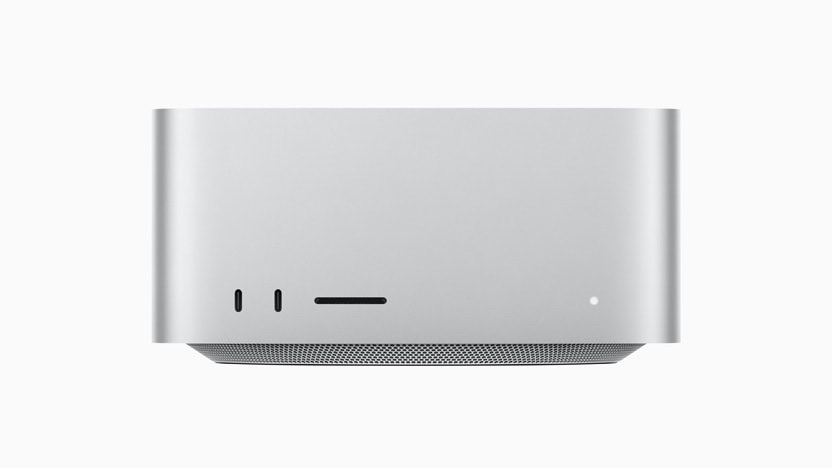
The Mac Studio chassis is unchanged from the 2022 original, according to Tom’s Hardware. The 2025 update is what Tom’s Hardware calls a “chip and ship” iteration: faster chips and new ports, with the same enclosure.
At 3.7 inches (9.5 cm) tall, the Mac Studio has a 7.7-inch (19.7 cm) square footprint at the top and bottom. The enclosure is silver only, and Apple has not added new colorways since the 2022 launch.
The aluminum enclosure uses 100% recycled aluminum, and so does the internal thermal module chassis.
Aluminum and Copper Heatsinks
The two configurations weigh different amounts because Apple uses different thermal hardware in each. The M4 Max model weighs 6.1 pounds (2.74 kg) and uses an aluminum heatsink. The M3 Ultra model weighs 8.0 pounds (3.64 kg), heavier because Apple uses a larger copper heatsink to dissipate the chip’s higher thermal load, according to Tom’s Hardware.
M4 Max Chip
The M4 Max is the chip in Apple’s $1,999 base Mac Studio. The base configuration has a 14-core CPU with 10 performance cores and 4 efficiency cores, a 32-core GPU, a 16-core Neural Engine, and 410 GB/s of memory bandwidth.
A $300 chip upgrade brings a 16-core CPU, a 40-core GPU, and 546 GB/s of memory bandwidth, according to AppleInsider. The Neural Engine count stays at 16 across both M4 Max configurations.
Apple says the M4 Max Mac Studio is up to 3.5x faster than the M1 Max Mac Studio and up to 6.1x faster than the most powerful Intel-based 27-inch iMac. Apple also says the M4 Max is up to 1.6x faster than the M1 Max for Photoshop image processing, plus up to 2.1x faster for Xcode builds and up to 1.6x faster for Topaz Video AI processing.
Media Engine
The M4 Max Media Engine includes hardware-accelerated H.264, HEVC, ProRes, and ProRes RAW. Apple lists 1 video decode engine, 2 video encode engines, 2 ProRes encode and decode engines, plus AV1 decode.
RAM
The base 14-core / 32-core M4 Max ships with 36GB of unified memory, and 36GB is the only memory option at that tier. Stepping up to the 16-core CPU / 40-core GPU upgrade unlocks 48GB, 64GB, and 128GB tiers, with 128GB costing $800 more than 64GB, according to AppleInsider.
Storage
The M4 Max Mac Studio ships with a 512GB SSD at base, configurable to 1TB, 2TB, 4TB, or 8TB.
M3 Ultra Chip
Apple Senior Vice President of Hardware Technologies Johny Srouji called the M3 Ultra “the pinnacle of our scalable system-on-a-chip architecture, aimed specifically at users who run the most heavily threaded and bandwidth-intensive applications.”
The M3 Ultra base in Mac Studio has a 28-core CPU with 20 performance cores and 8 efficiency cores, a 60-core GPU, a 32-core Neural Engine, and 819 GB/s of memory bandwidth. The top configuration moves to a 32-core CPU with 24 performance cores and 8 efficiency cores, plus an 80-core GPU.
Apple says the M3 Ultra is up to 1.5x the performance of M2 Ultra and up to 1.8x that of M1 Ultra on the CPU side, plus up to 2x faster than M2 Ultra and up to 2.6x faster than M1 Ultra on the GPU side. Apple also says the M3 Ultra has nearly 2x the performance of M4 Max in workloads that take advantage of high CPU and GPU core counts. Compared to the 16-core Intel Xeon W-based Mac Pro, Apple says the M3 Ultra Mac Studio is up to 6.4x faster.
UltraFusion Architecture
The M3 Ultra is built using Apple’s UltraFusion packaging that connects two M3 Max dies across more than 10,000 signals, providing over 2.5 TB/s of low-latency interprocessor bandwidth. macOS sees the result as a single chip. UltraFusion brings together 184 billion transistors.
Media Engine
The M3 Ultra Media Engine has 2x the resources of the M3 Max Media Engine. Apple lists hardware-accelerated H.264 and HEVC, 2 video decode engines, 4 video encode engines, plus 4 ProRes encode and decode engines, with the system capable of playing back up to 24 streams of 8K ProRes 422 video.
RAM
The base 28-core / 60-core M3 Ultra ships with 96GB of unified memory. The 32-core CPU / 80-core GPU upgrade currently supports 256GB as its memory ceiling. A 512GB option was offered at launch but Apple removed it from the store in March 2026.
Storage
The M3 Ultra ships with a 1TB SSD at base, configurable to 2TB, 4TB, 8TB, or 16TB. Apple frames the 16TB ceiling as “enough storage for over 12 hours of 8K ProRes video.”
Performance
The M4 Max wins on single-core performance, where its higher reported clock keeps application launches and UI responsiveness fast. The M3 Ultra wins on multi-core throughput and GPU performance, where its 28-core or 32-core CPU and 60-core or 80-core GPU pull ahead.
Apple chose to ship the Mac Studio with an M3-generation Ultra alongside an M4-generation Max, and the two chips are on different cycles. Reviewers noted the chip-line decision in launch coverage, with BGR describing it as confusing for shoppers comparing tiers. The practical result is that buyers get the latest single-core performance from the M4 Max and the latest top-end multi-core scaling from the M3 Ultra, but not both in a single chip.
For pro workloads that scale across many cores, the M3 Ultra is the better choice. For everyday-app responsiveness and most common workflows, the M4 Max is faster and saves $2,000 over the M3 Ultra base.
AI and Apple Intelligence
The Mac Studio is built for Apple Intelligence, Apple’s on-device generative model platform. Apple has positioned the M3 Ultra Mac Studio specifically as a workstation for local large language model use. With up to 512GB of unified memory at launch, Apple said the Mac Studio with M3 Ultra “is a powerhouse for AI, capable of running large language models with over 600 billion parameters entirely in memory.”
That 512GB ceiling has since been removed from the Apple Store, lowering the practical memory ceiling for local LLM work to 256GB. Apple’s launch press release framing still references the 512GB capacity even though current orders cannot be configured that high.
The Mac Studio shipped with macOS Sequoia at launch in March 2025. The macOS Sequoia 15.4 update introduced an iPhone proximity setup flow, allowing users to bring an iPhone close to a Mac to sign in to their Apple Account.
Connectivity
The Mac Studio has 12 ports across the front and back, plus Wi-Fi and Bluetooth.
Thunderbolt 5
The back of the Mac Studio has 4 Thunderbolt 5 ports, each supporting up to 120 Gb/s of bandwidth, plus USB 4 at up to 120 Gb/s, USB 3 at up to 10 Gb/s, and DisplayPort 2.1.
The M4 Max has 2 USB-C ports rated at up to 10 Gb/s and an SDXC (UHS-II) card slot. The M3 Ultra has 2 Thunderbolt 5 ports on the front instead, at up to 120 Gb/s, plus the same SDXC card slot. The M3 Ultra Mac Studio therefore has 6 Thunderbolt 5 ports total: 4 on the back and 2 on the front.
Each Thunderbolt 5 port has its own custom-designed controller integrated directly on the chip, providing dedicated bandwidth per port. Apple says Thunderbolt 5 is up to 3x faster than the prior generation for external storage, expansion chassis, and hub solutions.
HDMI 2.1 and 10Gb Ethernet
The back of the Mac Studio also has an HDMI 2.1 port, 2 USB-A ports rated at up to 5 Gb/s, a 10 Gb Ethernet port supporting 1, 2.5, 5, and 10 Gb over RJ-45, plus a 3.5 mm headphone jack with advanced support for high-impedance headphones.
Wi-Fi 6E and Bluetooth 5.3
The Mac Studio supports Wi-Fi 6E (802.11ax) and Bluetooth 5.3. According to XDA Developers, the absence of Wi-Fi 7 stands out as the most notable connectivity miss given that the rest of the Mac Studio is on the bleeding edge of consumer hardware. Note that the rumored M5 Mac Studio is expected to add Wi-Fi 7 and Bluetooth 6 via Apple’s new N1 networking chip.
Display Support
The two configurations differ on multi-display ceilings.
On the M4 Max, the Mac Studio supports up to 5 displays: up to 4 6K-at-60Hz displays over Thunderbolt plus 1 4K-at-144Hz display over HDMI. An alternate arrangement is 2 6K-at-60Hz displays plus 1 8K-at-60Hz or 4K-at-240Hz HDMI display.
With the M3 Ultra, that ceiling rises to 8 displays at 6K-at-60Hz or 4K-at-up-to-144Hz, or 4 displays at up to 8K-at-60Hz or 4K-at-up-to-240Hz. Apple says the M3 Ultra Mac Studio can drive up to 8 Pro Display XDRs at full 6K resolution.
Power and Acoustics
The Mac Studio’s maximum continuous power is 480W, with line voltage of 100 to 240V AC at 50 to 60Hz, single phase. Operating temperature is 50 to 95 degrees F (10 to 35 degrees C), and Apple has tested operation at altitudes up to 16,400 feet (5,000 meters).
Apple’s ECMA-109 acoustic measurements, taken on an M3 Ultra configuration with 96GB memory and 1TB storage, list 1.6 B sound power level at idle and during wireless web (Kv = 0.3), with operator-position sound pressure of 7 dB at idle and 7 dB during wireless web.
Reviewer experience matches the spec. According to Tom’s Hardware, the dual internal fans were essentially inaudible even under full load. The reviewer could only hear them with their ear up against the exhaust vent.
Accessibility
Apple lists Voice Control, Increase Contrast, Switch Control, VoiceOver, Reduce Motion, Live Captions, Zoom, plus Siri / Dictation among the Mac Studio’s accessibility features. These work across macOS.
Environmental
The Mac Studio is ENERGY STAR certified. Packaging is 100% fiber-based, with 59% recycled content in fiber-based packaging, and the unit overall uses over 30% recycled content.
Apple’s recycled-material breakdown is detailed: the enclosure and the thermal module chassis use 100% recycled aluminum; magnets use 100% recycled rare earth elements; gold plating in printed circuit boards uses 100% recycled gold; tin in solder of multiple printed circuit boards uses 100% recycled tin; copper and zinc in the power-cord plug prongs use 100% recycled material; and at least 25% recycled plastic is used in 3 components.
Mac Studio is mercury-free, BFR-free, and PVC-free. Apple says over 35% of manufacturing electricity for Mac Studio is sourced from low-carbon electricity, contributing to over a 30% emissions reduction against a business-as-usual scenario as modeled by Apple.
Other Features
The Mac Studio ships with the unit and a power cord. No display, keyboard, or mouse is included in the box.
The standard hardware warranty covers manufacturing defects. AppleCare+ for Mac extends coverage and adds unlimited accidental-damage incidents plus 24/7 priority support.
Mac Studio and Studio Display
Apple announced a refreshed Studio Display and an all-new Studio Display XDR on March 3, 2026. Both pair with the Mac Studio over Thunderbolt 5.
The refreshed Studio Display is a 27-inch 5K Retina display at 60Hz, with 600 nits of brightness, a six-speaker sound system, a 12MP Center Stage camera with Desk View, plus 2 Thunderbolt 5 ports. It starts at $1,599.
The Studio Display XDR is new and replaces the discontinued Pro Display XDR. It is a 27-inch 5K Retina XDR display with mini-LED backlight (over 2,000 local-dimming zones), 120Hz refresh rate with Adaptive Sync, 1,000 nits SDR brightness, 2,000 nits peak HDR brightness, plus 2 Thunderbolt 5 ports with 140W pass-through charging. It starts at $3,299.
Mac Studio and Mac Pro
Apple discontinued the Mac Pro on March 26, 2026, and confirmed to Bloomberg and 9to5Mac that no replacement is planned. With the Mac Pro gone, the Mac Studio is now Apple’s only “pro” desktop tier and sits at the top of the Mac desktop lineup.
The decision shifts the burden of supporting workstation-class workloads to the Mac Studio, which Apple has positioned as the more compact and lower-priced alternative to the Mac Pro since 2022.
What’s Next for Mac Studio
Bloomberg‘s Mark Gurman has reported that an M5 Max / M5 Ultra Mac Studio refresh is expected later in 2026, with the new model not expected to bring any design change. AppleInsider also noted in March 2026 that macOS Tahoe code leaked in October 2025 placed a Mac Studio update in summer 2026.
More recent reporting has shifted timing later. According to Gurman’s April 19, 2026 “Power On” newsletter, supply chain snags affecting production may push the launch into October 2026, per Macworld‘s analysis. MacRumors‘s rumor roundup similarly lists “around October 2026” as the expected window.
According to MacRumors, the M5 Max chip is expected to offer faster CPU and GPU performance than the M5 chip released in October 2025, with the M5 Ultra doubling M5 Max performance per Apple’s UltraFusion pattern. Note that Apple has made no public statement about an M5 Ultra chip.
According to TechRepublic, the M5 Mac Studio is expected to retain the current chassis with no design changes, but to add Wi-Fi 7 and Bluetooth 6 via Apple’s new N1 networking chip. Pricing may rise above the current $1,999 starting point if Apple raises base storage to 1TB, according to Macworld, citing Apple’s recent pattern with the M5 MacBook Pro lineup.
Mac Studio Timeline
April 19, 2026 — Bloomberg‘s Mark Gurman reports in his “Power On” newsletter that supply chain snags may push the M5 Mac Studio launch into October 2026.
April 11, 2026 — Mac Studio configurations with 128GB and 256GB of RAM are listed as “currently unavailable” on Apple’s U.S. online store, and lower-RAM configurations show 16-to-18-week shipping windows.
April 3, 2026 — 9to5Mac reports Mac Studio top-RAM shipping estimates of 4 to 5 months following the 512GB option’s removal.
March 26, 2026 — Apple discontinues the Mac Pro with no future Mac Pro hardware planned, leaving the Mac Studio as Apple’s only pro desktop. Confirmed by Apple to 9to5Mac and Bloomberg.
March 8, 2026 — AppleInsider, citing Gurman’s “Power On” newsletter, reports the M5 Mac Studio refresh is expected in 2026 with no design change.
March 5, 2026 — MacRumors and other outlets report that Apple has removed the 512GB unified memory option from the Mac Studio with M3 Ultra and raised the 256GB upgrade price by $400.
March 3, 2026 — Apple announces an updated Studio Display and the all-new Studio Display XDR (replacing the discontinued Pro Display XDR), both pairing with Mac Studio.
March 12, 2025 — Mac Studio with M4 Max and M3 Ultra ships and arrives in Apple Stores.
March 11, 2025 — First reviews from Tom’s Hardware, The Verge, TechRadar, AppleInsider, BGR, and others publish, with consensus around 4.5/5.
March 5, 2025 — Apple announces the new Mac Studio with M4 Max and M3 Ultra and unveils the M3 Ultra chip, with pre-orders opening the same day.
June 13, 2023 — Mac Studio (2023) with M2 Max and M2 Ultra ships, having been announced at WWDC 2023.
March 18, 2022 — Original Mac Studio with M1 Max and M1 Ultra ships and arrives in Apple Stores.
March 8, 2022 — Apple announces the original Mac Studio at its “Peek Performance” event alongside the Studio Display.
Changelog
May 3, 2026 — Initial publication.
Note: See an error in this roundup or want to offer feedback? Send us an email here.