Learn the location of the cameras, buttons, and other essential hardware features on iPhone 15 Plus.
On the front and sides, you’ll find the front camera, side button, USB-C connector, SIM tray, volume buttons, and Ring/Silent switch. Around back are the rear cameras and flash. The SIM tray is available on models purchased outside the U.S.
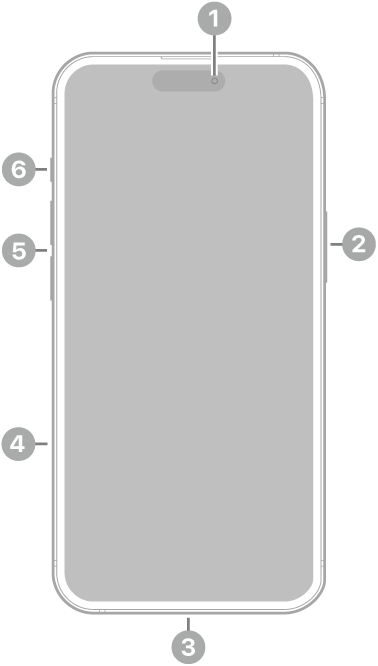
 Front camera
 Side button
 USB-C connector
 SIM tray (available on models purchased outside the U.S.)
 Volume buttons
 Ring/Silent switch
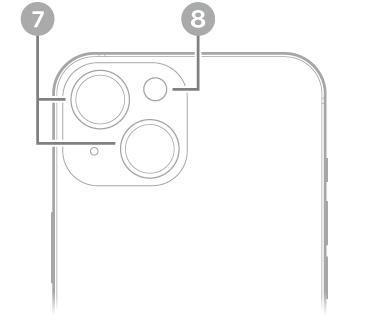
 Rear cameras
 Flash
Flash
Get started with iPhone 15 Plus
- Turn on and set up iPhone
- Learn gestures for iPhone models with Face ID
- iPhone camera basics
- MagSafe chargers and battery packs for iPhone
- What’s new in iOS 27
Tag: iPhone