If you subscribe to Apple News+, you can access daily and archived crossword, crossword mini, Quartiles, sudoku, and Emoji Game puzzles. Some puzzles may be available without a subscription.
You can view the Puzzles feed, follow a puzzle type, choose a puzzle, view puzzle stats and streaks, compete with others, and share a puzzle with friends. For quick access to one type of puzzle, you can follow it and even make it a favorite.
Note: Apple News, Apple News+, and puzzles aren’t available in all countries or regions.
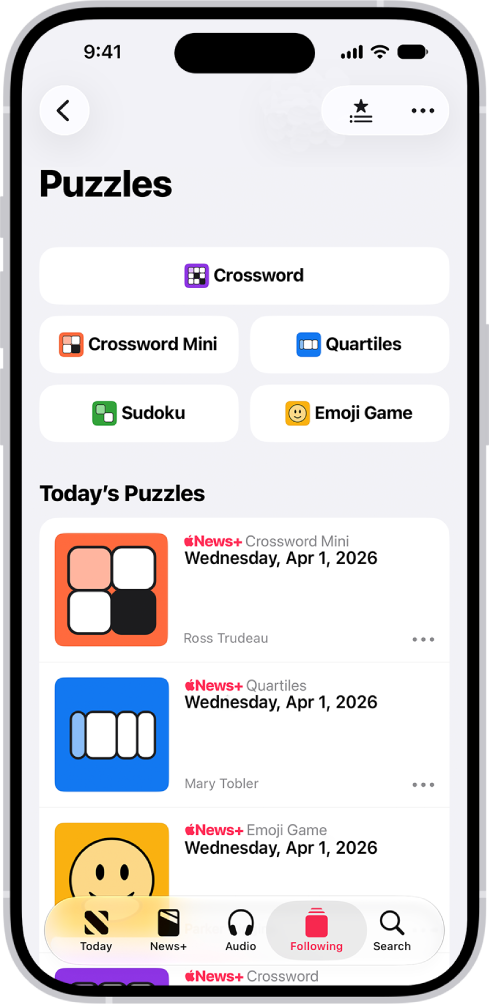
View the Puzzles feed
- Start the News app on your iPhone.
- Do one of the following:
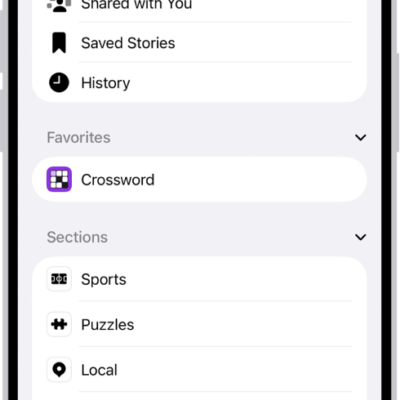
- Tap Following , then tap Puzzles (below Sections).
- Tap Today, scroll down, then tap the Puzzles group.
Follow a puzzle type
Want quick access to a specific type of puzzle? Add it to Following.
- Start the News app on your iPhone.
- View the Puzzles feed, as described above.
- Tap Crossword, Crossword Mini, Quartiles, Sudoku, or Emoji Game.
- Tap the More button, then tap Follow.
In Following, a Puzzles category appears, with the puzzle type below it.
To make it a favorite, tap Edit, tap the Add Favorite button next to the puzzle type, then tap the Done button.
Note: Apple News+ subscribers can have puzzles in the Puzzles feed and puzzle type feeds download automatically, then play them in Offline Mode.
Choose a puzzle
- Start the News app on your iPhone.
- Go to one of the following areas to find a puzzle:
- The Today feed
- The Puzzles feed
- The feed for a puzzle type (crossword, crossword mini, Quartiles, sudoku, or Emoji Game)
- Tap a puzzle to open it.
Crossword and sudoku puzzles each have a difficulty rating: easy, moderate, or challenging.
You can see more past puzzles in each puzzle type’s complete archive. Scroll down in the puzzle type’s feed, then tap the Right Arrow button next to Archive.
Quick tip: Tap the Filter button to sort or filter a puzzle archive.
View puzzle stats and streaks
You can find the Scoreboard in each puzzle feed, and it includes:
- Statistics for each puzzle type—the number of puzzles solved, for example
- Your current streak—the number of consecutive days you solved the daily puzzle
- Your longest streak
- Start the News app on your iPhone.
- Choose the feed for a puzzle type and then swipe up.
Conditions that affect stats include the following:
- If you use the Reveal command to show all or a portion of a puzzle, the puzzle won’t count toward your stats, and completing the puzzle won’t start or continue a streak.
- Puzzles you complete on a device with iOS 17.5, iPadOS 17.5, macOS 14.5, or later count toward your stats. Any puzzles you played on older OS versions don’t count toward your stats.
- After you open the News app on a device with iOS 17.5, iPadOS 17.5, macOS 14.5, or later, any daily puzzles you complete on a device with an earlier version of the OS are added to your streak. For example, if you complete Monday’s crossword and Tuesday’s crossword on your iPhone with iOS 17.5, and then solve Wednesday’s crossword on your iPad with iPadOS 17.4, your streak is extended.
- Players in the contiguous U.S. and Canada must complete a puzzle within 24 hours of its publication for it to count toward a streak.
- Players in Alaska and Hawaii must complete the day’s puzzle before midnight local time.
- To start or maintain a sudoku streak, solve at least one of the current day’s sudoku puzzles of any difficulty level without revealing answers.
If you’re signed in to the same Apple Account on all your Apple devices, your stats and streaks stay up to date on each one.
- Open Settings and tap your name. Tap iCloud.
- Tap See All (in the Saved to iCloud section) and turn on News.
Compete with others
To compete against friends and other puzzle solvers in the Apple Games app and Game Center, you’ll also need to turn on Game Center in News.
Set up your Game Center profile.
- Start the Settings app on your iPhone.
- Tap Apps, then tap News.
- Turn on Game Center.
Each puzzle type has a leaderboard in Game Center where your scores appear, and sudoku has one for each difficulty level. And you can challenge friends to solve sudoku, crossword, crossword mini, and Emoji Game puzzles.
Share a puzzle
Send another Apple News+ subscriber a link, and they can solve the puzzle too.
- Start the News app on your iPhone.
- Open a puzzle.
- Tap the More button, tap Share, and then choose Messages, Mail, or another sharing option.
Your answers aren’t shown, but the following information is shared for completed puzzles:
- Crossword, crossword mini, and sudoku: The time it took you to solve the puzzle
- Quartiles: Your rank
- Emoji Game: The number of moves you used to solve the puzzle