









iPadOS 26
Apple's next-generation operating system for the iPad, available now.
iPadOS 26 – What’s New
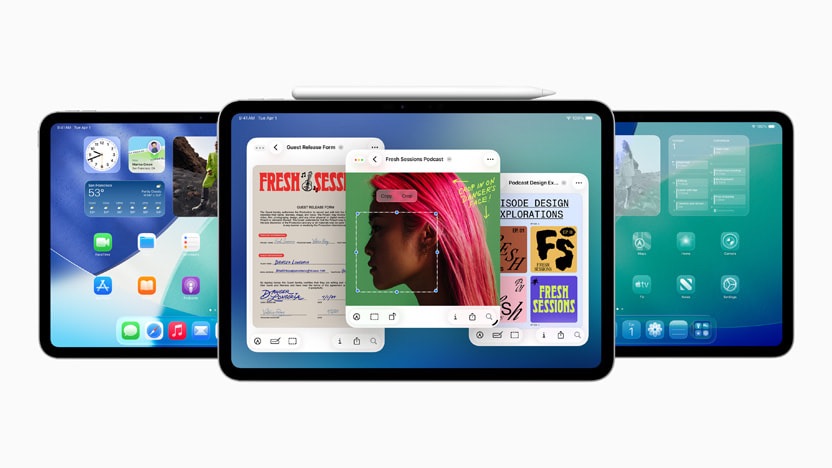
iPadOS 26 is Apple’s current major release for the iPad, and the largest single update the company has shipped to the platform. The release pairs an entirely new system-wide design called Liquid Glass with a rebuilt windowing engine that takes cues from the Mac, plus four new built-in apps: Phone, Preview, Journal, and Apple Games. Alongside those big changes, Apple Intelligence is more deeply woven into Messages, FaceTime, Phone, Reminders, Image Playground, Genmoji, and Shortcuts.
According to Apple’s WWDC 2025 press release, Craig Federighi (Apple’s senior vice president of Software Engineering) called iPadOS 26 “our biggest iPadOS release ever,” pointing to the new windowing system, the design, the Apple Intelligence integration, and the Files improvements as the changes that make iPad more capable.
Apple previewed iPadOS 26 at WWDC 2025 on June 9, 2025 and shipped it as a free software update on September 15, 2025, alongside iOS 26, macOS Tahoe 26, watchOS 26, tvOS 26, and visionOS 26.
Current Version
iPadOS 26 currently ships at iPadOS 26.4.2, which Apple released in late April 2026 with bug fixes and security updates, according to MacRumors. The April 2026 update followed iPadOS 26.4.1, which Apple released in early April with bug fixes.
iPadOS 26.4 is the most recent feature-bearing update. It added Apple Music’s Playlist Playground (in beta), Concerts, an Ambient Music widget, 8 new emoji, support for AirPods Max 2, a Compact tab bar option in Safari, urgent reminders, Purchase Sharing in Family Sharing, and Reduce Bright Effects in Accessibility settings.
Apple is currently testing iPadOS 26.5 with developers and public beta participants. Beta 4 was seeded on April 27, 2026.
iPadOS 18 to iPadOS 26
Apple changed its operating system numbering convention with this release, advancing from iPadOS 18 directly to iPadOS 26 to align every major Apple OS under a single year-based version number. The 26 refers to the 2025-2026 release season.
The same number applies to iOS 26, macOS Tahoe 26, watchOS 26, tvOS 26, and visionOS 26, which all shipped together on September 15, 2025. From now on, the version number is shared across the lineup, so every fall release Apple ships will land on the same digit.
Design Changes
The redesign is built around a translucent material that Apple calls Liquid Glass. Apple describes the material as combining the optical properties of glass with fluid, real-time rendering. The surface reflects and refracts what sits behind it, while dynamically transforming to focus attention on content. It adapts intelligently between light and dark environments, and it reacts to motion with specular highlights.
This is the first major iOS/iPadOS design overhaul since iOS 7, and it is the first time Apple has shipped a unified design language across iOS, iPadOS, macOS, watchOS, tvOS, and visionOS at the same time. Apple’s vice president of Human Interface Design Alan Dye spoke to the philosophy in the announcement, framing Liquid Glass as the latest expression of Apple’s tight hardware-software integration.
Pop Out Menus
Liquid Glass controls form what Apple describes as a distinct functional layer, hovering above app content. Tap a button or expand a section, and the controls morph in place to reveal more options or move you to another part of the app.
The redesigned Camera app shows the pattern clearly. Photo and Video are the only primary modes; additional capture options expand from button taps and swipe gestures rather than living on the main control surface. Apple says the simplified layout helps you keep your attention on the moment you are capturing.
Disappearing Navigation
In iPadOS 26, tab bars shrink as you scroll, so the navigation gets out of the way of the content while staying instantly accessible with a flick back up. The pattern recurs across the system: navigation surfaces are present when you need them and quietly recede when you do not.
Corners and Spacing
App controls and navigation are redrawn with rounded geometry that sits concentric with the rounded corners of modern iPad hardware and app windows. Apple says the previous controls were configured for rectangular displays; the new ones fit perfectly inside the curves of the device they live on.
On the Lock Screen, the time numerals are crafted from Liquid Glass and use a custom San Francisco typeface variant that scales weight, width, and height to nestle into the wallpaper subject.
Cross-Platform Cohesiveness
The new design also runs on iOS 26, macOS Tahoe 26, watchOS 26, tvOS 26, and visionOS 26. All six operating systems shipped on September 15, 2025, with the shared design language as a connective thread.
Multitasking and Windowing
iPadOS 26 introduces an entirely new windowing system. You can fluidly resize app windows, place them anywhere on the display, tile them, and open more windows at once than older iPadOS multitasking allowed. Familiar window controls and tiling shortcuts come along with the change.
According to MacStories‘ Federico Viticci, who interviewed Apple’s Craig Federighi, the engine that runs the new windowing system was rebuilt from scratch rather than reusing the iPadOS 16 Stage Manager engine. Viticci writes that the new engine is built around a window-prioritization system that taps into low-level frameworks for CPU, NAND, GPU, and battery to optimize rendering and prioritize windows based on user activity.
Reception of the new system has been broadly positive. AppleInsider‘s June 10, 2025 analysis described iPadOS 26 as a long-awaited reckoning for iPad multitasking, arguing the platform finally addresses years of complaints, though the publication noted the audience that wanted such features may have already moved on.
Windows
You can split the iPad screen into halves, thirds, or quarters. Tile arrangements are accessible from the menu bar, traffic-light controls, or keyboard shortcuts. iPad remembers each app’s previous size and position, so when you reopen an app it returns to its prior layout.
In hands-on testing on an M4 iPad Pro, Viticci reported the engine supports up to 12 active on-screen windows. The number scales with iPad model, so older iPads have a lower ceiling.
At launch in September 2025, iPadOS 26.0 removed the older Split View and Slide Over modes in favor of the new windowing engine. Apple has since brought parts of the older system back. iPadOS 26.1 restored Slide Over as a single resizable Slide Over window, and iPadOS 26.2 restored drag-and-drop gestures for tiling and Slide Over. As of the current shipping version, Full Screen, the new Windowed mode, Stage Manager, and the restored Slide Over coexist.
Stage Manager
Stage Manager is now an opt-in multitasking mode rather than a separate windowing system. You toggle it from Multitasking & Gestures in Settings, and the underlying windowing engine no longer constrains how many windows can sit in a stage or how they can be arranged.
iPadOS 26 expanded Stage Manager to every iPad that can run iPadOS 26. That is a significant change from iPadOS 18, when Stage Manager was limited to M-series iPads and the M2 iPad Pro family. Apple’s full Stage Manager device list per Apple Support now covers iPad (A16), iPad Air 13-inch (M3), iPad Air 11-inch (M3), iPad mini (A17 Pro), iPad Pro 13-inch (M4), iPad Pro 11-inch (M4), iPad Air 13-inch (M2), iPad Air 11-inch (M2), iPad (8th generation and later), iPad Pro 12.9-inch (3rd generation and later), iPad Pro 11-inch (1st generation and later), iPad Air (3rd generation and later), and iPad mini (5th generation and later).
External-display Stage Manager continues to work, but it remains restricted to a smaller set of iPads: iPad Air 13-inch (M3), iPad Air 11-inch (M3), iPad Pro 13-inch (M4), iPad Pro 11-inch (M4), iPad Air 13-inch (M2), iPad Air 11-inch (M2), iPad Pro 12.9-inch (5th generation and later), iPad Pro 11-inch (3rd generation and later), and iPad Air (5th generation).
Menu Bars
iPadOS 26 introduces a system menu bar. Pull down from the screen’s top edge, or push the cursor up to that edge, and the bar exposes every command an app supports along with keyboard shortcuts and an in-bar search field for finding a specific feature or related tips. Developers can build customized menu bars for their own iPad apps.
Exposé
Exposé spreads out all open windows so you can see them at a glance, and a tap brings the chosen window to the front.
Dock
Folders can now be added directly to the Dock for quick access to documents, downloads, and other folder contents from anywhere in the system.
Files App
The Files app has an updated List view: column widths can be dragged to resize, and folders collapse or expand inline, so you can see more document detail without opening every folder. You can give folders custom colors, icons, and emoji that sync across devices, and you can set a default app for opening specific files or file types.
Background Tasks
iPadOS 26 supports computationally intensive background tasks. When you start a long-running process in an app, Background Tasks shows the progress as a Live Activity, so you can see what is running and stop it if you need to. Apple has updated the Background Tasks API so developers can hook into the same system.
Home Screen and Lock Screen
The Lock Screen time fluidly resizes and repositions to keep the photo subject in view. A new Spatial Scene option uses depth to add a 3D motion effect to your wallpaper photo when you move the iPad.
The Spatial Scene effect requires an iPad Pro (M4 or later), iPad Pro 12.9-inch (5th generation and later), iPad Pro 11-inch (3rd generation and later), iPad Air (M2 and later), iPad Air (5th generation and later), iPad (A16), iPad mini (A17 Pro), or iPad mini (6th generation).
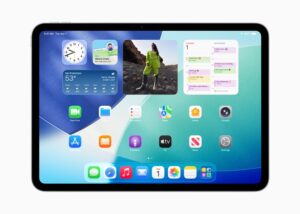
App icons get updated appearances. Light, dark, and color-tinted options return, plus a translucent clear Liquid Glass option that lets the wallpaper show through.
Messages
Messages adds custom backgrounds, polls, group typing indicators, Apple Cash in groups, and screening for unknown senders. Backgrounds can be set per conversation and pulled from a built-in library, your own photos, or images made with Image Playground. Polls include availability, and screened messages from unknown senders go to a dedicated area of the conversation list.
Live Translation in Messages translates incoming texts (including in group chats) into your preferred language. Apple Intelligence is required, and the supported languages are Chinese (Simplified), Chinese (Traditional), Dutch, English (UK, U.S.), French (France), German, Italian, Japanese, Korean, Portuguese (Brazil), Spanish (Spain), Turkish, and Vietnamese.
Sending Apple Cash in Messages group chats is U.S.-only on eligible devices. The service is provided by Green Dot Bank (Member FDIC) via Apple Payments Services LLC.
According to MacRumors, Messages now also supports natural-language search and the ability to select and copy just part of a message via long-press, then Select.
Phone
iPadOS 26 brings the Phone app to iPad for the first time. You can place and receive calls when your iPad is paired with a connected iPhone, with the audio routed via Wi-Fi calling. The app comes with Call Screening, Hold Assist, and Live Translation.
Call Screening
Call Screening asks unknown callers to identify themselves and say why they are calling, then forwards the audio summary so you can choose whether to pick up.
Supported regions and languages for Call Screening are Cantonese (China mainland, Hong Kong, Macao); English (Australia, Canada, India, Ireland, New Zealand, Puerto Rico, Singapore, South Africa, UK, U.S.); French (Canada, France); German (Germany); Japanese (Japan); Korean (Korea); Mandarin Chinese (China mainland, Macao, Taiwan); Portuguese (Brazil); and Spanish (Mexico, Puerto Rico, Spain, U.S.).
Hold Assist
Hold Assist stays on the line during a phone hold and notifies you when a live agent picks up.
Hold Assist supports English (Australia, Canada, India, Singapore, UK, U.S.); French (France); German (Germany); Japanese (Japan); Mandarin Chinese (China mainland); Portuguese (Brazil); and Spanish (Mexico, Spain, U.S.).
Live Translation
Live Translation in Phone provides spoken translations during one-on-one calls, with on-speaker transcription support. Apple Intelligence and a supported iPhone, iPad, or Mac are required. Supported languages are Chinese (Mandarin, Simplified), Chinese (Mandarin, Traditional), English (UK, U.S.), French (France), German, Italian, Japanese, Korean, Portuguese (Brazil), and Spanish (Spain).
Other Phone Features
The Phone app on iPad also has Contact Posters for incoming calls, an optional unified layout where Favorites, Recents, and Voicemails sit together, spam call silencing, expanded call history, voicemail spam reporting, and screen sharing/SharePlay during calls.
Apple Music
AutoMix
AutoMix is a new song-transition mode in Apple Music. It blends one Apple Music track into the next by applying time stretching and beat matching. Apple says the system analyzes key and tempo to choose the best transition for each pair of tracks, working like a DJ moving between songs.
AutoMix requires an Apple Music subscription. It runs on iPhone, iPad, Apple silicon Mac, and Apple Vision Pro on iOS 26 / iPadOS 26 / macOS Tahoe 26 / visionOS 26 or later, and is on by default for the Apple Music catalog. AutoMix does not run for sequentially-played albums, incompatible genres or tempos, library uploads, or iTunes Store purchases. The feature is unavailable on Intel-based Mac, Apple TV, Apple Watch, HomePod, Android, or Apple Music for Windows.
Other Apple Music Features
Lyrics Translation is available for select songs in English-to-Chinese (Simplified), English-to-Japanese, Korean-to-Chinese (Simplified), Korean-to-English, Korean-to-Japanese, and Spanish-to-English. Lyrics Pronunciation supports Cantonese-to-Jyutping; Chinese (Simplified) to Pinyin; Chinese (Traditional) to Pinyin; Hindi to Romanized Hindi; Japanese to Romanized Japanese; Korean to Katakana; Korean to Romanized Korean; and Punjabi to Romanized Punjabi.
According to MacRumors, Apple Music in iPadOS 26 also lets you pin playlists, albums, and artists to the top of the Library tab, and you can group playlists into folders.
Apple has continued layering on Apple Music updates after launch. iPadOS 26.1 brought AutoMix support over AirPlay. iPadOS 26.2 added a Favorite Songs playlist in Top Picks and offline lyrics for downloaded songs. iPadOS 26.4 introduced Playlist Playground (in beta), Concerts, an Ambient Music widget for Sleep, Chill, Productivity, and Wellbeing, and full-screen album/playlist backgrounds.
Shortcuts
Shortcuts gains intelligent actions, including Writing Tools, Image Playground, and a new Use Model action that lets a shortcut tap directly into Apple Intelligence models or ChatGPT. Apple says the new actions can summarize text, create images, and feed AI responses into the rest of a shortcut.
The Use Model action can route through an on-device model, Private Cloud Compute, or ChatGPT, depending on the model you pick when you build the shortcut. The on-device option keeps the work local; Private Cloud Compute scales to larger models without revealing the input to Apple; the ChatGPT option calls out to OpenAI for broader world knowledge.
Other New App Features
Safari
Safari adopts the Liquid Glass tab bar with rounded edges, and you can still choose to collapse the tab bar while scrolling. Advanced Tracking and Fingerprinting Protection is now applied to every browsing session by default rather than only to private browsing.
iPadOS 26.4 adds a Compact tab bar option in Safari that frees up more browsing space and lets you search directly from the active tab.
Every website added to the iPad Home Screen via Safari now opens as a web app by default, running without Safari’s address bar in its own window. An Open as Web App toggle appears in the Add to Home Screen flow, and turning it off adds a regular bookmark instead.
Two smaller Safari additions: HDR image rendering on supported displays, and SVG support for bookmark-bar and start-page icons.
Camera
The Camera app has a streamlined layout with Photo and Video as the primary modes; additional options expand from icon taps and swipe gestures.
AirPods 4 (with ANC) and AirPods Pro 2 can act as a remote shutter for the Camera app and compatible third-party camera apps via a press-and-hold on the stem.
According to MacRumors, iPadOS 26 also adds a Lens Cleaning Hints toggle in Settings, then Camera. Apple’s own toggle text describes the feature as displaying a suggestion when the camera lens should be cleaned to improve image quality, with an on-viewfinder Clean Back Camera prompt when the system thinks a lens is smudged.
Photos
Photos returns to separate Library and Collections tabs, with Search accessible from every view. Apple also added the option to convert any 2D photo into a Spatial Scene with a 3D depth effect, using technology shared with visionOS.
Notes
Notes can import and export Markdown files. The app can also capture Phone-app conversations as audio recordings with transcriptions; transcription requires Apple Intelligence.
In Calculator, Math Notes supports three-variable equations rendered as 3D graphs. You write the equation as you would on paper, and the resulting surface plot appears alongside.
Reminders
Reminders can categorize related items into sections within a list. With Apple Intelligence, the app can read on-device content (emails, websites, and other sources) and propose new reminders, including grocery items, follow-ups, and other tasks that fall out of what you are reading.
iPadOS 26.2 added the option to mark a reminder as urgent and set an alarm that fires when the reminder is due, with snooze and Live Activity support if you are not ready to check the reminder off.
FaceTime
FaceTime supports Live Translation captions during one-on-one calls, so you can follow translated captions while still hearing the speaker’s voice. The app has a redesigned landing page with personalized Contact Posters for recent callers and video messages that play as you scroll, plus new screening behavior for unknown numbers.
Podcasts
Podcasts adds Enhance Dialogue, which mutes background sounds, plus a wider range of playback speeds (now 0.5x to 3x).
Two more additions arrived in iPadOS 26.2: automatically generated chapters, and clickable links to other podcasts mentioned within an episode.
Games
The new Apple Games app comes pre-installed in iPadOS 26 as a single destination for App Store games, Apple Arcade titles, friend-based Challenges, and a Game Overlay that surfaces in-game settings, friend chat, and play invites without leaving the title.
iPadOS 26.2 added category, size, and other filters in the Games library, in-game challenge score banners with real-time leader updates, and improved support for connected controllers like Backbone and Razer.
Preview
The Preview app comes to iPad for the first time. You can view, edit, and annotate PDFs and images using Apple Pencil or your finger, fill PDF forms with AutoFill, and access all PDFs and images from the Files app inside Preview. Preview is also one of the built-in targets for the new Reed Pen calligraphy stroke option.
Journal
The Journal app comes to iPad for the first time in iPadOS 26 with handwriting support via Apple Pencil, drawings, multiple journals, inline images, and a map view that organizes entries by location.
Battery Settings
Apple redesigned the Battery section in Settings to give a clearer picture of how iPad usage affects battery life and how individual apps are using power. Tap Battery to see the day’s usage. Tap View All Battery Usage to see the previous eight days.
App and System Activity breaks down per-app battery use by On screen, Background, and Notifications categories, so you can see whether an app is draining the battery because it is open in front of you, doing background work, or sending notifications.
The Battery section also shows when the battery was last fully charged and when it was disconnected from the charger. On supported iPads, Battery Health surfaces battery capacity, battery health, cycle count, manufacture date, and first use date.
According to MacRumors, the redesigned Battery view replaces the older 24-hour and 10-day tabs from iPadOS 18 with a weekly view of average use, plus a comparison of current usage against the user’s typical average. You can tap back through the previous seven days for active and screen-idle breakdowns and charge times.
Apple Intelligence Updates
Live Translation across Messages, FaceTime, and Phone, the Reminders suggestions, and the Use Model action in Shortcuts all run on Apple Intelligence. Beyond those system features, two existing Apple Intelligence apps have been refreshed.
Genmoji
Genmoji can be created by mixing two existing emoji together or by combining an emoji with a written description. You can choose facial expressions for Genmoji of people and modify personal attributes like hairstyle, hair length, accessories, and facial hair on Genmoji inspired by people from your Photos library.
Genmoji and Image Playground are available in English, French, German, Italian, Portuguese (Brazil), Spanish, and Japanese.
Image Playground
Image Playground integrates ChatGPT-powered styles, including Oil Painting, Anime, Watercolor, Print, and Vector, in addition to the original Animation, Sketch, and Illustration styles. An Any Style option lets you describe a custom style, and the app can route a description or photo to ChatGPT to generate the image.
ChatGPT
Apple’s ChatGPT integration in Apple Intelligence has been refreshed in iPadOS 26. Apple’s own newsroom does not name a specific GPT model version. According to MacRumors, the integration uses GPT-5, though that version designation is not confirmed by Apple’s product pages.
Apple says the ChatGPT integration also lets you take a screenshot and ask ChatGPT questions about what you are looking at on screen, and search Google, Etsy, or other supported apps for similar images and products.
New AirPods Features
Improved Audio Quality
AirPods firmware update 8A356, paired with an iPadOS 26-supported iPad, brings studio-quality audio recording to AirPods 4, AirPods 4 with Active Noise Cancellation, AirPods Pro 2, and AirPods Pro 3. Apple says the feature improves vocal texture and clarity in Voice Memos, dictation in Messages, the Camera app, and CallKit-enabled apps such as Zoom.
iPadOS 26 lets you choose a different microphone for each app, and even for individual websites. Voice Isolation blocks ambient noise during recording.
Software Updates
iPadOS 26 introduces a manual AirPods firmware update interface in Settings. Open Settings, then Bluetooth, tap your AirPods, and the firmware version appears in the About section, with a manual update option when one is available.
Pause for Sleep
Apple says firmware 8A356 includes a setting that pauses media on inactivity for users who use AirPods to wind down for sleep, so the audio stops when the AirPods detect you have drifted off.
Smaller Changes
- Reed Pen — A new calligraphy stroke option in the Apple Pencil tool palette, available in Notes, Preview, Freeform, Journal, Markup, and PencilKit-enabled third-party apps.
- Custom snooze in Clock alarms — Configurable from 1 to 15 minutes, replacing the fixed 9-minute snooze.
- Password History — The Passwords app now keeps a timeline of changes to an account, including past passwords and previously generated strong passwords.
- Local capture — Records high-quality audio and video during any video conferencing call, with echo cancellation of other participants’ audio. iPadOS 26.1 added gain control for external USB microphones during local capture and a setting to choose where local capture files are saved.
- Family controls — Easier conversion of existing accounts to Child Accounts, Communication Requests for new contacts, age-appropriate experiences for third-party apps based on shared age range, expanded Communication Safety to detect nudity in live FaceTime calls, and blurring of nudity in Shared Albums.
- 8 new emoji in iPadOS 26.4 — Including an orca, trombone, landslide, ballet dancer, and distorted face.
- Purchase Sharing in iPadOS 26.4 — Adult members in Family Sharing groups can use their own payment method without relying on the family organizer.
- AirPods Max 2 support — Added in iPadOS 26.4.
- Studio Display (2026) and Studio Display XDR support — Added in iPadOS 26.3.1 for compatible iPads.
- Keep Audio in Headphones — Per MacRumors, a new toggle under Settings, then General, then AirPlay & Continuity, that stops the iPad from auto-switching audio to a newly paired device when headphones or AirPods are already in use.
- Captive Wi-Fi sign-in syncing — According to MacRumors and Bloomberg‘s Mark Gurman, captive portal credentials entered on one Apple device propagate to other devices on the same Apple Account, so they autofill on the same network.
- Apple News Emoji Game — Per MacRumors, available to Apple News+ subscribers in the U.S. and Canada.
- Apple Fitness+ Custom Plans — Automatically generated personalized schedules built from workout habits and meditation preferences, drawing on each user’s most-used trainers, durations, activity types, and music.
- Contacts Monogram styles, Safety Check on block, Dictation spelling — Per MacRumors, a set of smaller updates Apple has not documented in dedicated support articles.
Accessibility
According to Apple’s May 2025 announcement, Tim Cook (Apple’s CEO) said that “At Apple, accessibility is part of our DNA,” and that making technology for everyone is a priority across the company.
App Store Labels
App Store product pages now show Accessibility Nutrition Labels so you can see whether features such as VoiceOver, Voice Control, Larger Text, Sufficient Contrast, Reduced Motion, and Captions are supported before you download an app or game.
Accessibility Reader
Accessibility Reader is a system-wide reading mode designed for users with low vision, dyslexia, and other print disabilities. It offers extensive font, color, and spacing options plus Spoken Content support, and you can launch it from inside any app.
Accessibility Reader is also built into the Magnifier app on iOS, iPadOS, and macOS, so you can capture text in the real world (such as a book or a restaurant menu) and apply the reader’s formatting to it.
Braille Access
Braille Access turns iPhone, iPad, Mac, and Apple Vision Pro into a full-featured braille note taker integrated with the Apple ecosystem. It supports note taking, document reading, a built-in version of Live Captions for transcribing conversations onto braille displays, and opening Braille Ready Format files.
Braille Access requires a connected braille display. The integrated Live Captions feature is available in Cantonese (China mainland, Hong Kong); English (Australia, India, Singapore, UK, U.S.); French (Canada, France); German (Germany); Japanese; Korean; Mandarin Chinese (China mainland); and Spanish (Mexico, Spain, U.S.).
Other accessibility additions in iPadOS 26 include:
- New Background Sounds, including Steam, Babble, Airplane, Boat, Train, Bus, Quiet Night, and Rain on Roof.
- Faster on-device Personal Voice setup with Spanish support.
- New customization options for the on-screen Vehicle Motion Cues animated dots.
- Eye Tracking improvements.
- Head Tracking.
- A Brain Computer Interface protocol that supports Switch Control.
- An Assistive Access Apple TV app built around a simpler media-player layout.
- Sound Recognition Name Recognition.
- Expanded Live Captions language coverage.
- Share Accessibility Settings, which temporarily moves accessibility settings to another device.
iPadOS 26.4 added Reduce Bright Effects in Accessibility Settings, which limits bright flashes on UI elements when tapped. Subtitle and caption settings are also easier to find when viewing media in 26.4, with a real-time preview directly from the captions icon.
Compatibility
iPadOS 26 supports the following iPad models, per the apple.com/os/ipados page: iPad Pro (M5), iPad Pro (M4), iPad Pro 12.9-inch (3rd generation and later), iPad Pro 11-inch (1st generation and later), iPad Air (M3), iPad Air (M2), iPad Air (3rd generation and later), iPad (A16), iPad (8th generation and later), iPad mini (A17 Pro), and iPad mini (5th generation and later). The 7th-generation iPad does not get iPadOS 26.
Full external display support is limited to iPad Air (5th generation), iPad Air (M2 and later), iPad Pro 11-inch (3rd generation and later), iPad Pro 12.9-inch (5th generation and later), and iPad Pro (M4).
Apple Intelligence features (including Genmoji, Image Playground, Live Translation, Reminders Suggestions, and the Use Model action) require an iPad mini (A17 Pro) or an iPad with M1 or later, with Apple Intelligence enabled and Siri/device language set to a supported language.
iPadOS 26 Timeline
April 27, 2026 — Apple seeds iPadOS 26.5 beta 4 to developers and public testers.
April 22, 2026 — Apple releases iPadOS 26.4.2 with bug fixes and security updates. MacRumors.
April 8, 2026 — Apple releases iPadOS 26.4.1 with bug fixes. MacRumors.
March 24, 2026 — Apple releases iPadOS 26.4 with Playlist Playground (beta), Concerts, the Ambient Music widget, 8 new emoji, AirPods Max 2 support, the Compact tab bar in Safari, urgent reminders, Purchase Sharing, and Reduce Bright Effects.
March 4, 2026 — Apple releases iPadOS 26.3.1, expanding external display support to Studio Display (2026) and Studio Display XDR on supported iPads.
February 11, 2026 — Apple releases iPadOS 26.3 with bug fixes and security updates.
December 2025 — Apple releases iPadOS 26.2.1 with AirTag (2nd generation) support and bug fixes.
December 2025 — Apple releases iPadOS 26.2, restoring drag-and-drop multitasking gestures and adding a Favorite Songs playlist in Top Picks, offline lyrics for downloaded songs, automatically generated Podcasts chapters, Games library filters, AirDrop codes, Reminders alarms, Apple News Section links, and Freeform tables.
October 2025 — Apple releases iPadOS 26.1, restoring Slide Over as a single resizable window and adding a tinted Liquid Glass setting, AutoMix support over AirPlay, local capture gain control for USB microphones, the Apple Vision Pro app on iPad, FaceTime audio quality improvements, and a Camera setting for Lock Screen swipe to Camera.
September 2025 — Apple releases iPadOS 26.0.1 with bug fixes for floating keyboard positioning and a VoiceOver disablement issue after upgrade.
September 15, 2025 — Apple releases iPadOS 26 to the public alongside iOS 26, macOS Tahoe 26, watchOS 26, tvOS 26, and visionOS 26 as free software updates.
July 31, 2025 — MacStories‘ Federico Viticci publishes a hands-on after one month with the iPadOS 26 developer beta, detailing the new windowing engine.
June 18, 2025 — MacStories‘ Federico Viticci publishes an interview with Apple’s Craig Federighi covering the iPadOS 26 windowing engine and design rationale.
June 10, 2025 — AppleInsider publishes its analysis arguing that iPadOS 26 addresses long-standing iPad multitasking complaints.
June 9, 2025 — Apple unveils iPadOS 26 at the WWDC 2025 keynote alongside iOS 26, macOS Tahoe 26, watchOS 26, tvOS 26, and visionOS 26, and reveals the Liquid Glass design.
May 13, 2025 — Apple previews the year’s accessibility features, including Accessibility Nutrition Labels, Accessibility Reader, Braille Access, Personal Voice updates, Vehicle Motion Cues customization, and the BCI Switch Control protocol.
Changelog
May 1, 2026 — v1.1: Added Safari HDR image and SVG icon support.
May 3, 2026 — Initial publication.
Note: See an error in this roundup or want to offer feedback? Send us an email here.