On supported models, MagSafe chargers and battery packs snap to the back of iPhone or its MagSafe case or sleeve. The magnets ensure proper alignment for fast wireless charging, and you can hold and use iPhone while it’s charging.
And they’re not just for those models. Without the magnetic alignment, MagSafe chargers can also charge other iPhone models and AirPods. Just know that AirPods and MagSafe chargers, battery packs, cases, and sleeves are sold separately. With MagSafe Duo Charger, you can even charge iPhone or AirPods at the same time you charge your Apple Watch.
Charge iPhone or AirPods with MagSafe Charger
-
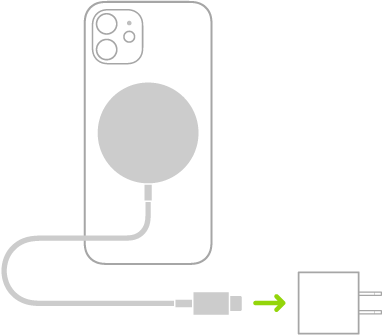
Connect MagSafe Charger to power using a compatible power adapter (sold separately).
-
Do one of the following:
-
iPhone: (supported models) Place MagSafe Charger on the back of iPhone or its MagSafe case or sleeve. The charging symbol appears when iPhone starts charging.
Note: If iPhone Leather Wallet is attached, remove it before placing MagSafe Charger on the back of iPhone.
- Other iPhone models: Place iPhone face up on the center of MagSafe Charger. When iPhone is aligned properly with the charger, the Battery Charging icon appears in the status bar.
- AirPods 2, AirPods 3 (MagSafe), AirPods 4 (with Active Noise Cancellation), AirPods Pro: Place your AirPods in the charging case, close the lid and then place the case with the status light facing up on the center of MagSafe Charger. When the case is aligned properly with the charger, the status light turns on for several seconds and then turns off while continuing to charge.
-
iPhone: (supported models) Place MagSafe Charger on the back of iPhone or its MagSafe case or sleeve. The charging symbol appears when iPhone starts charging.
Charge iPhone or AirPods and Apple Watch with MagSafe Duo Charger
With MagSafe Duo Charger, you can charge iPhone 12, iPhone 13, and iPhone 14 models or AirPods at the same time you charge your Apple Watch. (MagSafe Duo Charger, Apple Watch, and AirPods are sold separately.)
-
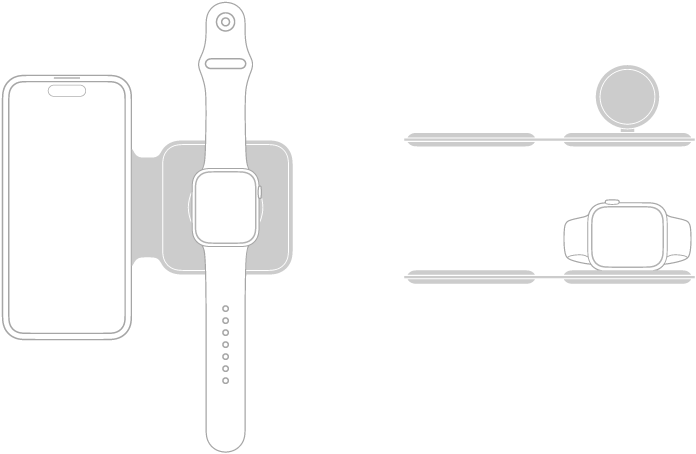
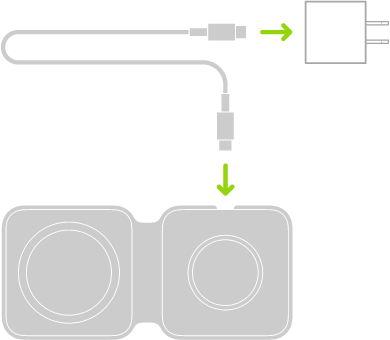
Connect MagSafe Duo Charger to power using the Apple 20W USB-C power adapter or another compatible power adapter (sold separately).
-
To charge iPhone or AirPods, do one of the following:
-
iPhone: Place iPhone face up on the center of the iPhone charging surface. The battery charging indicator appears when you properly align iPhone with the charging surface. Unless your iPhone is in Silent mode, you hear a chime when charging begins.
Note: If an iPhone wallet is attached, remove it before placing iPhone on MagSafe Duo Charger.
- AirPods 2 (with Wireless Charging Case), AirPods 3, AirPods 4 (with Active Noise Cancellation), and AirPods Pro: Place your AirPods in the charging case, close the lid. Place the case with the status light facing up on the center of the iPhone charging surface. When the case is aligned properly with the charger, the status light turns on for several seconds. Turns off while continuing to charge.
-
iPhone: Place iPhone face up on the center of the iPhone charging surface. The battery charging indicator appears when you properly align iPhone with the charging surface. Unless your iPhone is in Silent mode, you hear a chime when charging begins.
-
To charge Apple Watch, do one of the following:
- With the Apple Watch charging surface lying flat and the Apple Watch band open, place Apple Watch face up on the charging surface.
- With the Apple Watch charging surface raised, place Apple Watch on its side with its back against the charging surface. Apple Watch automatically goes into Nightstand mode, so you can also use it as an alarm clock.
The concave charging surface magnetically snaps to the back of your Apple Watch and aligns it properly. When charging begins, a charging symbol appears on the watch face.
Charge iPhone with a MagSafe Battery
To extend battery life, the MagSafe Battery Pack attaches magnetically to iPhone models that support MagSafe.
Only iPhone Air works with the iPhone Air MagSafe Battery.
Note: Remove any attached iPhone wallet before placing a MagSafe Battery.
- Charge your iPhone on the go: Place the MagSafe Battery on the back of iPhone or its MagSafe case. The charging symbol appears when iPhone starts charging.
- See the battery status of MagSafe Battery and iPhone: Check the Batteries widget in Today View or on the Home Screen.
- Charge MagSafe Battery and iPhone: With MagSafe Battery on iPhone, connect the MagSafe Battery to power using the USB-C to Lightning Cable or a USB-C Cable and Apple 20W USB-C power adapter or another compatible power adapter (sold separately). The status indicator on the MagSafe Battery is amber while charging, then turns green when charging is complete.
With the MagSafe Battery Pack (Lightning port) only, you can also charge both devices at the same time by connecting your iPhone to power instead of the MagSafe Battery.
Note: Charging is limited to 90 percent by default, which optimizes the lifespan of MagSafe Battery Pack. If you want to remove that limit, open Control Center, tap Low Power Mode, and then tap Charge past 90%.
The MagSafe Battery can also charge without iPhone.