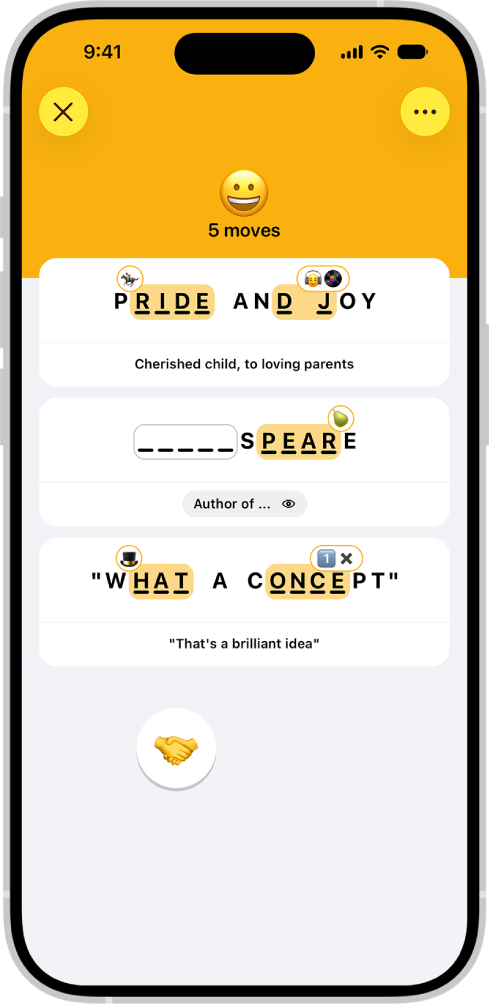
Apple News+ subscribers can solve daily Emoji Game puzzles by completing words and phrases with emoji. The object is to complete several phrases with as few moves as possible, and each emoji can be read directly, through association, or in combination with others. Trying an answer or expanding a clue counts as a move.
Letters relating to an emoji may appear nonconsecutively in an answer, and a group of emoji is interpreted as a whole. If you reveal the answers you didn’t find, the puzzle doesn’t count in your Scoreboard stats and streaks.
Note: Apple News, Apple News+, and puzzles aren’t available in all countries or regions.
- Start the News app on your iPhone.
- Open an Emoji Game puzzle.
- Do any of the following:
- Try an answer: Consider the various definitions or associations for the emoji and then drag the most appropriate emoji (or group of emoji) to complete each word or phrase. For example, a pear emoji 🍐 could complete DISAP_ _ _ _, but interpreted as fruit it could complete _ _ _ _ _ FUL. Letters relating to emoji may appear nonconsecutively in an answer. For example, dragging an earth emoji 🌍 to L_ _ _N _ _E ROPES completes the phrase learn the ropes. Interpret grouped emoji as a whole. For example, a single 🐠 could mean fish, while 🐠🐠🐠 might mean school.
- Expand a clue: Tap the Expand button. This counts as a move.
- Reveal answers: Tap the More button, then tap Reveal. The answers you didn’t find are shown. The puzzle doesn’t count in your Scoreboard stats and streaks.
Quick tip: For a quick Emoji Game tutorial, tap the More button and tap How to Play. You can also choose More Puzzles to open the Emoji Game feed.