When you travel with iPhone, choose settings that comply with airline requirements. Some airlines let you keep your iPhone turned on if you switch to Airplane Mode.
Turning on Airplane Mode switches off Wi-Fi, Bluetooth®, and cellular networks at first, but you can turn them back on even while it’s on. That way, you can make or receive FaceTime calls or use features and accessories that require wireless communication. When Airplane Mode is on, its icon shows up in the status bar at the top of your screen.
Turn on Airplane Mode
Open Control Center, then tap the Airplane Mode Switch button.
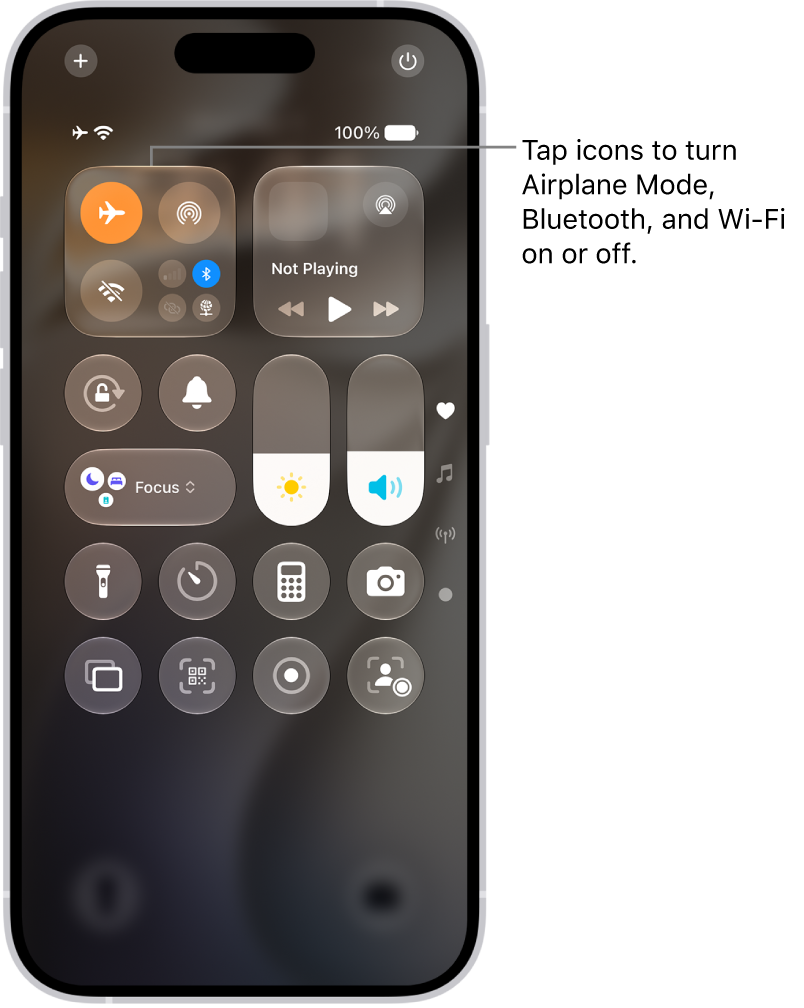
In Settings, you can also turn Airplane Mode on or off. The Airplane Mode icon appears in the status bar while it’s on.
Turn on Wi-Fi or Bluetooth while in Airplane Mode
Wi-Fi or Bluetooth can be used in Airplane Mode if your airline allows it.
- Open Control Center, then turn on Airplane Mode.
- Tap the Wi-Fi Switch button to turn on Wi-Fi or the Bluetooth Switch button to turn on Bluetooth.
Turning on Wi-Fi or Bluetooth in Airplane Mode means it may stay on when you next return to Airplane Mode. Control Center lets you turn it off again.