You can log your state of mind in the Journal app. The time you spend journaling can even be added automatically as mindful minutes in the Health app.
As you reflect on how you’re feeling, you can log your momentary emotions, and your state of mind is added to Health, where you can review its history over time. And the Health app can access your state of mind and mindful minutes, too, if you allow it.
Here’s how to journal for your wellbeing on iPhone.
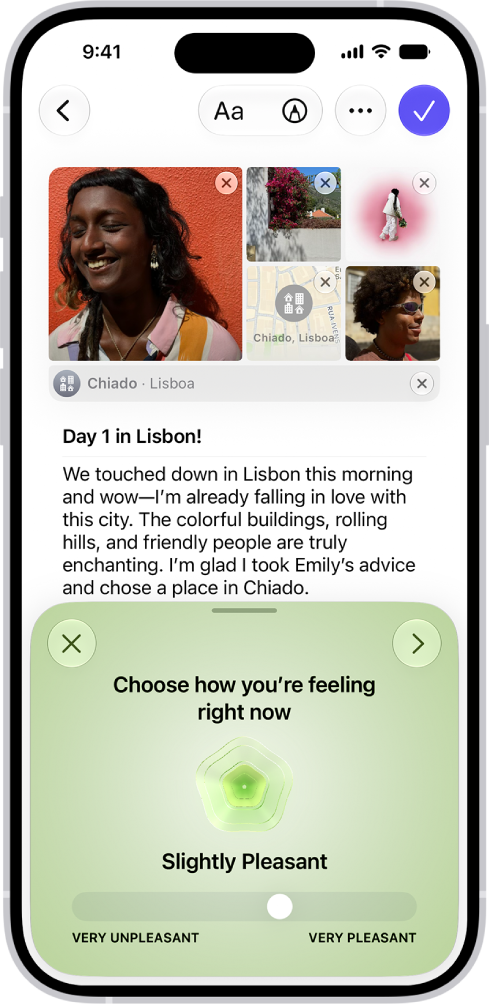
Log your state of mind
Your journal is a place to log your momentary emotions and reflect on how you’re feeling.
- Start the Journal app on your iPhone.
- While composing an entry, tap the More button above the keyboard. Then tap the Add State of Mind button.
You may be asked to turn on Health access.
- Drag the slider to indicate how you’re feeling and then tap the Next button.
- Tap any words that describe how you’re feeling, swipe up to see more words, and then tap the Next button.
- Tap any words that describe what’s having the biggest impact on you. Then tap the Done button.
Your state of mind is added to Health. There, you can review its history over time.
Allow the Health app to access your state of mind and mindful minutes
The Health app can automatically log your journaling time as mindful minutes.
- Start the Settings app on your iPhone.
- Tap Apps and tap Journal.
- Tap Health Access, then turn on Mindful Minutes and State of Mind.
Tag: Journal