With iOS 27, Apple Intelligence is integrated across your apps and experiences to help you communicate, express yourself, and get things done more easily, all while protecting your privacy. You can try Siri AI (Beta), find the perfect words with writing help, and make your photos frame-worthy.
Siri AI (Beta) is your conversational AI assistant, with personal context understanding, onscreen awareness, and broad world knowledge. It can generate a draft from scratch, summarize information, and give feedback on what you’ve written.
Note: Apple Intelligence on iOS 27 or later is available on an Apple Intelligence-enabled iPhone 15 Pro, iPhone 15 Pro Max, or iPhone 16 model or later. Apple Intelligence is not available in all languages or regions. Usage limits may apply.*

Try Siri AI (Beta)
Siri AI (Beta) is your conversational AI assistant with entirely new capabilities, including personal context understanding, onscreen awareness, and broad world knowledge. These new capabilities make Siri a more capable assistant by allowing you to find what you need and get more done. You can also use a dedicated Siri app that brings all your conversations in one place.
Siri AI is available in beta on iOS 27 or later on an Apple Intelligence-enabled iPhone 15 Pro, iPhone 15 Pro Max, or iPhone 16 model or later with Siri and device language set to a supported language. Available in English to start. Siri AI will not initially be available in the EU on iOS. Usage limits may apply.

Discover and take action on the world around you
With Visual Intelligence, Siri mode in Camera lets you ask questions, quickly identify something, take quick actions, or search based on what’s in your camera frame. You could split a bill with friends when you get the check, for example, or quickly import a card to Apple Wallet.
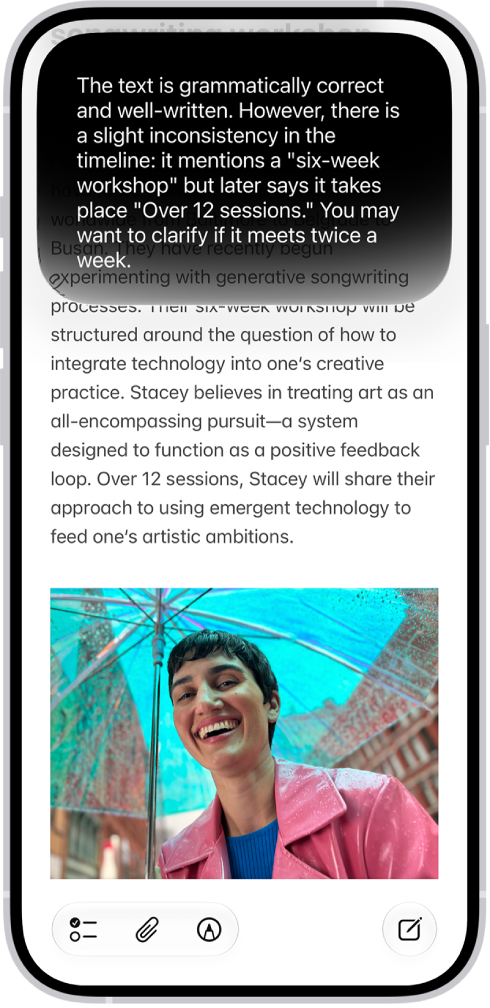
Find the perfect words
Siri AI can generate a draft from scratch, summarize information, and provide feedback on what you’ve written—just describe what you want. For example, ask Siri to proofread an email or to write an itinerary for an upcoming trip.
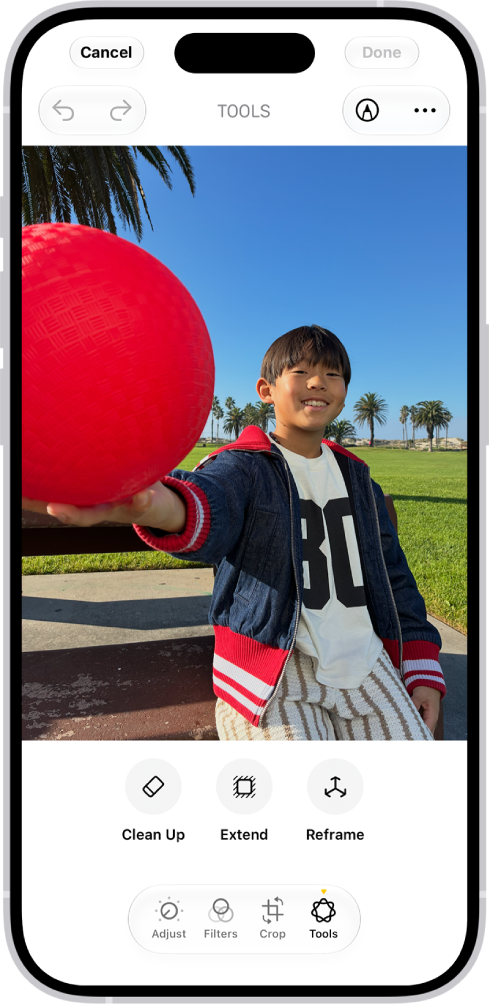
Make your photos frame-worthy
You can remove distracting objects, extend a photo beyond its original frame, and adjust its perspective. With Clean Up, Extend, and Reframe, a photo doesn’t have to be finished once you take it. Open a photo in the Photos app, then tap the Edit button to get started.
And more…
Even more Apple Intelligence features can help with your daily routine and your creativity, and make it easier to communicate.
| Productivity | Creativity | Communication |
|---|---|---|
| Create new shortcuts, calendar events, and reminders with a description. You can also create custom extensions in Safari, automatically organize your tabs by topic, and get alerts when a webpage has been updated (like a price change or restock). | Create original images and Genmoji, transform rough sketches into images with Image Wand, create custom memory movies with a description in Photos, and more. | Get relevant info in the Phone app during calls, translate across languages, and more. |
Important: Check the Apple Intelligence website for more information about features, supported devices, and languages.
*Apple Intelligence is available with Siri and device language set to Chinese (Simplified), Chinese (Traditional), Danish, Dutch, English, French, German, Italian, Japanese, Korean, Norwegian, Portuguese, Spanish, Swedish, Turkish, or Vietnamese. Some features may not be available in all regions or languages. Some devices may not be available in all regions. Siri AI is available in beta in iOS 27, iPadOS 27, macOS 27, watchOS 27, and visionOS 27 and requires an Apple Intelligence–enabled device set to a supported language. Available in English to start. Siri AI will not be initially available in the EU on iOS, iPadOS, and watchOS. Certain Apple Intelligence features that rely on server-side models are subject to daily usage limits, including but not limited to Siri AI, Intelligent Photo Editing Tools, Image Playground, and AFM 3 Cloud models in Shortcuts. Daily limits may vary by feature, request complexity, system demand, system policies, and other factors. Expanded access to such features will be available for a fee in the future. Use of these features is subject to the Apple Intelligence Terms and Conditions.