In the Stocks app, you can read business news that’s driving the market. In countries where Apple News is available, you also see stories selected by the Apple News editors and stories from Apple News+.
You can listen to a story, save it to Apple News, and clear your recommendations. You can also see more stories from a publication in Apple News, and change the text size. To save stories to Apple News, you need to be signed in to your Apple Account.
To learn more about Apple News+, see Subscribe to Apple News+.
Note: Apple News and Apple News+ aren’t available in all countries or regions.
Read a story
- Open the Stocks app on your iPad.
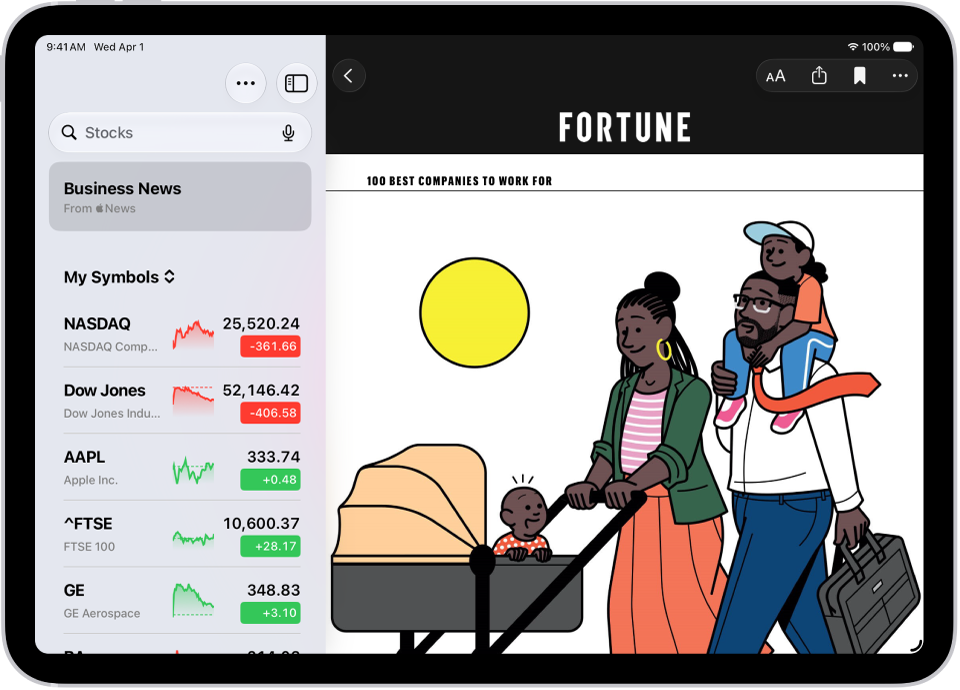
- Tap Business News in the sidebar or tap a symbol in your watchlist to browse related stories. See Manage symbols in the My Symbols watchlist.
-
While viewing a story, do any of the following:
- Return to your newsfeed in Stocks: Tap the Back button or Done in the top-left corner.
- See more stories from the publication in Apple News: Tap the publisher logo at the top of the screen.
-
Save the story to Apple News: Tap the Bookmark button.
Note: In order to save stories to Apple News, make sure you’re signed in to your Apple Account, then go to Settings > [your name] > iCloud, tap See All next to Saved to iCloud, then turn on News.
- Change the text size: Tap the Text Size button. Then tap the smaller or larger letter to change the text size in the story. If you don’t see the Text Size button, tap the More Actions button. Then tap Text Size.
- Share the story: Tap the Share button, then choose a sharing option, such as Messages or Mail.
Stories from publications you have blocked in Apple News don’t appear in the newsfeed. See news stories chosen just for you.
Listen to a story
Some news stories include an audio version that you can listen to in the News app. Tap the Play button to listen.
Clear recommendations
The Stocks app uses what you read in the past to recommend stories, though you can clear this information.
- Open the Stocks app on your iPad.
- Tap the More button and tap Clear Recommendations Data.
See also