How to get a warning when you visit websites that use HTTP on iPad
Websites use HTTP or HTTPS to transmit information to and from Safari, and HTTP doesn’t provide a secure connection. That’s why you can choose to receive a warning when you visit websites that use HTTP. You can also browse the web privately in Safari on iPad.
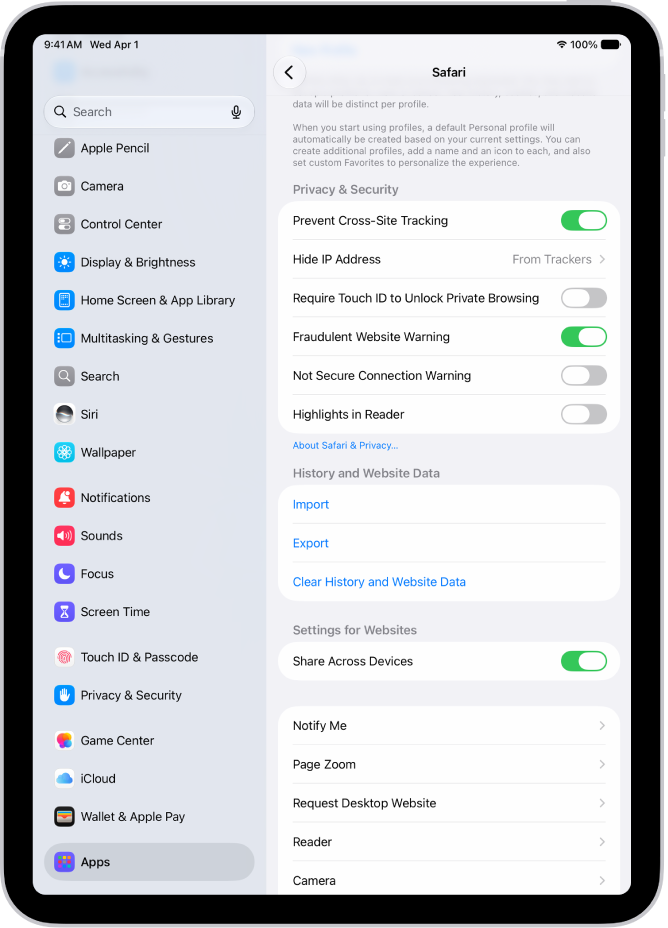
- Start the Settings app on your iPad.
- Tap Apps, then tap Safari.
- Below Privacy & Security, turn on Not Secure Connection Warning.
See also
Read Next
You can fill in personal information in Safari on iPad with AutoFill, including your contact info, user names, and passwords.
You can view your Safari tabs from another Apple device on iPad, and keep tabs and Tab Groups updated across your devices.
You can clear your cache and cookies on iPad by clearing your browsing history in Safari, and choose how much history to clear.