You can easily create a connected diagram, such as a flowchart, by using connectors and the shape picker in Freeform. Depending on the type of item, you can attach lines to an item or near it.
You can connect two items with a line and change connection points. You can quickly add equally spaced, aligned shapes with connectors, too.
Here’s how to add diagrams to a Freeform board on iPhone.
Create a diagram
- Open the Freeform app on your iPhone.
- Open a board, or tap the New Board button to start a new one.
-
Tap the More button, tap View Options, and then tap Show Connectors.
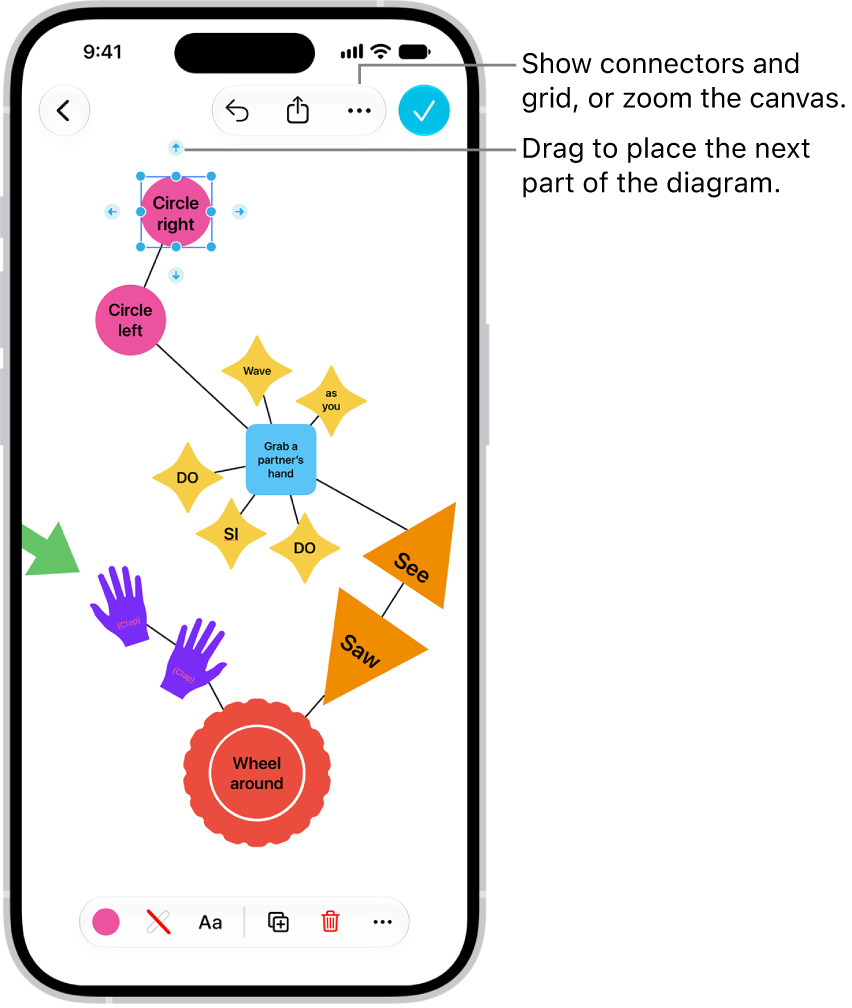
- To begin your diagram, add an item by tapping the Content Hub button, the Add Text Box button, or the Media button.
-
Drag a connector arrow to where you want the next part of your diagram. When you let go, a small menu of shapes opens. Tap to select the next shape you want to add.
To browse other shapes, tap the Other button.
- Tap the Done button when you’re finished diagramming.
Connector arrows don’t appear when you select a line or multiple items.
Quick tip: There’s a quick way to add equally spaced, aligned shapes with connectors. First, tap to select a shape, and then touch and hold a connector arrow. You’ll see a preview of the shape and line as you hold, and when you let go, they’re added to the board.
Connect two items with a line
- Open the Freeform app on your iPhone.
- Open a board with items on it.
- Touch and hold an item on your board, then, with another finger, tap another item to select it too.
- Tap the More button in the formatting tools at the bottom. Tap Add Connection Line.
Change connection points
You can change how a connection line connects, even after you add it to a diagram on a Freeform board.
- Tap to select a connection line, then drag one of its endpoints (the blue dots).
- Attach the endpoint to another item on the board at a new connection point.
Your item has connection points at its center, top, bottom, and sides. When a connection is possible elsewhere, in the item or near it, a filled circle appears.