You can take age-appropriate standardized mental health assessments to answer questions about how you’re feeling, and see your current risk for depression or anxiety. These questionnaires will help you understand if you should talk to your doctor, and you’ll have a PDF of the results that you can share.
The results and resources are provided for informational purposes only, and they’re not a substitute for advice provided by a doctor or other qualified health care professional. You can also manage mental health assessment settings.
Note: The Anxiety Risk assessment and the Depression Risk assessment are available for ages 13 and older.
Take a mental health assessment
- Start the Health app on your iPhone.
- Tap Browse and then tap Mental Wellbeing.
- Do one of the following:
- Take an assessment for anxiety or depression: Tap Anxiety Risk or Depression Risk and tap Take Questionnaire.
- Take an assessment for both anxiety and depression: Scroll down to Get More From Health. Tap Take Questionnaire.
- Tap Begin and then answer the prompts.
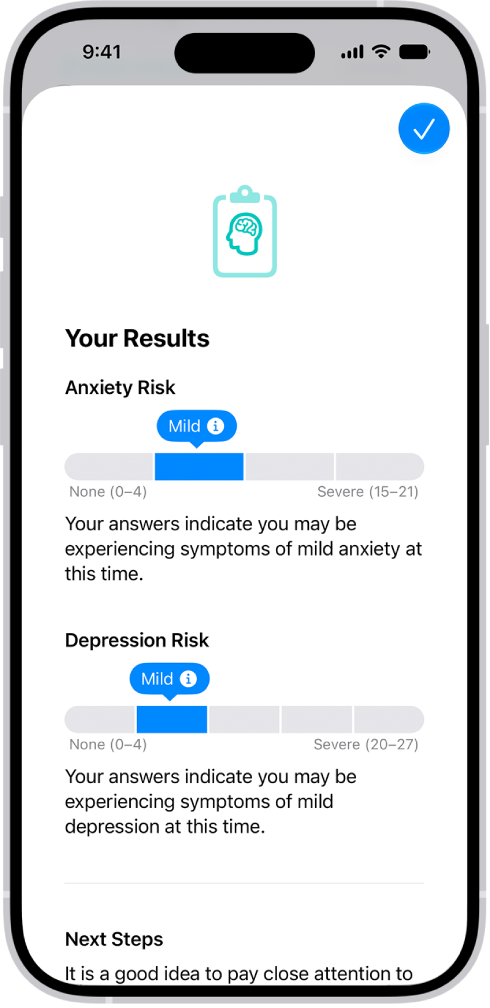
- When you’re finished, tap Done. Then you can do any of the following:
- Learn more about your results: Tap the More Info button next to your results.
- Export your results as a PDF: Tap Export PDF.
- Get access to articles and crisis resources: Scroll down to Learn More and tap an option.
- When you’re finished viewing your results, tap Done.
Note: The Patient Health Questionnaire-9 (PHQ-9) and Generalized Anxiety Disorder-7 (GAD-7), developed by Drs. Robert L. Spitzer, Janet B. W. Williams, Kurt Kroenke and colleagues, with an educational grant from Pfizer Inc., can be useful tools to help identify if you are at risk for depression and/or anxiety. They are provided in Health for informational purposes only, and the results are not a medical diagnosis. The assessments are clinically validated only in certain countries and languages. If you have concerns about your mental health, you should consult a clinician.
Manage mental health assessment settings
- Start the Health app on your iPhone.
- Tap Browse and then tap Mental Wellbeing.
- Tap Anxiety Risk or Depression Risk, scroll down to the bottom of the screen, and then tap Options below Export PDF.
- Do any of the following:
- Change how often you want to take mental health questionnaires: Tap Frequency, then choose an option.
- Choose whether to be notified to take a questionnaire: Turn Notifications on or off.
- Receive prompts to take a questionnaire after a pattern of unpleasant moods: Turn Unpleasant Logging on or off.
Turn on Periodic Questionnaires and Unpleasant Logging, and you’ll get a prompt to fill out a questionnaire a couple of times a year or when a pattern of unpleasant moods shows up.