









It’s not rocket science to figure out the button combination on your iPhone 18 Pro Max that will magically restart the device, but it can be frustrating. As often as not, even experienced iPhone owners get the sequence or synchronization–or both–wrong.
While restarting your device–which involves powering down and then rebooting–is not an everyday operation, it may be desirable for a number of reasons, including clearing up app glitches, solving network issues, or eliminating buggy behavior.
I found an easier way to restart my iPhone 18 Pro Max using a simple Siri voice command. First, you need to make sure our favorite voice assistant is enabled in Settings > Siri. I found toggling on “Siri” or “Hey Siri” (tap Requests) and Siri below Allow Access When Locked (in Settings > Face ID & Passcode) to be especially convenient. But there’s no harm in keeping the side button option on, too.
The next time you need to reboot your locked phone, you can just say “Hey Siri” (or press and hold the side button) and then say Restart, or Restart my iPhone, or Restart this device. Siri will respond by asking you to confirm that you really want to do this. Tap Restart or just say Yes. Then unlock your device–per Siri’s instructions.
That’s a genuine luxury considering what you would have to go through without Siri:
On an iPhone 18 Pro or iPhone 18 Pro Max it can get complex. First, press and release the Volume Up and Volume Down buttons in sequence. Then press and hold the side button, at which time you can either power off the device via the slider or keep holding down the side button until the device reboots.
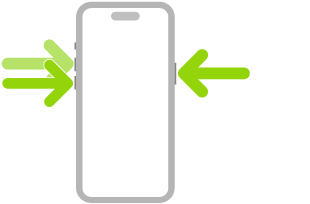
You can also power off the device via Settings > General > Shut Down, which may be easier. But compared to all those finger acrobatics, using Siri to restart your iPhone is a breeze.


