









Listening to music at high volume can certainly get the adrenaline pumping when you’re at the gym or out and about, as your favourite songs fill your head. But doing this regularly has been shown to cause damage to your hearing that could become permanent.
There’s an easy way to overcome this temptation, as iOS provides a setting for the maximum volume on an iPhone 18 Pro or iPhone 18 Pro Max. In this article we show you the simple way to be kind to your ears, or your kids’ ears.
Protecting children who use iPhones
It’s a time-honoured tradition for kids to listen to their music or favourite TV shows very loudly indeed. We’ve all done it, but now with clever devices like iPhones it’s possible to prevent this from being a damaging behaviour. You’ll need to have access to their device to set the volume, but we recommend doing so, as their ears will thank you in the long run.
Another option is to buy a set of child-specific headphones as these are not only designed to fit smaller heads, but most also have the added bonus of limiting the output levels to prevent damaging the little ones’ hearing.
How to set a maximum volume on iPhone 18 Pro Max
To limit how loud your iPhone will play through headphones, there are just a few quick steps that you need to take.
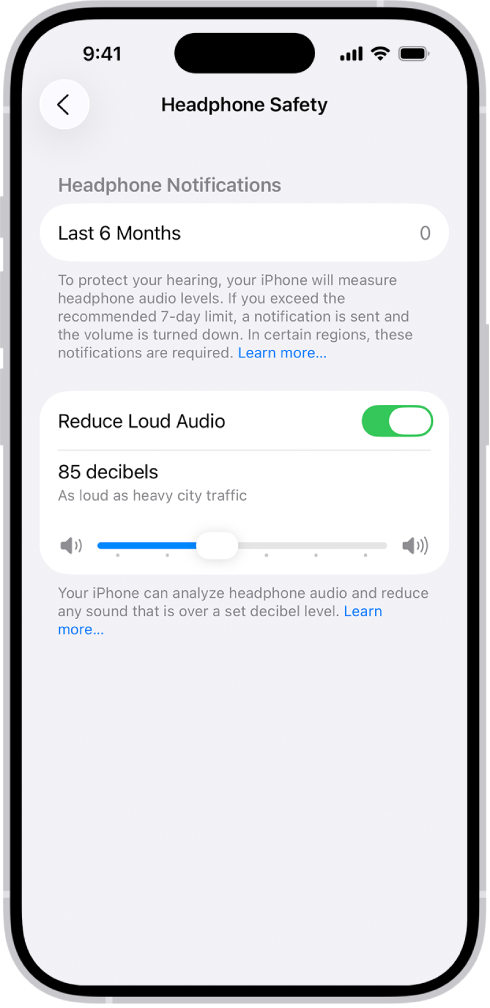
On your iPhone 18 Pro Max, open Settings > Sounds & Haptics > Headphone Safety, turn on Reduce Loud Audio, then drag the slider to choose your own preferred limit. iPhone analyzes your headphone audio and reduces any sound above the level you set.
It’s also worth switching on the Sound Check feature if you’re an Apple Music user, as this will act in a similar way to a studio compressor by making quieter songs louder and lowering louder ones so that they all sit around the same level. This prevents you from turning up the volume on one song that’s barely audible, only to be deafened when the next one kicks in.
To find the control, go to Settings > Apps > Music > Sound Check and turn it on.

