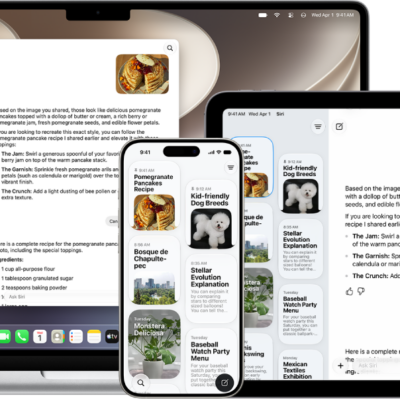
Siri AI is your conversational AI assistant with entirely new capabilities, including personal context understanding, broad world knowledge, onscreen awareness, and the ability to take action in apps. These new capabilities make Siri a more capable assistant by allowing you to find what you need to get more done.
Siri AI has broad world knowledge, so you can ask about virtually any topic, including important facts, recipes, and restaurant recommendations. It can also take action in apps, like setting a new goal for your Activity rings, and the Siri app keeps your conversations together.

Note: Siri AI is available in beta on watchOS 27 or later on Apple Watch Series 9 and later, Apple Watch Ultra 2 and later, and Apple Watch SE 3 when paired with an Apple Intelligence-enabled iPhone 15 Pro, iPhone 15 Pro Max, or iPhone 16 model or later with Siri and device language set to a supported language. Available in English to start. Siri AI will not initially be available in the EU on iOS and watchOS. Usage limits may apply.*
Get Siri AI on Apple Watch
- Open the Settings app on a supported iPhone.
- Tap Siri and then do one of the following:
- If Siri is off: Tap Turn on Siri and then tap Try the new Siri (Beta).
- If Siri is on, but you decide to use the previous version: Tap Try the new Siri (Beta).
- Follow the onscreen instructions.
Ask about any topic
Siri AI has broad world knowledge, which is combined with your personal context to give you detailed, up-to-date, and relevant insights to your questions. Ask about virtually any topic—from tips on how to improve your tennis backhand to details about the world around you.
Siri AI: Activate Siri, then ask a question. For example, say something like, “What’s the best time of year to visit Japan?” or “What’s a good way to teach someone how to play chess?”
Get detailed answers with Siri AI
Find what you need
Siri AI has broad world knowledge and understands your personal context, which means you can ask about virtually any topic—from important facts to recipes and restaurant recommendations. Siri AI can draw on personal context understanding and help users find what they need in the moment across their apps, including messages, emails, photos, and more. For example, search for your driver’s license number, easily find the door code for your upcoming house rental, or pull up the details from a note you saved.
Siri AI: Activate Siri, then say something like, “What’s the last thing I added to my ‘Weekend Projects’ note?” or “Where is next week’s dance class?”
Ask Siri to find what you need
Take action in apps
Siri AI understands your personal context and can take action in apps to help you quickly get things done. For example, share your flight details with your family, play the song your trainer recommended, or set a new goal for your Activity rings with just a single voice request—without having to open any of your apps.
Siri AI: Activate Siri, then say something like, “Update my exercise goal to 45 minutes.” or “Cancel my lunch with Jasmine tomorrow.”
Discover the Siri app
Siri AI comes with a dedicated Siri app that brings all your conversations in one place, so you can ask a question on your iPhone or any other device, and pick up where you left off on your Apple Watch. You can also pin conversations for easy access or start a new one.
Siri is designed to protect your information and to let you choose what you share.
*Apple Intelligence is available with Siri and device language set to Chinese (Simplified), Chinese (Traditional), Danish, Dutch, English, French, German, Italian, Japanese, Korean, Norwegian, Portuguese, Spanish, Swedish, Turkish, or Vietnamese. Some features may not be available in all regions or languages. Some devices may not be available in all regions. Siri AI is available in beta in iOS 27, iPadOS 27, macOS 27, watchOS 27, and visionOS 27 and requires an Apple Intelligence–enabled device set to a supported language. Available in English to start. Siri AI will not be initially available in the EU on iOS, iPadOS, and watchOS. Certain Apple Intelligence features that rely on server-side models are subject to daily usage limits, including but not limited to Siri AI, Intelligent Photo Editing Tools, Image Playground, and AFM 3 Cloud models in Shortcuts. Daily limits may vary by feature, request complexity, system demand, system policies, and other factors. Expanded access to such features will be available for a fee in the future. Use of these features is subject to the Apple Intelligence Terms and Conditions.
See also