If something isn’t working right, try restarting your Apple Watch and its paired iPhone.
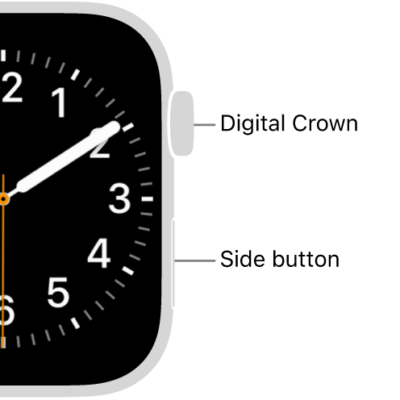
Restarting your Apple Watch means turning it off and on with the side button, but you can’t restart your Apple Watch while it’s charging. You can also force Apple Watch to restart, and restart the paired iPhone.
Restart Apple Watch
- Turn off your Apple Watch: Press and hold the side button until the sliders appear, tap the Power button, then drag the Power Off slider to the right.
- Turn on your Apple Watch: Hold down the side button until the Apple logo appears.

Note: You can’t restart your Apple Watch while it’s charging.
Restart the paired iPhone
- Turn off your iPhone: For models with Face ID, press and hold the side button and a volume button, then drag the slider to the right. For models without Face ID, press and hold the side or top button until the slider appears, then drag the slider to the right. With any model, you can also go to the Settings app, tap General, then tap Shut Down.
- Turn on your iPhone: Hold down the side or top button until the Apple logo appears.
Force Apple Watch to restart
When you can’t turn off your Apple Watch, or the problem continues, you might need to force your Apple Watch to restart. Only do this if you’re unable to restart your Apple Watch.
To force restart, hold down the side button and the Digital Crown at the same time for at least 10 seconds, until the Apple logo appears.
See also
Tag: watchOS