You can browse and open apps from the Home Screen. Your Apple Watch comes with a collection of helpful apps designed to keep you connected right from your wrist, and these built-in apps work with your iPhone to help you stay active, communicate with others, and access important information.
The dynamic app grid shows the apps you use most and the ones you’ve used recently. And if an app isn’t responding, you can quit and reopen it.
Open apps from the Home Screen
-
From the watch face, press the Digital Crown to see the dynamic app grid, which shows the apps you use most and have used most recently.
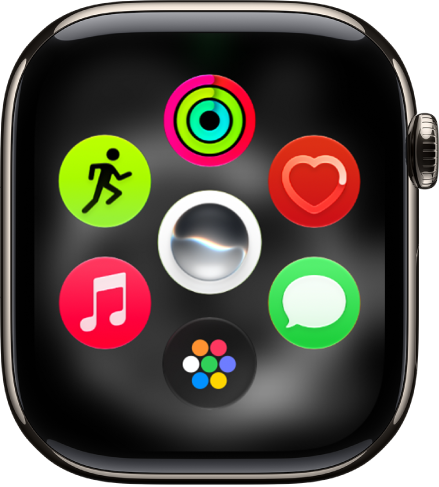
- Tap an app to open it.
-
To see more apps, turn the Digital Crown.
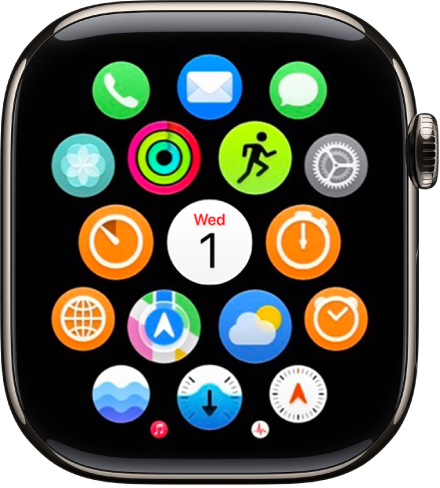
To return to the Home Screen from an app, press the Digital Crown once, then press it again to switch to the watch face.
Apps included with Apple Watch
| App icon | App name | For more information |
|---|---|---|
 |
Activity | Track daily activity |
 |
Alarms | Add an alarm |
 |
App Store | Get apps |
 |
Audiobooks | Listen to audiobooks |
 |
Blood Oxygen
(not available on Apple Watch SE; not available in all countries or regions) |
Measure blood oxygen levels |
 |
Calculator | Use Calculator |
 |
Calendar | Check and update your calendar |
 |
Camera Remote | Use Camera Remote |
 |
Compass | Use the compass |
 |
Contacts | See contact information |
 |
Cycle Tracking | Use Cycle Tracking |
 |
Depth | Measure underwater temperature, duration, and depth |
 |
ECG | Record an electrocardiogram |
 |
Find My | Set up Find My |
 |
Heart Rate | Check your heart rate |
 |
Home | Control your home |
 |
Read and write mail | |
 |
Maps | Get directions |
 |
Medications | Track your medications |
 |
Memoji | Use Memoji |
 |
Messages | Read and respond to messages |
 |
Mindfulness | Practice mindfulness |
 |
Music | Add and play music |
 |
Music Recognition | Identify songs with Shazam |
 |
News
(not available in all countries or regions) |
Read news stories |
 |
Noise | Measure noise levels |
 |
Notes | Take notes |
 |
Now Playing | Use Now Playing |
 |
Phone | Answer and make phone calls |
 |
Photos | View photos and Memories |
 |
Podcasts | Play podcasts |
| Readiness
(available on Apple Watch Series 12 and Apple Watch Ultra 4) |
Use the Readiness app | |
 |
Reminders | Use reminders |
 |
Remote | Control Apple TV 4K |
 |
Settings | Change the settings |
 |
Shortcuts | Use shortcuts |
 |
Siren
(available on Apple Watch Ultra models) |
Activate the siren |
 |
Siri
(Siri AI is available in beta on watchOS 27 or later on Apple Watch Series 9 and later, Apple Watch Ultra 2 and later, and Apple Watch SE 3 when paired with an Apple Intelligence-enabled iPhone 15 Pro, iPhone 15 Pro Max, or iPhone 16 model or later with Siri and device language set to a supported language. Available in English to start. Siri AI will not initially be available in the EU on iOS and watchOS. Usage limits may apply.)* |
Use the Siri app |
 |
Sleep | Track your sleep |
| Stocks | Track stocks | |
| Stopwatch | Use a stopwatch | |
| Tides | Tides | |
| Timers | Set timers | |
| Tips | View tips | |
| Translate | Translate text and voice | |
| Vitals | Track your vitals | |
| Voice Memos | Record and play voice memos | |
| Wallet | Set up cards and passes | |
| Weather | Check the weather | |
| Workout | Start a workout | |
| World Clock | Check the time in other locations |
Quit an app
If an app isn’t responding, you can quit and reopen it to try to resolve the issue. (Typically, there’s no reason to quit an app; quitting it doesn’t save battery power, for example.)
- From the app you want to quit, press and hold the side button until the sliders appear.
- Press and hold the Digital Crown until the watch face appears.
*Apple Intelligence is available with Siri and device language set to Chinese (Simplified), Chinese (Traditional), Danish, Dutch, English, French, German, Italian, Japanese, Korean, Norwegian, Portuguese, Spanish, Swedish, Turkish, or Vietnamese. Some features may not be available in all regions or languages. Some devices may not be available in all regions. Siri AI is available in beta in iOS 27, iPadOS 27, macOS 27, watchOS 27, and visionOS 27 and requires an Apple Intelligence–enabled device set to a supported language. Available in English to start. Siri AI will not be initially available in the EU on iOS, iPadOS, and watchOS. Certain Apple Intelligence features that rely on server-side models are subject to daily usage limits, including but not limited to Siri AI, Intelligent Photo Editing Tools, Image Playground, and AFM 3 Cloud models in Shortcuts. Daily limits may vary by feature, request complexity, system demand, system policies, and other factors. Expanded access to such features will be available for a fee in the future. Use of these features is subject to the Apple Intelligence Terms and Conditions.
See also
- Get apps in the App Store on Apple Watch
- Organize apps on Apple Watch
- See timely widgets in the Smart Stack on Apple Watch