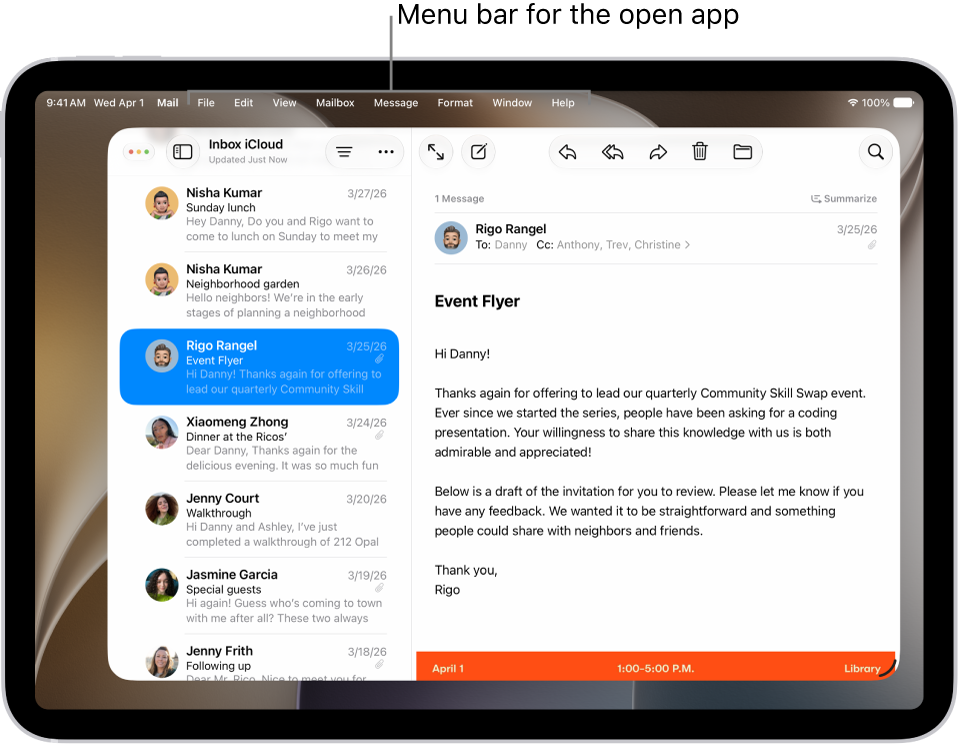
You can access an app’s features and commands in the menu bar for the active app on iPad.
The menu bar only appears when Windowed Apps or Stage Manager is turned on, so if you don’t see one at the top of your screen, you can set up iPad to work in multiple windows. With a mouse or a trackpad, the menu bar opens when you move the pointer over the app’s name. You can also open multiple windows of an app on iPad.
Open the menu bar for the current app
- If you’re using apps as windows, tap the app with the menu bar you want to access.
-
Tap the app’s name in the status bar in the top-left corner. If you’re using a mouse or a trackpad, move the pointer over the app’s name instead.
See also
Tag: Multitasking