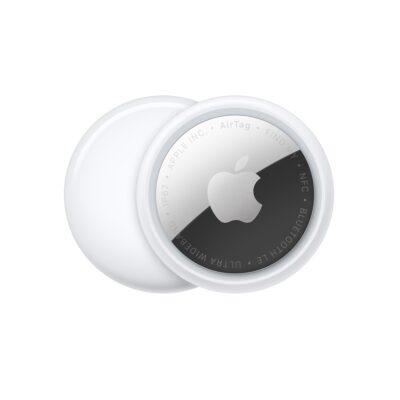
Apple introduced the 1st-generation AirTag in April 2021 and replaced it with the 2nd-generation AirTag in January 2026. (As usual, there’s no numbering system.) The compact device remains priced the same as when introduced: $29 each, or a batch of four for $99. (By not raising the price since then, Apple has effectively dropped the price by 20% due to inflation.)
While Apple stopped selling the 1st-generation AirTag, you can buy them while supplies last from online retailers, which seem to identify them as 1st generation.
Apple has almost entirely abandoned model numbers for their hardware, with the exception of Apple Watch and AirPods—though even with AirPods, they use a generation number within a particular series number! The same is true with AirTags: the original AirTag is the 1st-generation AirTag (2021), and the new one is the 2nd-generation AirTag (2026). In product and sales information, the new model is simply referred to as AirTag.
If you’d like to tell the difference between the two while looking at them, you can examine the reverse. While there’s no version number, Apple printed distinct information on the plastic silver battery cover. Note that the 2nd-generation AirTag uses nearly all uppercase or capital letters, includes the IP67 designation, and omits the “Designed by/Assembled in” details.
There are four technical differences between the two generations:
- Louder speaker: Apple says that the new model is 50% louder. The frequency of its chime, the sound you can trigger to locate it (see how to play a sound), is also higher-pitched (moving from an F on the chromatic scale to a G). These two changes allow it to be heard from farther away, from the inside of, or underneath things, like inside a piece of luggage or under a pile of clothing.
- Greater Precision Finding distance: A 2nd-generation ultrawideband (UWB) chip that appears in the iPhone 17 series, the iPhone Air, the Apple Watch Series 11, and the Apple Watch Ultra 3 allows Precision Finding at “from up to 50 percent farther away than the previous generation,” says Apple (see how to use Precision Finding). In practice, this might mean several dozen feet (or 20 to 30 meters) compared to 30 to 50 feet (10 to 15 meters).
- More powerful Bluetooth: Some features of an AirTag work only within Bluetooth range, such as playing a sound or live finding before Precision Finding kicks in, if available. The 2nd-generation AirTag has a newer Bluetooth chip that expands its range as well as allowing greater penetration through objects. Apple gives no guidance on distance, but if you could previously reach an AirTag over 150 feet (46 m), conceivably that could now be as much as 300 feet (91 m).
Bluetooth is also used to broadcast an encrypted transmission as part of the Find My network, and could improve tracking as the signal could reach more devices.
- A lack of backwards compatibility: The new AirTag requires iOS 26.2.1/iPadOS 26.2.1 or later to pair with an iPhone or iPad. Once activated, iOS 26, iPadOS 26, macOS 26, or watchOS 26 or later is required to track the items—maybe even the 26.2.1 release of each of those operating systems, but Apple has conflicting information. This means people using older versions of these operating systems will be unable to track an AirTag. If you have mixed generations of gear or have opted not to install some of the version 26 or 27 releases, you might see 1st-generation AirTags on some devices and 2nd-generation AirTags on others.
For most of the purposes of the rest of this book, you can consider a 1st- and 2nd-generation AirTag as interchangeable. I call out differences only where they exist.
What is inside an AirTag
An AirTag uses three different pieces of wireless technology, somewhat shocking for such a small piece of equipment:
- Near-field communications (NFC): NFC allows a device to read information from an item held very near or literally tapped against the device. NFC is used to identify an AirTag: the NFC tag can be read by any smartphone with NFC technology, and triggers the display of a webpage link connected to that AirTag.
Every Apple Find My item has a unique serial number. The webpage retrieved via an NFC tap is associated with that serial number. You also can open that webpage from a link transmitted via Bluetooth after being warned that an Apple or Google item is moving with you.
The page shows the serial number and a portion of the person’s phone number registered to their Apple Account or Google Account. For more, see how Apple and Google detect an unwanted AirTag. Starting in iOS 18.2/iPadOS 18.2 and macOS 15.2 Sequoia, you can also opt to create a secure tracking link you can share with anyone that also includes email address or phone number in full. See what someone sees when they find your lost device.
- Ultra-wideband (UWB): UWB is a low-power, broad-spectrum wireless technology introduced by Apple in the iPhone 11 series and Apple Watch Series 6 and later, and, for audio, starting with the charging case of the AirPods Pro (2nd generation). With the right model of iPhone or Apple Watch, you can pinpoint an AirTag or an enabled charging case with Precision Finding, which provides ranging distance and direction. Which models depend on your generation of AirTag; see how to use Precision Finding.
- Bluetooth LE: A low-power version of the short-range Bluetooth standard lets AirTags announce themselves to a nearby paired iPhone or iPad and to devices that are part of the Find My network. The 2nd-generation AirTag has a more powerful Bluetooth radio.
Apple does occasionally update the AirTag firmware. However, there’s nothing you can do to force that. With whatever logic the company uses, it sends the firmware update out over Bluetooth when it detects AirTags paired with your devices that are out of date.
Size, battery and price
Apple powers the AirTag with a replaceable battery that should last a year. Both generations of AirTag are identical in dimensions and weight: 1.26 inches (32 mm) in diameter, 0.31 inches (8 mm) thick at their widest point, and 0.39 ounces (11 g).
You can personalize your order when ordering directly from Apple by adding an emoji or a few numbers or letters. You might think the emoji or text is a gimmick. But if you buy several AirTags, it can help you distinguish among them. Bonus: When you pair an AirTag, Apple shows you the emoji or text that’s printed on the item in the pairing screen! Nifty.