









Is your iPhone’s display reacting without your input, where apps are opening and taking actions on their own without you touching anything? Here are some quick fixes to resolve this “ghost touch” issue on your iPhone 18 Pro or iPhone 18 Pro Max.
Which iPhones Are Affected by Ghost Touch?
Ghost touch is something that can, on rare occasions, affect any iPhone.
Here’s how to fix ghost touch on your iPhone 18 Pro Max.
1. Clean the Touchscreen
It may sound simple, but cleaning your iPhone’s touchscreen can be an effective defense against ghost touch. Doing this will clear away any debris or dust causing your iPhone to think you’re touching the screen.
To clean your iPhone’s screen, first turn it off and unplug any cables. Next, you should find a soft and clean cloth, such as a lint-free cloth for cleaning glasses. You should lightly dampen this cloth with water. Finally, start cleaning the touchscreen by wiping gently but firmly from one end to the other.
While wiping the screen, make sure you don’t get moisture into any openings.
Apple recommends avoiding window or household cleaners, as well as cleaners containing abrasives or hydrogen peroxide, as these could erode the oil-resistant coating Apple puts on your iPhone’s screen.
2. Take Off Your Screen Protector
Screen protectors are thin layers of glass or plastic that you can attach to the iPhone’s touchscreen to protect it from scratching or cracking. While they’re often useful, they can disrupt how the touchscreen operates if they’re of poor quality.
You should, therefore, try removing your screen protector to see if it fixes ghost touch problems. Remove your iPhone’s screen protector very carefully and slowly. Start at one corner, then gradually peel the protector off the iPhone’s screen.
If the protector has been cracked or damaged at all, it might be safer to take your phone to a suitably qualified repair shop (or to Apple) to ensure you don’t cut yourself on the cracked glass.
You should also consider contacting the manufacturer of the screen protector. The manufacturer might be better placed to recommend the best method for removing the protector and may be able to refund you if the screen protector caused your iPhone’s ghost touch problems.
Don’t forget to clean the screen again after removing any screen protectors.
3. Remove Your iPhone’s Case
A slightly twisted screen is another possible cause of ghost touch issues on an iPhone 18 Pro Max. If your iPhone has such an issue with its screen, you might be able to solve the problem by removing any hard case you’re using. Sometimes, a hard case may twist the screen, and these cases can also get twisted after an accidental drop.
As such, it’s worth trying to remove the hard case if your iPhone has one.
4. Maintain Good Charging Habits
Do you often put off charging your iPhone until the battery percentage drops to single digits? Or perhaps you frequently let the battery die, and your iPhone has no choice but to shut itself down?
Poor charging habits can also cause ghost touch issues on the iPhone. Therefore, it’s best to plug in your iPhone to charge before the battery drops lower than 20 percent.
5. Keep Your iPhone Away From Cold Surfaces
Although Apple states that an iPhone works fine in ambient temperatures between 32° and 95° F, it’s still best to avoid leaving it on cold surfaces for extended periods.
For example, I used to place my iPhone on the tiled floor next to my bed when I went to sleep. As the air-conditioning filled up the room throughout the night, the tiled floor naturally got colder.
Unaware, I did this for almost a week, and my iPhone started to have ghost touch issues. Once I left my iPhone on my wooden desk instead, the ghost touch problem stopped, and my iPhone worked normally again.
6. Restart Your iPhone 18 Pro Max
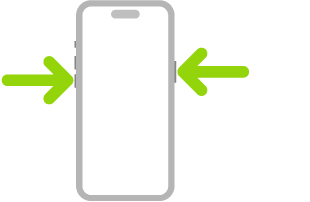
It’s always a good idea to restart your iPhone whenever it has a problem. This also applies to ghost touch issues, since it’s possible that clearing your iPhone’s short-term memory by restarting it could fix any glitch causing the screen to play up. Simultaneously press and hold the side button and either volume button until the sliders appear, then drag the Power Off slider. Press and hold the side button until the Apple logo appears.
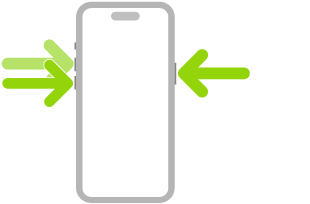
Similar to restarting your iPhone but noticeably more drastic, you could force restart your iPhone. You can do this if your iPhone’s ghost touch problem is so severe that you can’t even turn it off properly. Press and quickly release the volume up button. Press and quickly release the volume down button. Press and hold the side button. When the Apple logo appears, release the side button.
7. Update iOS
If ghost touch is still a problem, you should update your iPhone 18 Pro Max. This is worth doing because ghost touch could be caused by a software bug that Apple has fixed in a recent update.
To update your iPhone, go to Settings > General > Software Update. Tap Update Now if a newer version is available.
If ghost touch only happens when you’re using a third-party app, you should update that particular iPhone app as well to get the latest bug fixes for it.
8. Perform a Factory Reset
If restarts and software updates don’t stop your iPhone’s ghost touch problem, you should perform a factory reset on your iPhone. This is a good way of removing any underlying software issues that might cause ghost touch.
You should back up your iPhone before performing a factory reset because it will wipe all your data.
To reset your iPhone, go to Settings > General > Transfer or Reset iPhone > Erase All Content and Settings. After you’ve performed the factory reset, you’ll have to go through the setup process again. This is where you can choose to restore your iPhone from a previous backup.
9. Reinstall iOS Using Recovery Mode
If a simple force restart doesn’t work, consider putting your iPhone in recovery mode and reinstalling iOS. Once in recovery mode, your computer will show a message that says “There is a problem with the iPhone that requires it to be updated or restored.” You should click Update (if available) or Restore.
Restoring your iPhone from recovery mode will wipe all your data. You should therefore back up your iPhone beforehand, if possible.
If recovery mode doesn’t help, try using DFU mode on your iPhone instead. This is an even deeper version of recovery mode that resolves problems with the firmware.
10. Take Your iPhone to Apple
If your iPhone 18 Pro Max still suffers from ghost touch issues, you should book an appointment at your nearest Apple Store for a repair. You’ve now exhausted the software fixes, so it must be a hardware issue that’s causing ghost touch on your iPhone. For example, some people have mentioned that improper display assembly or touchscreen seating can cause this problem.
iPhone should only be serviced by a trained technician. It’s much safer to turn to Apple Support, where you can book an appointment. Attempting a DIY repair will also void any warranty you have on your iPhone.
If your iPhone needs a hardware repair to fix ghost touch, make sure you contact Apple or an Apple Authorized Service Provider. Low-quality parts or dodgy repairs can cause other problems with your iPhone’s screen.
Overall, it’s a good idea to start by checking if the ghost touch problem lies with your screen protector or phone case. Then, consider whether your usage habits are accidentally causing the issue. You can also restart, update, and, as a last resort, reset your iPhone 18 Pro Max before taking it to an Apple Store or an Apple Authorized Service Provider for repairs.

