









It’s no doubt Apple Vision Pro is extremely expensive. So, Why is it so pricey? Lets find out
During the June 2023 WWDC event, Apple made jaws drop when it announced that its newest product, the Vision Pro AR/VR "mixed reality" headset, would start at $3,499.00.
At $3,499, Apple’s Vision Pro costs more than three weeks worth of pay for the average American, according to Bureau of Labor Statistics data. The Vision Pro is also far more expensive than rival headsets, such as Meta’s $499.99 Quest 3, and the $999.99 Meta Quest Pro.
It tops many other Apple products in terms of price too. Buying an iPhone 14 Pro Max, a 12.9-inch iPad Pro and an Apple Watch Ultra would still be cheaper than an Apple Vision Pro (although it comes fairly close.) Shipments of virtual and augmented reality headsets also plummeted in 2022, according to International Data Corporation statistics published in March, adding to the skepticism.
In an interview with ABC News’ Good Morning America, Apple CEO Tim Cook acknowledged the headset’s price when asked if the average person would be able to afford it.
"I think people will make different choices depending upon their current financial situation," he said.
To call Apple’s new headset expensive may be an understatement. But once you step back and look at the larger picture beyond the initial sticker shock, that eye-watering price starts to make a little sense.
The $3,499 price tag is leading many Apple fans to question: “Why does Apple Vision Pro cost so much?”
Reasons Why Apple Vision Pro Is So Expensive
High-Quality Hardware
One of the biggest factors contributing to the cost of the Vision Pro is the hardware. The device is packed with state-of-the-art components, each contributing to the overall user experience. From the high-resolution display and powerful processor to the advanced sensors and the cutting-edge haptic feedback system, each piece of hardware plays a crucial role in providing a seamless and immersive experience. These components are not cheap to produce, and their high cost is reflected in the price of the Vision Pro.
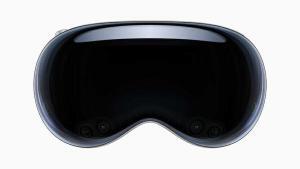
The first thing you’ll notice about the Vision Pro is the chassis, which evokes a pair of high-end ski goggles. A tinted, continuous front panel wraps around the wearer’s eyes, acting as a lens and concealing a fan that draws air through the headset to cool the electronics inside.
Around the back of the Vision Pro, there’s a band that can be easily swapped out, and a dial for adjusting the tightness of the headset. Zeiss worked in partnership with Apple to create magnetic lenses for prescription wearers.
Unlike some AR headsets on the market, the Vision Pro’s battery pack isn’t built into the device itself. A wire running from the rear connects to a battery pack, which provides up to two hours of use. Or Vision Pro wearers can plug into the wall for an extended experience.
One presumes that the displays suck up most of the power. The Vision Pro has two (plus an external panel), one for each eye, with 23 million pixels across both. A custom 3D lens ensures that the UI always remains within view, while features like HDR and “wide color” deliver an ostensibly superior image.
IR cameras inside of the Vision Pro track your eyes, while downward-facing cameras on the exterior of the chassis track hands. A third set of sensors — lidar sensors — sense objects around the Vision Pro in real time, tracking their positions.
All of the Vision Pro’s sensors — 23 in total, including a dozen cameras, five sensors and six mics — feed into the R1, a new Apple-originated chip designed to “eliminate lag” and stream images to the headset’s display “eight times faster than the blink of an eye” (as per Apple PR).
The R1 also enables EyeSight, a feature of the Vision Pro that projects a live feed of the wearer’s eyes to the aforementioned external display. It has the effect of making the headset look transparent — at least in pre-recorded videos.
Expensive Research and Development
Years of research and development are also likely reflected in Vision Pro’s price. Since it’s an entirely different type of computer compared to the Mac, iPhone or iPad, Apple had to develop new technologies such as the R1 chip, which processes data from the headset’s 12 cameras, five sensors and six microphones.
Apple has spent over $100 billion in research and development over the last five years. At least $20 billion has probably gone to the new device.
This means consulting new specialists, testing things it didn’t previously have facilities for, and many more underlying logistical factors.
Mike Rockwell, vice president of Apple’s technology development group, even said during the WWDC keynote that the.company filed over 5,000 patents related to the Vision Pro. Cook also said during the Good Morning America interview. "You’ve got more than a 4K experience in each eye. And, of course, it doesn’t come for free. It costs something to do that. " Of course, these R&D expenses will inflate the cost of the Vision Pro.
Many New Innovative Technologies
The Vision Pro boasts an impressive array of cutting-edge technology. It uses **a pair of micro-OLED displays **in its gasket, with 23 million pixels between them. That’s the same as having a 4K TV for each of your eyes.
There are a ton of cameras built in. There are at least 10 external cameras (oriented with two main forward facing cameras, four pointing downward, 2 TrueDepth cameras for establishing depth, and two pointing sideways to capture the periphery of your view and room), as well as at least four IR cameras for working in the dark areas inside the headset, as well as some on the outside.
There are a lot of sensors in the Apple Vision Pro too. There is a LiDAR sensor for measuring distance and 3D mapping of spaces, and accelerometers and gyroscopes to track movement.
Based on the above features, the price is high for a reason. The Vision Pro undoubtedly costs a fortune to produce. With an M2 and a new R1 chip inside, a dozen cameras, and a bunch of sensors, it surely costs Apple quite a bit of money to make this beast.
Software and Ecosystem Integration
An often-overlooked aspect of Apple’s pricing strategy is the investment in software development and ecosystem integration. The Vision Pro is more than just a standalone device; it’s a part of the larger Apple ecosystem.
The software powering the Vision Pro is visionOS, which Apple describes as “the first OS designed for the ground up for spatial computing” — “spatial computing” being Apple’s phrase of choice for AR and virtual reality experiences. At the architecture level, visionOS shares core blocks in common with MacOS and iOS but adds a “real-time subsystem” for processing interactive visuals on the Vision Pro.
Vision Pro support’s Apple’s Continuity features to allow you to work inside the headset, alongside your Mac. You can add multiple virtual displays to a MacBook, turning a single screen device into a multi-display workstation.
Apple Vision Pro makes use of your iCloud account to make sure that everything you do on the headset is synced with your more traditional devices, like the iPhone and Mac.
The seamless integration with other Apple products and services, such as the iPhone, Mac, and iCloud, is a significant part of the Vision Pro’s appeal. This integration requires a substantial investment in software development, another factor contributing to the device’s price.
Industry-Leading Privacy and Security
Apple Vision Pro is built on a strong foundation of privacy and security, and keeps users in control of their data.
Optic ID is a new secure authentication system that analyzes a user’s iris under various invisible LED light exposures, and then compares it to the enrolled Optic ID data that is protected by the Secure Enclave to instantly unlock Apple Vision Pro. A user’s Optic ID data is fully encrypted, is not accessible to apps, and never leaves their device, meaning it is not stored on Apple servers.
Where a user looks stays private while navigating Apple Vision Pro, and eye tracking information is not shared with Apple, third-party apps, or websites. Additionally, data from the camera and other sensors is processed at the system level, so individual apps do not need to see a user’s surroundings to enable spatial experiences. EyeSight also includes a visual indicator that makes it clear to others when a user is capturing a spatial photo or video.
These advanced privacy and Security features come at a cost, as the development and manufacturing of such technology require substantial investment which is reflected in the high price tag of the Vision Pro.
Vision Pro vs. Meta Quest 2: A Comparison
Some critics argue that the Vision Pro is overpriced when compared to the Meta Quest 2, which is available at a fraction of the cost. However, it is crucial to consider the significant differences in features and capabilities between the two headsets. The Vision Pro surpasses the Meta Quest 2 in terms of display resolution, field of view, processing power, and additional features like eye tracking and hand tracking. These advancements justify the higher price point of the Vision Pro.
Is the Vision Pro worth the price?
With a clear understanding of why Apple Vision Pro is so expensive, the next question is: Is it worth it? The answer largely depends on individual needs and circumstances.
For avid tech enthusiasts and professionals who rely heavily on VR and AR for their work, the Vision Pro may well be worth the investment. Its advanced features, superior performance, and seamless integration with the Apple ecosystem offer a level of convenience and functionality that cannot be matched by cheaper alternatives. However, if you are primarily interested in gaming and entertainment and are on a limited budget, there are more affordable options available in the market.
The Apple Vision Pro’s high price point can certainly be justified by a range of notable features. The headset boasts 12 cameras, five sensors, and six microphones. It also incorporates two powerful chips, including the M2 chip, which is also found in high-end laptops like the Apple MacBook Pro 13-inch, and a newly introduced chip R1. Moreover, the Vision Pro’s control system, relying entirely on your eyes, hands, and voice, is a testament to Apple’s innovation and a big leap towards a more intuitive, user-friendly digital experience.
The Vision Pro’s price is also justifiable when considering its potential to replace multiple devices. It functions as a tablet, 4K television, game console, and computer all in one, with added benefits that are exclusive to this device. For instance, it provides the capability to expand your workspace beyond the physical boundaries of your room or to bring your memories to life in 3D.
Still, for many customers, Apple’s characterization of a $3,499 mixed-reality headset as "great value" might seem out of touch, especially in the midst of a cost-of-living crisis.
However, Apple’s positioning also indicates the company’s target audience for the new device. The headset is not aimed at the average tech enthusiast but rather at developers and affluent early adopters who will play a crucial role in paving the way for a consumer-ready version.
Will the price of the Vision Pro come down in the future?
Apple has a history of making its products more affordable over time. As technology progresses, manufacturing processes improve, and economies of scale kick in, it is likely that the price of the Vision Pro will decrease. However, the timeline for price reductions may vary, and it is ultimately determined by market demand and advancements in the augmented reality industry.
See also: 6 Best Apple Vision Pro Tips, Tricks & Hidden Gestures You Should Know
Conclusion
While the Vision Pro may initially appear overpriced compared to other VR/AR headsets, its advanced technology, potential applications, and Apple’s pricing strategy make it a unique offering. Apple aims to cater to early adopters and pave the way for broader adoption of augmented reality. As the industry progresses and demand grows, it is likely that the price of the Vision Pro will become more accessible, just as we have seen with previous Apple products. Ultimately, the Vision Pro represents Apple’s vision of the future of augmented reality and its potential to transform various aspects of our lives.