Got a tip for us?

iPhone

Learn the location of the cameras, buttons, and other essential hardware features on iPhone 14.

The front and sides show the front camera, side button, Lightning connector, SIM tray, volume buttons, and Ring/Silent switch, while the back shows the rear cameras and flash. The SIM tray is available on models purchased outside the U.S.
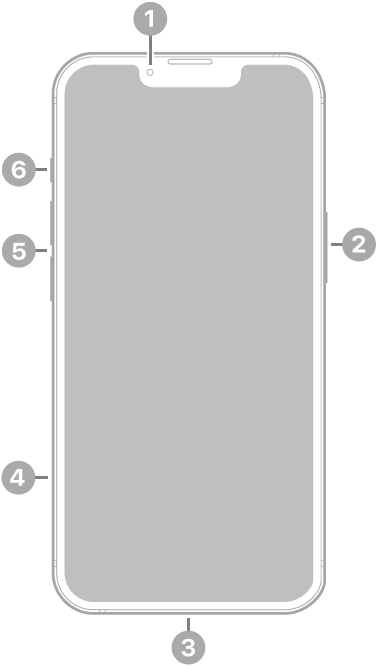
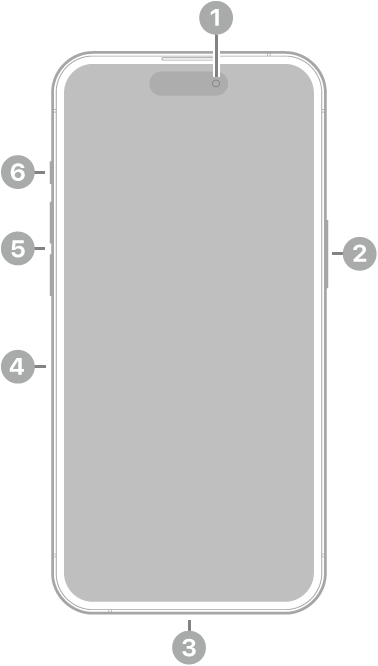
The front view of iPhone 14. The front camera is at the top center. The side button is on the right side. The Lightning connector is on the bottom. On the left side, from bottom to top, are the SIM tray, the volume buttons, and the Ring/Silent switch.

  • 1 Front camera
  • 2 Side button
  • 3 Lightning connector
  • 4 SIM tray (available on models purchased outside the U.S.)
  • 5 Volume buttons
  • 6 Ring/Silent switch

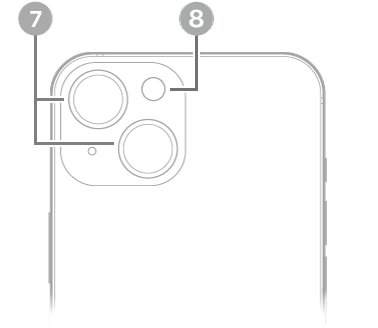
The back view of iPhone 14. The rear cameras and flash are at the top left.

  • 7 Rear cameras
  • 8 Flash

Get started with iPhone 14

Tag: iPhone

Learn the location of the cameras, buttons, and other essential hardware features on iPhone 16 Pro Max.

The front and sides show the front camera, side button, Camera Control, USB-C connector, SIM tray, volume buttons, and Action button, while the back shows the rear cameras, flash, and LiDAR Scanner. The SIM tray is available on models purchased outside the U.S.

The front view of iPhone 16 Pro Max. The front camera is at the top center. The side button and the Camera Control are on the right side. The USB-C connector is on the bottom. On the left side, from bottom to top, are the SIM tray, the volume buttons, and the Action button.

  • 1 Front camera
  • Side button
  • Camera Control
  • USB-C connector
  • SIM tray (available on models purchased outside the U.S.)
  • 6 Volume buttons
  • Action button

The back view of iPhone 16 Pro Max. The rear cameras, flash, and LiDAR Scanner are at the top left.

  • Rear cameras
  • 9 Flash
  • LiDAR Scanner

Get started with iPhone 16 Pro Max

Tag: iPhone

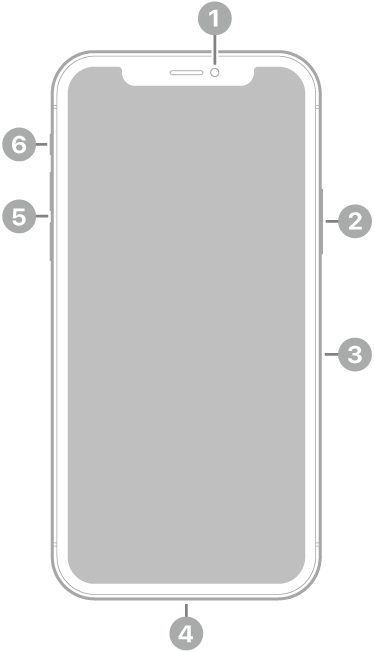
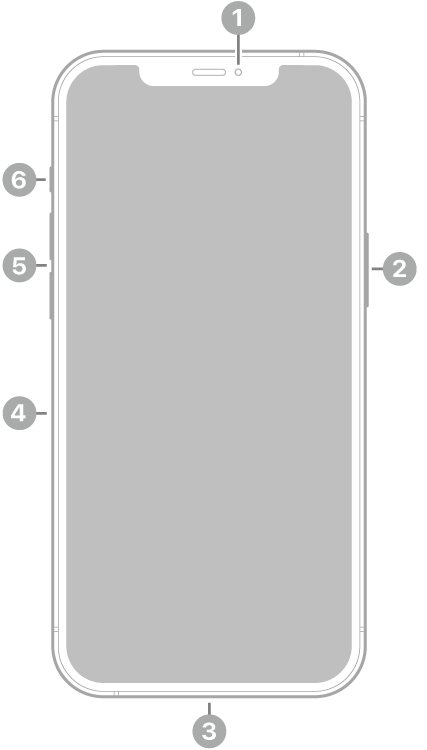
Learn the location of the cameras, buttons, and other essential hardware features on iPhone 12 mini.

Start with the front and sides, where you’ll see the front camera, side button, Lightning connector, SIM tray, volume buttons, and Ring/Silent switch. On the back are the rear cameras and flash.

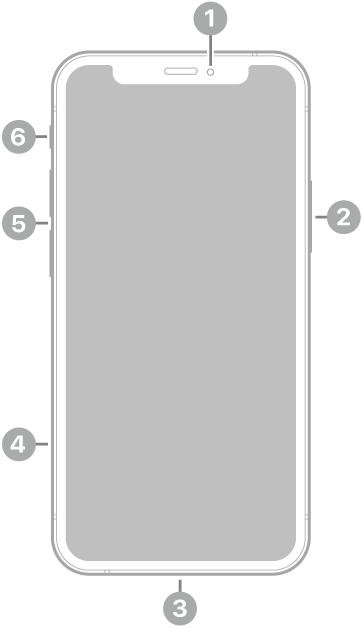
The front view of iPhone 12 mini. The front camera is at the top center. The side button is on the right side. The Lightning connector is on the bottom. On the left side, from bottom to top, are the SIM tray, the volume buttons, and the Ring/Silent switch.

  • 1 Front camera
  • 2 Side button
  • 3 Lightning connector
  • 4 SIM tray
  • 5 Volume buttons
  • 6 Ring/Silent switch

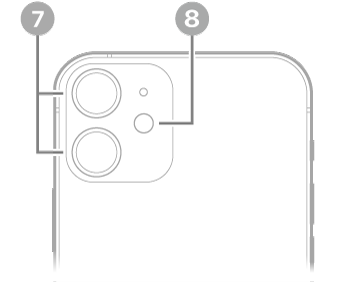
The back view of iPhone 12 mini. The rear cameras and flash are at the top left.

  • 7 Rear cameras
  • 8 Flash

Get started with iPhone 12 mini

Tag: iPhone

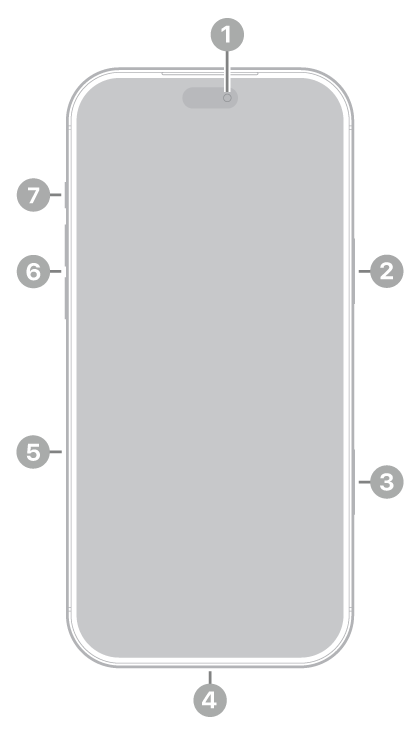
Learn the location of the cameras, buttons, and other essential hardware features on iPhone 18 Pro.

On the front and sides, you’ll find the front camera, side button, Camera Control, USB-C connector, SIM tray, volume buttons, and Action button. Around back are the rear cameras, LiDAR Scanner, and flash. The SIM tray is not available in all countries or regions.

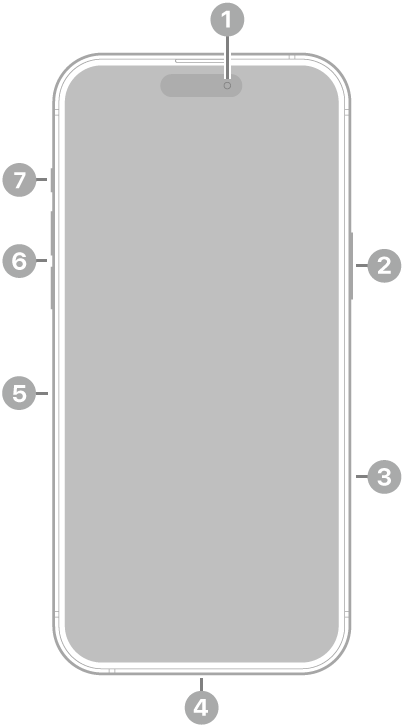
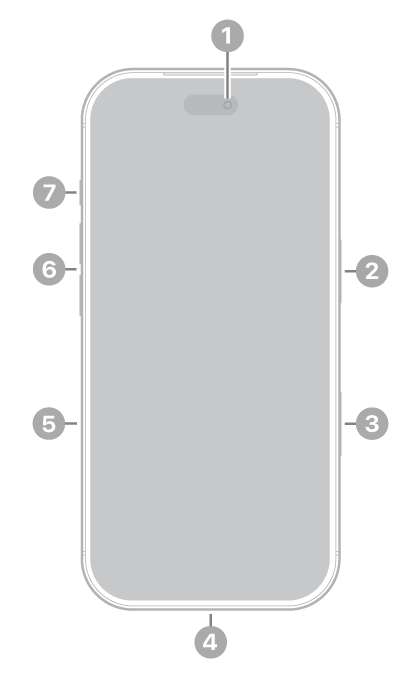
The front view of iPhone 18 Pro. The front camera is at the top center. The side button is on the right side. The USB-C connector is on the bottom. On the left side, from bottom to top, are the SIM tray, the volume buttons, and the Action button.

  • 1 Front camera
  • 2 Side button
  • 3 Camera Control
  • 4 USB-C connector
  • 5 SIM tray (not available in all countries or regions)
  • 6 Volume buttons
  • 7 Action button

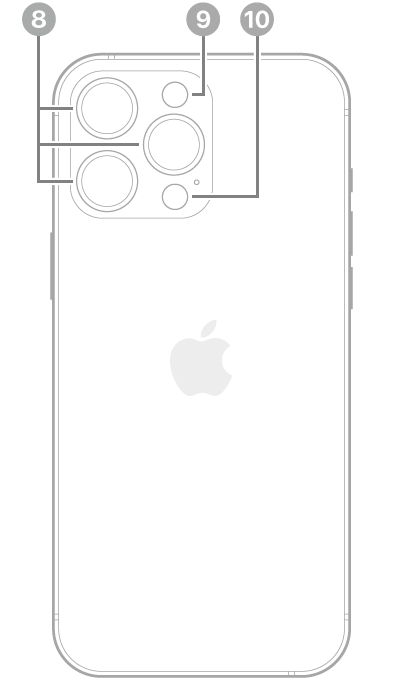
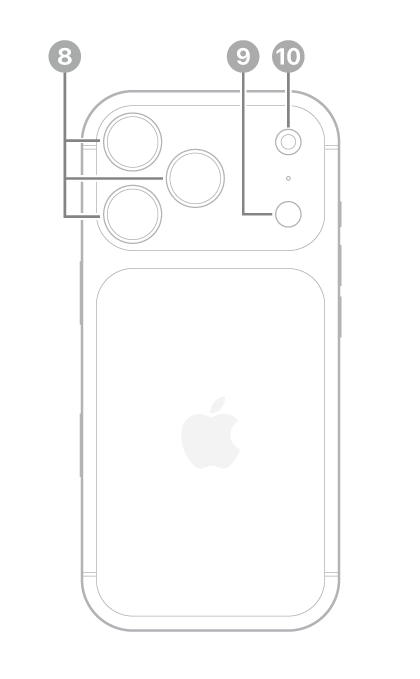
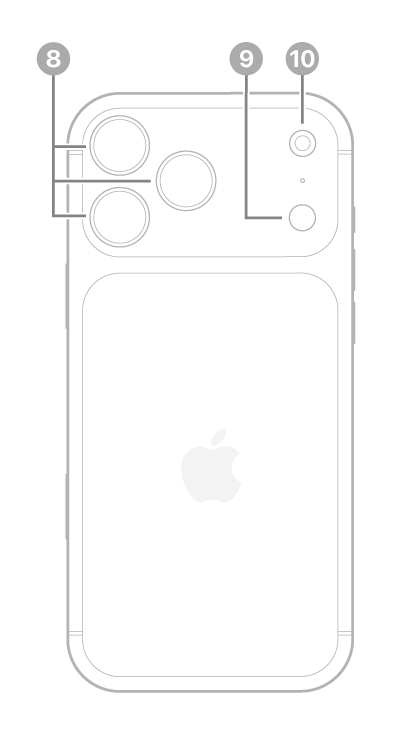
The back view of iPhone 18 Pro. The rear cameras are in the top left and the flash is at the top right.

  • 8 Rear cameras
  • 9 LiDAR Scanner
  • 10 Flash

Get started with iPhone 18 Pro

Tag: iPhone

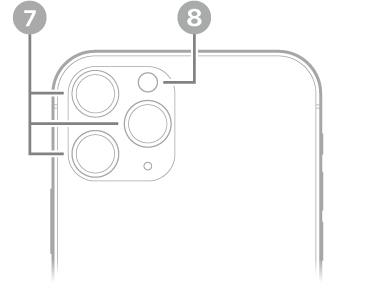
Learn the location of the cameras, buttons, and other essential hardware features on iPhone 11.

Start with the front and sides, where you’ll see the front camera, side button, SIM tray, Lightning connector, volume buttons, and Ring/Silent switch. On the back are the rear cameras and flash.

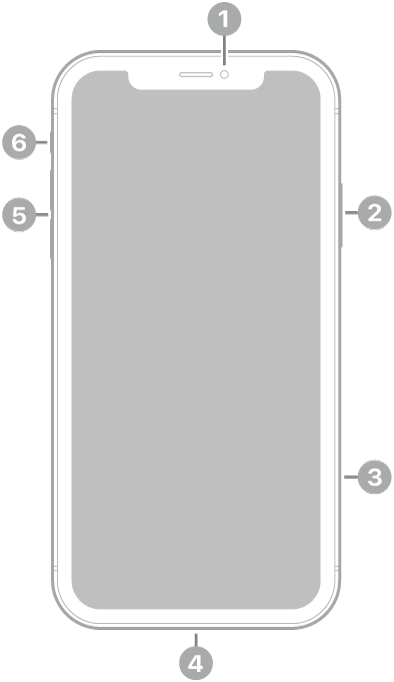
The front view of iPhone 11. The front camera is at the top center. On the right side, from top to bottom, are the side button and the SIM tray. The Lightning connector is on the bottom. On the left side, from bottom to top, are the volume buttons and the Ring/Silent switch.

  • 1 Front camera
  • 2 Side button
  • 3 SIM tray
  • 4 Lightning connector
  • 5 Volume buttons
  • 6 Ring/Silent switch

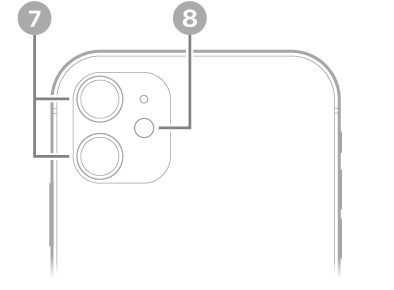
The back view of iPhone 11. The rear cameras and flash are at the top left.

  • 7 Rear cameras
  • 8 Flash

Get started with iPhone 11

Tag: iPhone

Learn the location of the cameras, buttons, and other essential hardware features on iPhone 15.

The front and sides show the front camera, side button, USB-C connector, SIM tray, volume buttons, and Ring/Silent switch, while the back shows the rear cameras and flash. The SIM tray is available on models purchased outside the U.S.

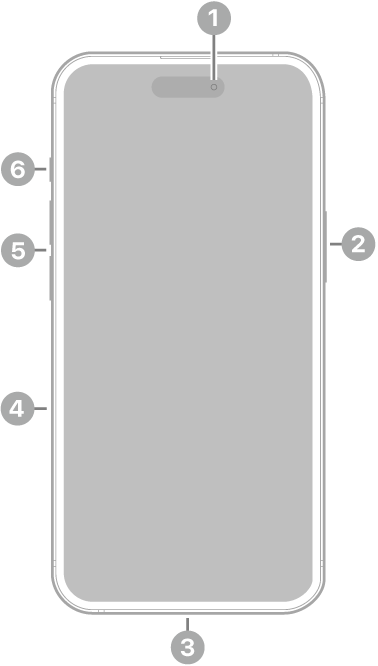
The front view of iPhone 15. The front camera is at the top center. The side button is on the right side. The USB-C connector is on the bottom. On the left side, from bottom to top, are the SIM tray, the volume buttons, and the Ring/Silent switch.

  • 1 Front camera
  • 2 Side button
  • 3 USB-C connector
  • 4 SIM tray (available on models purchased outside the U.S.)
  • 5 Volume buttons
  • 6 Ring/Silent switch

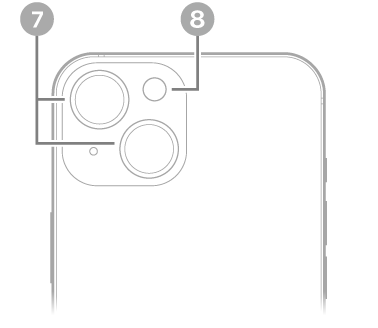
The back view of iPhone 15. The rear cameras and flash are at the top left.

  • 7 Rear cameras
  • 8 Flash

Get started with iPhone 15

Tag: iPhone

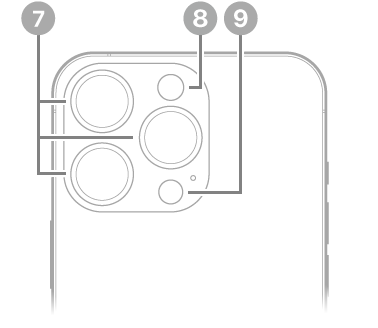
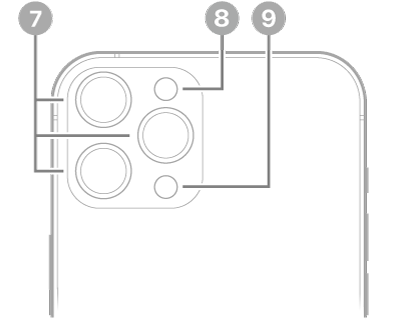
Learn the location of the cameras, buttons, and other essential hardware features on iPhone 14 Pro.

The front and sides show the front camera, side button, Lightning connector, SIM tray, volume buttons, and Ring/Silent switch, while the back shows the rear cameras, flash, and LiDAR Scanner. The SIM tray is available on models purchased outside the U.S.

The front view of iPhone 14 Pro. The front camera is at the top center. The side button is on the right side. The Lightning connector is on the bottom. On the left side, from bottom to top, are the SIM tray, the volume buttons, and the Ring/Silent switch.

  • 1 Front camera
  • 2 Side button
  • 3 Lightning connector
  • 4 SIM tray (available on models purchased outside the U.S.)
  • 5 Volume buttons
  • 6 Ring/Silent switch

The back view of iPhone 14 Pro. The rear cameras, flash, and LiDAR Scanner are at the top left.

  • 7 Rear cameras
  • 8 Flash
  • 9 LiDAR Scanner

Get started with iPhone 14 Pro

Tag: iPhone

Learn the location of the cameras, buttons, and other essential hardware features on iPhone 18 Pro Max.

The front and sides show the front camera, side button, Camera Control, USB-C connector, SIM tray, volume buttons, and Action button, while the back shows the rear cameras, LiDAR Scanner, and flash. The SIM tray is not available in all countries or regions.

The front view of iPhone 18 Pro Max. The front camera is at the top center. The side button is on the right side. The USB-C connector is on the bottom. On the left side, from bottom to top, are the SIM tray, the volume buttons, and the Action button.

  • 1 Front camera
  • 2 Side button
  • 3 Camera Control
  • 4 USB-C connector
  • 5 SIM tray (not available in all countries or regions)
  • 6 Volume buttons
  • 7 Action button

The back view of iPhone 18 Pro Max. The rear cameras are in the top left and the flash is at the top right.

  • 8 Rear cameras
  • 9 LiDAR Scanner
  • 10 Flash

Get started with iPhone 18 Pro Max

Tag: iPhone

Learn the location of the cameras, buttons, and other essential hardware features on iPhone 11 Pro.

It’s laid out in two views. The front and sides show the front camera, side button, SIM tray, Lightning connector, volume buttons, and Ring/Silent switch, while the back shows the rear cameras and flash.

The front view of iPhone 11 Pro. The front camera is at the top center. On the right side, from top to bottom, are the side button and the SIM tray. The Lightning connector is on the bottom. On the left side, from bottom to top, are the volume buttons and the Ring/Silent switch.

  • 1 Front camera
  • 2 Side button
  • 3 SIM tray
  • 4 Lightning connector
  • 5 Volume buttons
  • 6 Ring/Silent switch

The back view of iPhone 11 Pro. The rear cameras and flash are at the top left.

  • 7 Rear cameras
  • 8 Flash

Get started with iPhone 11 Pro

Tag: iPhone

Learn the location of the cameras, buttons, and other essential hardware features on iPhone 12 Pro Max.

On the front and sides, you’ll find the front camera, side button, Lightning connector, SIM tray, volume buttons, and Ring/Silent switch. Around back are the rear cameras, flash, and LiDAR Scanner.

The front view of iPhone 12 Pro Max. The front camera is at the top center. The side button is on the right side. The Lightning connector is on the bottom. On the left side, from bottom to top, are the SIM tray, the volume buttons, and the Ring/Silent switch.

  • 1 Front camera
  • 2 Side button
  • 3 Lightning connector
  • SIM tray
  • 5 Volume buttons
  • 6 Ring/Silent switch

The back view of iPhone 12 Pro Max. The rear cameras, flash, and LiDAR Scanner are at the top left.

  • 7 Rear cameras
  • 8 Flash
  • 9 LiDAR Scanner

Get started with iPhone 12 Pro Max

Tag: iPhone