Visual Voicemail shows you a list of your voicemail messages in the Phone app. You can choose which ones to play and delete without listening to them all, and a badge on the Voicemail icon shows the number of unheard messages.
When you store your voicemail messages in iCloud, they sync across your devices. Live Voicemail lets you see a real-time transcription as someone is leaving you a message, and you can even pick up the call as they’re leaving their voicemail.
Note: Voicemail, Visual Voicemail, and Live Voicemail are available from select carriers in select countries or regions.
Set up Voicemail
The first time you tap Voicemail, you’re asked to create a voicemail password and record your voicemail greeting.
- Start the Phone app on your iPhone.
- Do one of the following, depending on which Phone app layout you’re using:
- Unified layout: Tap the Filter button, tap Voicemails, tap Edit, and then tap Edit Voicemail Greeting.
- Classic layout: Tap Voicemail, then tap Greeting.
- Choose a greeting—Default or Custom; if you choose Custom, you can record a new greeting.
Turn on Live Voicemail
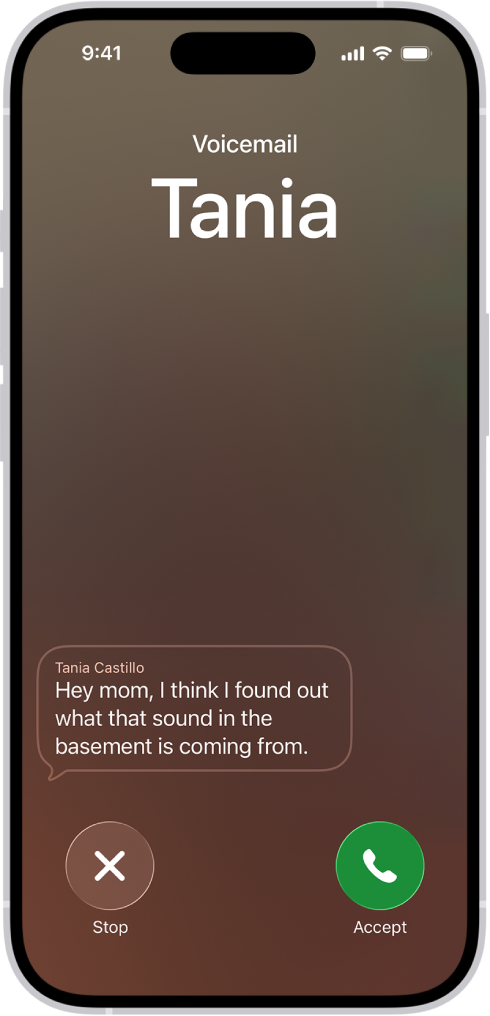
When a caller is sent to voicemail, your iPhone can display a transcription of the caller’s voicemail as they speak. (Calling and data rates may apply.) To turn on Live Voicemail, do the following:
- Start the Settings app on your iPhone.
- Tap Apps, then tap Phone.
- Turn on Live Voicemail.
The caller won’t be able to hear you and you won’t be able to hear them unless you choose to answer the call. To stop the incoming voicemail without answering or blocking the call, tap Stop. If your iPhone is turned off or is out of your carrier network’s range, the call is sent to carrier voicemail, if available. If you have Silence Unknown Callers turned on, unknown numbers go directly to Live Voicemail without ringing you first. Calls identified as spam by your carrier don’t go through Live Voicemail and are instead instantly declined.
Note: Live Voicemail isn’t available in all countries, regions, or languages.
Store Voicemail in iCloud
iCloud can store and sync your Live Voicemail and Carrier Voicemail.
- Start the Settings app on your iPhone.
- Tap your name, then tap iCloud.
- Tap See All next to Saved to iCloud and then turn on Phone & FaceTime.