When you subscribe to Apple Music, you can browse new and noteworthy music, music videos, playlists, and more.
You can explore featured songs and videos, browse playlists created by music experts, and explore new releases. You can also see upcoming concerts and what’s hot, listen to the top songs from around the world, and even discover your most-played music of the year.
Here’s how to find new music with Apple Music on iPad.
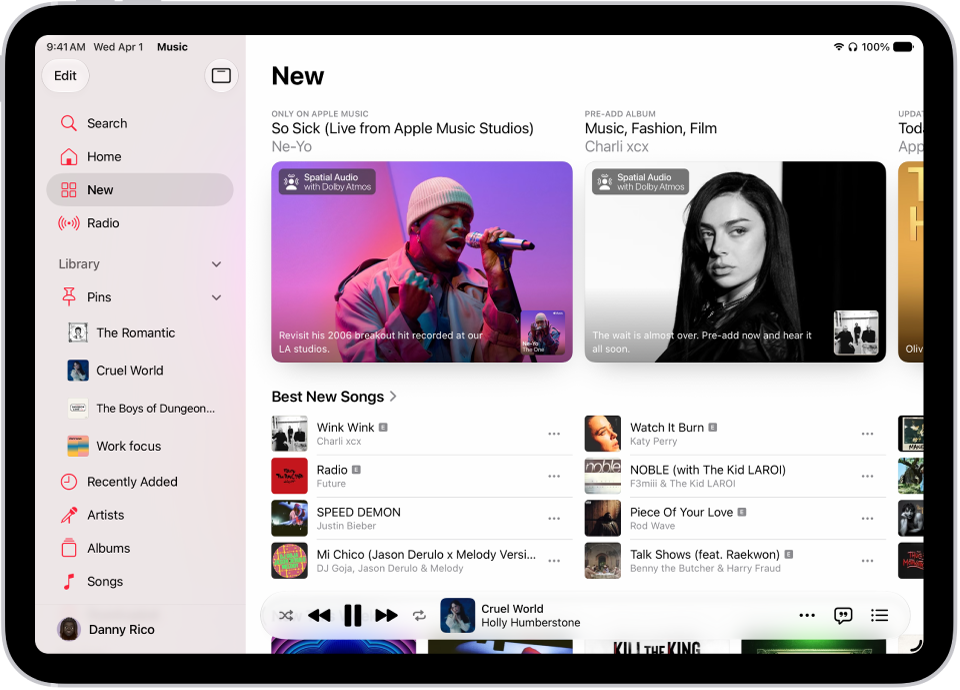
Discover new releases, featured music, and more
- Open the Music app on your iPad.
-
Tap New to find new music and then do any of the following:
- Explore featured music: Swipe through featured songs and videos at the top of the screen.
- Browse playlists created by music experts: Tap one of the many playlists created by music experts.
- Explore new music: Tap a song below the Latest Songs heading or swipe through the albums listed below New Releases.
-
See upcoming concerts: Go to any Artist page to see upcoming concerts. Scroll down to see details under All Upcoming Concerts. To view all upcoming concerts and update your location in the Concerts Hub, tap the Search tab and then tap Concerts.
Note: Concerts isn’t available in China.
- See what’s hot: Tap a song below the Trending Songs heading. Swipe left to see more songs.
- Listen to the top songs from around the world: Tap one of the Daily Top 100 playlists. These playlists reflect the day’s most popular songs in countries across the globe.
- Listen to songs from upcoming albums: Tap an album below Coming Soon and tap an available song to play it.
- Watch music videos: Tap Music Videos and then tap a featured music video or playlist of music videos.
- Play the day’s most popular songs: Tap Charts and tap a song, playlist, album, or music video to play it. Tap All Genres at the top of the screen to see the top songs and music videos in a genre you choose.
- Browse your favorite genres: Tap Browse by Genre, choose a genre, and then tap a featured playlist, song, album, artist, or radio station to enjoy music handpicked by music experts.
- Play music that matches your mood: Tap Moods and Activities and tap a playlist such as Feel Good, Romance, or Party.
Note: Swipe left on the album art to see more music, and if you want all the music in a section, such as New Releases, tap the Forward button next to the section’s name.
Discover your most-played music of the year
For every year you’ve been subscribed to Apple Music (and listened to enough music to become eligible), Apple Music builds a Replay personal chart ranking the songs you’ve played the most.
- Open the Music app on your iPad.
- Tap Home, swipe down to Replay: Your Top Music, and tap an option (for example, a year).
You can also see all your insights throughout the year on your iPad or at the Apple Music Replay website.
Discover music you’ve never played before
Using your listening history and taste profile, Apple Music recommends music you may like that you’ve never played before.
Siri: Ask Siri something like, “Play my Discovery Station.” Learn how to use Siri.
- Open the Music app on your iPad.
- Tap Home in the sidebar. Then swipe down to Stations for You.
- Tap Discovery Station.
Turn on or off new music notifications
- Open the Music app on your iPad.
- Tap the Show Sidebar button. Then tap your name at the bottom of the sidebar.
- Tap Notifications, then turn on (or off) New Music.