In the Photos app, you can find collections of photos and videos organized by media type. You might browse all your Portrait mode photos or time-lapse videos in one place.
You can reorder the list of media types to put the ones you use most often at the top, and pin your favorite media type to the Pinned collection.
Here’s how to locate photos and videos by media type on iPad.
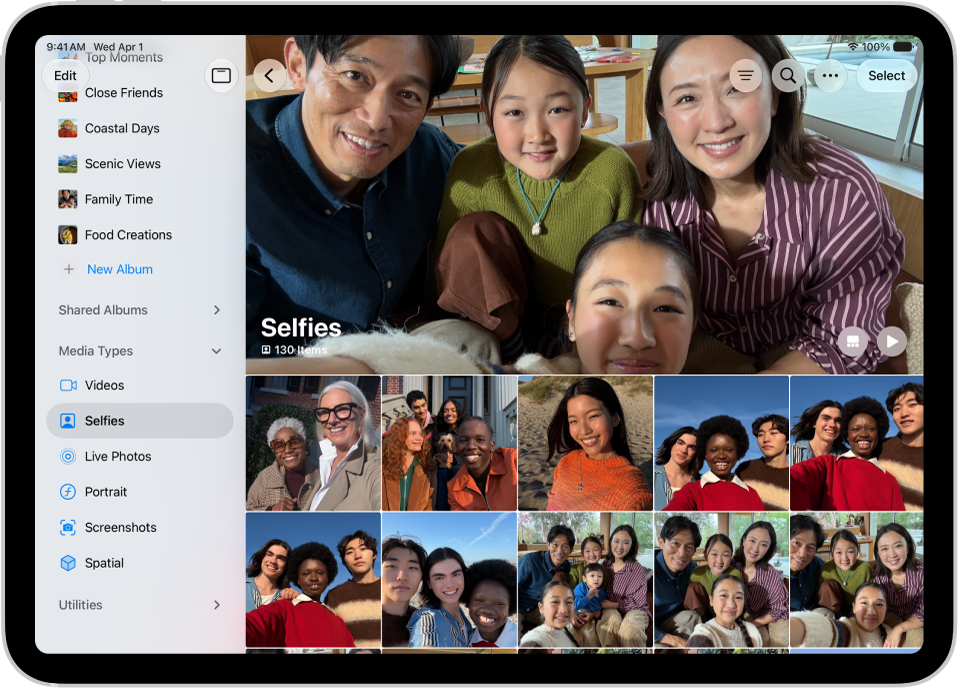
Browse photos and videos by media type
- Start the Photos app on your iPad.
- Tap Collections, scroll down, and then tap Media Types.
- Tap the type of photo or video you want to view.
Quick tip: Add your favorite media type to the Pinned collection, and you can locate it quickly. See our guide, Pin collections and albums.
Reorder media types
To help you find the media types you access most often, you can reorder the list.
- Start the Photos app on your iPad.
- Tap Collections, then tap Edit at the top of the screen.
- Touch and hold the media type you want to reorder and drag it to a new position.
- When you’re done, tap the checkmark at the top of the screen.
See also
- Search for photos and videos on iPad
- Find recently saved photos and videos on iPad
- Find receipts, QR codes, recently edited photos, and more on iPad
Tag: Photos