Apple wants you to avoid damaging your hearing when you’re using an iPhone (but, strangely, not a Mac). In Settings > Sounds & Haptics > Headphone Safety, enable Reduce Loud Audio, and you can set a threshold above which your iPhone 18 Pro or iPhone 18 Pro Max will moderate sound. It doesn’t create an abrupt cutoff, but it keeps you from hearing sounds above a particular level, measured using standard decibel units.
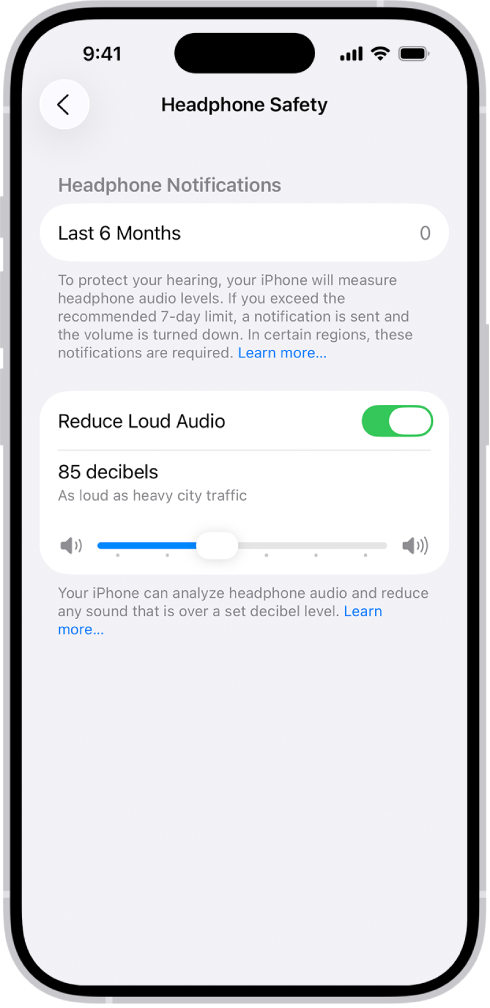
However, once you enable this setting, it affects all external audio devices, not just wired and wireless headphones and earbuds. Because Bluetooth doesn’t allow a phone or tablet to know what’s connected, just the kind of Bluetooth data requested, Apple throttles the maximum sound to all Bluetooth devices, including externally connected speakers.
If you forgot that you enabled Headphone Safety or you expected it wouldn’t affect external speakers, your mystery is now solved. My spouse and I troubleshooted the problem when it turned out my phone could produce a louder volume to an external Bluetooth speaker than hers: she had Headphone Safety on, and I did not.
Apple lets you categorize Bluetooth devices in Settings > Bluetooth. Tap the More Info button next to the device name, then tap Device Type. But Headphone Safety doesn’t refer to that choice if you’ve set it, nor does Apple show that sound is being throttled when the safety feature is turned on.