In the Readiness app on Apple Watch, you can view a readiness score that helps you understand when you are likely ready to push yourself and when it’s time to take a rest. You’ll need to set up Activity and Sleep, and wear your watch to bed for at least 7 nights first.
Note: The Readiness app is available on Apple Watch Series 12 and Apple Watch Ultra 4 for ages 13 and older.
Ranging from 0-10, your readiness score takes into account the following metrics:
- Activity: Recent Activity data including active calories, workout effort ratings, and training load data.
- Vitals: Overnight metrics like heart rate, respiratory rate, wrist temperature, heart rate variability (HRV), and blood oxygen, and heart rate measured during the day. These are analyzed versus your recent baseline, which requires you to sleep with your watch at least 7 of the past 49 nights.
- Sleep: Recent sleep score data.
Note: Readiness does not account for all health factors such as existing conditions or medications, and should not be solely relied on to determine whether and when it is safe to exercise. For important information about using the Readiness app safely, see Important safety information for Apple Watch. For models of Apple Watch purchased in the United States on or after January 18, 2024 with part numbers ending in LW/A or LS/A, Blood Oxygen is not available in the Vitals app.
Set up Readiness
Before you can see your readiness score, check that you’ve done the following:
- Set up your height, weight, and age in the Fitness app on iPhone.
- Set up Activity. See Track daily activity.
- Set up Sleep and wear your Apple Watch Series 12 or Apple Watch Ultra 4 to bed for at least 7 nights. See Set up sleep schedules and View your sleep score.
- Set up Overnight Vitals. See Track your vitals.
View your readiness score
To view your readiness score, do the following:
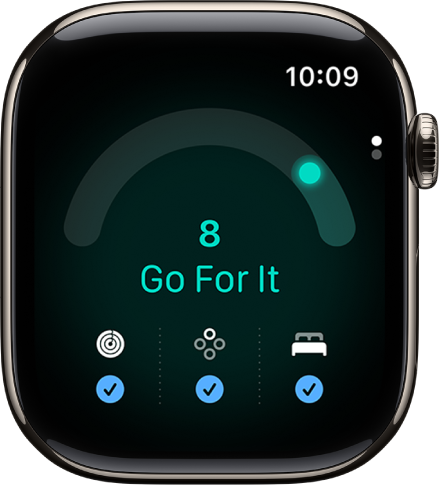
- Open the Readiness app on your Apple Watch.
-
Tap the Activity, Vitals, and Sleep buttons to learn more.
Note: Your readiness score updates throughout the day based on calories burned, naps, and your daytime heart rate.
You can also view your readiness score in the Fitness app on iPhone to learn more. Go to the Fitness app, then tap Readiness (you may need to scroll to the bottom of the screen).
Possible readiness scores
Your readiness score, which ranges from 0-10, has the following breakdown:
- Recover: 0-1
- Pace Yourself: 2-4
- Ready: 5-7
- Go For It: 8-10
Not all features are available in all areas and on all models, Apple notes.
See also