









Buying a shiny new iPhone is a great feeling. All those features and cameras to experiment with can be exciting. But in the end it’s still a phone – so you’ll want to ensure that people can reach you on your existing number. Here’s how to easily keep your old number when switching to a new iPhone 18 Pro Max.
Is my phone number connected to my iPhone?
The first thing to understand is that your phone number isn’t actually attached to the iPhone itself, but rather to the SIM card you put inside it. So if you’re not changing your network supplier, it’s just a matter of taking the SIM card out of the old iPhone and placing it in the new one. Your number will automatically follow, as your iPhone reads it off of the SIM card.
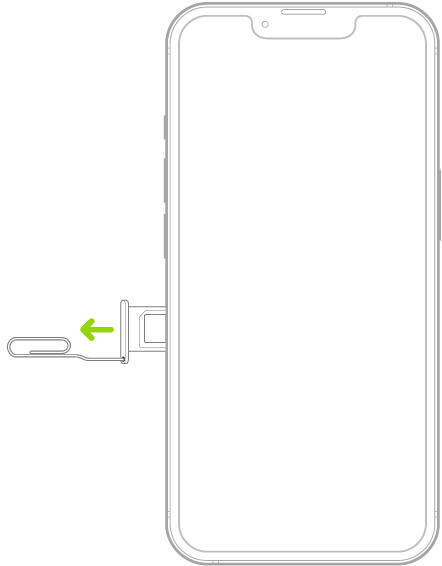
Note: iPhone 18 Pro Max models purchased in the United States can only be activated with an eSIM.
Some carriers support transferring a phone number from your previous iPhone to your new iPhone without needing to contact them. If you’re asked to transfer your phone number during setup of your new iPhone, transfer your physical SIM or eSIM using the onscreen prompts.
If you’re moving networks, then it’s a little different, as you’ll see below.
Can I use any iPhone with my SIM card?
If you’re buying a new iPhone 18 Pro or iPhone 18 Pro Max directly from Apple or another retailer, then it will be unlocked, meaning it can work on any network. The upshot of this is that popping your SIM card inside will instantly turn it into a phone with your existing number.
If you’re buying an iPhone second-hand or a kindly family member is passing it on to you, then you’ll need to check if it’s locked. This is usually the case when people buy iPhones on a contract from a network provider, such as T-Mobile, EE, Verizon or AT&T. These will more often than not be set up (or locked) to that particular network and trying to use it on another one will give you a warning that the new network isn’t supported.
How to keep your old number when moving to a new network provider
When moving from one network provider to another, things get a bit more complicated, but it’s nothing too Herculean.
One thing to bear in mind: you won’t be able to leave your current contract unless you’ve passed the agreed number of months. So, for example, if you’ve signed up to a 24-month contract, leaving any time before that will mean you’re liable to an early exit fee. These can be quite sizeable depending on how long your plan has left to run.
To find out your current status, log on to your network provider’s site and look at your account, or call the company’s customer service number and ask.
You’ll want to contact the new provider you want to use and give the company’s customer service reps the account number of your existing contract. They should then be able to sort things out on your behalf – just remember to tell them that you want to keep your number. You may also need to tell them your PIN code if there is one on your existing account. Don’t forget, you can always pop into one of the company’s stores and ask for help with the process.
So, there you go, the easy way to keep your number when you move to a new device.


