Got a tip for us?

iPhone Apps

Your iPhone is more than a phone; it’s a tool to make your life easier.

One of the greatest benefits of having an iPhone is its versatility. You can use it for work, browsing the web, and even playing some games. And most of this is thanks to all the apps the App Store has to offer.

Whether it’s booking a ride or sending money right from your iPhone, App Store has a lot of useful apps that’ll make your everyday life a bit easier. Keep reading to find out more.

Spotify

Even though Apple Music is better than Spotify in certain areas, Spotify is the best all-around music streaming app for iPhone. The app has the cleanest and most user-friendly interface in the field, and it features the strongest music discovery algorithms and social components for swapping music with your friends.

If you want to get rid of advertisements and have unlimited song skips, you can drop $10 per month for the Premium tier.

1Password

Maybe you are not aware, but you probably spend a lot of time trying to remember your passwords, especially if and when you forget one to an app you use on a regular basis.

1Password is a great app for iPhone that saves and remembers all your passwords for you in one place, so you can access all your favorite sites with one tap.

The app has a built-in password generator, so you won’t have to think up your own passwords. You’ll save time and keep all your accounts safe and secure.

Spark Mail

Usually, working with emails is quite cumbersome yes, boring, too). However, Spark Mail is designed to enhance the experience of working with your emails tremendously.

It’s worth pointing out that the features of Spark Mail are simple, yet deep and interactive. One of the great features of this nifty app is Smart Inbox that lets you focus on the most important emails and skip the noise. On the other hand, with Shared Inboxes, you can easily handle your inbox together with other people. The tool makes it possible to create and write collaborative emails with multiple users in real-time!

Other notable features include the ability to schedule, snooze, group, label, organize your emails, invite colleagues to discuss specific threads, and more!

Ulysses

Writers of any kind have got to try Ulysses! With an interface that is so easy to navigate and use, users can truly focus on what they write.

One thing that sets Ulysses apart is that when writing, you don’t have to worry about saving the document. The app saves your work on the fly as you write, allowing you to immerse yourself exclusively in what you are doing. In addition, the app features a built-in proofreader and editing assistant allowing users to detect possible errors or inconsistencies in the text.

Finally, the app offers a flexible export feature, you can create eBooks, export in all common text formats, or publish directly to platforms such as WordPress, Medium, or Ghost.

Uber

If you need to get somewhere and don’t own a car, hop in someone else’s ride. Uber allows you to call upon a private driver in your area who will help you get to where you need to go.

Stuck at the shopping mall? Call an Uber. Got an emergency call, and you have to travel immediately? Call an Uber. The uses are infinite, allowing you to get around with ease while also avoiding drunk drivers and other hazards. It’s all the ease of a taxi, at an affordable price, and without the fumbling for cash at the end.

PayPal

The easiest online checkout method is right on your iPhone. The app makes it incredibly easy to manage your PayPal account, send and receive payments, and more. The app can also notify you of transactions, offering reliable reminders and alerts when you use PayPal as a payment method or have an upcoming bill due.

PayPal offers Face ID and Touch ID authentication for easy sign-ins, alerts any time funds are sent or received, and you can make transfers straight from your iPhone.

While you may never replace your bank with PayPal, the conveniences and security that the app brings to the table are worth the effort of linking a bank account.

Conclusion

Just like your iPad, Mac, or Apple Watch, your iPhone is filled with a ton of cool and useful apps you can use in your everyday life. Technology can impact your life in many ways, so be sure to try all these apps out and use the ones that help you out the most. If we missed any useful apps for iPhone, drop a comment and let us know.

Are you doing enough to protect your kids online? With the best parental control app for iPhone, you won’t have to think twice.

As the world continues its relentless charge into the digital age, it’s more important than ever to ensure your children are protected from some of the web’s more mature content.

It’s impossible to know just how much of the internet is devoted to adult material, but estimates suggest pornography alone accounts for anywhere from 5–35 percent of all websites. And that’s before you count topics such as gambling, extreme profanity, dating sites, and other associated themes.

Luckily, the number of parental control apps for iPhone has been growing at an impressive rate over the last few years. Parents now have a wide choice of software to choose from.

We took a look at some of those parental control apps for iPhone and came up with the best.

The best parental control app for iPhone right now is FamiSafe.

What is FamiSafe? Why should you download it?

Developed by Wondershare, FamiSafe is an award-winning parental control app that allows you to monitor your kids without jail breaking the device. It can help you protect your children from malicious people, websites, places, and more.

FamiSafe features a host of comprehensive tools to help you oversee and manage your family’s internet activity. It doesn’t matter whether the children are young, approaching their teens, or preparing for exams—FamiSafe has tools to suit.

Cyberbullying protection, location tracking, app blocking, web filtering (for all types of adult-level content), and screen time controls are all included. As a parent, you get access to an activity report, notifications when your kids attempt to breach rules, a browser report (including deleted history and incognito browsing), and even the ability to set a schedule and set alerts when your children visit undesirable areas in your town (or beyond).

Furthermore, FamiSafe has tools to alert parents when unsuitable images are exchanged, intended to protect children from sextortion and bullying.

If you are a careful parent who wants to keep a safe online space for your kids, then the FamiSafe Software is the best bet. However, before purchasing your FamiSafe subscription, you should know about its key features.

Top Famisafe Features

There are plenty of useful features that make Famisafe a great option for many people.

1. Screen Time Management

Famisafe really excels in their Screen Time Management feature that helps parents restrict the amount of time kids spend on their devices. This can be helpful for parents who want to limit their kids’ screen time.

2. Activity Reports

Famisafe provides detailed activity reports, which can help parents keep track of their kids’ online activity. These reports include information on websites visited, apps used, and Social Media posts.

3. Location History

The Location History feature shows the list of all the places that your kid has been to. Not just the visited places but the time for which they stayed there will also appear on the screen. If your kid loves exploring new places and you’re always tensed, thinking about the places they go to, then it’s time to keep a record of all those places.

4. Driving History Reports

Famisafe offers driving history reports, which can be used to keep parents updated on their kids’ driving activity. The stats it shares with you include their driving time, route, hard braking, average speed, and top speed. It even allows you to set a speed limit so that whenever they cross the set limit in their car or bike you will get a notification about it. This can be helpful for parents who want to keep track of their kids’ driving habits or reward them for safe driving.

5. Real-Time Location Tracking

Famisafe Real-Time location tracking can be used to track the location of your kids. With the Real-time Location function, you can get the exact spot where your child is roaming. This function can be a real lifesaver if your kid is a minor and easily forgets the route home.

Not just the location tracking, you also get information about the battery life of your child. So if the battery life is really low, you can call your child and ask them to come back home or charge the phone somewhere asap. This can be helpful for parents who want to keep track of their kids’ whereabouts.

6. Geofencing tracking

Famisafe also includes geofencing, which can be used to set up safe zones for your kids. This feature creates imaginary fencing on the borders of the location set by a parent. The fencing is to be created when you don’t want your child to cross the area that you set using the geofencing feature.

The Geofencing feature of the app immediately sends you a notification whenever the child leaves or enters the set area. This can be helpful for parents who want to keep their kids safe while they’re out and about.

This is also a handy feature when your child misplaces their phone.

7. Safe Search

The Famisafe safe search feature can be used to ensure kids only see appropriate content when searching the internet. It can filter any harmful search results from Google, Bing, or Yandex. This helps parents keep their kids safe from inappropriate content online.

8. Explicit Content Detection

Famisafe also includes explicit content detection, which can be used to block inappropriate content from being accessed by kids. This feature detects explicit or inappropriate words in all apps, including Snapchat, Twitter, Facebook, and more.

9. Inappropriate Pictures Detection

Famisafe include inappropriate pictures detection which can help parents block their kids from accessing inappropriate images. It will recognize nude photos and pornographic images on your child’s device and send you an instant alert.

10. Web Filtering

Web filtering will block inappropriate websites from being accessed by kids. Parents can block specific websites or categories of websites, such as adult content, social media, and gaming websites.

11. Browser History

With FamiSafe, parents can view their kids browsing history with ease. The browser history feature can even track Incognito search history. So even if your child makes searches in the private window still you will be able to see it. All of this can be done remotely without needing to access the physical phone.

12. YouTube Monitoring

The FamiSafe block app keeps an eye on your child’s YouTube activity. If you’re unhappy with what your kid has been consuming on this video-sharing platform, you can restrict certain content and even channels.

13. Suspicious Text Detection

FamiSafe phone monitoring gives immediate warnings when it finds offensive and upsetting words sent to your child through Facebook, Gmail, Instagram, Kik, Messenger, SMS, Twitter, Whatsapp, or YouTube.

It’s possible to link your kid’s social media accounts to your device and choose the category of suspicious terms to monitor. Also, you can add trigger words to FamiSafe’s database.

Design and Ease of Use

Famisafe is designed to be easy to use for parents and kids. It includes a user-friendly dashboard and apps for all major platforms. Famisafe is easy to set up and get started, and parents and kids can easily access the features they need.

Compatible Devices

FamiSafe software is compatible with Kindle Fire OS, Android, iOS, macOS, and Windows operating systems. This means your kids will be protected regardless of which device they are using.

How to set parental controls on iPhone using Famisafe

Step 1: To set up Parental Controls, download the app on the parent’s phone and the kid’s iPhone and install it.

Step 2: After installation, launch the app and register for a FamiSafe account. You can use your email, Google or Facebook account or Apple ID for registration. The same account can be used on both devices.

Step 3: On your child’s iPhone, log in with your FamiSafe account, setting the identity as Kid, and entering the corresponding name and age.

Step 4: Select the OS of the kid’s device and grant the necessary permissions such as Location access and install the Mobile Device Management File.

Step 5: On your phone, log into the app with your account credentials and select Parent to view activity on the child’s device.

It’s really that simple to get started. Moving forward, the parents will have access to all the activities of the kids on their iPhones remotely. The parents can track the kid’s location, iPhone usage, restrict specified apps and websites, lock games, and also monitor when they are using their iPhone.

FAMISAFE – LIMITATIONS AND ADVANTAGES

Just like any other parental control app, FamiSafe also has certain pros and cons that you should know in advance.

Pros

  • A transparent Parental control app.
  • Real-time location tracking and multiple geofencing.
  • Smart scheduling and screen time features.
  • You can monitor and set restrictions on multiple phones from your FamiSafe app.
  • Wide range of device monitoring options.
  • No need to jailbreak iPhone to install FamiSafe.
  • Thoughtful and useful features.
  • Minimal and easy to use UI
  • Quite accurate.

Cons

  • Your kids can easily know you’re tracking them. After all, the app does not work invisible.
  • The child can delete the app (you will get an alert).

How Much Does FamiSafe Cost?

FamiSafe is one of the cheapest monitoring apps for the kids especially when you compare the price to its amazing features. The tracking app is available in three pricing plans: monthly, quarterly, and annually.

Monthly Plan costs $10.99 / month, with protection for up to five devices. The QUARTERLY plan will cost you $20.99 / Quarter, and ANNUAL plan for $48.79 / Year.

FamiSafe accepts almost all types of cards, be it, American Express, Visa, Mastercard, PayPal, and more.

Protect Your Kids Online With FamiSafe

FamiSafe is an excellent app for controlling and monitoring your kid’s iPhone. Its a reliable parental control app that will help you to remotely track your kids and secure their iPhone usage. With FamiSafe installed on your kids’ iPhone and your own device, you’ll be taking the precautions necessary to ensure online and physical safety. The cost of the software is quite affordable in the long run and it also offers a wide range of features. Therefore, we recommend it to our readers.

There are some things we have come to take for granted that would have seemed absurd twenty years ago. One such thing is the fact that we walk around with devices that cost a thousand dollars in our pockets, constantly at risk of being stolen.

We can’t afford to leave our phones in a safe at home, of course. The best we can do is install some security apps and stay alert. It is also crucial to get theft insurance for your phone. No matter how prepared you may be, your phone could always be stolen.

What anti-theft apps can you get for your phone? Here are the best options for iPhone and Android.

Best Anti-Theft Apps For iPhone

In most cases, the best apps for Android and iPhone tend to be the same. However, when it comes to theft, the options are very different. This is because Apple is very particular about what third-party apps are able to do on an iPhone. You’ll find very few anti-theft apps for your iPhone. These are the ones you should consider installing.

Find My iPhone

Apple’s native anti-theft app is excellent, even if it does not do everything other anti-theft apps do. It is ideal for people who have multiple Apple devices, as you can access Find My on any of these devices.

Find My iPhone is not just for tracking a stolen phone either. You can get your phone, tablet, or Macbook to beep using the app, leading you right to it. But its anti-theft properties go beyond tracking. You can use Find My iPhone to erase your phone remotely. This way, a thief cannot get access to your data even if they figure out your PIN.

Find My iPhone is automatically turned on. However, if you have privacy concerns, you can switch it off.

Prey

One of the few anti-theft iOS apps worth downloading is Prey Find my Phone Tracker. It offers one of the few things the Find My iPhone app does not. You can take a photo of the thief using the front and back cameras. It can also be set to trigger an alarm if your phone is taken out of specific zones.

The problem with using third party apps is that you are giving them a lot of access to your phone. If you don’t fully trust the company behind the app, you should not download it.

Best Anti-Theft Apps For Android

There are a few anti-theft apps for Android. However, there has been something of a crackdown on these apps in recent days. The app most considered to be the best anti-theft app for Android – Cerberus – was banned from the Google Play Store after having been exposed for selling their code to malicious parties and putting Android users at risk.

Nonetheless, the following anti-theft apps are available and effective.

Find My Device

This is the native Android tracking app. In terms of features, it is fairly similar to Apple’s Find My iPhone. You can track its location as well as erasing your data remotely. You can also send a message to the screen of your phone for whoever has stolen or found it.

Anti-Theft Alarm

Anti-Theft Alarm is not meant to be a complex security system. Rather, it serves as an alarm to alert you that something is wrong. You can set it to go off when your phone is taken from its charger, when the SIM card is removed, and in other scenarios. The sound will not stop until a passcode is entered. You can also activate it remotely and it will sound even if the phone is on silent.

McAfee Mobile Security

If you are going to give permissions to an app to access all aspects of your phone, you can’t do better than trusting McAfee, the antivirus company that has led the way for decades. Their mobile security app has tracking features, as well as the ability to capture an image of the thief.

You can set it so that if a person enters the code incorrectly 3 times, the phone is locked and a photo of the person is captured from the front-facing camera.

Losing your phone to theft is incredibly frustrating. The best anti-theft apps will help you find it or, at the least, keep your data from the hands of the thief.

Circleboom tweets deleter

One of the most common questions regarding using Twitter is how to delete all Tweets and retweets. This is a deceptively simple question, and we’re going to push aside any of the complexities of deleting tweets, and instead we’ll show you the single most direct method of deleting all Tweets and retweets in 2024, since that is usually what most people are looking to do.

If you’ve ever needed to delete all Tweets and retweets, you know how challenging it can be. That’s where Circleboom Twitter and its arsenal of tools to manage your Twitter account come into the picture. It lets you better manage your Twitter account by allowing you to delete all tweets, delete retweets, and delete all Twitter likes in just one click. You can easily search for your specific tweets and replies through their powerful search engine and get them deleted anytime you want. You can either choose to delete your tweets one by one or you can select their bulk delete option to get rid of all your tweets through a single click.

Moreover, you also get the liberty to view and delete Twitter archive via date range, language, media, etc.

In this article, I’ll review Circleboom and show you how to delete tweets on your iPhone, iPad, or Mac!

What is Circleboom?

Circleboom is a Twitter management tool that helps you to create consistent tweeting schedules, analyze your followers and target audience, delete tweets/retweets, unlike tweets, and view analytics.

Circleboom was first created in 2017 and has continued to alter and expand their tools. It’s especially become known for its ability to delete all tweets and retweets.

This tool is particularly useful for those who have had their Twitter account for a while and want to go through and delete things that aren’t particularly relevant anymore.

While there is no shortage of tweets deleting tools, most of the premium offerings come with a very high price point. As for the free tools to delete old tweets, most of them are trash – forget about deriving a reliable solution to delete your Tweets.

So, when I stumbled upon Circleboom, a social media account management web-application a few days ago, I (kind of) pushed it aside almost instantaneously. It was only when I tried it out that I realized that Circleboom is different from the rest on several pivotal fronts – so much so that most online social media account management tools can fail to compete with its versatility. And that’s what has propelled me to write a comprehensive review of this tool.

Circleboom

In this review, I’ll break down its delete services including:

  • Delete all tweets
  • Delete all retweets
  • Delete all likes
  • Delete Twitter archive

Let’s delve into all of these features in a bit more detail.

Delete All Tweets

With Circleboom Twitter, it’s pretty easy to remove all of your Tweets! You can delete any (or all) of your Tweets and replies with a few clicks.

How to Delete Your Tweets Using Circleboom:

If you want to delete your tweets one by one or all at once, you can do it super quickly using Circleboom. Simply follow these steps:

Step 1: Sign in with your Twitter account

Step 2: Navigate to the menu, and select My tweets

Step 3: You will see various options, out of those select delete tweets

Step 4: Now select the tweets one by one that you want to delete and click on the Delete selected button. If you want to delete all the tweets at once, then just simply select, Delete all tweets

Please note: Once deleted, your tweets are lost, you cannot recover them. Hence, please think and make sure before doing it.

It is usually advised to download your Twitter archive first to be on the safe side.

Delete all retweets

With Circleboom, you can delete all of your retweets up to the most recent 3,200.

How to Delete Your Retweets Using Circleboom:

Step 1: Log in to the Circleboom dashboard.

Step 2: Navigate to the Circleboom menu on the left side of the window.

Click on the drop-icon next to “My Tweets”. Go for “Delete RTs”.

Step 3: After you specified the selection, click on the “Delete selected RTs” button in red. That’s it!

Here, you may consider specifying your retweets that you want to delete. For instance, you can filter your retweets by searching some keywords, hashtags, and date info on the search bar on the right.

Delete all likes

Circleboom downloads up to 3200 of your recent likes and enables them to filter them out by using the free-text search option. Just like tweets, you can either pick and unlike any of your likes individually or you can unlike Twitter likes all at once, using the bulk, unlike option.

How to Delete All Twitter Likes Using Circleboom:

Step 1: Log in to the Circleboom.

Step 2: Navigate to the Circleboom menu on the left side. From there, click on “My Tweets” and “Unlike” respectively.

Here, you can find your recent Twitter likes listed.

Step 3: On the screen prompting, you can go for “Unlike All” to unlike all your Twitter likes.

If you don’t want to remove all your Twitter likes in bulk, you can easily specify them via using the search bar on the right. Hence, you can specify your Twitter Likes via typing in keywords, hashtags, and date.

Step 4: Once you are done, you can finish the process to delete all Twitter likes, click on “Delete selected”.

That’s it!

Note: Twitter does not allow access beyond the most recent 3,200 Twitter likes. That’s why it is not possible to delete all Twitter likes if they are more than 3,200.

Delete Twitter Archive

You can also delete your complete Twitter archive using Circleboom. You simply upload it after requesting it from Twitter. They’ll delete it all, or you can filter your tweets prior to deletion. You can delete your previous tweets, replies and likes.

Circleboom Pricing

Circleboom is basically free for everyone. However, it does offers three plans which are as follows:

  • Pro: $15.83/mo
  • Premium: $34.99/mo
  • Business: $79.99/mo

Circleboom is available as an iOS app (iPhone) and a browser version (Mac or

Apps are also frequently used as a business tool and different apps could be helpful to make the business grow. So, what are the most popular apps of 2023 and what are they used for?

Apps have long been a natural part of our everyday life as we use apps for a wide range of important and less important matters. Whether we need to find our way around a new city or collect inspiration for a new meal. As much as we use apps in our personal lives, apps are also quite useful for businesses. If you want to know what the most popular business apps of 2023 are if you are questioning how and why you should read further.

The social media – moving business online

The first three on the list are all social media. Most businesses have recognized that it is necessary to make a mark on social media. This is where people use a lot of their time. Therefore, it is a great potential line to plenty of different customers. The different social media platforms can help you catch a wider audience and establish a clearer presence.

These are important factors of surviving in a competitive field where a lot of businesses are fighting for the consumers’ attention. Breaking into the consumers’ screentime is one of the most effective ways to get more customers. And with great algorithms, the content is often targeted towards the consumers most likely to be interested in the content. If you are using social media, you should gather tips and tricks on how to create accessible content.

Website creations and communications

Even though social media is important, your website is necessary as you will need to have a place to guide all the potential customers too. Apps like WordPress and Weebly that present templates for you to develop your website are also to be found on the list of popular apps. You won’t get far if you’re not able to present a business website, so these are necessary apps.

Mailchimp and Google Drive are two apps that are consistently popular to businesses as they offer channels for communication. They present intuitive and easy solutions to something as indispensable as communication and sharing information and documents.

Keeping track of finances and accounting

Down the list, we encounter accounting apps like Xero and Freshbooks. These apps can make your business finances easy to overcome and keep track of. This is one of the more used apps as it can be a struggle for most to keep the books straight. And it is an important factor of a successful business. Naturally, they are a part of the most popular and used apps in business in the past year. It is not surprising that accounting apps are popular as this is one thing it can be hard to keep track of as a business. And having an app that can assist you is popular.

Does your iOS device give you problems now and then? Thus the screen gets stuck, or you cannot get out of the recovery mode?

There can be numerous errors, even with the newest iPhone models. The best and safe way to solve all these errors is to use an iOS system repair tool to make your repair work easier.

iPhone may be the world’s best smartest phone in the market, but even the perfect things have some flaws. You may be aware of some iOS systems problems such as wheniPhone is stuck on the apple logo, screen freezing, recovery mode, white screen, system error, boot loop, application stuck, updates stuck, and other kinds of issues.

iOS users experience a lot of issues. Fixing these iOS system issues without any software to help you can prove tricky and complex, especially when the iPhone buttons are unresponsive. Most iPhone users prefer going to the factory resetting option, but there is a risk of losing data.

If you’re having a problem with your iOS device – if it’s stuck on the Apple logo or a white screen, for example, or you can’t get it out of recovery mode – these reliable iOS system repair tools are exactly what you need.

How to Choose the Best iOS System Repair Tool

When you choose an iOS system repair tool, it’s good to consider some factors, such as powerful features, success rate, security, compatibility, price, repair speed, ease of use, technical support, free download, upgrades, etc. Based on these few criteria, we have selected the 7 best iOS system repair software in 2022.

The 7 best iOS System Repair Software

So here are the seven best iOS system repair software tools we recommend for you. Each has its own pros and cons, and we list them here. You can compare them and choose the best one that fully meets your needs.

1. Dr. Fone System Repair

Dr. Fone
Dr. Fone System Repair software is undoubtedly the best iOS recovery and repair tool out there.Dr. Fone is a software developed by Wondershare. Not only a reliable system repair tool. Dr.Fone also recovers, transfers, and manages iOS and Android phone data, which aims to give you more control over your device and protect your files.

Loaded with tons of powerful features, Dr. Fone System Repair can help you resolve major problems such as updating problems, iPhone stuck on the Apple Logo, black screen, recovery mode, white screen of death, and more. The company also designed a similar version of System Repair for Android.

For a good reason, Dr.Fone is one of the most powerful iOS system repair software. The tool comes with two optional modes, the standard and the advanced, convenient for you to solve different problems according to specific situations.

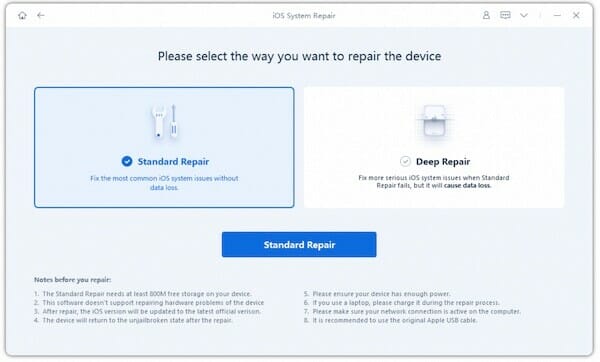
With Standard Mode, we can fix most iOS system issues without losing data on the iOS device.

The software also has advanced mode capabilities, making it easy to fix more serious iOS issues.

Pros

  • Fix various iOS system issues, including white Apple logo, boot loop, etc
  • Repair the iOS system from the full range of devices, including iPhone, iPad, and iPod touch.
  • Standard and Advanced repair options
  • Fix most iOS issues without data loss
  • Supports various iOS versions, including iOS 15
  • Easy to use
  • A free version is available

2. Tenorshare ReiBoot

Tenorshare ReiBoot

ReiBoot is another iOS repair tool that Tenorshare introduced. It is crucial in repairing iOS issues such as iPhone freezing, and the screen won’t turn on, iPad stuck on DFU mode, and other commON problems. It is worth noting that this tool allows one to recover the iOS system to normal status without losing any data. Additionally, the trial version of this program allows you to either enter or exit the recovery mode in one click for free.

Pros

  • Fix 150 iPhone system, not working issues and iPhone/iTunes 4013/4005 errors.
  • Easy To Use

Cons

  • The Tenorshare ReiBoot Free version does not work. You are required to register and provide the ReiBoot registration code.
  • Even though ReiBoot does not work, it is hard to ask for a refund. The ReiBoot 30-day money-back guarantee is misleading.
  • Most ReiBoot iPhone troubleshooting solutions are not working.

3. PhoneRescue for iOS

Phone Rescue for iOS

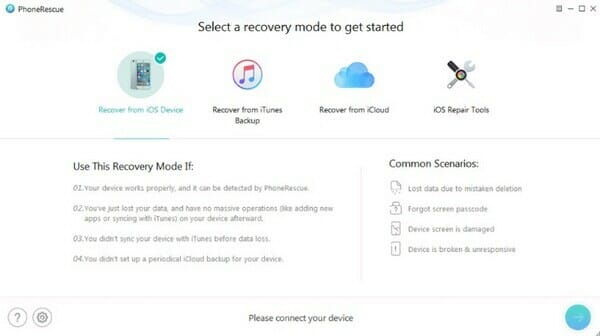
This app is arguably one of the best iPhone repair software tools out there. It will help you to repair a wide range of problems such as devices stuck in the recovery mode, Apple logo, upgrade failure, iPhone activation problem, and so on.

Pros

  • One-click to get into recovery mode free
  • Fix a wide range of iPhone issues on iPhone/iPad.

Cons

  • Time-consuming to repair iOS system issue;
  • High chance of data loss during the repair process
  • The tool is not stable and will crash at times.

4. Joyoshare UltFix

JoyoshareUltFix(iOS System Recovery

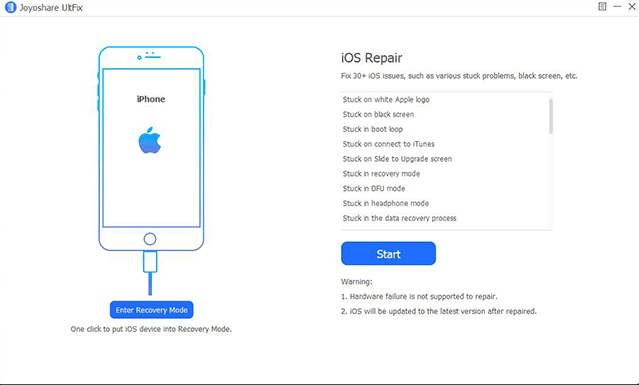
Joyoshare UltFix is a safe and trustworthy iOS system recovery tool that can fix over 30 different common or serious iOS problems such as iPhone gets bricked, iPhone stuck on a black screen with a spinning wheel, GIFs not working on iPhone, etc. More importantly, Joyoshare UltFix can repair the problem without causing any data loss.

Pros

  • Repair more than 30 kinds of iOS/iPadOS/tvOS issues.
  • Reset your iOS device to factory settings without a password.

Cons

  • The trial version has limited features.
  • The support team is slow to resolve the queries of the customers.

5. FoneDog Toolkit- iOS Recovery System

fonedog ios system recovery

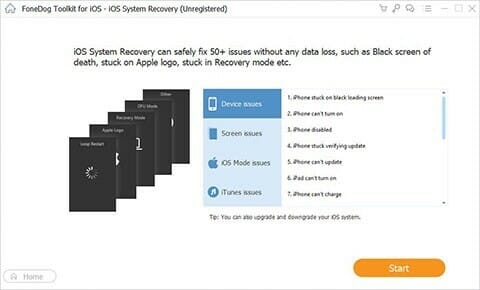
FoneDog Toolkit, an iOS Recovery Program, is one of the favorite tools for iOS users. It claims to fix more than 50 problems like an iPhone that is stuck on Apple’s logo, freezing, crashing, iTunes error codes, red/white/black/blue screen, among others.

Pros

  • Repair different system issues on iPhone/iPad

Cons

  • Doesn’t have the ability to fix issues on Apple TVs

6. iMyFone – Fixppo

imyfone fixppo

iMyFone Fixppo lets you fix a wide range of iOS problems, including an iOS device stuck on a white screen, Apple logo, spinning circle, recovery mode, boot loop, etc.

Pros

  • Simplified UI makes it easy to use
  • Available for both Mac and Windows
  • Has step-by-step guide for all users

Cons

  • The advanced mode of this program might wipe out the settings and delete content on iPhone

7. FoneLab – iOS System Recovery

FoneLab- iOS System Recovery

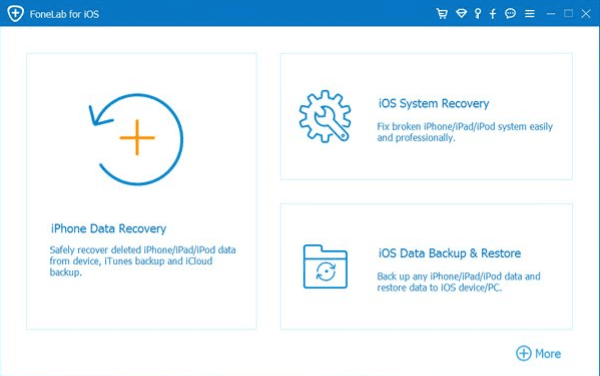
One more tool that has been made to this list is FoneLab. The tool lets you fix an iOS device from headphone mode, DFU mode, Apple logo, recovery mode, and Apple logo to a normal state without data loss.

Pros

  • Recover iPhone from headphone mode, DFU mode, Apple logo, recovery mode, among others.
  • It is safe and easy to use.

Cons

  • Slower to work
  • Sometimes it won’t fix iOS stuck effectively.
  • The trial version doesn’t include the file recovery feature.

Conclusion and recommendation

Commonly, you may encounter such problems as iPhone stuck on the Apple logo, recovery mode, etc. But take it easy because these iOS system repair tools are here to help you. Above all the listed tools, it is recommended that users use Dr. Fone System Repair since it’s undoubtedly the easiest iOS system repair solution with the highest success rate.

Dr.fone – System Repair stands out among other software like ReiBoot and iMyFone due to its high demand and comprehensive features, affordable price, and high customer rating.

As compared to other iOS system repair tools, Dr. fone – System Repair is much more powerful, and all the features are as simple as they could be. Where other iOS system repair tools are complex and advanced and are compatible with few iPhone models, Dr. fone – System Repair has a simple UI and UX interface and is compatible with a wide range of iPhone models.

Feel complicated to store multiple passwords for various accounts? Worried about your social media accounts getting hijacked by hackers and abusing your social media accounts?

You don’t have to anymore; use the following best password storage applications or password managers to keep your social media accounts safe on iOs devices.

Understanding Password Manager

A password manager is a software or application that allows you to create passwords with complex and lengthy combinations. Still, you don’t need to remember them because this application will automatically store and manage the passwords.

Some of these password storage applications also have a form filler feature, which is a feature that can automatically fill in your username and password when you log into any social media account.

So if you want to have super-secure passwords and complicated combinations but don’t want to remember them, a password manager app is an answer.

How It Works

These are the applications for storing and managing passwords by generating unique, complex and lengthy password combinations and then saving them to a database in encrypted form so that this password data is protected from hackers.

So, for example, someone can access your PC or smartphone to get your account password. The hacker will not get it because the stored password data is encrypted. This encrypted file can only be accessed via the master password; the primary password used to access the Password Manager application. So, all you need to remember is the master password to open the password manager application.

But make sure that this master password is secure. Use a combination of numbers and letters, preferably at least 16 characters.

Best iOS Apps for Managing Your Password

Authy

Authy already supports most services that have implemented 2-factor authentication, such as Gmail, Github, Evernote, Dropbox, etc. The appearance of the application is immaculate and sleek. Account options with 2-factor authentication are listed in the boxes at the bottom.

You can easily copy the resulting 6-digit number with the easy-to-notice button. Authy added a today widget in the Notifications Center to make things easier. Authy also has an Apple Watch version of the app.

Although you got a decent amount of protection with Authy, it’s better if you add another layer of safety. Keeping yourself safe when browsing is essential since hackers can obtain your personal information once you’re connected to the internet.

To solve the problem, you need something called VPN. Amongst the other top best VPNs, there’s one called Cyberghost VPN, which we highly recommend.

LastPass Authenticator

LastPass is an online password manager service. Apart from managing passwords, LastPass has its app to generate an additional 6 digit number.

Just like Authy, LastPass already supports most online services with 2-factor authentication. If you use the LastPass password manager service, this application would be a fitting complement.

Enpass

The Enpass password manager application also supports a 6-digit code to access data from your saved list of account credentials. This application helps store account data and passwords in one place, so you only need to remember one secure password to access other data.

The application is also equipped with a peek and pop feature to find the stored passwords’ details easily. An Apple Watch version is also available to make it easier to get 6 OTPs via Apple smartwatches.

1Password

1Password was originally a password manager app that later added 2-factor authentication. The advantage of using 1Password is that you can manage it with your stored passwords and sync them according to your needs, either via Dropbox or iCloud.

OneSafe Password Manager

OneSafe is one of the best password storage apps for iOS devices, be it iPhone or iPad. This application can store passwords and be used to store important documents such as credit card data, photos, and others.

Like other password manager applications, One Safe also works by encrypting password data with AES-256 encryption, which is the highest level of encryption for mobile devices today.

OneSafe also uses Touch ID to log in to apps securely. In addition to the primary password, you can also provide additional passwords for specific folders that you think contain sensitive data.

Another feature is that it supports autofill when logging in to the browser, so you don’t have to repeatedly enter your username and password every time you want to log in.

In addition, OneSafe also provides features such as automatic locking, detecting suspicious logins, self-destruct (which runs automatically) and two-step authentication.

In a perfect world, you wouldn’t even need third-party X formally Twitter apps for iPhone or iPad. The default X app would offer an optimal experience, and that would be pretty much it.

However, we don’t live in that world. Actually, there’s a legion of developers somewhere who feel it’ their obligation to not only improve X But also design it to their vision.

The developers of X apps for iPhone and iPad are focused on improving your experience as well as offering a glimpse at the potential of the platform through the eyes of a different creative vision. Not only do These apps improve Twitter, they also redefine it.

With that in mind, the following are the best X apps for iPhone and iPad in 2025:

Best Twitter apps for iPhone and iPad

Our best picks:

#1. Twitter

It’s a fact that most people browse social platform using the default Twitter app. As you may understand, it’s not the best options on the market. There are a bunch of other Twitter apps that offer so much more in terms of features, options, and customizability.

Having said that, the app excels In terms of reliability, performance, and overall design. It’s not the absolute best Twitter app, but that’s kind of its appeal. The app offers an easy and reliable way to browse one of the most popular social media platforms on the world.

#2. Circleboom Twitter

Tweeting is just one side of using Twitter. You need to manage and control your Twitter account and Circleboom Twitter has the most comprehensive Twitter management tool serves users with amazing features to manage their Twitter followers and connections in a variety of ways. You can track the growth of your followers and followings at the same time thanks to its user analytics tool. You can also get demographic information about your audience as well as detailed statistics. Your Twitter circle can be filtered by language and gender. Circleboom also allows you to see the optimal time to tweet and the interest areas of your Twitter followers with nice, cloud-like graphs.

Circleboom Twitter allows you to see detailed insights about your followers. In a few seconds, you can find followers who aren’t following you back on its simple interface. One of the other benefits of this multi-purpose application is the ability to filter inactive, bot, spam, and verified Twitter followers. If you want, you can look at the unfollowers, visit their profiles, and unfollow them.

Circleboom can also be used to search on Twitter. It allows you to locate and follow your target audience. Twitter’s user-friendly, intelligent search tool enables you to search for Twitter accounts that utilize keywords and hashtags related to your interests in their tweets, bios, profiles, and names. Then, if you want, you can go to their profile and follow them.

Moreover, you can delete all your tweets, retweets, likes, replies, and your Twitter archive in just one click on Circleboom Twitter. You can do everything mentioned above on your mobile devices.

#3. Twitterrific

If you want a well-designed Twitter app that is not mean with options, then Twitterific
might be what you are looking for.

Twitterific presents your Twitter feed free or promoted tweets and customized to ignore certain words, trends, and other qualifiers. Even better, the app allows you to customize your feed’s timeline to help focus on tweets that fall into a particular chronological criteria.

Again, however, the thing that really separates this from the other Twitter apps is its clean design. This is one of the oldest independent Twitter apps, and you can see how its design and functionality have been polished over the years.

#4. Tweetbot

Most Twitter apps are focused on achieving two things: expand Twitter’s features and make existing Twitter features a breeze to use. Few achieve those things better than Tweetbot.

For those not looking for too much, Tweetbot can prove to be a better way to use Twitter. The app makes it easy to schedule tweets, offers better filters, and it also allows you to sync your feed between multiple devices.

One great thing about this app, though, is its ability to allow you to create multiple, personalized timelines. Advanced features such as that make it easy to recommend this exceptional app despite a range of free alternatives.

#5. TweetLogix

If you want a Twitter app that better capitalizes on the capabilities of the mobile format, then TweetLogix might just be exactly what you are looking for.

In its simplest form, TweetLogix makes it easier to perform almost every Twitter task. Tasks such as muting, following, and composing can easily Be executed on TweetLogix than via the standard mobile app.

If you really want to explore the features this app has to offer, though, you’ll find so much to love. We’re particularly impressed with this app’s custom theme options, and its search functionality is one of the best among the apps of its nature. Experts and newbies will be impressed with everything this app can do.

#6. Crowdfire

As a matter of fact, Crowdfire isn’t the best Twitter app available today. However, that’s only because it’s not just a Twitter app.

Crowdfire is compatible with multiple social media apps and lets you carry out a range of tasks across them. Besides performing simple tasks such as scheduling posts, the app also recommends articles and content for your various social media feeds.

Only a small number of apps focus on curating content for various platforms, and that alone makes Crowdfire one of the best Twitter apps on the market.

#7. Echofon for Twitter

One thing you should know about Echofon for Twitter is that it features more ads than some of the other free Twitter apps on this list. However, that’s totally understood because it rocks a range of otherwise premium features.

As outlined on the app’s homepage, Echofon is one of the only free apps that offers in-line photo previews and push notifications. Those features alone make it a striking alternative however, one thing we love about this app is its uniformly smooth user interface.

Echofon might be one of the better options on the market for anyone who need premium features without the premium price tag.

#8 . UberSocial

Do you feel like Twitter could be a more “social” social media platform that presents you with expanded interaction options? Well, that’s one of the many functionalities that UberSocial offers.

UberSocial is popular for its social features such as an “inner circle” friends list that makes it easy to see what certain users are up to. Even better, it grants you access to an advanced tweet composer that lets you compose longer, more targeted tweets.

Put it all together and you have a Twitter app that offers more control over how you interact with people and various ways to see what others are up to. It’s definitely a unique style that will be valuable to some.

#9. Hootsuite

At times, you need a Twitter app that’s more than just a companion. Quite candidly, there are times when you need a Twitter app that is essentially a social media manager Hootsuite has a solution for the latter times. Frankly, it’s not the richest of the mobile Twitter apps when it comes to features. The app allows you to schedule Tweets, manage multiple accounts, and accomplish other premium tasks, but that’s all there is to it.

One area where Hootsuite really excels is through a series of advanced analytics that lets you better understand who is reading your tweets and why. For the people who manage a more professional Twitter account, that’s certainly useful information you don’t want to miss out on.

#10. Fenix

There’s certainly no shortage of relatively similar Twitter apps on the planet. As such, the difference between good and great ones is the matter of details.

What makes Fenix app to stand out from the rest is the details. It offers support for multiple accounts, media previews, as well as multiple social media and media clients.

Notably, this app truly sets itself apart via a fantastic interface that is rich and user-friendly. If you love your standard Twitter app but just Want something that offers a little more features, then this may certainly be one of the best Twitter apps for you.

#11. Janetter

Janetter is another free Twitter app that’s worth a mention. Its primary focus seems to be offering a more smooth mobile Twitter experience. It achieves that goal quite excellently.

Just like other free and premium Twitter apps, Janetter allows users to schedule tweets, manage multiple accounts, and enjoy expanded timelines. However, this app goes a little further by offering features such as customized touch controls that take advantage of the mobile medium.

Janetter is just one of those fantastic free Twitter apps that offers a modest upgrade without a lot of commitment.

#12. Listomatic

Has your Twitter account grown wild and unwieldy? Is it time to clean things up a bit and get things back in order? If that’s the case, then Listomatic has a solution for you.

Listomatic browse through your Twitter feed with the purpose of finding similarities. This could be your IRL friends, people who focus on music, or even just GIF posters. It then groups those similar accounts into categorized lists that gives you a better understanding of where your content is originating from.

Should you want to re-examine your Twitter feed or just want to better understand it, Listomatic will help you do so perfectly.

#13. Nighthawk

As you may already know, one of the most requested features for premium Twitter apps is advanced filters. In any case, even the most well-managed Twitter feeds can turn out to be a total mess over the course of just one busy day. Nighthawk is a relatively new Twitter app whose main aim is to simplify your Twitter experience. It lets you filter everything from spoilers to politics and even make a custom timeline that only features tweets from your friends.

This app offers one of the smartest suite of filters that we’ve seen in the apps of this nature. It’s definitely worth downloading if that’s what you need.

#14. Tweetings

Tweetings is a powerful Twitter client for iPhone, iPad and Apple Watch. The app offers an extensive feature list which includes lists, push, geolocation and syncs your timeline with your Mac or iPad!

The app allows you to follow your friends tweets, share your photos & videos, view conversations, who’s nearby and find out what’s trending at the moment.

Designed with users in mind, Tweetings is a worthwhile buy if you’re looking to try out another Twitter client for iPhone or iPad with some decent design.

And that covers pretty much everything about Best Twitter Apps for iPhone and iPad in 2023
We also have plenty of other articles below that I suggest you check right now.