








Got a tip for us?

Apps

Smartphones are very powerful computers that we often take for granted and simply use to check Twitter or Reddit and play some games or watch videos of puppies. But for the visually-impaired, smartphones can be very helpful tools that support them throughout the day and bring them a bigger sense of independence. One of the most popular and useful tasks that visually impaired people perform with a smartphone such as the iPhone, other than making phone calls of course, is identifying objects. The process involves taking a photo of a physical object, and the app provides information about the image. This is one useful technique which can help blind and visually impaired find out information about the subject clicked by their camera. In this article, I’ll discuss the seven best object recognition apps for the blind and visually impaired in 2021.

Best object recognition apps for the blind and visually impaired

1. TapTapSee

TapTapSee is an object recognition app for the visually impaired that let’s users to accurately identify objects they encounter in their daily lives without the need for sighted assistance. Using your iPhone camera, you can take a photo at any angle and hear the description of the object read back to you. The app also features an auto-focus notification and sharing options. In addition, you can have the last image identification repeated. Finally, you can upload photos from your camera roll for identification and even save them to your phone afterward with the provided definitions for easy reuse.

2. Lookout by Google

If there’s a brand you can trust more than others to provide useful and reliable innovations, it’s Google. By using your smartphone’s rear-facing camera, Lookout identifies important items in your environment and reports the information it believes is relevant. This might include things like exit signs, the location of a bathroom, people or objects nearby, and even text in a book. Lookout’s spoken notifications are designed to be used with minimal interaction so that they don’t distract you or get in the way.

3. Seeing AI

Developed byMicrosoft, Seeing AI allows users to use the rear camera on the smartphone to identify and narrate the world around them, turning the daily unseen into an audible experience. The app helps the blind and visually impaired identify objects, text, and even people. You can use Seeing AI to complete multiple tasks you’re otherwise incapable of doing due to your visual impairment.

Simply navigate to the Scene Preview channel. Once you are ready, double tap the “Take Photo” button. The app will describe the surroundings. At the top of the screen is a “Close” button. Below the description are options to save and share the photo.

4. Supersense

Clearly, when it comes to accessibility, less is more. Supersense is one more example of great objects recognition app that can boost your confidence when out and about, despite very minor flaws.

The app’s Object Explorer mode uses streaming video from your smartphone camera. No need to take photos and wait for images to be uploaded and analyzed.

Likewise if you’re sitting in a room and you want to know what’s around, fire up the Supersense app and enable Object Explorer. Slowly pan the phone and the app will identify and speak the names of furnishings: sofas, chairs, lamps, picture frames and such. Again, the identification happens in real time—very handy for a quick look-around to orient yourself in an unfamiliar room or office setting.

  • Download: Supersense for Android | iOS (Free, in-app purchases available)

5. Be My Eyes

Be My Eyes pairs blind people with sighted volunteers who help them identify objects using a smartphone app and camera.

One notable difference that does appear to exist between Be My Eyes and other apps, is that Be My Eyes uses live video chat to communicate with the volunteer at the other end, whilst other apps will require you to take a photo. The person who’s blind connects to people with sight, points the smartphone camera at things and gets help seeing what they are. The app rings — a monotonous, droning ring — until both sides are connected.

6. Bespecular

This is a pretty fantastic app to use when you need help. The app offers a very unique and simple process to get a remote volunteer to help you out on something you need. You will and can get multiple of responses to your questions. It gives you a variety of different answers to get that aquestion answered that you want and need.

What separates this app from the park is the ability to send a question along with the picture of the object you want identified to a community of volunteers.

A visually impaired person can ask a question, for instance taking a photo of an outfit they would like to wear and ask a question such as, does the outfit match my shoe and then that question is sent to a community of volunteers who can then provide a feedback”

7. Cash Reader

Whether you need to hand out cash or count bills given to you, check out the Cash Reader app. This tool not only speaks the denomination but also vibrates and displays it in large contrasting numbers on the screen for those discreet situations. The app supports over 100 currency denominations and multiple languages. It doesn’t matter which way you use it, even if you show just a small portion of the banknote to the camera, it will work. So, make sure you get the correct change or assistance with counting your cash with Cash Reader.

  • Download: Cash Reader for Android | iOS (Free, subscription available)

“What Is This?” These object recognition Apps Have the Answer!

Thanks to the advancements in image-recognition technology, unknown objects in the world around you no longer remain a mystery. With these object recognition apps for the visually impaired, you have the ability to identify just about everything, whether it’s a plant, a rock, some jewelry, or currency. If you find certain apps difficult to see, for instance, you can adjust accessibility for those titles without affecting everything else.
One of the most powerful categories of productivity apps available for visually impaired users on both iOS and Android is Optical Character Recognition, or OCR: software that enables users to take a picture of text, and have the app read it back with the device’s screen reader. For example, you can take a picture of a magazine article or printed recipe and have it read aloud by the smartphone! There are dozens of OCR apps specifically designed to help people with visual impairments live their best lives. Here are 4 of the best OCR apps for the visually impaired in 2021.

What is OCR

Optical Character Recognition (OCR) is a form of technology that identifies the characters – like numbers and letters — included in an image.

Optical Character Recognition, or OCR application enables users to take a picture of text, and have the app read it back with the device’s screen reader such as VoiceOver. For example, you can take a picture of a magazine article or printed recipe and have it read aloud by the smartphone! This can be done using a computer and a scanner or a digital camera, but this is expensive and bulky when compared to using a smartphone.

OCR has been around for decades. Years ago, when Ray Kurzweil developed one of the first commercially available OCR devices, it originally cost tens of thousands of dollars and was the size of a filing cabinet—neither cheap nor portable.

Over time these devices have morphed into software applications that can run on a smartphone, and there are now apps available on both the Apple iOS and Google Android platforms and costs infinitely less—or free, which I will talk about below.

Each of these applications require processing data sets that consist of hundreds of thousands scanned documents or images in order to train and optimize the algorithms. Processing the training data set is typically done by humans in order to provide accurate data that can be used by the engine to learn and apply, making it "smarter" over time. Currency identifier apps such as Cash Reader employs the same concept.

Without further ado, let’s take a look at the best OCR apps for the blind and visually impaired.

The best OCR apps for the blind and visually impaired

Voice Dream Scanner

This has to be one of the most useful OCR apps on the Apple Store and Google Play Store. It makes it easy to scan printed paper documents.

The app uses your phones in built camera to auto focus on text in view. A photo is taken, and the app will read back all the text. And of course, with the iPhone you can decrease or increase the speed of the read-back using your phones settings. Photos can then be deleted or saved dependant on whether you need to read something back later.

The app is able to detect when all edges of the document being scanned are visible, and it uses a tone which varies in volume to indicate when the phone is pointing at the text and is properly in focus. The app can be set up to automatically snap a picture when your phone is in the right position, about 12 inches above the text. The scanning is all done on the phone so none of your scans are uploaded on to the internet. This means that your documents are kept private, and the process of scanning the document and doing the OCR is all generally completed in less than 3 seconds. It’s enhanced scanning accuracy is brilliant and it supports various languages.

However, this stand-alone app only scans paper documents and photos stored on your device. If you want to import PDF files you should install the Voice Dream Reader, app created by the same developer. This is a great app for reading almost any kind of audio or text file and it now includes the OCR features of Voice Dream Scanner, and I would strongly recommend this app.

Voice Dream Scanner costs $5.99 and the Voice Dream Reader app costs $19.99.

Voice OCR

Voice OCR is an OCR app that will also allow the import of PDF files as well as recognising handwriting. It is simple to use, and it also gives you a report of how many edges of the document are visible to help with lining up the phone. Another great feature of the Voice OCR app is that it will allow you to speak commands to make the app take a photo then recognise the text. The spoken command Capture will take the photo and the spoken command Read will recognise the text and start reading any text it finds aloud. I have found Voice OCR to be very good at recognising handwriting, in fact you don’t need to tell the app whether you are reading handwriting or standard text – it is able to recognise both types of text.

The main downside of Voice OCR is that all the recognition is done online so the scanned image of the document is sent to a server and the resultant text is sent back to the phone. This helps with the task of processing the handwriting, but an internet connection is required, and some may have concerns around privacy.

Seeing AI

Seeing AI was surely going to pop up somewhere on this list, right?

The app has “short text” mode which is real time OCR, where you don’t need to snap a picture, it will simply read whatever is the view of the camera. All you have to do is point the camera to the item and once text is found, the app will read it. The app will continue to look for text, which can be useful if looking for a room number or address.

The app also features document mode where it can scan automatically or using a snapshot and shows you the OCR in text view. The easiest way to scan a document page with Seeing AI is to put the phone on the document with the camera in the middle. Gradually lift the phone up and the app will say which edges are not visible. Slowly lift the phone up until you hear "hold steady." This means that the document is going to be photographed in about two seconds. After the document is processed, it can be read using VoiceOver navigation or by activating the "Play" button at the bottom left of the screen. Additional options at the bottom of the screen are Stop, Increase Font Size, Decrease Font Size, and Share.

Lookout by Google

Like the name hints, the app was developed by Google. It uses your phone’s camera to process the image and turns it into text that a screen reader can read. It turns on the flashlight automatically when needed.

The app features “quick read” which is real time OCR, where you don’t need to take a picture, it will simply read whatever is the view of the camera.

It also has document mode where it can scan automatically or using a snapshot and shows you the OCR in text view. The document mode has voice guidance to tell you where to move the camera.

Conclusion

The technology for recognising text on mobile phones is improving all the time, and it is hard to predict which apps will be the best for scanning documents in the next few months. Thanks to iOS 15 Live Text feature, iPhone Camera can now seamlessly detect written text from the viewfinder and let you instantly copy and paste it anywhere in the iPhone.

There you have it – a comprehensive list of best OCR apps for the blind and visually impaired. If you have other recommendations, feel free to drop them in the comment section below.

The smartphone has become a central part of our lives. With the advent of apps, it is more feasible for people to make life easier since they are constantly on the go. This article highlights some of the best-featured apps available on iOS and Android designed to improve day-to-day tasks.

From entertainment to productivity, these apps can be used by anyone to tackle their day with ease. There are many popular iPhone apps that people can download from the app store IOS.

There are many questions that people often ask us like:

  • What is the most useful apps for Android?
  • How can I make my iPhone better?
  • Do Apple iPhones get viruses?

This article will answer all these questions. So, stay tuned!

Best iPhone Applications Ever:

People should download Apple applications that can make their day-to-day tasks easy to perform and improve their iPhone performance. Some of the best mobile software that are available on app store IOS are the following:

Slice:

Many users are using their phones to handle most of their daily activities, from banking to social media. One way they can make life easier is by downloading the Slice.

It helps people find coupon codes for online retailers and other companies, as well as order deliveries of their favorite products. It also helps them track packages, so if they have ordered something online, they know when it’s arriving.

VeePN VPN:

People often ask that will their iPhones get viruses. The answer is yes though the iPhone OS is super hard to hack; still, there is a possibility of getting viruses. In fact, most of the time, people themselves download files from unknown sources and infect their devices. To avoid such a situation, people need to download a VPN. It will not only provide cybersecurity for the phone, but it will also allow access to blocked websites and streaming services.

The VeePN VPN for iPhone users is a way to make life easier and better. It is incredibly easy to use with only one tap to secure your location and the IP address from hackers. It also helps people enjoy the internet without any restrictions.

The VeePN will let users access all of their favorite programs anywhere in the world, even if they are blocked at home by country-based content restrictions or blackouts. It is the best solution to get rid of viruses and make your iPhone better.

Waze:

Waze is a navigation software for iPhone users. Waze lets people find the fastest way to get where they need to go. It takes information crowdsourced by drivers and uses it to show you what path will be fastest at any given time.

It provides turn-by-turn directions, real-time traffic information, and incident reports that can save you time when driving through unfamiliar neighborhoods or when an accident blocks your usual route.

AroundMe:

AroundMe is a new location-based program for Apple iPhone users that finds the best places to go in a certain area. AroundMe is meant to make life easier and better by providing users with a list of restaurants, grocery stores, cafes, and other places in their neighborhood. All of this information is presented in a list, which is sorted by distance from the user’s current location.

Best Android Applications Ever To Improve Performance:

Android smartphones are the most used smartphones worldwide. About more than 70% of people are android users and using millions of android software daily. Here is the list of best applications to improve android performance.

Avast Cleanup:

Do you dread having to clean your android device? Are updates taking forever to download, or are there dozens of software you don’t use anymore? Avast Cleanup is the perfect app for all Android users looking for a way to declutter their devices.

It can be installed in just minutes and will take care of your phone in no time. The app includes cleaning out ads, unused software, old documents, previous backups, cache data, and more.

VeePN VPN:

Unlike iPhones, Android OS is not much secure as it is open-source. Getting a virus or hacker’s attacks on android smartphones is much easier compared to iPhones. That’s why VeePN is again an essential app for android users.

VeePN is a tool that can hide your IP address and actual location with just a single click. It has many features like a double VPN to protect people more than ever before.

Greenify:

Greenify for android users was developed to make life easier. It allows an Android user to force apps to hibernate when they are not in use. This prevents apps from running in the background, which can cause battery drain, slow phone performance, and decrease the amount of available storage space on the device.

AnTuTu Benchmark:

The AnTuTu Benchmark is an easy-to-use, free benchmarking app for android devices. It provides you with benchmark scores that measure your device’s performance in a number of areas, including battery life, data processing, 3D rendering, and RAM management.

This Android application has been available on the Play Store, and it allows users to compare their own results against those of other Android users around the world.

Conclusion:

The smartphone market is always changing, constantly updating with new technology and new apps. People need to use only known and performance optimizer apps to keep their devices in good health. It is essential to have a VPN app like VeePN on your android and iPhone smartphones to keep your device, and yourself protected online.

In this article, we will present you with a few iOS apps that are designed specifically for women.

1. myPill® Birth Control Reminder

It is almost a necessary app for every modern woman, who takes oral contraceptives. Because of the fast pace of life, work, various activities outside the home, you may forget to take your pill. Skipping a single dose can be traumatic for your reproductive health or simply weaken the effect of contraceptives.

myPill® Birth Control Reminder reminds you to take your pill. You can also turn off the notifications when you take a break from the pill.

2. Cozi Family Organizer

For many modern women, it is necessary to maintain a good and trusting relationship in your family. For these, it is essential not to forget important dates and keep warm memories and not only.

Cozi Family Organiser helps you focus on your family. Manage your schedule, save memories, and do more by keeping all your family activities in one simple app. Family Organizer presents your events and deadlines in a convenient daily format, so you’ll never feel like you missed anything.

3. Stylebook

For a modern woman, it is essential to be in Vogue. This app is absolutely a good decision for your wardrobe.

Stylebook allows you to manage your closet, creating creative looks with what you have on hand. Upload photos of your clothes and accessories or similar models to model sets for every day: for the office, travel, or parties. The “Inspiration” and “Shop” sections are suitable for planning new purchases.

4. Net-a-Porter

No limits to shopping. With the app from the leading online retailer, you can order outfits from anywhere in the world and under any circumstances. With Net-a-Porter, you can also send your favorite items to your wish list and be inspired by the stylists’ images (based on the selected items).

5. Vera Wang on Weddings

We all know the chic dresses by Vera Wang. Now imagine that this chic brand created its wedding app.

App from Vera Wang’s Fashion brand is a handy online wedding planner. Inspirations, décor, dress and accessories can be organized according to style in a practical mood board. Now you can visualize the wedding of your dreams.

6. Noonlight

Every woman could sometimes find herself in a situation where she felt unsafe. This app is always on your phone and can become a necessary help at any time. It offers you emergency help.

The instructions are simple enough. First, hold it when you feel unsafe. Once you know you’re okay, let go of your finger and enter the pin code. If you still need help, then release the button and don’t enter the pin code.

Conveniently, Noonlight cooperates with Tinder. It also makes you feel protected on blind dates.

7. MyFitnessPal

The MyFitnessPal is a calorie calculator for weight loss. It allows you to take control of your fitness goals. This calorie counter for weight loss will allow you to track calories, nutritional value and record your activity for later analysis.

This program is made by the wonderful developer UnderArmor. They are a manufacturer of athletic apparel. UnderArmor has made a great gift to their consumers and has developed a cool weight loss calculator program as well as a calorie counter.

8. Pinterest

Pinterest, of course, is not just for women. It will be great for all people who like aesthetically pleasing pictures. Bloggers and stylists will find this app particularly useful. You can take inspiration from other people’s photos and pictures and create your own new, individual art.

The success of an individual will depend on what they interact with and what they do with that. Academic excellence is one thing that many scholars would admire.
You could be studying a course that you are passionate about. Therefore, you won’t have any other option than to succeed in it. But now, do you have all that it takes to achieve that? Besides, what are the valuable tools you might require?
Below, we have various IOS apps that are crucial for the success of scholars. Read on to learn more about that and why they are relevant to your education!
IOS Apps You Can Access With Your Phones

Not every scholar can afford a PC for managing academic tasks. It is thus crucial to find out the best and most reliable options to use when in need of such help. Today, you can access online relevant sources like Wikipedia if you have an IOS app installed on your device that can access the internet.
Today, managing academic work has become easy, thanks to the advancement in technology. With a smartphone and a stable internet, you can search for scholarly resources, compile a report and scan through them for corrections. So, what are some of the useful IOS apps for managing school work? They include:

Adobe

Do you find it complex writing notes in class because maybe the tutor was fast or you weren’t paying attention? With an IOS phone, you can install adobe apps to help you out with such issues. With this tool, you can download pdf format documents and access the content from your mobile phone. At times, you might not get the most relevant article for use in your academic work because they are all in pdf form. With this IOS app, it will be effortless to retrieve info from such a document.
Besides, you can edit a pdf document with the help of this tool. Moreover, you might also have to install a pdf word converter app on your phone. This will help you to navigate from pdf to word documents with ease.

CamScanner

Another useful IOS app is the CamScanner. Many times, students will encounter relevant documents for their school work. But now, you might not be in a position to copy the entire document. In such cases, it would be best to rely on a cam scanner to finish the job for you. Here, you’ll scan through the document and save it in pdf form.

Google Assistant

A Google assistant will listen to you and access the information from the internet. Such an app is useful when you need quick answers to long queries. You have to turn on your data before accessing this app. Ensure that you are audible enough when providing instruction for the tool to capture your words and present precise answers to your challenges.

Google Drive

Where can you save academic work and access it with ease? Google Drive provides storage for individuals who might want to save data online. The best thing is that it isn’t specific on the type of data to store. For instance, students can save word documents, pictures, videos and so forth.
The best thing about this storage app is that you’ll receive 15 GB of free storage space for every Google account that you have. When the storage gets full, you can purchase 100 GB of extra space from Google. From there, you can save as much data as you can.
Additionally, this IOS app allows individuals to access their documents at any time from any smartphone. Nonetheless, you’ll need a stable internet to achieve that. Additionally, you are sure that the data is safe from third-party access or loss.

Google Translate

Last but not least, you can boost your understanding of particular languages with the help of Google translate. This IOS helps to convert the language used on a page to one that you can easily understand. Funny enough, you don’t have to pay to access the service.
All these apps relate to each other at some point in your studies. For instance, you can access the saved data in your CamScanner with the help of the Adobe IOS app. Therefore, individuals need to select the best fit of IOS apps to rely on for academic success.
There are some which you’ll have to buy, while others are free. Additionally, you should check the compatibility with your phone, as some might not support various IOS apps.

One of the most common questions regarding using MacBook is how to download videos from YouTube and save them as MP3s on Mac. This is a deceptively simple question, and we’re going to push aside any of the complexities of downloading YouTube videos in MP3 format on Mac, and instead we’ll show you the single most direct method of downloading videos from YouTube in MP3 format on Mac in 2023, since that is usually what most people are looking to do.

There are numerous reasons why you might want to download YouTube videos in MP3 on Mac – being able to listen to them when you’re on a train, for instance, or if you just want to save something for future use. Thankfully, downloading your favorite YouTube videos in MP3 on Mac is dead simple!

Downloading YouTube videos to MP3 on Mac is easy, and there are lots of reasons to give it a try. For example, it lets you listen to music without an internet connection, which is fantastic for keeping yourself entertained during the long traffic and trips to places without reliable internet connection.

Downloading YouTube videos to MP3 on Mac is also great if you have a Wi-Fi connection. You can download YouTube playlist to your Mac using your home Wi-Fi, and listen to music on the move without risking going over your data allocation.

Which tool should you use, though? Well, that’s where things get complicated.

There are a couple of YouTube videos to MP3 downloader softwares for Mac on the market and most of them are quite good. However, there is a software that is preferred out there that always snag the most recommendations.

We took a look at some of those YouTube videos to MP3 downloader software for Mac and came up with the best.

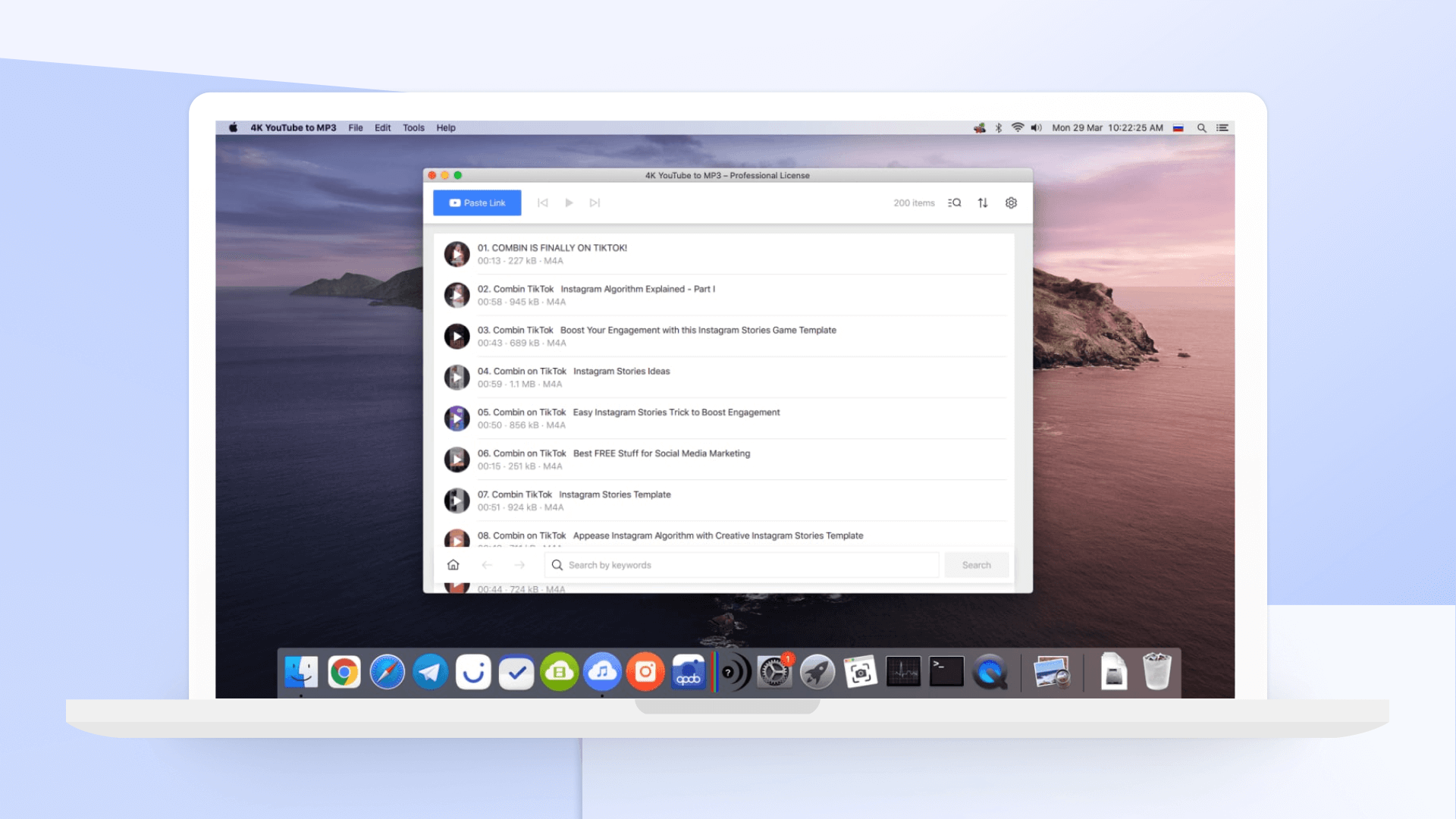
The best YouTube to MP3 converter for Mac right now is: 4K YouTube to MP3.

4K YouTube to MP3

Of all the YouTube to MP3 converter applications we’ve tried, 4K YouTube to MP3 is the best.

Whether you want to listen to music from a video offline whenever you like, or turn your favorite YouTube’s channel into a podcast that you can enjoy when you’re working, 4K YouTube to MP3 is the best tool for the job. Provided that you have the copyright owner’s permission, that is – bear in mind that YouTube’s terms of service explicitly prohibit unauthorized downloading.

4K YouTube to MP3 is the world’s first YouTube to MP3 converter for MacBook. It provides a complete solution to download high-quality audio from the major social networks including YouTube, Soundcloud, Vimeo, Instagram, Facebook, Flickr, Dailymotion, Metacafe, Twitch,, Tumblr and more. Unlike many other YouTube to MP3 converter software for Mac, 4K YouTube to MP3 supports all kinds of audio formats and types including MP3, M4A and OGG.

How to download YouTube videos in MP3 format on Mac using 4K YouTube to MP3

Let’s take a look at how to download YouTube videos to MP3 and save them on your Mac using 4K YouTube to MP3. As you’ll see, downloading YouTube playlists and channels in MP3, M4A or OGG on Mac is a simple and straightforward process. Below are step-by-step instructions for how to download YouTube videos in MP3 format on Mac using 4K YouTube to MP3.

Step 1: Get 4K YouTube to MP3

Download, install and launch 4K YouTube to MP3 on your Mac.

4K YouTube to MP3

Step 2: Copy and paste the video URL

Launch your web browser, find the content you want to download from YouTube and copy its URL from the address bar.

Step 3: Open 4K YouTube to MP3 and click The Paste URL button.

Step 4: Wait until the download process is complete.

Once the audio has finished downloading, it will appear in the destination folder. You can also right-click it in 4K YouTube to MP3 and select Play. Unless you adjust the settings, the audio will remain in this list until you choose to remove it – even if you close and restart the software.

There you go! Now you can enjoy listening to YouTube audio on your Mac even when you are offline.

Should I buy 4K YouTube to MP3?

Absolutely! 4K YouTube to MP3 is the best free YouTube to MP3 converter on the market. It’s easy to use, highly customizable, ad-free, and doesn’t include any malware. Unlike other YouTube to MP3 converter software that work only on a single operating system, 4K YouTube to MP3 supports Windows, macOS and Linux, and this gives it an edge over other software. 4K YouTube to MP3 is used by beginners as well as experts in Apple products. And therefore, we recommend it to our readers.

Availability and price

4K YouTube to MP3 is available on Mac, Windows, and Linux.

4K YouTube to MP3 is free to use. However, Upgrading to the premium version for a one-off fee will unlock additional features, including unlimited downloads, concurrent downloads, ad-free usage, and the ability to download entire channels, playlist, etc.

Licenses start from $15 for a Personal license and go up to $65 for a Bundle that includes licenses for 4K Video Downloader Pro and 4K Stogram Pro, and 4K YouTube to MP3.

Highlights of 4K YouTube to MP3

  • Download YouTube playlist and channels
  • Download private YouTube content with access in original quality.
  • Built-in music player
  • Download audio in the same quality it is stored on the website.
  • Supports many video sites including YouTube, Soundcloud, Vimeo, Instagram, Facebook, Flickr, Dailymotion, Metacafe, Twitch, and Tumblr
  • YouTube Premium download
  • Audiobooks download
  • Download speed control
  • Great choice of audio formats including MP3, M4A and OGG.
  • Smart file organization
  • Simple to use
  • Available for Windows, macOS and Linux.

Start downloading and converting YouTube videos to MP3

You’ve successfully downloaded Youtube videos in mp3 format on your Mac using 4K YouTube to MP3! 4K YouTube to MP3 is intuitive, user-friendly, and accomplishes its intended goal in a very short amount of time.

Go ahead download 4K YouTube to MP3 and give it a try. If you have any other questions about this software or our 4K YouTube to MP3 review, drop us a comment and let us know.

The first thing that an iOS phone user might think when asked about translating something would be Siri that can do all sorts of things and entertain you with basically anything. However, if you have to travel and translate things into several languages, it is better to consider some stand-alone apps that will help you cope with the basics. Regardless if you would like to learn some phrases to feel more comfortable at the restaurant or talk to the bank clerk as you open the foreign account, these iOS apps will fit any taste, budget, and requirements!

Top 8 Language Learning Apps For iOS Users

1. DuoLingo.

It is one of the most popular language-learning apps that supports over 23 languages from Spanish and French to Irish and Swahili. You can choose anything that you like and enjoy learning in a fun and entertaining way. Regardless if you are only starting or already know the bits here and there, this app will make you satisfied.

2. HelloTalk.

What makes it unique is the great community of people from all over the world that will help you polish your verbal language skills. It supports over 150 languages and lets you talk to native speakers by teaching them back. It is user-friendly and always helpful as you can ask people to translate things you do not know. Do so because you need a certified translator for such kind of work!

3. iTranslate.

It is the best for those who like to travel because it lets you listen to translations and type your text. It supports over 100 different languages and dialects. The voice-to-voice approach is a great way to learn when you need to storm your brain with pronunciation rules. You will also learn the basic dictionary and will understand the meaning of certain expressions.

4. Rosetta Stone.

It supports up to 24 languages and helps you with it all by implementing speech recognition, reading, writing, and speaking tools. It also has an amazing accent coaching feature. It offers both online and offline learning modes with relevant courses.

5. Free Microsoft Translator.

It is one of the most accurate translation tools that you will enjoy for those business purposes when you have to start a multi-language conversation. If you need to sign an agreement, always approach a verified translation company because such documents hold legal power. For all other purposes like pointing your phone at the restaurant menus, you can use Microsoft Translator!

6. Google Translate.

It is good when you do not have an online connection because it supports 59 different languages. It lets you point your device camera to various objects, identify handwriting, or just handle your text. The phrase suggestion tool is second to none.

7. Babbel.

It lets you improve your basic reading and writing skills by supporting 14 languages. It has one of the best pronunciation training and speech recognition engines.

8. Speak and Translate.

It is quite versatile and accurate! You can safely communicate in various languages as you talk into your phone and earn. It is also free and supports up to 100 languages as you compose a written conversation.

The Cultural Aspect

No matter what language learning app you would like to add to your collection of helpful tools, the most important is to do your best to learn more about the culture. Talk to the locals, consider reading about the customs and traditions in your native language first, and always keep your mind open. You will always learn so much more!

Each Apple Watch has its own set of functions and abilities, and a vibrant community of third-party applications adds to the utility of your step-tracking. Apps that allow you to get things completed, help during your trips, receive answers to your queries, and get on with your life without continuously reaching for your phone in your pocket. It also can help to cope with the language barrier you may face when you travel to other countries, work with individuals who speak a different language, or have personal relations with people whose native language is not yours.

Here is the list of the best translation apps for your Apple Watch.

  1. iTranslate Converse

This app transforms your Apple Watch into a two-way personal translator that you can carry with you everywhere you go. iTranslate Converse for Apple Watch is as simple to use as the full phone version – when you press the button and utter a sentence, the app will read it out loud to your interlocutor, whether you are talking to a policeman, waiter, or flight attendant.

iTranslate Converse also includes a textual translation, which is presented upside down to make it simpler for the other party to understand what you’re saying.

  1. IHG Translator App

Developed by InterContinental Hotels Group (IHG), one of the most prestigious hotel chains in the world, the app incorporates the most popular aspects of its mobile counterpart, allowing users to “travel like a local” on any device.

Travelers can translate from English into 13 different languages in real-time by speaking straight into the watch or picking from a list of pre-loaded popular words. Translations are shown instantaneously on the device’s screen in the selected language, allowing users to read the word or phrase using phonetic spelling. There are formal, informal, and slang settings accessible.

  1. iTranslate Translator

iTranslate is a language converter iOS app that also includes a dictionary (synonyms alternative meanings). As a result, the user might benefit twice from this app.

It can correctly translate all the terms in your native language. Just like any professional online translation company, the app has over 100 languages available, which means it covers all the languages spoken in the United States, Europe, India, and other Asian countries. The conversion may be heard in both male and female voices.

Offline and speech-to-text translation services are available, however, they are premium features. There are three subscription options to choose from, depending on your needs and budget.

  1. Speak & Translate App

Speak & Translate is a voice application that allows you to speak the words and receive a translation. You can communicate with the individual in another language in this manner. It’s a fun tool to use to amaze your friends or employer who speaks a different language.

This app includes translation capabilities for all major languages. First and foremost, because English is an international language and the language of science and technology, it is utilized as a voice translator from/to any language.

  1. Microsoft Translator

Keep the Microsoft Translator on your Apple Watch Series 5 or previous watches at all times. It is one of the most reliable translation applications on the market, providing accurate results.

You can always have a trip guide with you if you have a cellular connection – no additional gadgets are necessary. Add Microsoft Translator to your Apple Watch’s home screen for easy access to the app’s features — and go back to enjoying your traveling experience.

  1. Babbel

Babbel is not exactly a translation app, it is more of a vocabulary learning game. There are no restrictions on how long you may play the game. You may check your word pocket to see whether you have a good score. It’s a fun way to learn new words while having fun.

The app is intended to integrate into your daily routine, allowing you to acquire a new language while interacting with your environment.

Every year, many people travel to new countries with little or no understanding of their native language. Translation apps may now be carried on your wrist thanks to the Apple Watch, and it is one of the most convenient features ever.

As you plan to embark on your travel, one thing you may want to think about are some apps that can make that travel experience more efficient, more enjoyable, and provide resources that you will want or need.

There are a huge number of such apps, and it is difficult to isolate and identify those that will be best for both leisure and business travelers.

Here are seven apps that, if you do not already have, you should consider adding to your phone before you leave.

  1. ~~Google Translate~~

This is not a perfect translation tool, but it does fulfill basic needs for simple translations. One of the coolest features of this app is that a traveler can actually take a picture of a sign, menu, etc. and have it translated immediately.

This is not an app to use for important translations, however.

  1. ~~Uber/Lyft~~

Both of these companies have gone global, Uber a bit faster than Lyft. Still, you can now order one of them in all major cities on the planet. Think about these benefits: they will be cheaper than taxis; you will get the car description, the driver’s name, and time of arrival. Plus, you order and pay for your ride using your bank card, not cash – no hassle with local currency and tips.

  1. ~~Banking Apps~~

Be certain to upload the apps for your bank and your credit/debit card accounts. You don’t want to risk using hotel Wi-Fi web services where you are unsure of the security measures they may or may not have in place.

  1. ~~Airbnb/Hostelworld/Couchsurfing~~

Yes, these are three separate apps, but for leisure travelers, all three may be of use. Whether you need a couch, a room, an apartment, a house, or a reasonable hostel, these will serve you well. Each of these apps allows you to explore all of your options, pricing, and many are available on very short notice. If you do not have a set agenda, these apps will come in handy. With each of them, you can set your parameters and be shown all that is available in the locale. If you do have an itinerary, you can book in advance – your budget will thank you.

  1. ~~Maps.Me~~

This is an app you can use offline when traveling. All you have to do is download a map for a specific locale, and you will have walking routes for wherever you want to go. It’s a simple and easy-to-use app, and perfect for sightseeing when you prefer to walk.

One note here: If you are walking about, you must be aware that, in certain cities, you will need to carry your travel documents with you. It will be important to have duplicates of these should those you carry be lost or stolen. Research the documents you will need for every country you plan to visit and get translated forms of them to keep in the hotel safe or other secure places.

  1. ~~Skyscanner~~

Rather than check cheap flights via every website and app that offers them, roll all of your searchings into a single app. It will search through millions of flights from all other sources and find you the cheapest, based upon your entry details. The added bonuses with this app are that it will show the best days to travel the cheapest and will send you notices when prices change.

  1. ~~Airline Apps~~

Every major airline has an app that you can download to an Android or iPhone device. You should download all of those that you regularly use, for a number of conveniences:

  • ~~You get a digital boarding pass which will streamline your passing through checkpoints – no more printed out boarding passes~~
  • ~~You can sign up for notifications from all of these airlines. They will notify you of flight delays, gate changes, and more.~~

These Seven…

Is this a complete list? Absolutely not. Every traveler will have unique needs – methods for tracking expenses, a complex itinerary compiled all in one place, finding attractions, restaurants, etc. Think about what types of apps will serve your needs, do the research to find the best ones, and keep that phone charged.

Being a college student isn’t easy. Most likely, it’s a lot tougher than you imagined when you were in high school. You have to do so many things, and the academic pressure makes it hard to find your balance, especially when you’re not particularly experienced with time management. If you also have to work part-time to pay at least part of your tuition, you’ll be on a tight schedule.
Fortunately, we’re living in increasingly digital times where laptops have become an integral part of academic life. You have a tool you can always rely on for studying, researching, and doing assignments: you’re shiny new Mac.
In this article, we’ve put together a list of some of the best Mac apps for college students.

Best Mac apps for college students

Manuscripts

Manuscripts is a word processor that simplifies the academic writing process and eliminates one more excuse to procrastinate. It offers the standard features you would expect from a text editor, but the layout is very intuitive.
What Manuscripts truly excels at is handling footnotes, annotations, and references. It makes academic writing and meeting style requirements fairly straightforward and painless.

iStudiez Pro

iStudiez Pro is a student-oriented organizer application. It will help you keep track of their classes, assignments, deadlines, and exam dates, among other things. It has a well-designed, clean, and intuitive interface, so you don’t have to be particularly tech-savvy to learn how to use it.
Everything you save on it will be synchronized on multiple platforms, and it supports macOS, iOS, Windows and Android.

MacFly Pro

College students typically don’t excel in the tidiness department. If you are no exception, then MacFly Pro might be just what you need. It might not clean your dorm room, but it will help you detect and remove any useless files on your laptop.
It won’t be long until your Mac is full of duplicate files from completing assignments. This could mean academic paper copies, textbooks in PDF format, essay drafts, discarded apps or anything else you may have accumulated while doing research or studying.

XMind

XMind is great for when you have to do group projects with your colleagues. It allows you to map out the different tasks and sub-tasks that need to be completed to see the connections between the tasks in a more intuitive way. With a few drags and drops, you can get a clear yet detailed view of even the most intricate projects.
In other words, XMind lets you see the big picture so you can break down a complex assignment into manageable parts.

Prizmo

Prizmo offers optical character recognition (OCR) in 23 languages, translation in 50 languages, text-to-speech, iCloud support, and powerful editing features.
You can use it to turn printed paper, photocopies of textbooks and screenshot into digital text – something you’ll definitely need as a college student. It even has batch OCR support for multipage documents and it corrects any distortions like skewness and warping.

MindNode

If you have trouble organizing your thoughts when working on an assignment, you might want to give MindNode a try. It’s a brainstorming tool that gives you an easy way to approach complex topics.
You can see how you can connect multiple subjects to the main theme so you can get insights and draw informed conclusions. Just what your professors are looking for when giving out these assignments.

Studies

Whether you’re studying law, medicine or mathematics, you’ll want Studies as a companion. Why? Because it will help you achieve your academic goals. How? We’re glad you asked.
You can use Studies to create notes that include links, images, audio and video content and other resources. You can also use it to make a study plan which we assure you that you’ll need.
If you have study buddies, you can share your notes with them and export your notes in different formats to read them on other devices or create flashcards.

Quizlet Go

Speaking of flashcards, Quizlet Go can help you out. The best part is that you can also get access to flashcards other students make. Whatever topic you’re studying, chances are you’ll find a few sets to retain the information more easily.

Be Focused

Do you easily get distracted? Be Focused is an app that used psychology to help you stay on track. It was designed to achieve the ideal work-break balance so you can get good grades without risking burnout. Your job is to set your daily goals, and Be Focused will help you get there at a steady and sustainable pace, so you don’t lose your sanity in the middle of the semester.
How do you use it? Easy. You open the app, which will appear in your menu bar and set the timer. It’s also great for keeping track of how much time you’ve spent on each subject or assignment.

Evernote

You can’t make a must-have college app list without including Evernote. This highly popular cloud-based note-taking app can help you collect and sort information quickly. You can create and save your notes in many different formats, it syncs on all your devices, and you can also use it to keep track of deadlines and collaborate with your peers.

Alfred

Alfred basically helps you find stuff on your Mac. If you have a lot of files on your laptop and you don’t want to spend a lot of time looking through them, this app will fish out whatever you need.
You create a keyboard shortcut to open the app and then type in the name of the file or app you’re looking for. But you can also type in a question or look for definitions of terms. This saves you a lot of time that would be better spent actually studying.

Ulysses

Ulysses is a simple tool with a lot of useful features to help you write essays and papers. It offers a dependable and distraction-free writing environment and saves every word automatically. It also makes it a lot easier to stay organized when working on writing assignments since you can tag everything with keywords.
Other major advantages are that it syncs with iCloud Drive, and you can export your work in multiple formats.