Got a tip for us?

iPhone

The iPhone is a smartphone from Apple that runs the iOS mobile operating system. Between its apps, communication features, the camera, mobile internet access, and other functionalities, the iPhone has quickly become an integral part of many peoples tech lives.

Apple takes the stance that our data belongs to us, and they’re just the conduit by which it is passed and stored. Sadly, this makes them stand out in the current marketplace in which the user, and our data, is the product that is strip-mined and used in unwanted ways, often without our consent in the United States and many other countries. (And even in states, countries, and regions where that’s forbidden.)

All major chatbots harvest what we tell them in the spirit of training their models further. Some have privacy policies that limit what they extract, but it’s all kind of beyond our control, because the models run in their data centers, and whenever we interact with them, we’re sending them our data in the clear, often directly connected to our accounts. That means that over time, chatbots learn a great deal about us, and some of that becomes the basis for future responses to other people.

For Apple Intelligence, Apple said they brought the same privacy-minded approach to using large language model processing. The company started down this path in June 2024 and updated and revised how they approach it with Siri AI. This ensures Siri can maintain conversational context, provide analysis, and deliver information without compromising our privacy.

Apple uses a combination of on-device and Private Cloud Compute to provide this sort of privacy protection:

  • On-device models allow Siri AI to provide responses and Apple Intelligence to perform analysis or generation, which could include internet information requests and retrieving information from your data, without the chatbot component leaving your device.
  • Private Cloud Compute is a privacy-protecting framework in which only certain kinds of data from your device leave it to head to Apple’s cloud, where they use models derived from Google Gemini without exposing data of any kind to Gemini.

On-device vs. Private Cloud Compute

As Apple describes it, any task that can performed on your device will be, avoiding privacy issues altogether. However, for the vaguely described “more sophisticated requests” Apple must send some information to their cloud for processing. This cloud system is called Private Cloud Compute (PCC).

Apple enumerates many principles of PCC in their foundational 2024 announcement, but I can summarize this for you (without involving an AI):

  • Nobody but you should see your data, including Apple.
  • Apple has to have control and understanding of all components that handle data, and not have modes that let their staff access information in special cases, such as debugging modes.
  • The system must be designed to prevent targeted attacks that would let an attacker know exactly where an individual’s personal data was being processed and attempt to break in and exfiltrate information from it. _Apple_ doesn’t even know which server will handle the cloud portion of queries. And someone would have to overcome the system’s extreme global protections just to even begin trying to figure that out. Because of the architecture and security, it’s beyond exceedingly unlikely that a global exploit could work.
  • Nonetheless, a lot of companies claim they’re impenetrable and privacy-forward. Thus, Apple said outside researchers must be able to verify Apple’s claims.

Apple first built PCC using the same secure components that protect data on their hardware, including the Secure Enclave, which protects encryption keys and biometric information (among many other security bits), and Secure Boot, which prevents devices from starting up with compromised operating systems. This cloud is a collection of nodes that sound like Macs running a highly customized, secure version of macOS that’s stripped down to the necessary components and infused with the PCC sauce.

Data is sent from your device to PCC through end-to-end encrypted connections. Information transmitted is used for the user’s specific purpose (an “inferential request”) and is destroyed after the task is completed. This data can never be accessed by Apple staff or other people, though there are limits Apple does not advertise.

How Google Gemini powers Siri AI

To make Siri AI and expanded Apple Intelligence features work, Apple collaborated with Google to draw on the technologies behind Google’s Gemini model to add to the Apple Foundation Models (the Apple frameworks used for access to large language models). Apple is not handing off data to Google. Heavens, no! Rather, they are “collaborating”—ostensibly involving some form of licensing that isn’t disclosed.

Apple Foundation Models run both on-device and in new PCC nodes on Google Cloud, where Google runs Intel-based servers with Nvidia graphics processing units (GPUs). (GPUs turned out to be ideal for AI operations.) Apple’s in-house PCC uses Apple silicon. The Intel CPU is paired with Google Titan, a security chip that verifies the server’s boot firmware before the CPU is allowed to run it, so that an infiltrator couldn’t slip in a compromised server image.

To achieve this, Apple ensures that every piece of hardware is cryptographically tracked—so another server couldn’t be slipped in, say—and that these new nodes have the same integrity as Apple’s own.

Apple has tried to cover all the bases to protect your privacy, including one the company often receives criticism for: providing enough information or access for independent outside security researchers or research companies to examine their security and privacy claims.

So far, the company has operated Apple Intelligence and PCC for two years, and only a single flaw was found by a researcher examining the disclosed components (the researcher was awarded Apple’s top security bounty). None have been discovered in any public-facing portions of the system. That doesn’t guarantee anything in the future, but it’s a good sign.

You should consider how Siri AI and Apple Intelligence affect your privacy, and what you might do about it:

  • Siri conversation syncing is secured with end-to-end encryption among your devices, like other sorts of data that are available exclusively on your devices, such as your conversations in Messages and entries in Passwords, and not via iCloud.com. If someone could access your Apple Account and to log into iCloud.com, they can’t see your Siri conversations. Someone would have to use your account information to add a device to your Apple Account set, or take over one of your devices.
  • You have to trust that Apple is making the right decisions. Their transparency helps, because you know that hundreds—maybe tens of thousands?—of people are looking for weaknesses in a system that will be used by hundreds of millions of people every day. But there’s nothing you can do, unless you’re a security researcher, to further that work. So it’s a bit of a binary trust/no trust option.
  • You don’t know when and if your personal data leaves your devices to use PCC—at Apple or in Google Cloud—so you can’t flip a switch to say “only use on-device models,” or “only use Apple’s PCC nodes when off-device.”
  • We don’t see a way that you can entirely disable Apple Intelligence, so you can’t per se prevent your information from being processed in the cloud. You can disable Siri, though you must disable it entirely to not use Siri AI—there’s no mode of Siri without Apple Intelligence on devices that support Apple Intelligence. Fully disabling Siri turns off all Apple Intelligence features related to Siri, likely covering a significant portion of off-device transactions involving more general information. You can turn off some features that rely on Apple Intelligence for individual apps, but not all such features.
  • While Google, Intel, and Nvidia are involved in the new Google Cloud-based portion of PCC, you aren’t being asked to trust how they manage privacy as such. Apple has built the secure stack that runs on the nodes. The risks here are firmware or hardware exploits that could compromise the non-Apple elements in Google Cloud. However, if Apple has done their work correctly, those exploits still wouldn’t allow targeting of individual data or exposure of that data. In particular, while each of those companies has security features in their hardware, Apple isn’t relying on those features for protection—they’re another layer before Apple’s secure stack is encountered by attackers.
  • Your data should be off-limits to government access just like any end-to-end encrypted data. The process Apple describes should prevent the company or any partner from having access to any of the keys required to access information inside a PCC transaction. However, it’s not yet clear how fully Apple will allow inspection of that process outside the software that runs it. That is, we don’t know whether they’ll allow testing of their cryptographic infrastructure.

Our frank conclusion is that if it’s intolerable to you to have any personal data potentially be processed outside of your devices, you will be unable to use iOS 27, iPadOS 27, or macOS 27 on Apple hardware that supports Apple Intelligence.

Otherwise—and we fall into this category—we rely on the information Apple has provided and non-affiliated researchers to keep them honest.

Wallet’s gain with Apple Intelligence goes hand-in-hand with a feature many users long desired: the capability to add any pass to Wallet, not just ones that generate the Wallet-formatted membership cards, loyalty cards, rewards cards, and other kinds of things that you can add via a website or an app.

Wallet lets you add these manually, but the real power comes in a new feature added in iOS 27, using Visual Intelligence. (Wallet is available only on iPhone.) You can scan a card via the camera to turn it into a pass. Here’s how:

  1. Open the Wallet app.
  2. Tap the Add button.
  3. Tap Create a Pass.
  4. Tap Continue.
  5. Point the camera at the side of the card that has its barcode or QR code, then tap the shutter button. If Visual Intelligence can’t parse the card, it asks you to tap Try Again, Create Pass Manually, or Cancel.
  6. When successful, Wallet shows you a preview of the pass.
  7. You can now tap the Add button, and the pass is placed in your wallet.

If the card lacks a barcode or QR code, enter that information manually by tapping Create Pass Manually in the previous step.

Customize a pass

If you want to customize your pass, tap Edit Pass. Then you can:

  • Tap any white, slightly glowing rectangle, and edit the contents. Be sure to tap the portions of the field that contain text, numbers, or a barcode or QR code. If you tap the code field, Wallet brings up a camera to capture (or re-capture) the code.
  • Tap the Palette button to change the color scheme.
  • Tap the Edit button and then choose Add/Remove Fields. Then you can tap in areas within those glowing white rectangles and choose from a variety of field types to add more information to the card.

When you’re done, tap the blue checkmark to save changes.

Tag: iOS 27

To use Siri AI’s expressive voice and take advantage of more advanced dictation, you need a newer device than Siri AI itself requires.

Extended requirements for Siri AI

All Apple hardware with an M3 or later chip and 12 GB or more of unified memory supports these features. If you’re not sure if your device hits that mark, here’s the list:

  • iPhone Air, iPhone 17 Pro, iPhone 17 Pro Max, or later
  • iPads with an M4 or later chip
  • Macs with an M4 or later M-series chip
  • Macs with an M3 chip and 12 GB or more unified memory, which excludes some configurations
  • Apple Vision Pro M5

Note: This list excludes the base configurations of the M4 iPad Pro. The 256 GB and 512 GB models carry 8 GB of unified memory, below the 12 GB minimum. The 1 TB and 2 TB M4 models have 16 GB and qualify, as do the M5 iPad Pros.

Siri AI voice settings

It has long been possible to choose among various male- and female-sounding voices and even different dialects, and Siri AI adds even more choices. But now, you can also adjust Siri’s speed and expressiveness. If you want a zippy, flat, “just the facts” response; a relaxed, cheerful response; or anything in between, you can go to Settings > Siri on iPhone or iPad, or System Settings > Siri on a Mac, and click or tap Voice. On this pane, you can select a base voice and then drag the Pace and Expressivity sliders as sample responses are played to dial in exactly the tone you prefer.

Dictation

Although Apple devices have had a Dictation feature for many years, starting in iOS 27, iPadOS 27, and macOS 27, Apple offers an improved version of Dictation—assuming your device meets the system requirements. You’ll need an iPhone 17 Pro or Pro Max, iPhone Air, or later; an iPad with an M4 chip or later and at least 12 GB of RAM; a Mac with an M3 chip or later with at least 12 GB of RAM; or an M5 Vision Pro.

Assuming your device meets those requirements, you can go to Settings > General > Keyboard on iPhone or iPad, or System Settings > Keyboard on a Mac, and enable Advanced Dictation Preview, which applies systemwide. Apple says this version of Dictation offers improved accuracy and automatic punctuation, while keeping all processing on your device. We have not yet been able to test this feature to validate this claim.

Apple started deploying what’s loosely called “artificial intelligence” over a decade ago, when they silently switched the original Siri voice-assistant system to use a neural network—a software model that mimics neurons in the brain—in 2014. Unfortunately, even then, Siri was always somewhat frustrating to use unless you learned exactly the set of words you should use for particular kinds of instructions, and were patient when it got it wrong—repeatedly. Other voice assistants, like Amazon’s Alexa and Google Assistant, offered more natural interactions.

The new Siri AI in iOS 27, iPadOS 27, and macOS 27, along with many other features under the broader Apple Intelligence umbrella, seems to have gotten it right: you can use Siri much more like a chatbot offered by numerous companies. You ask questions with free-flowing natural language, and Siri responds. You can ask follow-up questions, and it maintains the thread of context to dig in.

Learn how AI learns

Siri and its competitors were built using a machine-learning approach called deep learning, which creates neural networks that have a very, very loose relationship to the way that humans think. These networks are formed through training: feeding sometimes billions of examples of a thing, like human speech, that’s been classified by human beings. The model develops a fuzzy pseudo-understanding of, say, the difference between a photo that contains a cat or a dog, or between the words “hermetic” and “emetic.”

The emergence of deep learning is why Apple’s transcription of spoken words became quite good, with Siri and dictation. More generally, it’s why image recognition became useful—like in Photos when you would search for “dogs” and get images of dogs that weren’t labeled dog—and computerized voice transcription suddenly jumped from passable to very good.

However, the issue with Siri and other machine-learning interactive tools was that they often understood the precise words you said, but couldn’t correctly act on them. Google and Amazon seemed to advance their products with the same input limitations as Apple—however invasive to our privacy they might be—ostensibly by building out answers to queries instead of parsing them and generating results on the fly. We’ll never know for sure what happened behind the scenes.

The rise of large language models (LLMs), a specific form of neural network—one that relies on predictive models—seemed to spur Apple to action. Chatbots based on LLMs first appeared in 2022. LLMs also require massive amounts of training, but generalized training, rather than specialized.

Where previous deep-learning models were given massive amounts of very similar things to identify them—a billion animal photos—LLMs ingest written materials (like books, academic papers, webpages, and source code) and visual materials (illustrations, photographs, cartoons, and more).

Having swallowed the world of knowledge, an LLM has a sort of statistical, fuzzy basis on which to produce words and images. The interactive interface to an LLM can produce credible-sounding responses or graphics based on prompts, or what a user says, types, or uploads, because it has had such vast training on what humans have ever written, said, or visually created.

Some LLMs violated copyright in training

It is alleged—and we believe the evidence shows this is true—that some companies building LLMs have trained their models on copyrighted material for which they lacked permission. In our view, this violates the rights of, and effectively steals from, authors, artists, and programmers by failing to reach an agreement with or compensate them (including us).

Courts remain undecided on our opinion that this is theft. A judge in an author-driven lawsuit against Anthropic—they make Claude—ruled that the company’s scanning 7 million books and using them for training fell under “fair use,” but Anthropic’s central storage of the scanned items was a violation. Anthropic has agreed to settle the remaining issue for $1.5 billion without agreeing that their actions violated copyright. This will play out for years to come.

LLMs also enabled generative uses: you could ask an LLM model to revise an essay, write an academic paper, draw a cartoon, or create a photo showing the Pope in a fashion-forward puffer jacket. Using known sequences and analyzed features in images sometimes allowed plausible-sounding results. However, LLMs aren’t particularly good at any of these tasks. We cover that in the Apple Intelligence features to skip.

Hallucinations and big models

We still worry about LLM-based hallucinations, which is typically when a model either doesn’t know something and “makes it up” by compiling unrelated information into something that sounds plausible, or when a back-and-forth conversation has continued so long that its random walk down word selection has gone way off the rails. It’s something all the AI companies have tried to correct for.

In our testing of Siri AI, we haven’t seen meaningful hallucinations yet, in the sense that we get answers that seem to be on target, and we’re not told to, for instance, add glue to a pizza’s top to keep the cheese from sliding off. However, it’s always worth remembering that Siri AI may be working from a knowledge base Apple has defined, but it remains limited by the fact that it doesn’t understand what it is telling you.

Understand Apple’s retooling

Apple’s launch of Apple Intelligence (their own brand of artificial intelligence) in 2024 was supposed to happen alongside the revamp of Siri, which would finally be more reliable at understanding and acting on, or answering, what we said. This revamp apparently incorporated LLM technology, though to what extent, it’s unclear.

When that didn’t pan out well enough to release, Apple Intelligence on its own seemed a bit lackluster. You could see improvements built on it in the fall 2024 and fall 2025 releases that were increasingly useful, such as Live Voicemail, call screening in the Phone app, and Live Translation.

iOS 27, iPadOS 27, and macOS 27 contain Apple’s long-promised update.

Besides using Siri to learn things like the current score of a sports event or details about the cast of a movie, you can also use it to perform tasks on your device. Siri can adjust various settings, enable or disable features, open apps, play music, add calendar events and reminders, create notes, and countless other activities.

There’s no exhaustive list of the commands you can issue; your best bet is simply to try whatever you’re curious about. Here is just a handful of examples to get you started:

  • Change settings:
    • Increase the screen brightness
    • Lower the volume by 20 percent
    • Turn on Reduce Transparency
    • Enable VoiceOver

Some of these commands may require confirmation with a switch or button on screen.

  • Work with apps:

    • Open Safari
    • Play something by Angine de Poitrine
    • Pause music
    • Add peanut butter to the Shopping list
    • Remind me to water the garden
    • Start a FaceTime audio call with Johnson
  • Find information:

    • Show me documents I created last week
    • Find PDFs with the label Important
    • Look up Stacey Butler’s address

Thanks to an Apple framework called App Intents, third-party developers can provide hooks in their own apps that let Siri gather information and perform actions. Over time, as more apps add these capabilities, you should be able to ask Siri to do an ever-increasing number of tasks for you.

As writers and technologists with combined experience in the tech industry of well over six decades—much of it focused on Apple—we have fairly well-developed opinions about which features are genuinely useful to a wide range of people and which ones lack practical utility and are more effective as marketing tools. That’s especially true for people in our age range (Gen X) and older, who constitute the vast majority of our readers.

Even though we want to be thorough and describe all the Apple Intelligence capabilities, there are a few that we think most people are better off avoiding because they may waste your time or may negatively impact your life. We briefly discuss the Image Playground app, Genmoji, and Write with Siri (formerly known as Writing Tools); you can make up your own mind as to whether they’re worth your time.

Image Playground

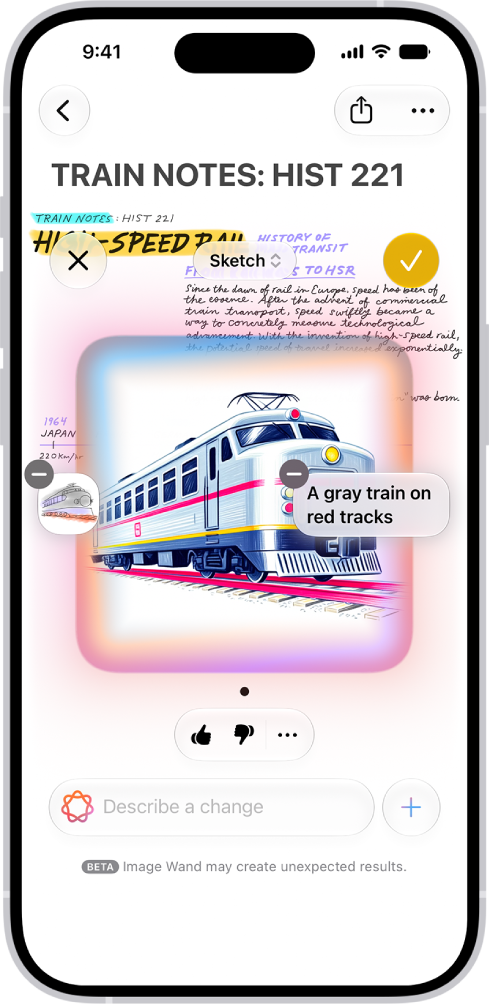
The Image Playground app uses Apple Intelligence to create images, or alter existing images from Photos or files on your device, based on descriptions you enter. So, if you ever had a burning need to see a picture of a goat skateboarding down a pyramid in central London or picture yourself dressed as a space pirate, Image Playground has you covered.

When you ask for a new image, Image Playground now displays a pop-up Any Style menu that lets you choose Animation, Illustration, Sketch, Genmoji, or ChatGPT (the latter of which is most likely to be photorealistic). It also lets you describe both the initial image and any desired changes (including changes to the style) in your own words. You can also sketch an image in Notes using the Magic Wand tool in iOS 27 and iPadOS 27 and have the app automagically interpret it.

One of us tried “An owl and a pussycat in a beautiful pea-green boat” and got a reasonable image of just that (for some values of “beautiful” and “pea-green”), something that had completely flummoxed Image Playground in Tahoe unless he replaced “pussycat” with “cat” (we’ll let you puzzle that one out on your own), but even then, the picture in Tahoe showed actual peas. The other tried to get an image of the “world’s largest collection of LPs,” and the first go-round showed someone on a ladder with just the edges of the LPs on a huge number of shelves.

When you describe a change, the image adjusts per your request. So, one of us said, “The owl is singing to a small guitar,” and sure enough, that’s what the next version showed. (And, OK, the owl wasn’t singing to the cat, nor was there any sign of honey or money, but then, he hadn’t asked for that.) The other asked Image Playground to refine his shelved LP images to show album covers face outward, and, wow, the generated cover images were something to behold—none real, but so many variations that resembled actual ones.

Genmoji creation and editing

Genmoji are conceptually similar to the images created by Image Playground, but smaller, more cartoonish, and without the backgrounds. They’re like emoji in that you can use them on the fly in Messages (and a few other places). Instead of picking from a fixed list of emoji, you describe what you want (“a squirrel playing a piano” or “a hammer with wings,” say) and let your device create it from scratch. Like Image Playground, Genmoji can also incorporate images of people from Photos (for example, “my wife riding a dragon” or “my grandmother skydiving”).

To use a Genmoji in Messages, click or tap the plus button next to the iMessage field and choose Genmoji from the pop-up menu. In the popover that appears, type a description of what you’d like to see and press Return (or tap or click the yellow arrow button), and after a moment, an image appears. If you like it, click Add to insert it in your message; if you want to see something different, type into the “Describe a change” field.

For the first time in Siri history, you can ask Siri questions or ask it to do something and almost always get a satisfactory outcome. Revolutionary! Even better, Siri retains context: you can have an ongoing conversation in the Siri app, and the vastly upgraded chatbot feature now doesn’t lose the thread.

Many people have mixed feelings about chatbots, particularly when they veer from utility into social, emotional, and personal interactions, but Siri is designed to stay largely on the utility target. Siri is designed for a purpose, and works well within those constraints. More broadly, it has the same limitations, advantages, and failings of other chatbots.

Carry on conversations

The power of Siri AI extends beyond asking it questions, of course. Engaging in conversations lets you drill down, rephrase your question, or ask follow-ups. This can be done after activating Siri, where you are just continuing on. This is already different than before iOS 27, when Siri’s ability to keep up its side of the conversation dropped off immediately or quickly.

Or you can open the Siri app. You can also click or tap answers from Siri in its pop-up or sheet-based view, and your device will open the Siri app.

However you navigate to activate Siri, you can immediately type or speak something after its response to whatever your first question or requested action was.

This can be useful if Siri’s first response or action wasn’t sufficient, or if it provided information or succeeded and you want to follow up by using context. You don’t have to define your scenario once again, which Siri often required before Siri AI.

For instance, we followed this line of questioning: “I watched a movie with Orson Welles in it last night. I think it took place in Austria.” Siri responds, “The movie you are thinking of is likely The Third Man. This 1949 film noir stars Orson Welles as Harry Lime and is famously set in post-World War II Vienna, Austria.”

You can then continue down that line of questions. We then asked why the zither was so prominent. It provided a detailed response (and an accurate one). Thinking of zithers, we wondered whether there was any zither music in the library. He hit a limit here: Siri only knows about locally stored music from its metadata, as far as we can tell, or at least without asking further questions. So it found, appropriately, “The Third Man” by Anton Karas in Apple Music, and offered to play it.

The new Pro lineup introduces variable aperture with the most advanced camera in an iPhone, incredible battery life, next‑level performance, and Siri AI, all powered by A20 Pro

        • The front of a burgundy iPhone 18 Pro is displayed next to a rear-facing burgundy iPhone 18 Pro Max.

iPhone 18 Pro and iPhone 18 Pro Max feature the most advanced camera Apple has ever made and deliver massive leaps in battery life and performance.

CUPERTINO, CALIFORNIA Apple today announced iPhone 18 Pro and iPhone 18 Pro Max, delivering the most advanced pro camera system in an iPhone, and huge leaps in battery life and performance. The new 48MP Fusion Main camera, now with variable aperture, brings creative control that wasn’t possible before, and new Pro controls let users customize their experience in the Camera app. Both models feature a smaller and even more useful Dynamic Island, as well as A20 Pro and a next-generation vapor chamber that together deliver the highest sustained performance in iPhone history. iPhone 18 Pro Max also delivers the largest increase in battery life ever on iPhone, thanks to advancements in Apple silicon and a larger battery.1 Featuring iOS 27with Apple Intelligence2 and Siri AI,3 iPhone 18 Pro models bring powerful AI capabilities together with personal context to become an intelligent personal hub with privacy and security at its core.

iPhone 18 Pro and iPhone 18 Pro Max are available in four elegant finishes: black, silver, glacier, and an all-new burgundy. Pre-orders begin Saturday, September 12, with availability beginning Friday, September 18.

“With iPhone 18 Pro, we’ve made advancements to the areas our users care about most: camera, performance, battery, and intelligence. And we didn’t just make incremental improvements in these areas — we took huge leaps forward to create the best Pro iPhone we’ve ever made,” said Greg Joswiak, Apple’s senior vice president of Worldwide Marketing. “iPhone 18 Pro makes it easy for anyone to capture stunning photos and videos using variable aperture, while providing more versatility for creators and more control for pros. Paired with impactful upgrades to Photographic Styles and powerful video capabilities, iPhone 18 Pro unlocks entirely new ways for users to express themselves.”

iPhone 18 Pro is displayed in black, silver, glacier, and burgundy.

iPhone 18 Pro will be available in four elegant finishes: black, silver, glacier, and burgundy.

An Advanced Camera System That Unlocks More Creativity Across Photo and Video

The new 48MP Fusion Main camera with variable aperture is the most advanced camera Apple has ever made, bringing aperture control to iPhone for the first time along with even more creative control. Six laser-cut blades smoothly transition between different apertures, making it incredibly easy to capture the best shot by automatically adjusting for depth of field and lighting. Combined with a new sensor that improves image quality, the result is better low-light photography, crisper detail in the back of group photos, and more unique shots. Variable aperture also provides more control for creative pros by giving them the ability to manually adjust any of the four aperture settings in the Camera app, and an API is available to developers for even more control across the aperture range in their apps.

Replay video: The Most Advanced Camera Available on iPhone

The new 48MP Fusion Main camera uses six laser-cut blades controlled by a new rotor mechanism to smoothly transition between different apertures.

With a new computational imaging pipeline, the Main camera produces sharper, more detailed shots, and upgraded Photographic Styles with new texture and grain controls let users further dial in their desired appearance and have more creative control over their photos.4 Industry-leading video capabilities also become more versatile, with the ability to apply Cinematic effects after capture to videos shot at up to 60 fps. In Time-lapse mode, users can now record videos in 4K and Dolby Vision HDR. Audio Mix also has new algorithms that deliver higher-quality voices and can now isolate music.

A photograph captured on iPhone 18 Pro using the new 48MP Fusion Main camera amid low-light conditions.

The new 48MP Fusion Main camera can intelligently widen the aperture to ƒ/1.48 for impressive low-light shots.

A black-and-white photograph of a person is captured on iPhone 18 Pro.

iPhone 18 Pro shoots gorgeous portraits at an aperture of ƒ/1.8, optimized for the best balance of light gathering and depth of field.

A photograph captured on iPhone 18 Pro shows people on a staircase and crisp details in the background.

The new 48MP Fusion Main camera can keep more of the group in focus by narrowing the aperture to ƒ/4 for more depth of field.

A photograph captured on iPhone 18 Pro using Night mode shows a person silhouetted against a starry sky.

In darker environments, iPhone 18 Pro adjusts the aperture automatically to let in more light, resulting in stunning Night mode shots.

A portrait captured on iPhone 18 Pro using Photographic Styles shows the luminous skin of a photo subject.

iPhone 18 Pro introduces new texture and grain controls in Photographic Styles, so users can adjust color and skin qualities in unison for a more personalized look.

A photograph captured on iPhone 18 Pro using Pro controls shows the blur of people in motion in the background while keeping the main subject in sharp focus.

Pro controls let users manually adjust settings, such as shutter speed, which can create artful motion blur in photos.

A photograph of a mountain landscape is captured on iPhone 18 Pro.

A new computational imaging pipeline produces even more detailed shots from the Main camera.

Pro controls is a new customizable experience in the Camera app for iPhone 18 Pro and iPhone 18 Pro Max that makes it easier than ever for users to access their most used settings and introduces new options for manual control. Users can now adjust settings such as lens aperture, shutter speed, and white balance, or use a histogram to check exposure levels throughout a scene.

Continue playback of video: New Pro controls in the Camera App

Pro controls offer broader creative range, with manual control over shutter speed, white balance, aperture, and the ability to use a histogram.

Introducing Apple Reference Image

Users can now prove the authenticity of a photo taken on iPhone 18 Pro models with Apple Reference Image, powered by the new sensor in the Main camera that can sign every pixel it sees. When a photo is taken in the new Reference mode, the camera captures signed sensor data that Private Cloud Compute develops into an unalterable reference image.5Reference images can be viewed in the Photos app alongside the main image, like a digital negative, to visually compare the two assets and determine if any edits were made. APIs are available in iOS, iPadOS, and macOS 27 for third-party apps to enable viewing of these reference images.

Three iPhone 18 Pro devices display Apple Reference Image comparing an original photograph with an edited version.

Apple Reference Image provides users with an unalterable reference photo, visually confirming what the sensor saw at the moment of capture.

Image metadata and upcoming support for the SynthID standard can also help users identify images generated or edited with AI.6 Together with Apple Reference Image, this set of features represents a multifaceted approach to image authenticity — vital for photojournalists, photographers, and everyday viewers.

An Even More Useful Dynamic Island

Using advanced display technology, the Dynamic Island is redesigned to create room for additional information. The upgraded Dynamic Island can now show three Live Activities at once, while continuing to enable Face ID for securely unlocking iPhone 18 Pro models, authenticating purchases, signing in to apps, and more.

Replay video: Upgrades to Dynamic Island

The upgraded Dynamic Island can show even more information at a glance, with up to three Live Activities at once.

A20 Pro: A Powerhouse for Pro Performance and AI

Built using the latest 2-nanometer process technology, A20 Pro sets a new bar for mobile computing. Featuring 50 percent more memory bandwidth than A19 Pro, the new 6-core CPU features integrated Neural Accelerators and is faster than the competition, while the new 7-core GPU design is up to 40 percent faster than A19 Pro — a significant upgrade for graphics rendering. A20 Pro also features a new Dual 16-core Neural Engine, which accelerates on-device AI models and computational photography, and includes 32 total cores for double the AI processing power of A19 Pro. With huge upgrades across the entire chip, A20 Pro is a powerhouse for everything from more advanced on-device AI workloads to demanding games, and is designed to deliver exceptional performance for years to come.

The A20 Pro logo.

Featuring a new 6-core CPU, 7-core GPU, and Dual 16-core Neural Engine, A20 Pro is a powerhouse for pro performance.

Both models feature N1, an Apple-designed wireless networking chip that enables Wi-Fi 7, Bluetooth 6, and Thread. iPhone 18 Pro introduces C2, Apple’s next-generation cellular modem system, which brings AI-powered improvements to cellular quality and reliability. C2 delivers meaningfully faster uploads when compared to C1X while consuming 15 percent less energy, and now supports mmWave in the U.S.

A New Thermal Management System for Maximum Performance

A20 Pro introduces custom packaging inspired by M-series Apple silicon that places the silicon die side by side with the memory, removing the memory from the thermal path of the chip and allowing A20 Pro to attach directly to a next-generation vapor chamber. With new materials and three times more surface area than the previous generation on iPhone 17 Pro, the redesigned vapor chamber dramatically improves sustained performance and enables up to a 40 percent gain over the previous generation — the highest sustained performance yet.

Replay video: Next-Generation Vapor Chamber

The next-generation vapor chamber dissipates even more heat and enables a massive leap in sustained performance on iPhone 18 Pro.

Incredible Battery Life

iPhone 18 Pro models deliver a massive leap in battery life with new battery designs that leverage powerful silicon efficiencies. eSIM-only models deliver up to 36 hours of video playback on iPhone 18 Pro and up to 45 hours of video playback on iPhone 18 Pro Max. iPhone 18 Pro can also charge up to 50 percent in around 15 minutes, or wirelessly charge up to 50 percent in 30 minutes.7 On iPhone 18 Pro Max, five minutes of wired charging provides around seven hours of video playback, and based on a new battery usage model that leverages real-world data, it provides up to 30 hours of usage on a full charge.8

Replay video: New Battery Designs

Both iPhone 18 Pro models feature updated battery designs that support faster wired charging and leverage powerful silicon efficiencies to deliver incredible battery life.

Featuring iOS 27 with the Next Generation of Apple Intelligence and an All-New Siri

iPhone 18 Pro and iPhone 18 Pro Max give users access to Siri AI, rolling out in beta with iOS 27. Siri AI is an entirely new version of Siri powered by Apple Intelligence that is profoundly more personal, capable, and conversational. Both models bring powerful AI capabilities together with personal context to become an intelligent personal hub with privacy and security at its core.

Siri AI can draw on personal context understanding to help users find what they need in the moment across messages, emails, photos, and more; use onscreen awareness to take action related to the content on a user’s screen; and answer questions about virtually any topic. Siri mode in the Camera app allows users to get information and take action on what’s in front of them, and users can write with Siri by simply describing what they need. Additionally, Apple Intelligence makes apps smarter and more useful. Users can improve the composition of a photo after it’s been taken with Spatial Reframing, Extend, and upgraded Clean Up. And now Image Playground offers photorealistic imagery. In Safari, Notify Me helps users monitor web pages for changes, like product restocks or price drops, and stay on top of updates. To protect users’ privacy, Apple Intelligence uses on-device processing and Private Cloud Compute, which extends the privacy and security of iPhone into the cloud.

Siri AI can draw on personal context understanding to help users find what they need in the moment across apps, and with Siri mode in the Camera app, they can get information on what’s in front of them.

iOS 27 delivers an expansive set of improvements that make iPhone more responsive, reliable, and easy to use, along with refinements to the software design and more ways to personalize the appearance of Liquid Glass. Additionally, powerful and simple tools, based on expert guidance, give parents more flexible ways to manage what their kids can see, who they can talk to, and when they have access. iOS 27 also introduces iPhone Handoff, which allows users with supported carriers to easily switch back and forth between two iPhone models with the same phone number.9

eSIM: A Flexible, Convenient, and Secure Connection

eSIM offers greater flexibility, better security, seamless connectivity compared to traditional physical SIM cards, and more battery life on eSIM-only models.10 An industry standard, eSIM is supported by over 500 carriers worldwide, including AT&T, T-Mobile, Verizon, and more. eSIM-only models of iPhone 18 Pro and iPhone 18 Pro Max will be available in Bahrain, Canada, Guam, Japan, Kuwait, Mexico, Oman, Qatar, Saudi Arabia, the UAE, the U.S., and the U.S. Virgin Islands. These models feature an even larger battery, taking advantage of the space formerly occupied by the physical SIM to provide two additional hours of video playback.

Beautiful New Accessories

iPhone 18 Pro models introduce a range of new Silicone Cases, TechWoven Cases, Crossbody Straps, and FineWoven Wallets — all designed to complement the four beautiful finishes. The Clear Case features an updated design and is now compatible with the Crossbody Strap and Wrist Strap. The new Wrist Strap introduces a convenient, hands-free way to carry iPhone, AirPods Pro 2, or AirPods Pro 3. Woven with 100 percent recycled polyester yarns and embedded with flexible magnets that keep it neatly fitted together, the Wrist Strap will be available in six colors: black, taupe, olive, crisp blue, magenta, and burgundy.

iPhone 18 Pro in glacier is paired with the glacier Wrist Strap.

The new Wrist Strap introduces a beautiful hands-free way to carry iPhone.

A burgundy iPhone 18 Pro with coordinating case is paired with a magenta Crossbody Strap.

The Crossbody Strap can be paired with MagSafe cases in gorgeous new color combinations.

iPhone 18 Pro in glacier is paired with the Clear Case.

New MagSafe accessories complement the elegant finishes of iPhone 18 Pro.

iPhone 18 Pro and the Environment

iPhone 18 Pro and iPhone 18 Pro Max were built with the environment in mind, and drive progress toward Apple’s ambitious plan to be carbon neutral across its entire footprint by 2030. Both models are made with 40 percent recycled content overall,11 including 100 percent recycled cobalt in the battery and 85 percent recycled aluminum in the enclosure. They are manufactured with 50 percent renewable energy, like wind and solar, across the supply chain, and meet Apple’s high standards for energy efficiency and safe chemistry. Like all Apple products, their paper packaging is 100 percent fiber-based12 and can be easily recycled at home.

Pricing and Availability

  • iPhone 18 Pro and iPhone 18 Pro Max will be available in 256GB, 512GB, 1TB, and 2TB storage capacities. Available in burgundy, glacier, silver, and black, iPhone 18 Pro starts at $1,199 (U.S.) or $49.95 (U.S.) per month, and iPhone 18 Pro Max starts at $1,299(U.S.) or $54.12 (U.S.) per month for 24 months.13
  • Apple offers great ways to save and upgrade to the latest iPhone models. With Apple Trade In, customers trading in iPhone 13 or later can get $175 to $885(U.S.) in credit instantly.14 Apple also partners with select carriers to offer incredible deals, and customers can get up to $1,200 (U.S.) in credits when they trade in iPhone 14 or later — in any condition — to put toward iPhone 18 Pro or iPhone 18 Pro Max. Customers can take advantage of carrier deals by visiting the Apple Store online or an Apple Store location. For carrier deal eligibility requirements and more details, see apple.com/shop/buy-iphone/carrier-offers. To see what their device is worth and for trade-in terms and conditions, customers can visit apple.com/shop/trade-in.
  • Apple Upgrade, a leasing program provided by Klarna and available in the U.S., gives eligible customers monthly payment options for iPhone 18 Pro, with 12- and 24-month leasing terms starting as low as $34.99 (U.S.) per month for 24 months. For more information, visit apple.com/shop/apple-upgrade.15
  • Customers in more than 65 countries and regions, including _Australia, Brazil, Canada, China, Colombia, France, Germany, India, Japan, Malaysia, Mexico, Singapore, South Korea, Türkiye, the UAE, the UK, _the_U.S., and Vietnam, _will be able to pre-order iPhone 18 Pro and iPhone 18 Pro Max beginning at 5 a.m. PT this Saturday, September 12, with availability beginning Friday, September 18. iPhone 18 Pro and iPhone 18 Pro Max will be available in 20 other countries and regions beginning Friday, September 25.
  • A TechWoven Case with MagSafe will be available for $59 (U.S.) in black, chambray blue, taupe, olive, mulberry, and burgundy. A Clear Case with MagSafe will be available for $49 (U.S.), and a Silicone Case with MagSafe will be available for $49 (U.S.) in black, navy blue, crisp blue, olive, burgundy, and magenta. A FineWoven Wallet with MagSafe will be available for $59 (U.S.) in black, navy blue, wildflower blue, olive, magenta, and burgundy.
  • A Wrist Strap will be available for $29 (U.S.). A Crossbody Strap will be available for $59 (U.S.) in black, navy blue, taupe, sand, olive, crisp blue, magenta, burgundy, and light gray.
  • iOS 27 will be available as a free software update on Monday, September 14. Some features may not be available in all languages or regions, and availability may vary due to local laws and regulations. For more information about availability, visit apple.com.
  • Apple Intelligence will be available with iOS 27 on Monday, September 14, for users with an Apple Intelligence-enabled device set to a supported language. Apple Intelligence is available with support for these languages: English, Danish, Dutch, French, German, Italian, Norwegian, Portuguese, Spanish, Swedish, Turkish, Vietnamese, Chinese (simplified), Chinese (traditional), Japanese, and Korean. Some features may not be available in all regions or languages. For feature and language availability and system requirements, see apple.com/apple-intelligence.
  • Siri AI is rolling out with iOS 27 as a beta on Monday, September 14, for users with a supported device set to English, with support for French, Japanese, Korean, Portuguese, and Spanish coming in October. Some features may not be available in all regions or languages.
  • When outside of cellular and Wi-Fi coverage, Apple’s groundbreaking satellite features help iPhone 18 Pro and iPhone 18 Pro Max users stay connected and get assistance when it matters most. Apple is extending free access to satellite features for an additional year for existing iPhone 14, iPhone 15, and iPhone 16 users. The free trial will be extended for iPhone 14, iPhone 15, and iPhone 16 users who have activated their device in a country that supports Apple’s satellite features prior to midnight PT on September 9. For satellite feature availability, visit support.apple.com/en-us/105097.
  • AppleCare delivers exceptional service and support, with flexible options for Apple users. Customers can choose AppleCare+ to cover their new iPhone, or, in available markets, AppleCare One to protect multiple products in one simple plan. Both plans include coverage for accidents like drops and spills, theft and loss protection on eligible products, battery replacement service, and priority support from Apple Experts. In the U.S., customers can also choose AppleCare One Family, which extends that same coverage to every eligible device across an Apple Family Sharing group for one fixed monthly price. For more information, visit apple.com/applecare.
  • iCloud+ plans start at just $0.99 (U.S.) per month, providing additional storage to keep photos, videos, files, and more safe in the cloud and accessible across devices. iCloud+ also gives access to premium features such as event creation in the Apple Invites app, as well as Private Relay, Hide My Email, custom email domains, and HomeKit Secure Video. With Family Sharing, users can share their subscription with five other family members at no extra cost. For more information and feature availability, visit apple.com/icloud and apple.com/ios/feature-availability.
  • New and qualified returning subscribers who purchase iPhone 18 Pro or iPhone 18 Pro Max can unlock three months of Apple One for free. Apple One bundles up to six Apple services — including Apple TV, Apple Music, up to 2TB of iCloud+ storage, and more — into one convenient plan across multiple Apple devices. This offer is available in select countries and regions with an eligible new iPhone, iPad, or Mac beginning September 17. Service availability varies by region. Learn more about Apple One at apple.com/apple-one.

It’s almost time. Apple is holding its next event, which the company is calling “Surprise and shine,” later today. Historically, Apple has used its September event to announce new hardware, particularly the newest models of iPhones. The company is expected to announce new iPhone 18 Pro models and a new foldable “iPhone Duo” alongside new Apple Watch models, and potentially AirPods 5 and other products during the event, dubbed “Sunshine and Shine.” We expect to hear from Apple’s incoming CEO, John Ternus, for the first time in his role after he took up the mantle on Sept. 1.

Here’s how you can watch Apple’s event today wherever you are in the world.

apple surprise and shine event
There are multiple ways to watch the September 9 event, with details listed below. We’ve also included a useful guide on when the event will take place in your particular time zone.

Apple Events Website

With the Apple Events website, you can watch the event live on a Mac, iPhone, iPad, PC, or any other device with a web browser. The Apple Events website works in Safari, Chrome, Firefox, and other main browsers.

apple website events iphone 18 e1788892558167
Just navigate to www.apple.com/apple-events/ using a web browser at the appropriate time to watch. You can visit the site now to add an event reminder to your calendar.

YouTube

Apple also plans to stream the event live on YouTube, which is perhaps the easiest and most efficient way to watch because the YouTube live stream can be viewed on every platform where YouTube is available, which is pretty much all platforms, from smartphones and tablets to consoles and smart TVs.

play

Apple has posted a placeholder for the September 9 event on YouTube, and you can visit it now to set an event reminder.

Apple TV App

Apple used to have a dedicated Apple Events app on the Apple TV, but ahead of WWDC 2020, it was folded into the Apple TV app. On event day, there will be a prominent Apple TV app section dedicated to the live stream, which can be watched on any device where the Apple TV app is available.

appleevents1
This includes the Apple TV, iPhones, iPads, and Macs, as well as select smart TVs, streaming devices, and gaming consoles. If you have an Apple TV, the Apple TV app is one of the best ways to watch the event live. Apple hasn’t updated the Apple TV app with the new event as of yet, but it should be added soon.

When to Watch the Apple Event

Apple’s event will take place at 10:00 a.m. Pacific Time, like most Apple events. Event times in other time zones are listed below.

  • Honolulu, Hawaii — 7:00 a.m. HST
  • Anchorage, Alaska — 9:00 a.m. AKDT
  • Cupertino, California — 10:00 a.m. PDT
  • Phoenix, Arizona — 10:00 a.m. MST
  • Vancouver, Canada — 10:00 a.m. PDT
  • Denver, Colorado — 11:00 a.m. MDT
  • Dallas, Texas — 12:00 noon CDT
  • New York, New York — 1:00 p.m. EDT
  • Toronto, Canada — 1:00 p.m. EDT
  • Halifax, Canada — 2:00 p.m. ADT
  • Rio de Janeiro, Brazil — 2:00 p.m. BRT
  • London, United Kingdom — 6:00 p.m. BST
  • Berlin, Germany — 7:00 p.m. CEST
  • Paris, France — 7:00 p.m. CEST
  • Cape Town, South Africa — 7:00 p.m. SAST
  • Helsinki, Finland — 8:00 p.m. EEST
  • Istanbul, Turkey — 8:00 p.m. TRT
  • Dubai, United Arab Emirates — 9:00 p.m. GST
  • Delhi, India — 10:30 p.m. IST
  • Jakarta, Indonesia — 12:00 a.m. WIB next day
  • Shanghai, China — 1:00 a.m. CST next day
  • Singapore — 1:00 a.m. SGT next day
  • Perth, Australia — 1:00 a.m. AWST next day
  • Hong Kong — 1:00 a.m. HKT next day
  • Seoul, South Korea — 2:00 a.m. KST next day
  • Tokyo, Japan — 2:00 a.m. JST next day
  • Adelaide, Australia — 2:30 a.m. ACST next day
  • Sydney, Australia — 3:00 a.m. AEST next day
  • Auckland, New Zealand — 5:00 a.m. NZST next day
Tag: iOS 27